


Shipping high-value products involves higher risks, including loss, damage, or delivery disputes that can affect both revenue and customer trust. For WooCommerce stores selling premium items, standard shipping coverage may not be sufficient. UPS shipping insurance helps protect high-value WooCommerce orders by providing coverage against unexpected shipping issues.
This guide explains how UPS insurance works, why it matters for high-value WooCommerce orders, and how to enable it in WooCommerce.
On This Page
- What Is UPS Shipping Insurance?
- Why High-Value WooCommerce Orders Need Insurance
- UPS Insurance Coverage: What’s Included and What’s Not
- How to Enable UPS Insurance in WooCommerce
- Real-World Example
- Conclusion
- FAQs
What Is UPS Shipping Insurance?
UPS doesn’t sell traditional insurance in the way a third-party insurer does; instead, it offers Declared Value coverage, which increases the carrier’s maximum liability if a package is lost or damaged while in transit.
By default, UPS provides limited liability coverage of up to $100 per shipment at no extra cost. For higher-value WooCommerce orders, you can declare a greater value for the shipment and pay an additional fee so UPS recognizes the higher worth of the goods and may reimburse up to that amount if an approved claim is filed.
This feature helps WooCommerce stores protect shipments worth more than the standard liability limit and adds a level of financial safety for high-value products shipped via UPS.
Why High-Value WooCommerce Orders Need Insurance
High-value WooCommerce orders carry greater financial risk, especially when shipment values exceed the carrier’s standard liability limits. For premium products, even a single lost or damaged package can result in significant revenue loss, refunds, or chargebacks.
Stores selling luxury goods, electronics, collectibles, or bulk orders often ship items worth far more than the default protection provided by carriers. In such cases, relying on basic coverage can leave merchants absorbing most of the loss. Adding UPS declared value protection helps safeguard these shipments, reducing financial exposure and maintaining customer confidence.
Insurance becomes increasingly important as order value rises or fulfillment involves express and international deliveries, where handling risks are higher.
UPS Insurance Coverage: What’s Included and What’s Not
UPS limits its responsibility for shipments through declared value coverage, which determines how much liability UPS accepts if a package is lost or damaged during transit. Understanding what this protection does and does not cover is essential for WooCommerce stores shipping high-value orders.
What’s Included
UPS declared value protection applies when:
- A package is lost or physically damaged while under UPS’s control.
- The shipper declares a value above the default $100 at the time of shipment.
- The shipment meets UPS packaging, handling, and service requirements.
- Supporting documents, such as proof of product value, are provided during the claims process.
When these conditions are met, and a claim is approved, UPS may compensate the shipper up to the declared value amount.
What’s Not Included
Declared value coverage does not apply to:
- Indirect or consequential losses, including lost profits or business disruption.
- Damage resulting from inadequate or non-compliant packaging.
- Restricted or excluded items as defined by UPS policies.
- Any amount beyond the declared value, even if the actual product value is higher.
- Loss or damage occurring outside UPS’s custody, such as before pickup or after delivery confirmation.
Declared value sets a clear liability limit for UPS rather than providing full insurance protection. WooCommerce merchants shipping high-risk or very expensive products often evaluate third-party insurance options when broader coverage is required.
How to Enable UPS Insurance in WooCommerce
Integrating UPS insurance for high-value items in WooCommerce is simple when you use the right setup. The WooCommerce UPS Shipping Plugin with Print Label allows store owners to protect shipments using UPS declared value coverage while managing everything directly from the WooCommerce dashboard.
For detailed instructions on installing and configuring the plugin, refer to the UPS Shipping Guide for WooCommerce.
Within the plugin settings, you can enter a Declared Value coverage. The declared amount sets the maximum responsibility UPS assumes if a shipment is lost or damaged.
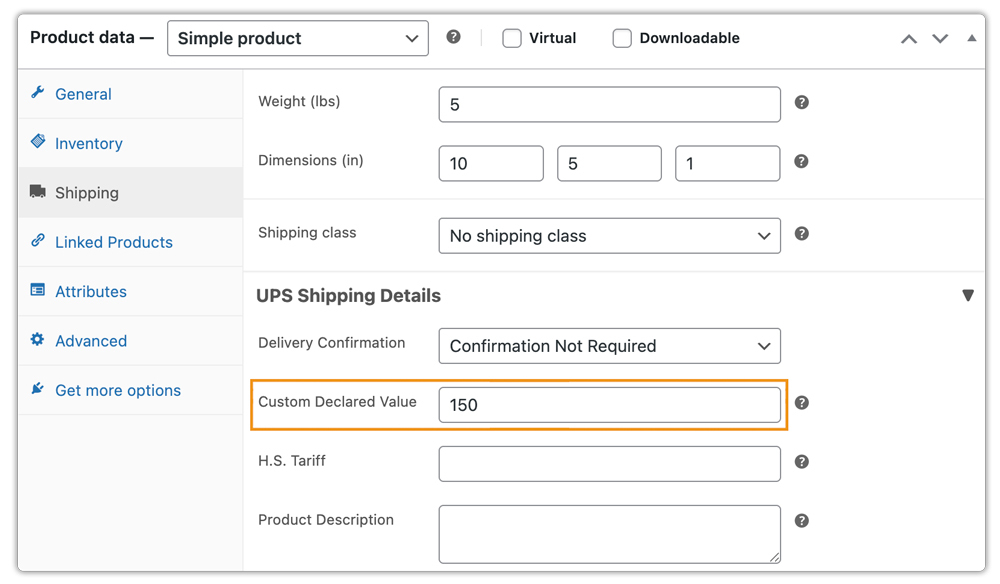
Offer UPS Shipping Insurance through the plugin settings. You can also define a minimum order amount to automatically apply insurance protection.

Once these options are configured, customers see live UPS shipping rates at checkout, including any applicable surcharges related to shipment value.

In addition to insurance, the plugin lets you generate UPS shipping labels, request UPS pickups, and track shipments directly from WooCommerce, giving you full control over high-value order shipping from one place.
Real-World Example: WooCommerce Store Selling Jewelry with UPS Insurance
A WooCommerce store selling premium gold and diamond jewelry ships high-value orders daily to customers across multiple regions. Initially, the store processed shipments without declared value protection, which exposed the business to financial risk and operational inefficiencies.
Challenges Faced
- High-value jewelry orders exceeded UPS’s default liability coverage.
- Manual checks were required before shipping premium items, slowing down fulfillment.
- Any lost or damaged shipment resulted in costly refunds or replacements.
- The lack of automated protection made scaling during peak sales periods difficult.
Solution Implemented
The store integrated UPS shipping with WooCommerce using the WooCommerce UPS Shipping Plugin. The store entered declared value coverage for high-value shipments and set a minimum order amount to apply protection automatically.
Results
- The plugin automatically applies the declared value to high-value jewelry shipments.
- The store displays real-time shipping rates at the cart and checkout pages and generates shipping labels directly from the WooCommerce dashboard.
- Reduced financial risk from lost or damaged shipments.
- Faster fulfillment with fewer manual checks.
- Improved customer confidence when purchasing premium products.
By enabling UPS declared value coverage in WooCommerce, the jewelry store protected its high-value shipments and shipped premium products with greater confidence and control.
To learn more about shipping jewellery in WooCommerce, refer to this guide – Shipping Jewelry & High-Value Items with UPS in WooCommerce.
Conclusion
Shipping high-value products requires more than standard carrier coverage. UPS declared value protection helps WooCommerce store owners reduce financial risk and build customer trust when handling premium orders. By enabling UPS insurance directly in WooCommerce, merchants can streamline fulfillment and scale confidently.
If you need help setting up or customizing UPS insurance in WooCommerce, reach out to PluginHive Support for assistance.
FAQs
Q. Can I manage UPS insurance for international shipments?
Yes. The plugin supports international shipping with UPS, allowing you to declare higher values for packages, subject to UPS’s declared value limits for each destination.
Q. Can I hide certain UPS shipping methods based on package size or value?
Yes. You can hide slower or unsuitable UPS shipping methods for specific orders. The PH Hide WooCommerce Shipping Methods & Rate Adjustment Plugin lets you manage this efficiently.
Q. Can I set different UPS shipping rates based on cart weight, quantity, or product type?
Absolutely. Using the WooCommerce Table Rate Shipping Pro Plugin, you can define flexible UPS shipping rules based on weight, quantity, destination, product category, or declared value.
Q. Can I provide advanced shipment tracking and delivery notifications for UPS orders?
Yes. You can track UPS orders with the plugin, and for advanced features, including real-time tracking notifications, you can use the WooCommerce Shipment Tracking Pro Plugin.
Q. Can I display estimated delivery dates for my high-value WooCommerce shipments?
Yes. You can calculate the estimated delivery dates and display them using a plugin like the Estimated Delivery Date Plugin for WooCommerce, helping customers know when to expect their high-value orders.
