


When customers land on your WooCommerce product page, they decide within seconds whether they want to continue or leave. If you offer deposits, that decision becomes even more important because buyers are evaluating both the product and the payment flexibility. A well-optimized product page can make deposits feel like a helpful option rather than a confusing extra step.
This is where PH Deposits for WooCommerce by PluginHive can make a real difference. By allowing customers to pay a partial amount upfront, you reduce purchase hesitation and make higher-value products feel more affordable. But to truly increase conversions, your product pages must clearly communicate how deposits work. Let’s explore how to do that in a simple, practical way.
Table of Contents
- Why Your WooCommerce Product Page Matters When Offering Deposits
- Optimizing Your Product Page with WooCommerce Deposits
- Real-World Example
- Tips to Optimize Your WooCommerce Product Page Further
- Conclusion
- FAQs
Why Your WooCommerce Product Page Matters When Offering Deposits
Your WooCommerce product page is where buying decisions happen. Before a customer ever reaches checkout, they’ve already decided whether they trust your store, and your payment options play a bigger role in that decision than most store owners realize.
- First impressions decide purchases: if a customer doesn’t see a deposit option upfront, they’ll assume they have to pay in full and move on.
- Clarity reduces hesitation: showing “Pay $50 now, $150 later” is far more persuasive than a single $200 price tag.
- Transparency builds trust: transparent payment options signal that your WooCommerce store is professional and customer-friendly.
- Mobile shoppers need simplicity: a cluttered deposit layout on mobile can instantly push customers away.
- Your product page competes with giants: giving customers flexible payment options levels the playing field with larger retailers who offer financing.
Your product page isn’t just a display shelf; it’s your best salesperson. When it clearly communicates flexible payment options, conversions follow.
Optimizing Your Product Pages with WooCommerce Deposits
Getting deposits right on your product page comes down to what customers see, understand, and trust. With PH Deposits for WooCommerce by PluginHive, you can present flexible payments in a simple and customer-friendly way that encourages more purchases.
Here’s how to present deposits clearly on your product pages:
- Choose the right deposit type for each product: different products need different payment approaches. PH Deposits for WooCommerce gives you three options:
- Fixed Amount – Best for services or bookings (e.g., Pay $100 to reserve)
- Percentage-Based – Ideal for high-value products (e.g., Pay 30% upfront)
- Payment Plans – Suitable for custom or bulk orders (e.g., 3 monthly installments)

Not sure which works best for your store? Check out this guide on WooCommerce Deposits vs Payment Plans to help you decide.
- Set deposits as default: Making deposits the default option for expensive products helps reduce hesitation and improves purchase completion.
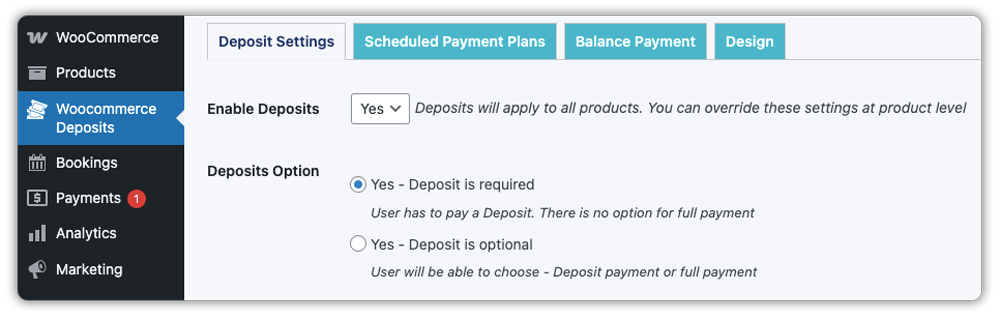
- Use clear, human-friendly labels: instead of “partial payment,” say “Reserve now for just $X.” PH Deposits for WooCommerce lets you customize the text customers see.

- Pick a layout that fits your store: the plugin offers both vertical and horizontal UI designs for the deposit selector, so you can match your store’s look without touching any code.
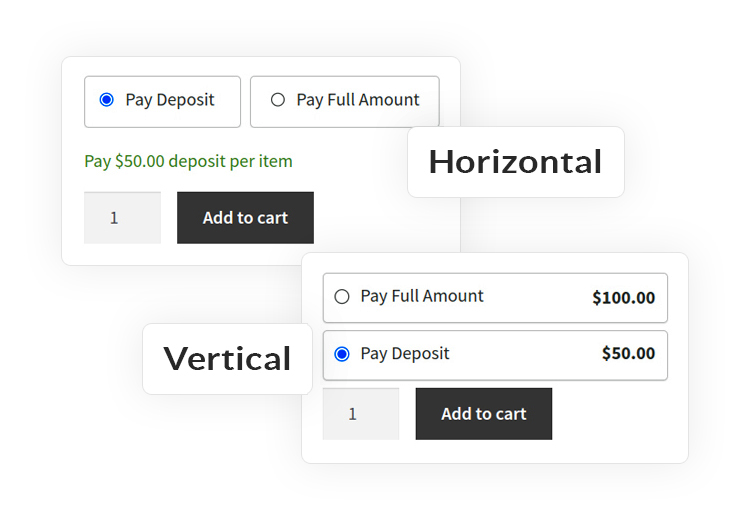
- Apply deposits only where it makes sense. Not every product needs a deposit option. You can enable it only for specific products, keeping the experience clean and relevant across your store.

Once a customer selects a deposit, the plugin automatically shows the deposit amount and remaining balance at every step:
- Product page: deposit amount and remaining balance are shown before adding to the cart.

- Cart: both amounts appear separately, so there are no surprises.

- Checkout: only the deposit amount is charged, with the balance shown clearly.
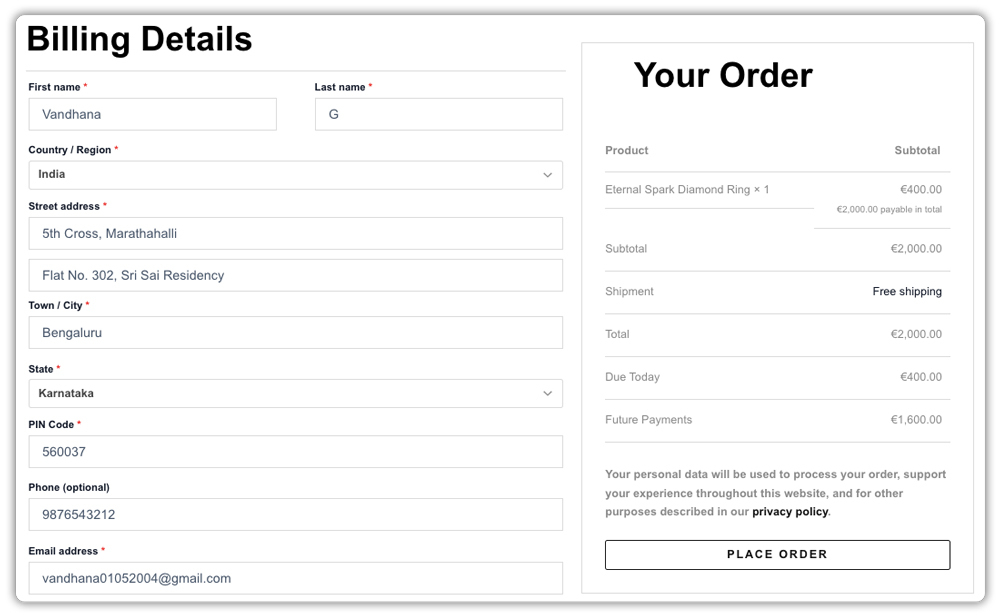
- Order confirmation: a full payment breakdown is displayed for the customer’s reference.

When your product page speaks plainly about what customers pay now versus later, they feel in control, and customers buy more confidently.
Real Example: How WooCommerce Deposits Help a Custom Furniture Store Sell More
Let’s say you run a WooCommerce store selling custom furniture. A single order ranges from $400 to $800, depending on size and finish, and every piece is made to order, which means you need commitment from the customer before you start work.
The situation:
- Customers hesitate to pay the full amount upfront for something they haven’t received yet.
- You can’t begin production without confirmed payment, and materials cost money.
- Your product page shows only the full price, which is pushing hesitant buyers away.
How PH Deposits for WooCommerce handles it:
- You set a 30% deposit on all custom furniture products. A customer ordering a $600 sofa pays just $180 upfront to secure their order.
- On the product page, the deposit option is displayed clearly with a label that reads “Reserve yours for just $180 today.”
- The deposit selector sits right above the Add to Cart button, visible, simple, and impossible to miss.
- The remaining balance is shown separately on the product page, in the cart, and at checkout, so there are no surprises at any step.
- Automated email reminders notify the customer when the balance payment is due; no manual follow-up is needed from your end.
The result: customers who previously left because the full price felt too steep are now placing orders. The product page does the convincing, and the deposit option makes saying yes a lot easier.
Tips to Optimize Your WooCommerce Product Page Further
Deposits work best when the rest of your product page supports them. Here are a few ways to strengthen the experience:
- Add a date or time selector for booking-based products: If you sell services or appointments alongside deposits, the Bookings and Appointments for WooCommerce plugin lets customers pick their preferred date directly on the product page, so the deposit and the booking happen in one smooth step.
- Let customers personalize their order on the product page: For custom or made-to-order products, the PH Product Add-Ons for WooCommerce plugin lets customers add specifications, upload files, or choose variations all before they pay their deposit. This reduces back-and-forth after the order is placed.
- Show delivery dates before checkout: The Estimated Delivery Date plugin for WooCommerce displays expected delivery dates upfront, giving customers the confidence to commit to a deposit when they know when their order will arrive.
- Promote your deposit option: Mention flexible payment options in marketing emails, homepage banners, and category pages so customers know before they even land on the product page.
- Add a short FAQ block: Answer questions like “Is my deposit refundable?” and “When will the balance be charged?” directly on the page. It reduces cart abandonment and saves you from answering the same emails repeatedly.
A well-optimized WooCommerce product page paired with the right plugins creates a buying experience that feels effortless, and effortless experiences convert better.
Conclusion
WooCommerce deposits give your customers a more comfortable way to buy and give you a more reliable way to confirm orders, especially for high-value, custom, or made-to-order products. When your product page is set up to support the deposit option clearly, customers move through the buying journey with confidence instead of hesitation, and your conversion rate reflects that.
The PH Deposits for WooCommerce plugin by PluginHive takes care of everything on the backend – partial payments, balance collection, payment plans, and automated reminders, so optimizing your product page is the only thing left for you to focus on. Start with your highest-value product, apply these changes, and see the difference it makes. If you need help setting up this in your WooCommerce store, the PluginHive support team is ready to assist you with configuration and guidance.
FAQs
Q1. Does WooCommerce support deposit payments by default?
No. WooCommerce doesn’t include deposit or partial payment functionality out of the box. You need a plugin like PH Deposits for WooCommerce to collect deposits, set up payment plans, and manage balance payments directly from your store.
Q: How to increase sales on WooCommerce?
One simple way is to reduce the upfront cost barrier. When customers can pay a deposit instead of the full amount, they are more likely to complete the purchase. PH Deposits for WooCommerce makes it easy to offer this directly on your product page without any technical setup.
Q: How can I improve SEO on my WooCommerce product pages?
Write clear product titles, use relevant keywords in your descriptions, and make sure your payment terms are spelled out in plain text on the page. Optimizing images, improving page speed, and enabling customer reviews also help your product pages rank better in search results.
