


Almost no business actually pays USPS retail rates; the price posted at the Post Office counter is a starting point, not what most WooCommerce stores end up paying. The gap between retail and the discounted rate your USPS account actually qualifies for can run well into double digits, and it’s a gap that gets left on the table entirely if a store’s checkout isn’t configured to pull those negotiated rates specifically.
This guide explains USPS’s pricing tiers, how negotiated and commercial rates actually work, and how to configure the PH USPS Shipping Plugin for WooCommerce with Print Label to display your account’s actual rates at checkout.
On This Page
- USPS’s Pricing Tiers Explained
- How to Configure Negotiated Rates in WooCommerce
- Real-World WooCommerce Use Case
- Conclusion
- FAQs
USPS’s Pricing Tiers Explained
USPS operates on a tiered pricing structure, and understanding which tier a store’s checkout is actually pulling rates from is the first step to fixing it if the answer is retail.
| Pricing Tier | Who Gets It | Typical Discount |
|---|---|---|
| Retail | Anyone paying at a Post Office counter | None, the highest published price |
| Commercial Base | Any business shipping labels online, no volume requirement | Roughly 10-28% below retail depending on service and weight |
| Commercial Plus/ Contract/ Negotiated | High-volume shippers, or those using a platform that qualifies on their behalf | A further 5-15% below Commercial Base |
Commercial Base Pricing requires no volume commitment; any business shipping labels online through an approved platform qualifies automatically, no contract or approval process needed. Commercial Plus Pricing, sometimes referred to loosely as negotiated pricing, was historically reserved for shippers moving very large volumes and requiring a direct USPS contract. In practice today, many shipping platforms and integrations qualify for this deeper tier by aggregating volume across their customer base, and pass a version of that discount through to individual store owners without requiring them to personally hit a high-volume threshold.
How to Configure Negotiated Rates in WooCommerce
To configure negotiated USPS rates in WooCommerce, you can use the PH USPS Shipping Plugin for WooCommerce with Print Label. The plugin lets you connect your USPS account and display the applicable USPS rates at checkout.
To install and configure the plugin in your WooCommerce store, follow the USPS Shipping Plugin setup guide.
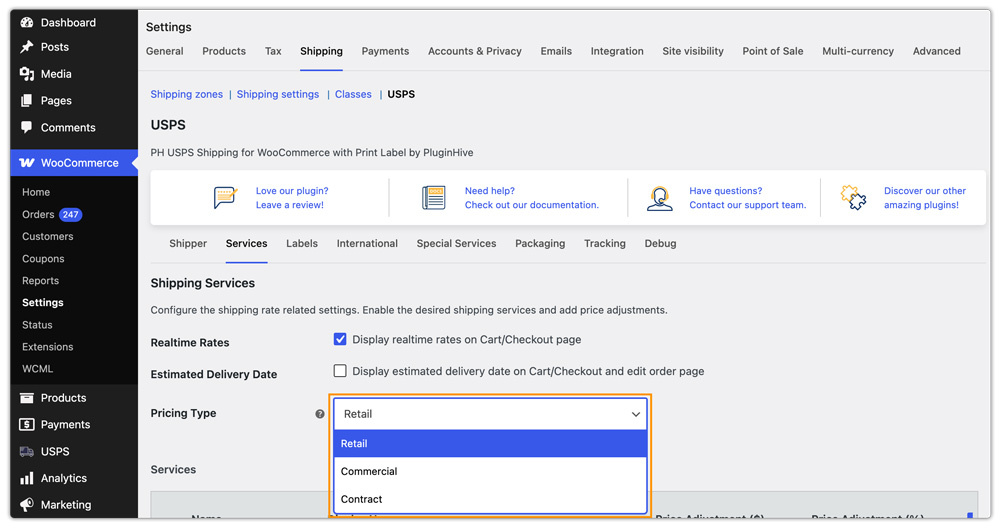
With this plugin, you can select the Retail, Commercial, or Contract rates you want to display at checkout. Make sure you are eligible for the selected rate type and already have the corresponding USPS account or pricing agreement.
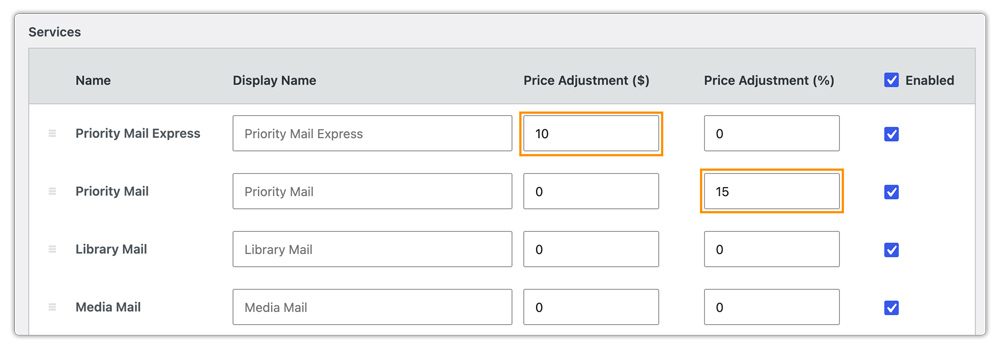
Adjust Rates if Needed: You can add a fixed handling fee or apply a percentage adjustment to the rates returned by USPS. This can be useful for stores that want to add a margin to shipping costs or pass part of their negotiated savings on to customers.
Set a Fallback Rate: You can configure a fallback rate to use when USPS does not return a live rate for a particular order. This helps keep a shipping option available at checkout instead of leaving the customer without a rate when the live rate request fails.

After connecting your account, compare a sample checkout rate with the rate you expect based on your USPS pricing tier.
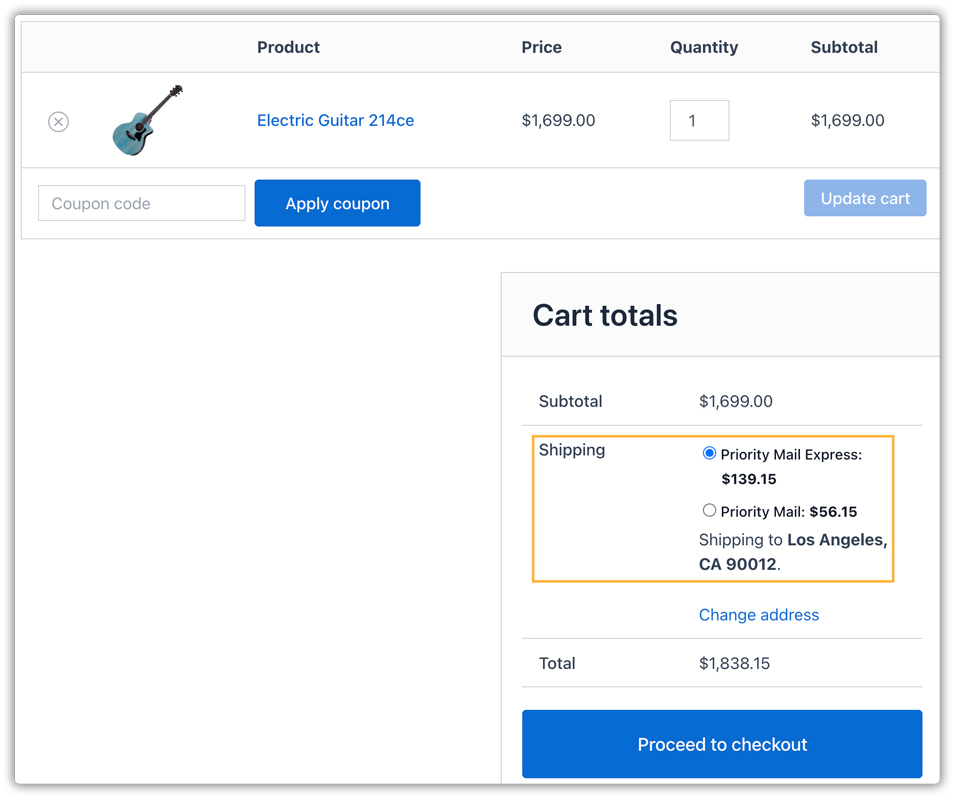
If the displayed rate appears closer to the retail rate than your expected commercial or negotiated rate, verify that the correct USPS account is connected and that the appropriate rate type is selected in the plugin.
Real-World WooCommerce Use Case
A WooCommerce store selling craft supplies noticed that the USPS shipping rates shown at checkout were significantly higher than the rates other businesses were getting for similar shipments. As the store’s order volume increased, these higher shipping costs became a concern, especially for customers placing larger orders.
How the Store Fixed It
The store contacted USPS to find out whether it qualified for commercial or negotiated pricing. After reviewing the account, USPS provided the store with an account offering a discounted pricing tier.
The store connected this USPS account to the PH USPS Shipping Plugin for WooCommerce with Print Label. It then selected the applicable commercial rate option so the plugin could retrieve rates based on the store’s USPS pricing tier.
The store also compared the rates displayed at checkout with its USPS account pricing to verify that the correct rates were being returned.
The Result
- Checkout rates reflected the discounted USPS pricing available to the store.
- The store reduced the shipping costs shown to customers.
- Part of the savings could be passed on to customers through a rate adjustment.
- The store no longer had to rely on higher standard rates when it had access to commercial pricing.
Conclusion
Most WooCommerce stores are eligible for USPS pricing well below the retail counter rate, but that discount only reaches checkout if the store’s USPS account connection is actually configured to reflect it. The USPS Shipping Plugin is capable of surfacing commercial or negotiated pricing at checkout, the key is connecting the right account and verifying the displayed rate actually matches what your account is entitled to.
Need help verifying your store is showing the correct USPS pricing tier? The PluginHive support team is here.
FAQs
Q. How do I know if my WooCommerce checkout is showing retail or negotiated USPS rates?
Compare the rate shown at checkout for a sample order against the published USPS retail rate for that same weight and destination. If the numbers are close to identical, the connected account likely isn’t reflecting a commercial or negotiated pricing tier, and the account connection should be reviewed.
Q. Can I pass on my USPS rate savings to customers, or keep it as margin?
Both are possible. The plugin lets you add a percentage discount to reduce the displayed rate for customers, or leave the account’s negotiated rate as-is and keep the difference between it and what you’d otherwise charge as margin.
Q. Will my negotiated USPS rate update automatically if USPS changes its pricing?
Yes. Since the plugin pulls live rates from your connected USPS account at the time of each checkout, any pricing tier changes USPS applies to your account are reflected automatically, without needing manual reconfiguration in WooCommerce.
Q. Can I show USPS negotiated rates alongside other carriers in WooCommerce?
Yes. The Multi-Carrier Shipping Plugin for WooCommerce shows live rates from USPS alongside UPS, FedEx, DHL, and Stamps.com at the same checkout, so customers can compare your USPS negotiated rate against other carriers directly.
Q. Can I display weight-based shipping rates in WooCommerce along with USPS rates?
Yes. You can use the WooCommerce Table Rate Shipping Pro Plugin to offer weight-based shipping methods alongside your USPS live rates.
Q. Can I hide specific USPS services from WooCommerce checkout?
Yes. The PH Hide Shipping Methods & Rate Adjustment for WooCommerce lets you hide specific USPS services based on conditions such as destination, order weight, cart value, or product.
