



Shipping high-value items in WooCommerce requires proper protection. USPS offers Insurance, Declared Value, and Signature Confirmation to secure packages against loss, damage, or unauthorized delivery. When selling items like electronics, jewelry, collectibles, luxury goods, or custom products, these USPS protection options are essential.
This guide explains how each USPS protection feature works and how to enable them in WooCommerce to keep your shipments safe and your customers confident.
On This Page
- Understanding USPS Package Protection in WooCommerce
- Enable USPS Insurance, Declared Value & Signature Options in WooCommerce
- Real-World Use Case
- Conclusion
- FAQs
Understanding USPS Package Protection in WooCommerce
When you ship packages via the United States Postal Service (USPS), it’s possible to add protection to shipments through insurance, declaring a value, or requiring a signature. Below are the key USPS protection features and their respective functions.
USPS Insurance/ Liability Coverage
- USPS allows purchase of insurance coverage up to $5,000 for lost or damaged mailpieces.
- Insurance fees depend on the declared value of the package.
- Some USPS services include limited insurance by default: for example, many Priority Mail or Ground-based services offer base protection (often modest) under their standard postage.
- For high-value items (such as jewelry, electronics, and collectibles), purchasing extra insurance ensures you’re covered up to the insured amount if the package is lost, damaged, or the contents go missing while in USPS custody.
USPS Declared Value for Packages
- Declared Value is the value you state for the contents of the package when shipping. It sets the maximum liability of USPS if there is loss or damage.
- Declared value is not the same as full insurance: it’s a cap on liability, not a guarantee of full reimbursement.
- For packages with declared value above the basic coverage, you will often need to pay an extra fee to increase liability/insurance accordingly.
- It’s especially important when shipping high-value or fragile items: by declaring the correct value, you ensure USPS’s liability is aligned with what you’re shipping.
Signature Confirmation Services
- USPS offers a Signature Confirmation service, where the recipient (or a responsible adult at the address) must sign for delivery. This adds an extra layer of security beyond standard delivery.
- Signature Confirmation gives the mailer a recorded delivery date/time and the recipient’s signature (or name of signer), which serves as proof of delivery.
- Signature Confirmation does not automatically include insurance; they are separate services, and insurance must be purchased or declared separately if needed.
For high-value shipments, combining Insurance (or Declared Value) with Signature Confirmation is often the best practice; it ensures that if something goes wrong, you have both coverage and proof of delivery.
How To Enable USPS Insurance, Declared Value & Signature Options in WooCommerce
Enabling USPS insurance, declared value, and signature confirmation in WooCommerce is quick and straightforward with the PH WooCommerce USPS Shipping Plugin.
For detailed instructions on installing and configuring the plugin, refer to the WooCommerce Shipping Guide for WooCommerce.
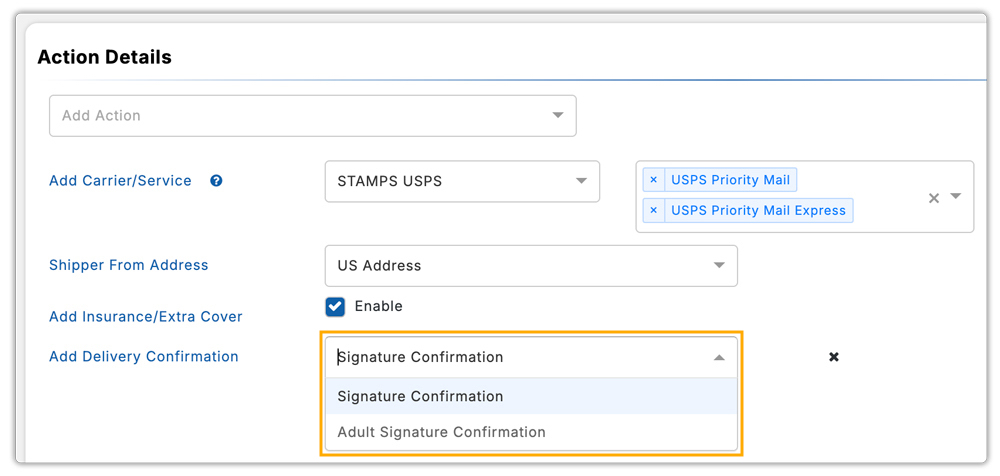
With this plugin, you can enable Insurance/Extra Cover and Delivery Confirmation directly in the plugin’s Rate Automation Settings. Once enabled, USPS automatically adds the applicable cost to the real-time shipping rates shown at checkout.

You can select Signature Confirmation or Adult Signature Confirmation as delivery confirmation options.
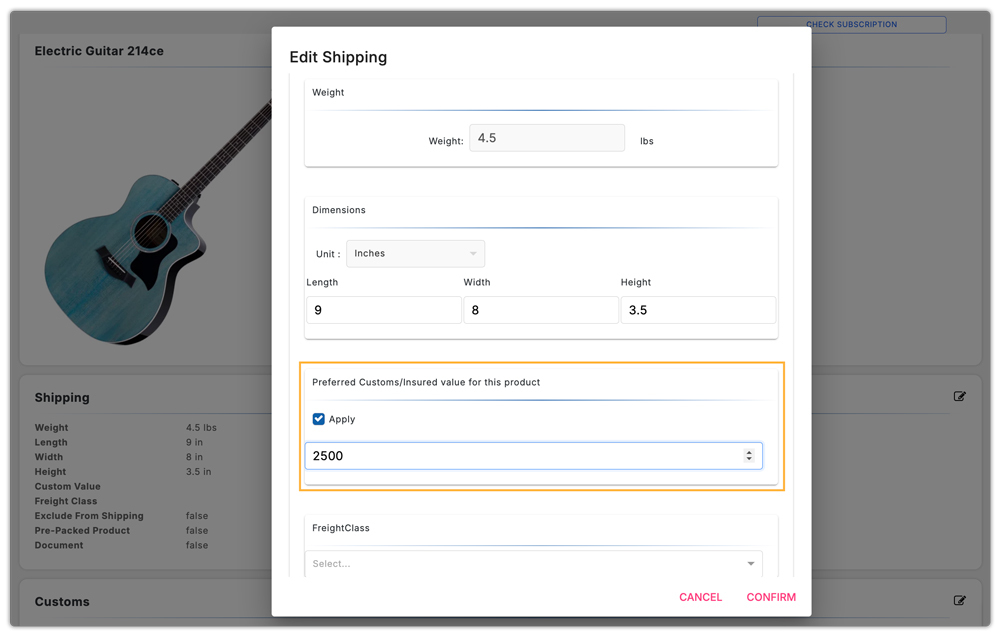
The plugin lets you set a Declared Value (insured value) for each product in its WooCommerce Product Settings. USPS uses this value to calculate the additional insurance fee.
USPS includes the corresponding charges in the real-time rates, giving customers complete clarity on protected shipping choices.

Along with rate calculation, the plugin supports USPS shipping label generation and pickup scheduling, making fulfillment fully streamlined.
If you want advanced control, such as adding extra charges for high-value items or offering free shipping above a specific cart value, you can use the WooCommerce Table Rate Shipping Pro Plugin. If you need to restrict certain USPS services for specific product types, you can use the PH Hide Shipping Methods & Rate Adjustment for WooCommerce.
Real-World Use Case: WooCommerce Shipping Jewellery
A WooCommerce jewellery store selling premium gold and diamond pieces needed a reliable way to ship high-value orders using USPS while keeping customers informed and ensuring the shipments were fully protected. Using the PH WooCommerce USPS Shipping Plugin, the store built a secure, automated workflow that handled everything from accurate rate display to insurance and signature verification.
- The store enabled USPS Insurance/Extra Cover, and each product was assigned a Declared Value in WooCommerce, ensuring USPS automatically applied the correct insurance charges for expensive jewellery pieces.
- To avoid delivery disputes, the store activated delivery confirmation with signature, ensuring packages were handed over securely.
- At checkout, customers viewed USPS real-time rates, including declared-value fees and signature charges, creating complete transparency.
- The fulfillment team generated USPS shipping labels with built-in tracking, scheduled pickups, and automatically sent tracking updates to customers.
- As a result, the store cut manual processing time, reduced shipping errors, and significantly improved customer confidence for luxury item deliveries.
This setup allowed the jewellery store to ship high-value products safely through USPS while maintaining a smooth, automated WooCommerce fulfillment workflow.
Conclusion
Shipping high-value products with USPS becomes safer and more reliable when you use the right protection options. By declaring accurate values, adding insurance, requiring signatures, and using proper packaging, WooCommerce stores can build trust and provide a secure, transparent shipping experience for every high-value order.
Need help setting up secure USPS shipping in WooCommerce? Contact PluginHive Support.
FAQs
- How can I notify customers automatically when their high-value USPS shipment is sent?
You can automate shipment updates using the USPS Shipping Plugin. If you want more flexibility, like custom tracking messages or multi-carrier tracking, you can use WooCommerce Shipment Tracking Pro.
- Can I add additional packaging protection for Jewellery shipped via USPS?
Yes. USPS allows you to insure high-value items, but you should also package jewellery using padded boxes, tamper-evident tape, and discrete labelling. Avoid mentioning jewellery on the outside of the package to reduce theft risk.
- Can I show estimated USPS delivery dates for insured or signature-required shipments?
Yes. USPS provides delivery estimates for all services, including those with insurance or signature requirements. For more advanced rules, such as cut-off times, holidays, delays, or custom delivery windows, you can use the Estimated Delivery Date Plugin for WooCommerce.
- Can I restrict certain USPS services for high-value products in WooCommerce?
Yes. Using the PH Hide WooCommerce Shipping Methods & Rate Adjustment Plugin, you can hide low-security or slow USPS services for jewellery or expensive items, ensuring customers only choose secure and reliable shipping options.
- Can multi-vendor jewellery sellers offer USPS-insured shipping from each vendor location?
Yes. With the WooCommerce Multi-Vendor Shipping Addon, each vendor can generate USPS labels, apply insurance, and add signature options from their own warehouse or store location.
