


Managing WooCommerce shipments with USPS can be tedious when done manually. Scheduling USPS pickups, creating manifests (SCAN forms), and preparing end-of-day reports take time and increase the chance of errors. Automating these USPS processes saves time, reduces effort, and ensures smoother coordination with USPS.
This guide explains how USPS automation simplifies shipping, boosts efficiency, and delivers a faster, more reliable experience for your customers.
On This Page
- Understanding USPS Pickups, Manifests & End-of-Day Reports for WooCommerce
- Key Benefits of USPS Automation for WooCommerce Stores
- Automating USPS Pickups and Manifests in WooCommerce
- Real-World Use Case
- Conclusion
- FAQs
Understanding USPS Pickups, Manifests & End-of-Day Reports for WooCommerce
Efficient USPS shipping in WooCommerce relies on three key processes: Pickups, Manifests (SCAN Forms), and End-of-Day Reports. Each plays a crucial role in ensuring packages are collected, scanned, and recorded accurately, helping you maintain a smooth fulfillment workflow.
1. USPS Pickups
A USPS pickup lets WooCommerce merchants have their packages collected at their location, eliminating daily trips to the post office.
Key Points:
- USPS offers Free Package Pickup for next-day collections and Pickup on Demand (same-day or scheduled time) for a small fee.
- Packages must have prepaid shipping labels and be ready before the scheduled pickup time.
- You can include multiple USPS services like Priority Mail, First-Class Package Service, and international mail in one pickup.
Automating pickups through WooCommerce ensures your carrier arrives on time, helping you avoid delays during busy order days.
2. USPS Manifests (SCAN Forms)
A manifest summarizes all USPS shipments prepared in a single day. The Shipment Confirmation Acceptance Notice (SCAN Form) groups all packages under one barcode, streamlining the acceptance process.
How It Works:
- The SCAN Form lists all shipping labels generated that day.
- When the USPS carrier scans the SCAN Form barcode, every package listed receives an “Accepted” tracking status automatically.
- This eliminates the need for scanning each package individually.
SCAN Forms must be generated on the same day as the shipping labels, and once created, they cannot be modified; any new shipments will require a new SCAN Form.
3. USPS End-of-Day Reports
An End-of-Day Report summarizes all shipments processed and handed over to USPS for that day. It acts as your official shipping record and helps track fulfillment volume and accuracy.
What It Includes:
- Total number of packages shipped.
- USPS services used (e.g., Priority Mail, Ground Advantage).
- Origin address and acceptance details.
- A reference to the corresponding SCAN Form.
In WooCommerce, end-of-day manifests ensure you have a complete daily shipping record, essential for audits, tracking, and efficient USPS handovers.
Key Benefits of USPS Automation for WooCommerce Stores
Automating USPS pickups, manifests, and end-of-day reports can completely streamline your WooCommerce shipping process, which removes repetitive tasks and minimizes errors. Here’s how automation benefits your store:
- Saves Time and Effort: Instead of manually scheduling USPS pickups or generating SCAN forms, automation handles it all in the background. Pickups are automatically requested, and manifests are created in bulk, saving hours each week.
- Reduces Errors and Missed Shipments: Automation ensures every order with a USPS label is included in the daily manifest, eliminating the risk of missed packages or incorrect tracking entries.
- Faster USPS Acceptance and Tracking: With automated SCAN forms, all shipments are linked under one barcode. When your carrier scans it during pickup, every package gets an “Accepted” status instantly, ensuring faster tracking visibility and a smoother customer experience.
- Scales with Your Business: Whether you ship 10 or 1,000 packages a day, automation grows with your store. It standardizes the process, reduces manual intervention, and ensures consistent performance even during peak order volumes.
With the right USPS shipping automation solution for WooCommerce, you can easily manage USPS shipping tasks, keeping your shipping workflow fully optimized.
Automating USPS Pickups and Manifests in WooCommerce
In WooCommerce, you can automate your entire USPS shipping workflow directly from your store dashboard using the PH WooCommerce USPS Shipping Plugin. This automation streamlines every step of your fulfillment process, from label generation to daily pickups and shipment manifests.
Once the plugin is configured and an order is placed, you can generate and print USPS shipping labels right from the WooCommerce Orders page.
To learn how to generate labels, check out the USPS Label Printing Guide for WooCommerce.
After labels are generated, you can schedule USPS pickups directly from the plugin. The system automatically sends pickup requests to USPS, eliminating the need for manual scheduling.
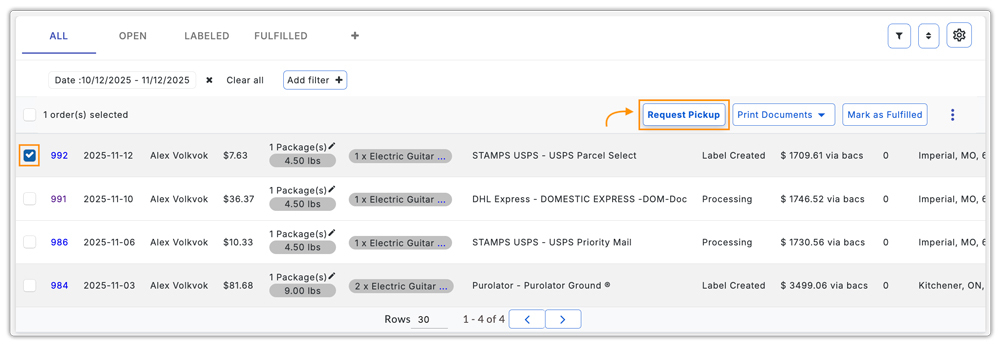
Pickups can be requested for multiple packages in a single batch.
After scheduling your pickup, you can get the shipment manifest (SCAN Form) in the Manifest tab. Make sure the order has been fulfilled before printing the manifest.

When the USPS carrier arrives at your specified address for collection, you can simply hand over the packages. You can track the order from your store dashboard itself.

With this level of automation, your USPS shipping process becomes completely seamless, improving overall efficiency.
Refer to the USPS Shipping Setup Guide for WooCommerce for detailed step-by-step plugin configuration instructions.
Real-World Example: WooCommerce Store Optimizing USPS Pickups and Manifests
A U.S.-based WooCommerce store specializing in subscription-based wellness products faced recurring delays with its USPS shipments. Each day, the team had to manually request USPS pickups, prepare manifests separately, and confirm collections by email, a process that often led to missed pickups and fulfillment bottlenecks.
Challenges:
- Missed or delayed USPS pickups due to manual scheduling.
- Time-consuming preparation of daily shipment manifests (SCAN Forms).
- Difficulty tracking pickup confirmations and statuses.
- Increased workload during subscription renewal periods.
Solution:
The store integrated the PH WooCommerce USPS Shipping Plugin with Print Label to automate their USPS workflow. With the plugin:
- Your team can monitor all pickup requests and statuses in one place under the Pickup tab.
- You can schedule USPS pickup requests as soon as you generate the label.
- The plugin combines multiple orders into a single batch pickup, saving time and reducing coordination.
- It generates USPS Shipment Manifests (SCAN Forms) directly inside WooCommerce.
Within weeks, the store reduced its daily fulfillment time by nearly 60% and eliminated missed USPS collections. By automating USPS pickups and manifests, the WooCommerce store turned a manual, error-prone process into a smooth, hands-free workflow.
Conclusion
Automating USPS pickups, manifests, and end-of-day tasks in WooCommerce speeds up fulfillment. With automation, your store can easily manage growing order volumes, maintain accurate records, and ensure timely USPS collections and tracking updates. Whether you run a small shop or a large store, USPS automation simplifies logistics and lets you focus on growth and customer satisfaction.
For help setting up USPS automation or improving your WooCommerce shipping process, contact PluginHive Support.
FAQs
- Can I schedule a pickup for international shipments?
Yes, USPS Home Pickup supports international shipments as long as they have valid prepaid labels. It’s an easy way to ship globally without leaving your home.
Learn more about international shipments: WooCommerce USPS International Shipping.
- Can I change my pickup address after scheduling a USPS Home Pickup?
No, once you have scheduled pickup, the address cannot be changed. You’ll need to cancel and reschedule the pickup with the correct address.
- Can I use USPS Flat Rate Boxes for WooCommerce pickup?
Yes. USPS picks up Flat Rate Boxes from your home through free Package Pickup or Pickup on Demand®, as long as you attach prepaid labels. Learn more about USPS Flat Rate Boxes: WooCommerce Shipping with USPS Flat Rate Boxes.
- Can I handle USPS drop-off locations for my WooCommerce shipments?
Yes. After printing your USPS shipping labels from WooCommerce, you can drop off your packages at any USPS drop-off location. To learn more, check out this guide: Where Can You Drop Off USPS Packages?
