


WooCommerce stores shipping with USPS often manage multiple steps manually, calculating rates, printing labels, adding tracking details, and updating order statuses. As order volumes grow, these repetitive tasks can slow down fulfillment and increase the risk of errors. End-to-end USPS shipping automation in WooCommerce helps eliminate these challenges.
In this guide, we’ll explore what USPS shipping automation means for WooCommerce and how to set up a fully automated USPS shipping process for your store.
On This Page
- What End-to-End USPS Shipping Automation Means for WooCommerce
- Key USPS Shipping Tasks You Can Automate in WooCommerce
- How to Set Up End-to-End USPS Shipping Automation in WooCommerce
- Real-World Use Case
- Conclusion
- FAQs
What End-to-End USPS Shipping Automation Means for WooCommerce
End-to-end USPS shipping automation in WooCommerce refers to automating the complete shipping workflow, from checkout to final delivery, without relying on manual processes or switching between multiple dashboards. Instead of handling each shipping step separately, WooCommerce manages everything directly. Automation also ensures consistency and accuracy. Address validation, correct service selection, and proper package data reduce shipping errors and delivery delays.
For WooCommerce stores handling regular or high order volumes, end-to-end USPS shipping automation turns shipping into a streamlined, predictable process, saving time, reducing errors, and improving the overall post-purchase experience.
Key USPS Shipping Tasks You Can Automate in WooCommerce
With the right USPS shipping automation setup in WooCommerce, you can eliminate most manual shipping work and manage the entire fulfillment process from one dashboard. Here are the key USPS shipping tasks you can automate:
- Real-time USPS rate calculation at checkout: WooCommerce can automatically fetch live USPS rates based on package weight, dimensions, destination, and selected service. This ensures customers always see accurate shipping costs.
- USPS service selection: Automation helps display only the relevant USPS services based on order and destination rules, avoiding confusion and invalid shipping options.
- Automatic shipping label generation: Generate USPS shipping labels directly from WooCommerce orders with a single click, eliminating the need to enter shipment details manually in the USPS portal.
- Package creation and packing logic: Products are automatically grouped into packages using predefined packing rules, ensuring correct weight and dimensions for USPS rate calculation.
- Tracking number assignment: Once you generate a label, WooCommerce automatically adds the USPS tracking number to the order, eliminating manual copy-paste errors.
- Customer tracking notifications: Tracking details can be sent automatically to customers via email, keeping them informed about shipment progress without additional follow-ups.
- Order status updates: Orders can be auto-marked as shipped or completed once USPS labels are generated, helping store owners keep fulfillment workflows consistent.
By automating these USPS shipping tasks in WooCommerce, store owners can focus less on operational work and more on scaling their business.
How to Set Up End-to-End USPS Shipping Automation in WooCommerce
Automating USPS shipping in WooCommerce is easy and efficient when you use the right solution. With the PH USPS Shipping Plugin for WooCommerce with Print Label, you can connect your store directly to USPS and automate the entire shipping workflow.
To configure the plugin in your WooCommerce store, refer to this guide: Setting Up USPS Shipping Plugin for WooCommerce.
After you install the plugin and connect your USPS account, you can enable real-time USPS rates in the plugin settings.

You can select which USPS services appear at checkout and hide the ones you don’t want to offer.
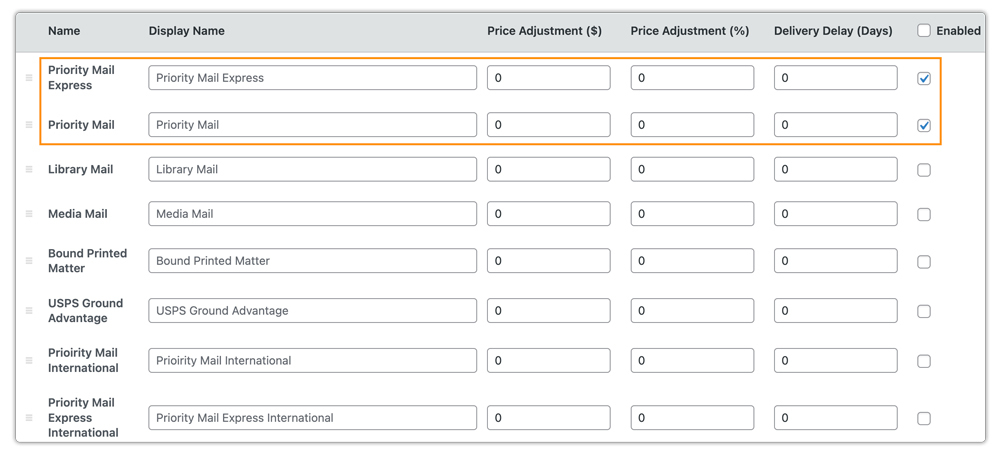
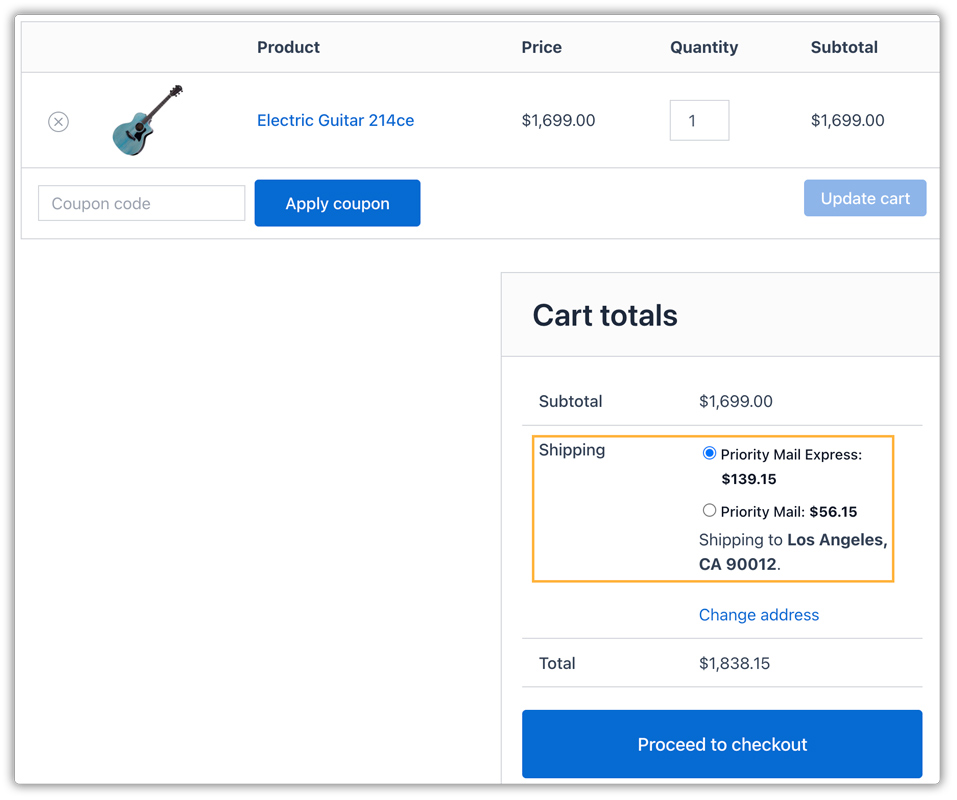
This allows WooCommerce to automatically request live USPS rates based on package weight, dimensions, destination, and service type, and display them at cart/checkout.
After a customer places an order, you can generate the package and then create the shipment to generate and print the USPS shipping label instantly, without logging in to the USPS portal.

Once you create the label, WooCommerce automatically adds the USPS tracking number to the order. When you fulfill the order, the system emails customers the tracking ID, keeping them informed about their shipment without any manual follow-ups.
To make your USPS automation even more powerful, you can combine this setup with additional shipping tools. Using the WooCommerce Table Rate Shipping Pro Plugin, you can create flexible shipping rules based on cart weight, order value, etc., while still relying on USPS for fulfillment. With the PH Hide WooCommerce Shipping Methods & Rate Adjustment Plugin, you can hide specific USPS services dynamically based on several conditions.
Real-World Use Case: WooCommerce Store Automating USPS Shipping
A U.S.based WooCommerce store selling lightweight electronics accessories processed around 80 – 120 orders per day, with spikes of up to 40% during promotions. USPS was the primary carrier due to its affordability for small parcels, but the store’s shipping workflow relied heavily on manual steps.
Challenges Faced
- Live USPS rates were checked inconsistently, leading to occasional undercharged or overcharged shipping costs.
- Shipping labels were created manually in the USPS portal, adding 2-3 extra minutes per order.
- Tracking numbers had to be copied and pasted into WooCommerce, increasing the risk of errors.
- Customers frequently contacted support asking for tracking updates, especially during peak sales periods.
- Order statuses were updated manually, making it hard to track fulfillment progress in real time.
Solution Implemented
The store implemented end-to-end USPS shipping automation using the PH USPS Shipping Plugin for WooCommerce with Print Label. It enabled USPS live rates at checkout, selected the relevant USPS services, and configured automatic package creation based on product weights and dimensions. It also enabled tracking email notifications to keep customers informed automatically.
Results
- Live USPS rates are displayed accurately at checkout for every order.
- Shipping labels and tracking numbers were generated directly from WooCommerce in seconds.
- Fulfillment time per order dropped by nearly 35%.
- Customer support queries related to shipping and tracking were reduced significantly.
- The store managed all USPS shipping operations from a single WooCommerce dashboard, even during high-volume sales.
By automating USPS shipping end-to-end, the store eliminated repetitive tasks, reduced fulfillment errors, and scaled operations smoothly without adding extra staff.
Conclusion
End-to-end USPS shipping automation in WooCommerce simplifies the fulfillment. By eliminating manual steps and reducing errors, stores can ship faster, scale with confidence, and deliver a better post-purchase experience for customers. With the right automation in place, USPS shipping becomes a reliable and efficient part of your WooCommerce operations.
Need help setting up USPS shipping automation for your WooCommerce store? Reach out to our support team here: PluginHive Support
FAQs
Q. Can I show estimated USPS delivery dates along with automated real-time shipping rates?
Yes. USPS provides delivery estimates for most services, and you can display these alongside real-time USPS rates at checkout. If you want more control over delivery messaging and logic, you can use the Estimated Delivery Date Plugin for WooCommerce to enhance the automated experience for customers.
Q. Will USPS shipping automation update tracking details automatically in WooCommerce?
Yes. “Once you generate a USPS shipping label, WooCommerce automatically adds the tracking number to the order. The system emails customers the tracking details when you fulfill the order, eliminating the need for manual updates.”
Q. Does end-to-end USPS automation work for high-volume WooCommerce stores?
Absolutely. USPS shipping automation is especially useful for high-order-volume stores. By automating the shipping tasks, fulfillment remains fast and consistent even during peak sales periods.
Q. Can multi-vendor WooCommerce stores automate USPS shipping?
Yes. With the WooCommerce Multi-Vendor Shipping Addon, each vendor can automate USPS shipping from their own location, including rate calculation, label generation, tracking, and order updates, all managed within WooCommerce.
Q. Can I automate USPS shipping along with other carriers in WooCommerce?
USPS automation applies only to USPS services. You can show automated rates for multiple carriers (such as UPS, FedEx, DHL, or others) at checkout using the Multi-Carrier Shipping Plugin for WooCommerce. However, label printing is not possible through multi-carrier plugins.
