


Shipping costs are one of the most common reasons customers abandon their carts. Charge too much, and you lose the sale; charge too little, and it eats into your margins. For WooCommerce store owners shipping across the United States, USPS live rates offer a straightforward fix, displaying the exact postage cost for each order at checkout based on real-time USPS data.
This article walks you through how USPS live rates work in WooCommerce and how to optimize them to keep your shipping costs under control.
On This Page
- How USPS Calculates Shipping Rates in WooCommerce
- How to Display USPS Live Rates in WooCommerce
- Strategies to Optimize USPS Shipping Costs in WooCommerce
- Additional Tips to Reduce USPS Shipping Costs in WooCommerce
- Conclusion
- FAQs
How USPS Calculates Shipping Rates in WooCommerce
USPS rates are not a flat figure; they shift based on several factors. Understanding what drives them helps you identify where your costs are climbing.
- Package Weight (Actual vs Dimensional): USPS charges based on the greater of actual weight or dimensional weight, calculated from the package’s length, width, and height. Lightweight but bulky items often cost more than expected because of this.
- Shipping Zones: USPS divides the US into zones based on the distance between origin and destination ZIP codes. The further the package travels, the higher the rate.
- Service Type: Faster services like USPS Priority Mail Express cost more than standard options like USPS Ground Advantage. Offering multiple service levels at checkout lets customers choose based on budget and urgency.
- Surcharges and Additional Fees: USPS may apply extra charges, including non-machinable surcharges, address correction fees, and peak season surcharges, all of which quietly add to your fulfillment costs.
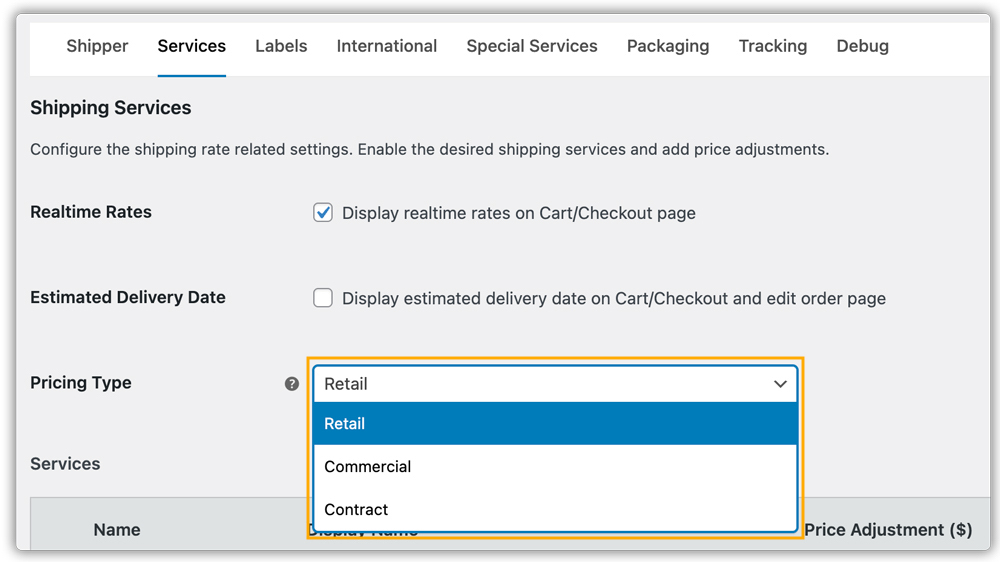
- USPS Account Rates: If your account includes commercial or negotiated rates, those discounted prices are what customers see at checkout when the plugin fetches your account-specific pricing, typically lower than standard retail rates.
How to Display Optimized USPS Live Rates in WooCommerce
To display USPS live rates at checkout, install and activate the PH USPS Shipping Plugin for WooCommerce with Print Label. This plugin connects your WooCommerce store directly to USPS and fetches real-time postage rates based on cart weight, dimensions, and the customer’s destination ZIP code.
For a step-by-step setup walkthrough, refer to the WooCommerce USPS Shipping Plugin setup guide.
Strategies to Optimize USPS Shipping Costs in WooCommerce
Display Live USPS Rates at Checkout
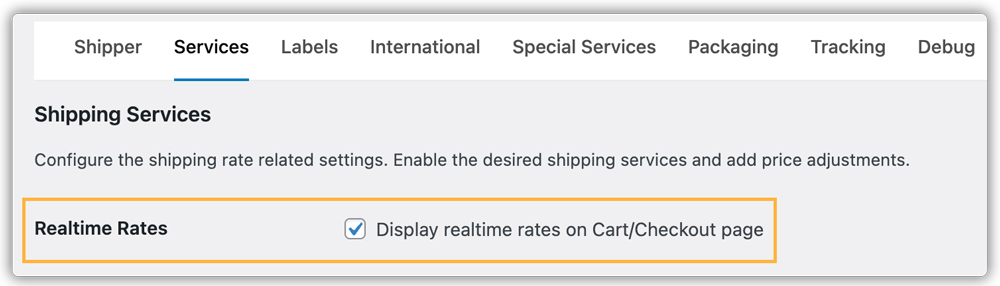
Make sure to enable real-time rates in the plugin settings. Real-time USPS rates ensure customers are charged exactly what USPS quotes — no flat-rate guesswork, no overcharging, and no undercharging.

Adjust Shipping Rates with Markups or Discounts
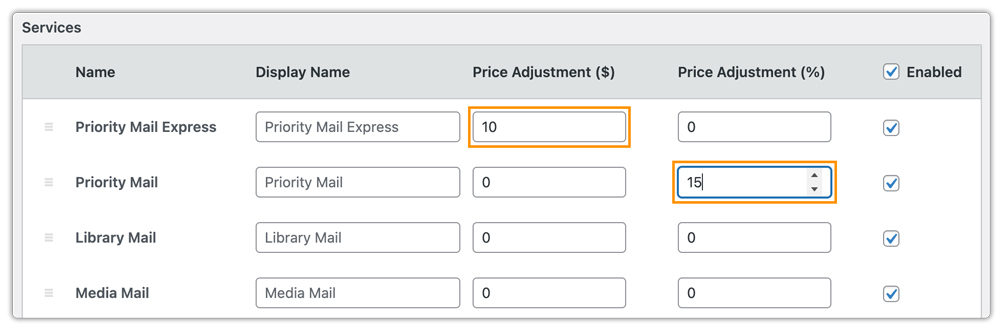
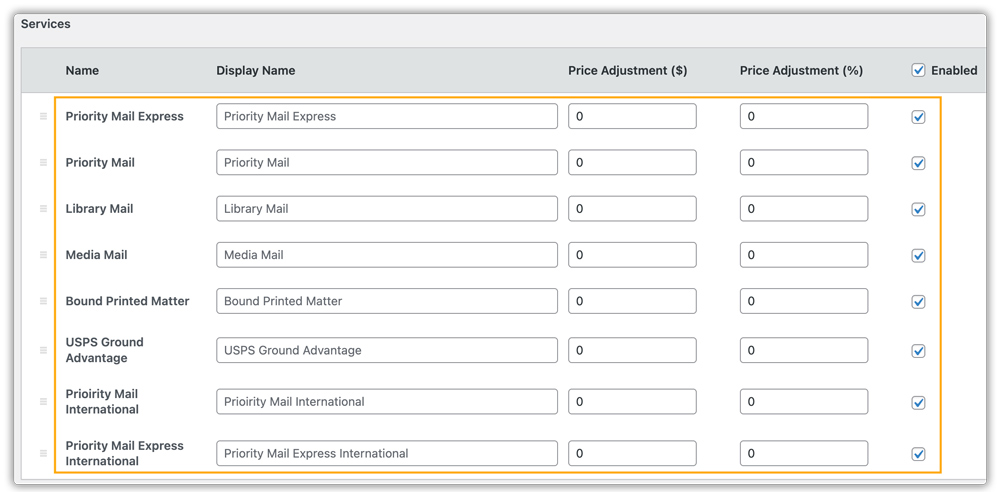
The plugin allows you to fine-tune live USPS rates by applying a percentage or fixed amount. You can increase rates to cover handling costs or reduce them to stay competitive. The adjusted rate is calculated on top of the live rate and displayed directly at checkout.
Use USPS Flat Rate Packaging
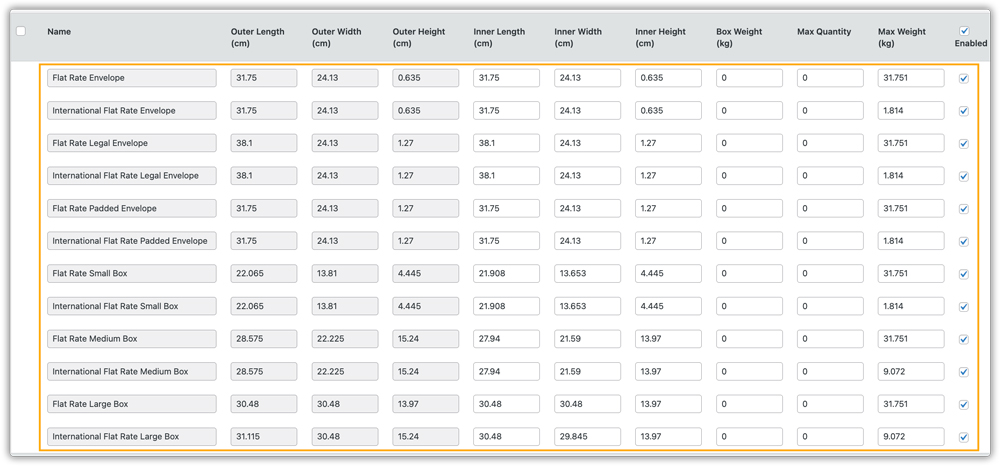
For heavier shipments over shorter distances, USPS Flat Rate boxes and envelopes often cost less than dimensional-weight pricing. The plugin supports Flat Rate Envelopes and Boxes alongside standard rates.
Leverage USPS Negotiated Rates
Retail, Commercial, and Contract rates from your USPS account are automatically fetched by the plugin. For stores with consistent shipping volume, the cumulative savings from these discounted rates can be significant over time.
Disable Unnecessary Special Services
Make sure optional USPS special services (such as additional handling or extras you don’t need) are disabled in the plugin settings. Leaving unnecessary services enabled can increase shipping costs without adding value to your shipments.

Offer Multiple USPS Service Levels
Presenting options like Ground Advantage, Priority Mail, and Priority Mail Express at checkout lets customers choose based on their budget and delivery needs, helping reduce overall shipping costs across your orders without manual intervention.
Additional Tips to Reduce USPS Shipping Costs in WooCommerce
- Combine USPS with Free or Flat Rates: You can use the WooCommerce Table Rate Shipping Pro Plugin to set up flexible shipping rules, offering free shipping above a certain cart value or flat-rate options, without removing live USPS rates from the checkout for other scenarios.
- Control Which USPS Services Appear: The PH Hide WooCommerce Shipping Methods & Rate Adjustment Plugin lets you hide specific USPS services or restrict options to certain zones, keeping the checkout clean and straightforward.
- Use Multi-Carrier Shipping When Needed: You can compare USPS rates alongside FedEx, UPS, and DHL in real time with the Multi-Carrier Shipping Plugin for WooCommerce, which lets you route each shipment through the most cost-effective carrier without juggling multiple plugins.
- Reduce Address Errors: USPS address correction fees add up over time. Encouraging customers to verify their shipping details at checkout helps avoid these preventable charges.
Conclusion
Displaying and optimising live USPS rates in WooCommerce is one of the most practical steps you can take to align shipping costs with what you are actually paying. Accurate checkout rates and smart service options all contribute to a more cost-efficient fulfillment setup. The PH USPS Shipping Plugin for WooCommerce with Print Label brings all of this together from a single dashboard.
If you need help configuring USPS live rates in your store, feel free to reach out to PluginHive Support.
FAQs
Q. Do I need a USPS account to display live rates in WooCommerce?
Yes. A valid USPS account is required to fetch real-time rates, access negotiated pricing, and generate USPS shipping labels directly from your WooCommerce store.
Q. Can I display estimated delivery dates alongside USPS rates in WooCommerce?
Yes. With the USPS plugin, you can show accurate delivery estimates at checkout for each USPS service. For more flexibility, you can use the Estimated Delivery Date Plugin for WooCommerce.
Q. Can multi-vendor WooCommerce stores use USPS live rates?
Yes. With the WooCommerce Multi-Vendor Shipping Addon, each vendor can manage USPS shipping independently, with live rates calculated based on each vendor’s shipping origin and product data.
Q. Why are my USPS live rates not showing at checkout in WooCommerce?
This is usually caused by missing product weights or dimensions, or incorrect USPS account credentials in the plugin settings. Ensure all products have weight and dimension data entered in WooCommerce and that your credentials are active.
