


Accurate shipping costs play a major role in WooCommerce checkout conversions. Manually set or estimated rates often lead to pricing errors, especially with USPS, where costs vary by weight, size, destination, and service. Displaying real-time USPS shipping rates in WooCommerce allows you to show exact USPS-calculated costs at checkout.
In this guide, you’ll learn how to set up real-time USPS shipping rates in WooCommerce step by step.
On This Page:
- What Are Real-Time USPS Shipping Rates?
- How to Set Up Real-Time USPS Shipping Rates in WooCommerce
- Real-World Use Case
- Conclusion
- FAQs
What Are Real-Time USPS Shipping Rates?
Real-time USPS shipping rates are live delivery charges calculated directly from USPS based on the actual details of an order. Instead of using fixed or estimated pricing, WooCommerce requests the current USPS rate at checkout using package weight, dimensions, destination, and the selected USPS service.
When a customer reaches checkout, WooCommerce sends the order details to USPS and retrieves the exact shipping cost for available services such as Priority Mail, First-Class Mail, or Priority Mail Express. These live rates adjust automatically for each order, ensuring customers always see accurate USPS pricing without manual updates from the store owner.
How to Display Real-Time USPS Shipping Rates in WooCommerce
Displaying real-time USPS shipping rates in your WooCommerce store is simple with the PH USPS Shipping Plugin for WooCommerce with Print Label. This plugin connects your store directly with USPS and automatically fetches live shipping rates at checkout.
To configure the plugin in your WooCommerce store, refer to this guide: Setting Up USPS Shipping Plugin for WooCommerce.
Simply enable Real-Time Rates in the plugin settings. This allows WooCommerce to request live USPS rates based on the order’s weight, dimensions, destination, and selected services.

When fetching USPS rates, the plugin lets you choose which pricing type to display:
- Retail Rates
- Commercial Rates
- Contract Rates

You can select the USPS services you want to offer as per your business requirements from the plugin’s settings.
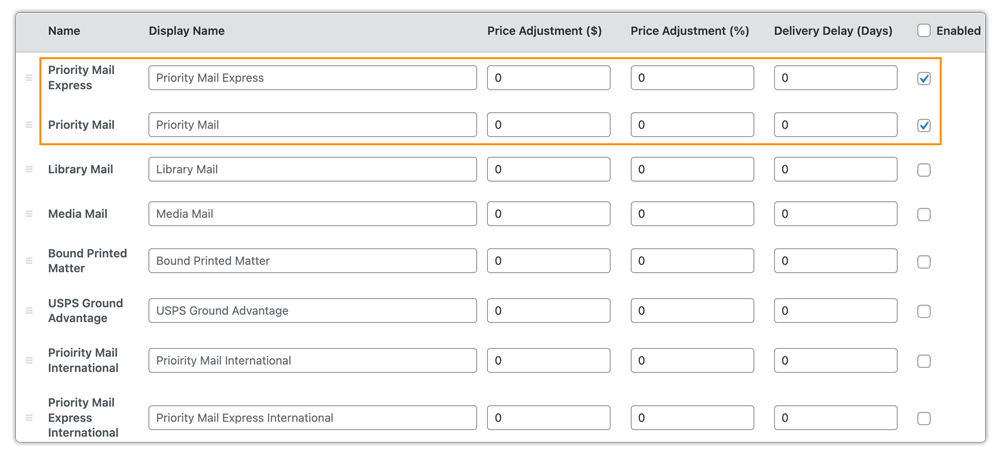
After completing the configuration, your WooCommerce store will automatically display real-time USPS shipping rates on the cart/checkout pages, ensuring customers always see accurate USPS pricing before placing an order.

If you want to hide specific USPS shipping methods or adjust rates based on products, zones, or other conditions, use the PH Hide WooCommerce Shipping Methods & Rate Adjustment Plugin.
Real-World Use Case: WooCommerce Store Shipping with USPS
A US-based WooCommerce store selling lightweight consumer products ships orders nationwide and occasionally to international destinations. USPS is the preferred carrier due to its wide coverage and affordable services. The store wants to display real-time USPS shipping rates at checkout so customers can see accurate shipping costs based on order details and delivery location.
Challenges:
- Flat-rate shipping caused frequent overcharging for nearby customers and undercharging for long-distance shipments.
- Manual rate adjustments were time-consuming and prone to errors.
- Inaccurate shipping costs led to cart abandonment and customer support queries.
Solution:
The store enabled real-time USPS shipping rates in WooCommerce using the USPS Shipping Plugin for WooCommerce with Print Label. The plugin fetched live USPS rates based on package weight, dimensions, destination, and selected services, and displayed them directly at checkout.
Impact on Store Operations and Customer Experience:
- Customers saw accurate USPS shipping rates before placing orders.
- Cart abandonment related to shipping costs decreased.
- Manual rate management was eliminated.
- Order fulfillment became faster and more predictable.
This is how the store owner set up real-time USPS shipping rates in WooCommerce, ensuring customers saw accurate shipping costs while improving overall customer satisfaction.
Conclusion
Setting up real-time USPS shipping rates in WooCommerce ensures that your customers see accurate shipping costs. By automating rate calculation based on order weight, dimensions, and destination, WooCommerce stores can streamline fulfillment and offer a smoother shopping experience.
For assistance with USPS shipping setup in WooCommerce, you can reach out to PluginHive Support.
FAQs
- Can I combine USPS real-time rates with free shipping or flat rates?
Yes. You can set up conditional shipping rules to offer free shipping above a certain cart value, or combine real-time USPS rates with flat-rate options using the WooCommerce Table Rate Shipping Pro Plugin for more flexible shipping strategies.
- Can I show estimated USPS delivery dates along with real-time shipping rates?
Yes. USPS provides delivery estimates for most services, and these can be displayed alongside real-time shipping rates at checkout. For more advanced delivery logic, you can use the Estimated Delivery Date Plugin for WooCommerce.
- Can multi-vendor WooCommerce stores display real-time USPS shipping rates?
Yes. Using a WooCommerce Multi-Vendor Shipping Addon, each vendor can show real-time USPS rates based on their own shipping location and package details, ensuring accurate rates at checkout.
- Can I display other shipping services along with USPS in WooCommerce?
The USPS shipping plugin supports only USPS services and rates. If you want to display rates from multiple carriers (such as UPS, FedEx, DHL, or others) alongside USPS, you can use the Multiple Carrier Shipping Plugin for WooCommerce.
