


Travel packages often come with a high upfront cost, and that can stop customers from completing their booking. Many travellers want flexibility; they prefer paying a deposit first and the remaining balance later instead of paying the full amount at checkout. If you run a WooCommerce travel store, offering vacation package payment plans can help you increase bookings and improve cash flow.
In this guide, you’ll learn how to set up structured payment plans using the PH Deposits for WooCommerce plugin and how to use them effectively for your travel business.
Table of Contents
- Why Travel Businesses Need Vacation Package Payment Plans
- How to Offer Vacation Package Payment Plans in WooCommerce
- Real-World Example: Travel Bookings with WooCommerce Payment Plans
- Best Practices for Offering Travel Payment Plans in WooCommerce
- Conclusion
- FAQs
Why Travel Businesses Need Vacation Package Payment Plans
Travel packages often carry big price tags, and that alone can make shoppers hesitate. Offering a payment plan changes the conversation from “I can’t afford this right now” to “I can start with a deposit today.”
- High cart abandonment rates are common in travel eCommerce – customers add packages but leave when they see the full price at checkout
- Seasonal cash flow is unpredictable for travel businesses; deposits help you secure revenue early
- Competitors are already doing it – airlines, hotels, and travel agencies all offer installment options
- Customers feel more confident booking when they’re not pressured to pay everything upfront
- Bigger packages become easier to sell when broken into manageable chunks
- Early bookings increase because travellers can lock in a deal with just a deposit
Offering payment plans isn’t just a convenience feature; it’s a smart business strategy that directly impacts your sales and customer trust.
How to Offer Vacation Package Payment Plans in WooCommerce
Offering payment plans for your vacation packages in WooCommerce is simpler than it sounds. The PH Deposits for WooCommerce plugin gives you full control over how and when your customers pay.
Make sure you have purchased, installed, and activated the plugin on your WooCommerce store before getting started.
Decide Whether Deposits Are Required or Optional
If you run limited-spot tours or seasonal packages, making deposits mandatory ensures every booking comes with a real financial commitment. If you sell a mix of packages at different price points, keeping deposits optional works better- customers choose between paying a deposit or the full amount upfront.

Set the Right Upfront Amount
The plugin gives you three ways to collect the upfront payment. A percentage deposit scales with the package price 30% on a $2,000 package means just $600 at checkout. A fixed deposit keeps things consistent with one flat amount across all bookings. For high-value trips like luxury tours or honeymoons, a scheduled payment plan breaks the total into multiple payments over weeks or months so the full cost never hits the customer all at once.

Set Different Rules for Different Packages
Not every vacation package needs the same payment setup, and the plugin gives you the flexibility to handle this at the product level. A $5,000 luxury safari tour might need a higher upfront deposit to secure the booking, while a budget weekend city break can work with a smaller fixed amount that feels easy to commit to.

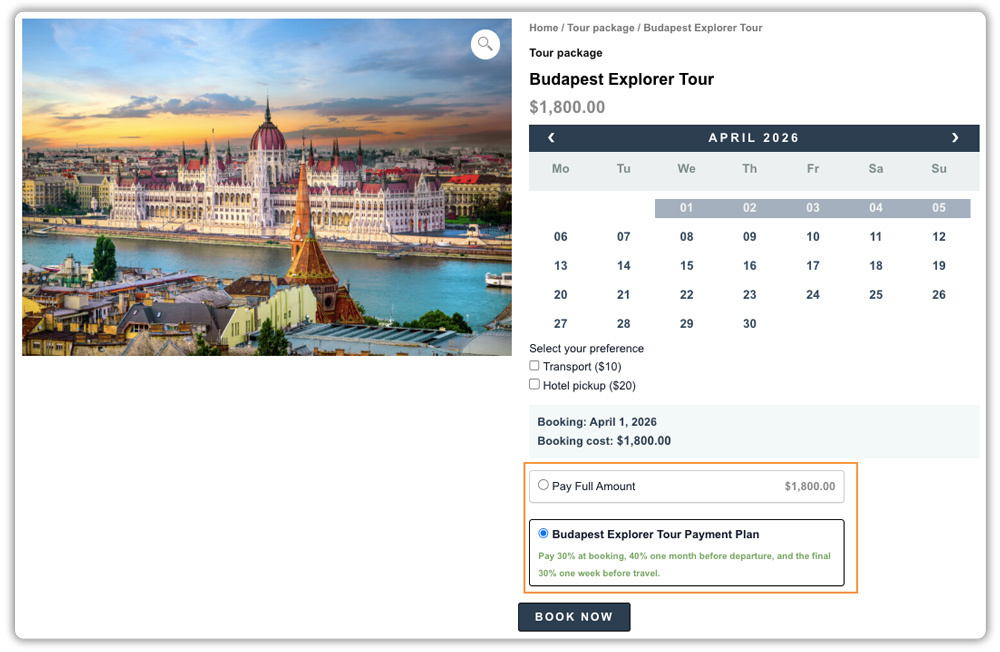
Take the Budapest Explorer Tour priced at $1,800 as an example. You set a 30% deposit on the package. Instead of paying $1,800 upfront, the traveller pays just $540 at checkout to lock in their spot. The remaining $1,260 is split across two payments, one a month before departure and the final amount a week before travel.

The spot is secured, the customer is comfortable, and the full payment comes in well before the trip begins.

Keep Customers on Track With Reminders
The plugin automatically sends reminder emails before each payment is due. You control how early those reminders go out and can customize the message to reflect your travel brand so it feels personal, not like a generic billing alert.

Once set up, your vacation packages give customers a flexible way to book, and you get confirmed reservations without waiting for full upfront payments.
For a full configuration walkthrough, refer to the PH Deposits for WooCommerce setup guide .
Real-World Example: How Travel Payment Plans Help Secure Vacation Bookings
Let’s say you run a travel agency through your WooCommerce store, selling international vacation packages worth $2,500 to $4,000. Bookings increase during holiday seasons, and each confirmed reservation matters. But when customers hesitate at checkout or cancel at the last minute, it directly affects your revenue and vendor arrangements.
The Challenges You Will Face
- Customers abandon their cart after seeing the full package price upfront.
- Last-minute cancellations leave you stuck with prepaid hotel or tour reservations.
- High-ticket packages feel risky to customers without flexible payment options.
- Tracking partial payments manually through spreadsheets becomes confusing and time-consuming.
- Chasing customers for remaining balances creates extra administrative work.
How It Can Be Solved
With the PH Deposits for WooCommerce plugin, you can fix this with a simple and automated setup:
- Require a fixed or percentage-based deposit at checkout so every booking is financially secured.
- Offer structured installment plans that split the remaining balance into manageable payments.
- Set clear due dates before departure to avoid last-minute payment issues.
- Allow customers to choose between full payment and a deposit for added flexibility.
- Use automatic payment tracking within WooCommerce to manage outstanding balances easily.
As a result, your bookings become more secure, cash flow improves, and managing travel payments becomes far more organized and stress-free.
Best Practices for Managing Travel Payment Plans in WooCommerce
Setting up payment plans is only the beginning. Managing them properly is what keeps your bookings organized and your customers confident.
- Keep the number of installments simple: Stick to two or three payment stages. Too many installments can confuse customers and make the booking process feel complicated.
- Pair payment plans with a booking system: If your vacation packages depend on specific travel dates, combine PH Deposits for WooCommerce with a Bookings and Appointments for WooCommerce plugin to manage availability and secure each reservation with an upfront deposit.
- Include add-ons within the payment plan: Offer extras like travel insurance, airport transfers, or guided tours. With the PH Product Add-ons for WooCommerce plugin, the cost of these add-ons is automatically included in both the deposit and the remaining balance.
- Clearly define cancellation and refund policies: Mention whether deposits are refundable or non-refundable on every package page. This protects your business and sets the right expectations.
- Review your deposit settings regularly: If you notice frequent late payments or cancellations, adjust your deposit percentage or installment schedule. Small changes can improve reliability over time.
These simple steps help you run a payment plan system that feels professional to customers and stays easy to manage inside your WooCommerce store.
Conclusion
Offering vacation package payment plans in WooCommerce makes it easier for customers to book and easier for you to secure revenue. Instead of losing sales at checkout, you allow travellers to confirm their trip with a deposit and pay the rest over time. With the PH Deposits for WooCommerce plugin, you can create simple, clear payment structures that protect your business while giving customers the flexibility they expect.
Getting started only takes a few setup steps, and the impact on bookings can be significant. Flexible payments build trust, improve conversions, and help you grow your travel Business with confidence. If you need help setting up this in your WooCommerce store, the PluginHive support team is ready to assist you with configuration and guidance.
FAQs
1. How do I offer payment plans for travel packages in WooCommerce?
You can offer payment plans in WooCommerce by using the PH Deposits for WooCommerce plugin. It lets customers pay a deposit at checkout instead of the full amount. You can set a fixed amount or a percentage as the deposit. The remaining balance can be paid before the travel date.
2. How do I split travel package payments in WooCommerce?
You can split payments by setting up an installment plan. With the PH Deposits for WooCommerce plugin, you decide how much customers pay first and when the rest is due. For example, they can pay 30% now and the remaining amount in two payments later.
3. Can I create different payment plans for different vacation packages in WooCommerce?
Yes. You can set different deposit rules for each package. A luxury trip can require a higher deposit, while a short trip can have a smaller one. Each vacation package can have its own payment plan.
4. Do customers need an account to pay in installments on my WooCommerce travel store?
Customers can book with a deposit like a normal order. But if they create an account, it’s easier for them. They can log in, see their payment schedule, and pay the remaining balance anytime.
