


Managing a vehicle rental business is complex. You’re not just selling a product; you’re managing a time-based service. This means constant juggling: checking vehicle availability, calculating dynamic prices, coordinating pickups and returns, and handling customer inquiries. As your bookings grow, manual processes crumble, leading to double bookings, pricing errors, and overwhelming administrative work.
If your business runs on WooCommerce, you already have a powerful foundation for e-commerce. However, to truly scale your WooCommerce rentals, you need to transform your store from a simple product catalogue into an automated booking engine. This article will walk you through how to overcome the specific challenges of vehicle rentals using a dedicated WooCommerce booking solution, turning operational chaos into streamlined growth.
Table of Contents
- Common Challenges of Managing Vehicle Rentals in WooCommerce
- Automating Vehicle Rentals with WooCommerce Bookings
- Real-World Example
- Conclusion
- FAQs
Common Challenges of Managing Vehicle Rentals in WooCommerce
WooCommerce is great for selling products, but vehicle rentals work differently. Rentals depend on time, availability, and scheduling. Because of this, many rental businesses face daily challenges when using a basic WooCommerce setup.
Here are some common issues rental owners deal with:
- Checking availability manually: You often need to look at calendars, messages, or spreadsheets to see if a vehicle is free. This takes time and can lead to double bookings.
- Manually calculating rental prices: Rental prices usually depend on dates, duration, and extras. Without automation, you end up calculating totals and sending quotes by hand.
- Booking details scattered in different places: Pickup times, return dates, and customer notes are often not stored in one place. This makes bookings harder to manage and easy to miss.
- Managing multiple vehicles as a fleet: When you have several similar vehicles, tracking each one by date becomes confusing. It’s easy to overbook or block the wrong vehicle.
- Too much admin work: Every booking needs manual confirmation, price checks, and calendar updates. As bookings increase, this admin work quickly becomes overwhelming.
The core problem is simple: your store isn’t built to handle time. In the next section, we’ll look at how to add that missing piece and automate these tasks directly in WooCommerce.
Automating Vehicle Rentals with WooCommerce Bookings
Managing vehicle rentals becomes much easier when your store can handle bookings based on time and availability instead of manual checks. With a booking-based workflow in place, you can spend less time coordinating rentals and more time focusing on your business.
A solution like Bookings And Appointments for WooCommerce adds this rental-focused structure to your WooCommerce store, helping you organise bookings more reliably as demand grows.
Before you begin, make sure you’ve installed and activated the Bookings and Appointments for https://www.pluginhive.com/product/woocommerce-booking-and-appointments/ plugin. To follow along easily, you can refer to this basic setup guide.
Here’s how to get your automated rental system up and running with ease.
Define the Core Rental Rules for Your Business
This is where you decide how customers can rent your vehicles and when those rentals are allowed.
- Offer flexible rental durations: You can allow rentals by the hour, by the day, or for multiple days, depending on the vehicle. For example, scooters may work best for short hourly rentals, cars for daily trips, and RVs for longer stays.
- Schedule buffer time between rentals: Buffer time gives you breathing room between bookings. It helps with cleaning, inspections, refuelling, or moving vehicles between locations. This avoids rushed handovers and back-to-back rentals.

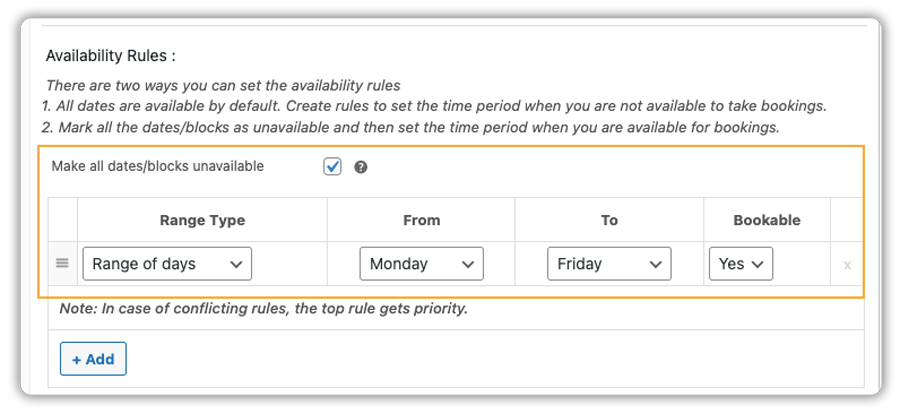
- Set business hours and availability: You can decide when vehicles are available for pickup and return, and hide dates when rentals aren’t possible. This includes holidays, maintenance days, or seasonal breaks. Customers only see dates that actually work for your business.
Manage Pricing, Inventory, and Added Value
Once rental timings are clear, automation takes care of pricing and vehicle availability.
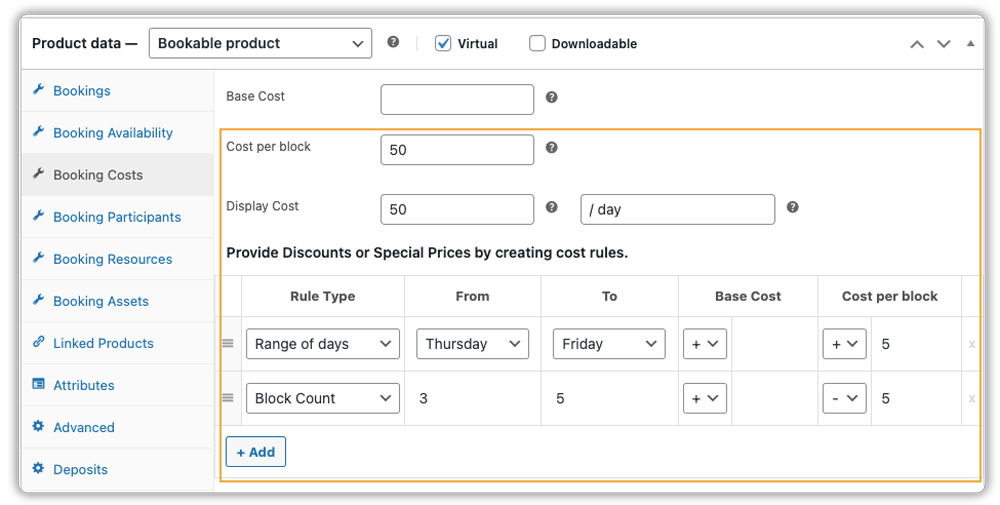
- Use automated pricing instead of manual quotes: You can decide prices in advance and let the system do the math. This includes weekend pricing, seasonal rates, or discounts for longer rentals. Customers see the full cost instantly when they choose dates.
- Let customers choose the number of vehicles or seats: If your business allows booking multiple vehicles at once, or seat-based rentals (such as vans, shuttles, or cabs), customers can select how many cars or seats they need during booking. This works well for group travel, airport transfers, or event rentals.
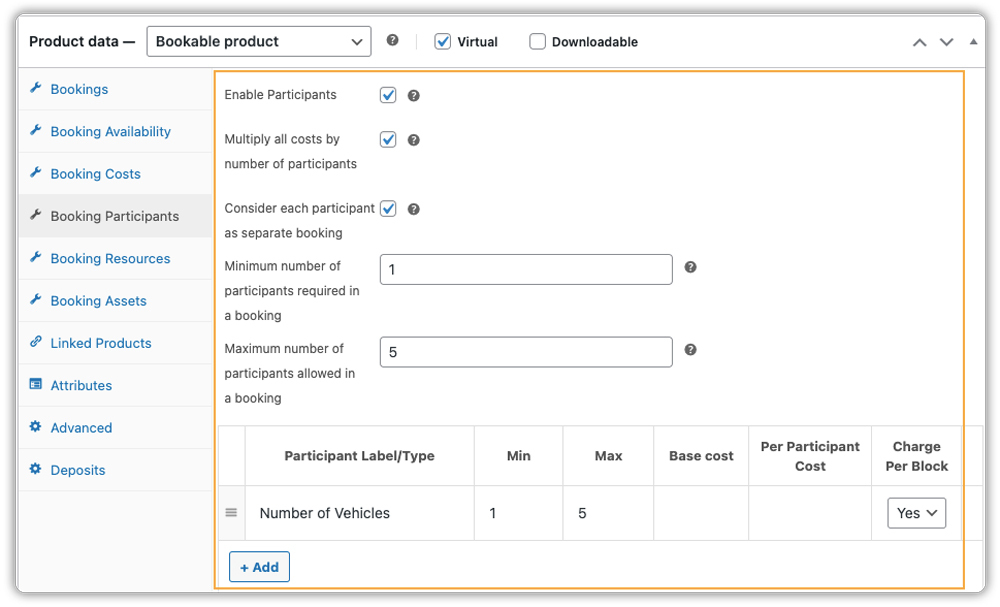
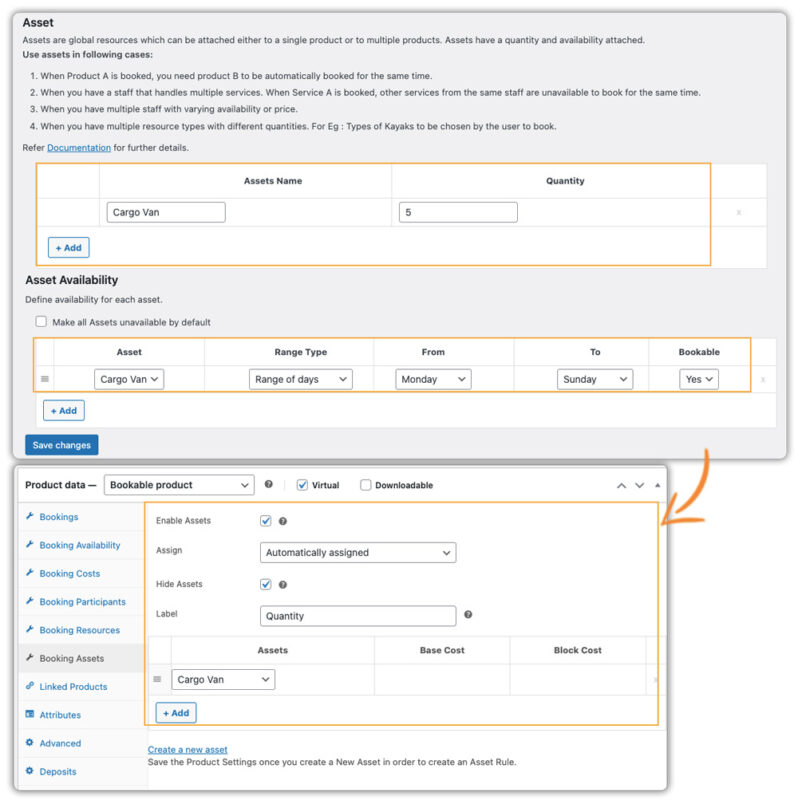
- Keep fleet availability accurate: If you have multiple similar vehicles, you don’t need to manage each one separately. You can treat them as a group and let the system track how many are available on each date. This helps avoid overbooking without constant checking.
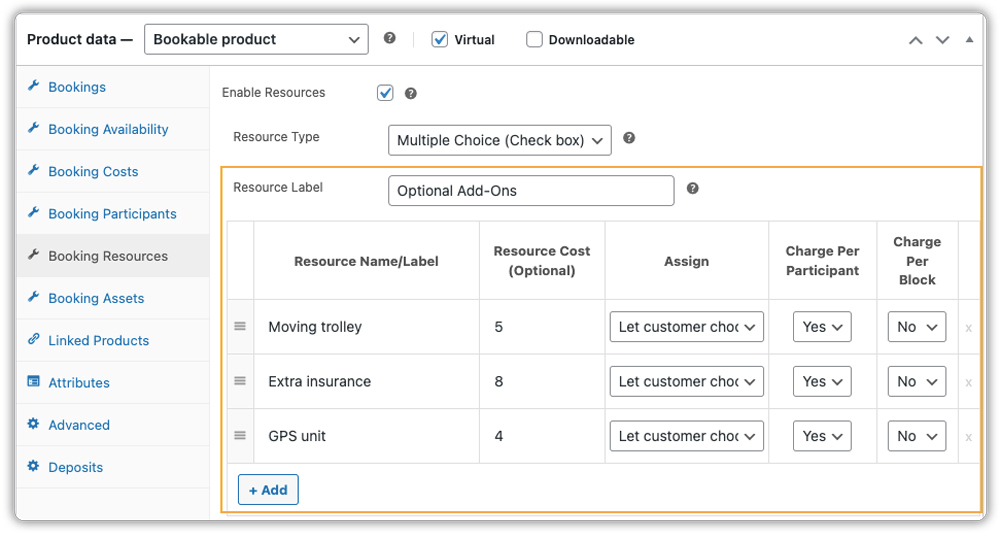
- Offer helpful extras during booking: You can give customers the option to add useful extras such as helmets, insurance, GPS devices, or equipment. These appear during booking and update the total automatically
Streamline the Complete Customer Journey
Automation also makes the booking experience clearer and smoother for customers.
- Collect important details early: You can ask for things like license numbers, ID proof, or special permissions during the booking itself. This avoids follow-up messages later.
This can be done using PH WooCommerce Product Add-Ons. - Offer flexible payment choices
You can take full payment, a deposit, or a partial payment when the booking is placed. This helps secure bookings while keeping things comfortable for customers. This is handled using the PH WooCommerce Deposits plugin. - Send confirmations and reminders automatically: Customers receive booking confirmations right away. You can also send reminder emails before pickup dates, which helps reduce missed bookings.
A Simple Real-World Example
Consider a van rental business that rents out vehicles for moving, events, or group travel. The owner lists the vans on the website and sets clear rental conditions, such as when the vans are available and how long they can be rented.
From the customer’s side, booking is straightforward. They choose their rental dates, see which vans are available, add any extras they need, and complete the booking online.
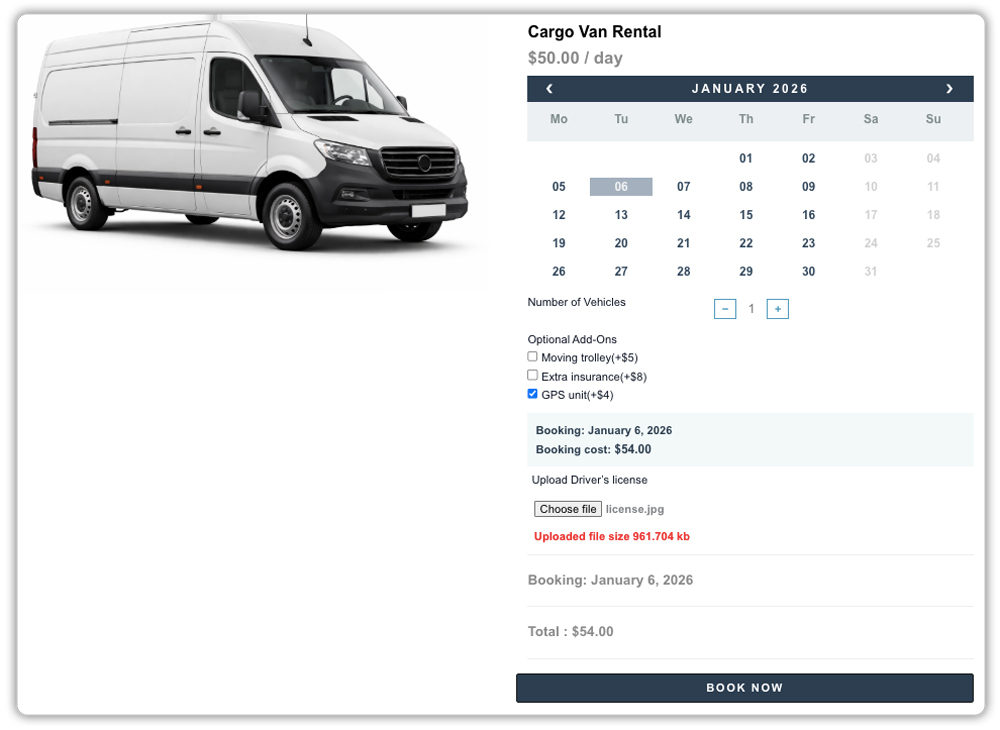
Availability updates automatically, and both the customer and the business owner receive confirmation.

By keeping rental rules clear and letting automation handle pricing, availability, and communication, your WooCommerce store becomes much easier to run and ready to grow. In the next section, we’ll look at how this kind of approach helps rental businesses scale with confidence.
Real-World Use Cases of Vehicle Rentals in WooCommerce
The table below shows how different vehicle rental businesses use the WooCommerce booking plugin features to handle their specific day-to-day challenges.
| Vehicle Rental Type | Key Challenge | How WooCommerce Bookings Solves It |
|---|---|---|
| Scooter & E-Bike Rentals | High turnover, short hourly bookings, and a need for charging/cleaning time. | Sets minimum rental durations (e.g., 2 hours) and enforces buffer time between bookings. Manages a large fleet as a shared pool. |
| Adventure Motorcycle Rentals | Multi-day trips, seasonal demand, need for security deposits and documentation. | Supports weekly pricing, collects deposits online, and uses custom fields to upload required documents (e.g., motorcycle license). |
| Commercial Van & Truck Rentals | Managing multiple identical vehicles, scheduling maintenance. | Lists one “Van” product with a quantity of 10. Automatically blocks a vehicle for scheduled maintenance dates. |
| Campervan & RV Rentals | Need for thorough cleaning and prep between rentals, increasing average order value. | Enforces 24-hour buffer periods. Offers lucrative add-ons like camping kits, outdoor chairs, or generators during checkout. |
| Luxury Car Rentals | Protecting exclusivity, managing precise time slots, premium customer experience. | Limits bookings per day, uses specific pickup/return time slots. Automates elegant confirmation and reminder emails. |
Across these use cases, the Bookings And Appointments for WooCommerce plugin adapts to different rental models while keeping availability, pricing, and bookings organised in one place.
Conclusion
Scaling a vehicle rental business is ultimately about working smarter, not just working harder. By integrating a dedicated booking system into your WooCommerce store, you move from managing constant daily inquiries and calendar chaos to overseeing a streamlined, automated operation. This shift allows you to focus on what truly grows your business: maintaining a great fleet, delivering excellent customer service, and exploring new opportunities.
No matter what type of vehicle you rent, cars, bikes, scooters, vans, or mixed fleets, the Bookings And Appointments for WooCommerce can handle your rental needs flexibly and reliably. If you need help setting things up or want guidance tailored to your rental business, you can always reach out to PluginHive Support for assistance and expert help.
FAQs
1. Can WooCommerce be used for vehicle rental businesses?
Yes, WooCommerce can be used for vehicle rentals when combined with a booking plugin by PluginHive. It allows you to manage bookings, payments, and availability from one place instead of handling everything manually.
2. Can I collect and refund security deposits for vehicle rentals in WooCommerce?
Yes. With the PH Deposits plugin for WooCommerce, you can collect a security deposit at checkout as a fixed amount or percentage. After the vehicle is returned, the deposit can be refunded directly from the WooCommerce order.
3. Can I offer recurring vehicle bookings in WooCommerce?
Yes. If customers need vehicles on a regular schedule, Bookings And Appointments for WooCommerce, along with PH Recurring Booking Addon, let you offer repeat bookings, such as daily or weekly rentals, without manual rebooking.
4. Can customers book the same vehicle for multiple non-consecutive dates?
Yes. With WooCommerce Bookings, along with the PH Multiple Non-Adjacent Bookings Addon, customers can select multiple separate dates in one booking, which is useful for events, tours, or repeated short rentals.
