




Things start to get complicated when your WooCommerce store ships from more than one warehouse. You need to determine which location should fulfill an order, calculate the accurate cost from various origins, and make sure that labels reflect the correct ship-from address. Canada Post alleviates some of that burden by providing real-time distance-based rates directly to your checkout. With the right setup, connecting Canada Post to WooCommerce means you can confidently calculate your shipping costs precisely from the closest warehouse to your customer.
This tutorial will cover issues most store owners commonly face while shipping their products from one or more warehouse locations within WooCommerce. It will also explain how you can manage both single and multi-warehouse shipping in WooCommerce using Canada Post, along with best practices for smooth order fulfillment.
On This Page
- Overview of Warehouse Shipping in WooCommerce
- Challenges of Warehouse Shipping in WooCommerce
- Manage Warehouse Shipping with Canada Post in WooCommerce
- Real-World Scenario
- Best Practices for Warehouse Shipping in WooCommerce
- Conclusion
- FAQs
Overview of Warehouse Shipping in WooCommerce
Warehouse shipping in WooCommerce involves more than just packing orders; it’s about selecting the correct warehouse for fulfillment and calculating precise shipping costs. For small stores with one location, this is simple. But with multiple warehouses, it gets complicated. Each order must be shipped from a specific address, and costs must be accurately calculated from that warehouse to the customer.
This precision is critical when using Canada Post, which bases rates on the distance between the “ship from” and “ship to” postal codes. Since WooCommerce doesn’t support multiple warehouses by default, managing this manually can be challenging.
Challenges of Warehouse Shipping in WooCommerce
Even though Canada Post offers dependable service, multi-warehouse management through WooCommerce can be tricky. Without proper configuration, you might run into several issues:
- No automatic warehouse selection: WooCommerce doesn’t decide which warehouse fulfills an order. Every order uses the same shipping rules regardless of location.
- Inaccurate shipping rates: If the warehouse origin isn’t used in the rate calculation, customers might see incorrect Canada Post rates at checkout.
- Incorrect shipping labels: Each warehouse has a different “ship from” address. If shipping labels use the wrong origin, pickups and deliveries may fail.
- Manual work: Many store owners manually adjust details or recreate labels, which slows down fulfillment and increases errors.
These issues can delay orders and raise costs. That’s why many WooCommerce stores turn to tools that automatically use the correct warehouse for rate calculation and label generation.
Manage Warehouse Shipping with Canada Post in WooCommerce
The WooCommerce Canada Post Shipping Plugin with Print Label, along with the Multi-Warehouse Shipping Add-on, makes managing warehouse shipping in WooCommerce simple and efficient.
To get started, first configure the Canada Post plugin for your store – follow this Setup Guide.
This connects your store with Canada Post, enabling live shipping rates, label printing, and tracking.
With the Multi-Warehouse Shipping Add-on, each warehouse can be configured with its own address in WooCommerce.
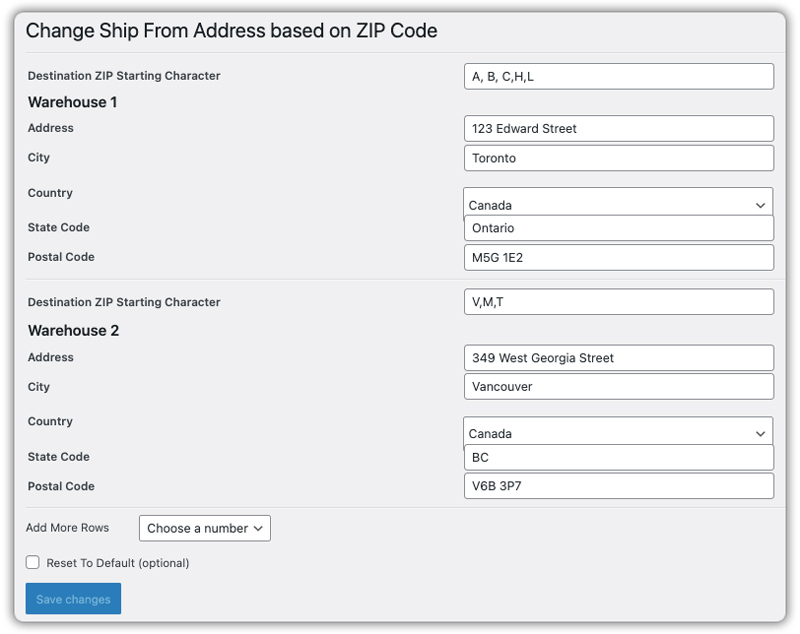
This add-on lets you assign multiple warehouse addresses in WooCommerce. When a customer places an order with a shipping address that matches your defined Destination ZIP Starting Character, the system automatically selects the corresponding warehouse.
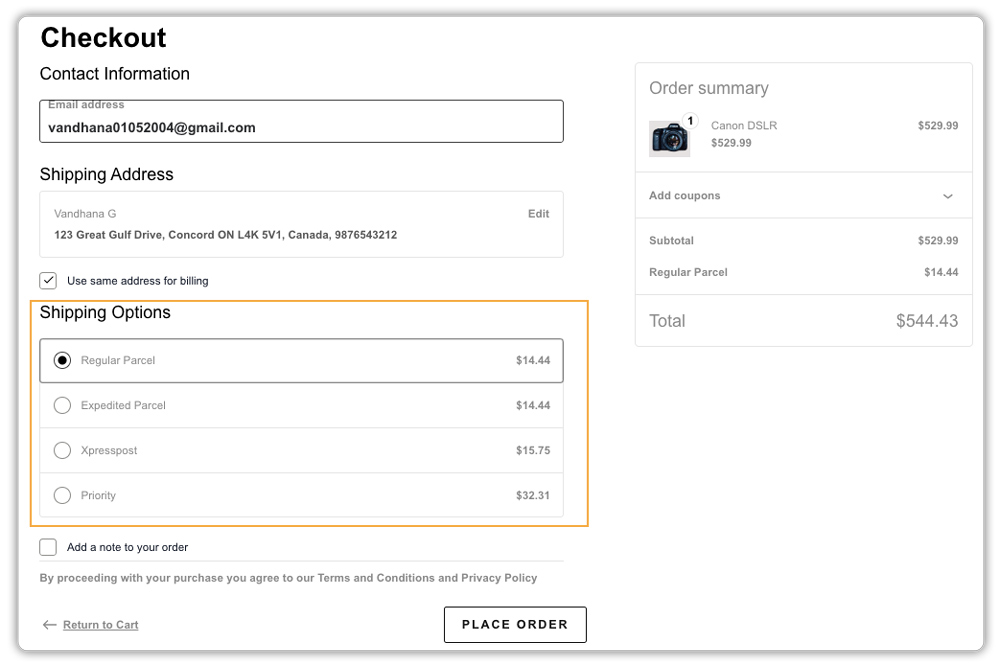
The Canada Post plugin then uses that specific warehouse’s address as the origin point to fetch and display the correct live shipping rates at checkout.
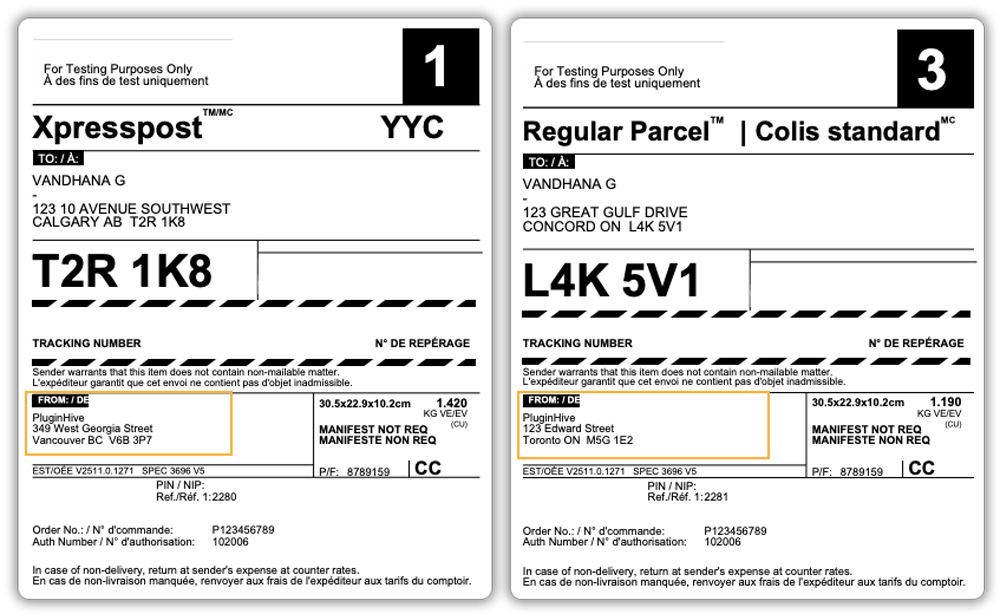
The plugin also lets you generate and print Canada Post shipping labels for each warehouse directly from the WooCommerce order page, ensuring the correct ‘ship from’ address is used for smooth fulfillment and accurate tracking.
This is how you can manage accurate, location-based shipping in WooCommerce with Canada Post. Now, let’s see it in action with a real-world scenario.
Real-World Example
A medium-sized WooCommerce store in Canada operates from two warehouses – Ontario and British Columbia.
Before using the plugin:
- Orders are sometimes shipped from the wrong warehouse.
- Customers saw incorrect shipping rates.
- Labels had the wrong addresses.
- Manual handling was frequent and slow.
After implementing the Canada Post plugin and the Multi-Warehouse Add-on:
- Each warehouse had its own address.
- Orders were routed automatically by province.
- Rates reflected the correct warehouse at checkout.
- Labels used accurate “ship from” details.
- Fulfillment time decreased, and costs stabilized.
With this setup, the store reduced manual work, improved shipping rate accuracy, and ensured labels consistently reflected the correct fulfillment location. Orders were processed faster, shipping costs stayed predictable, and customers received more reliable delivery timelines.
Best Practices for Warehouse Shipping in WooCommerce
To manage warehouse shipping smoothly across multiple locations in WooCommerce with Canada Post, here are a few best practices to follow:
- Enter each warehouse address correctly – even one incorrect postal code affects rates.
- Keep product data accurate – wrong weight or size affects shipping costs.
- Automate tracking emails – use the Canada Post plugin’s default setting to send tracking numbers when labels are generated.
- Monitor performance – regularly check fulfillment accuracy and delivery times for each warehouse.
Following these steps ensures reliable, efficient fulfillment and better customer experiences.
Conclusion
Managing multi-warehouse shipping in WooCommerce can be complex, but combining the WooCommerce Canada Post Shipping Plugin with Print Label and Multi-Warehouse Shipping Add-on simplifies it. Together, they automate fulfillment, apply correct rates, and reduce manual errors. The result is faster, more efficient deliveries and happier customers.
Need help setting up? Contact PluginHive Support.
FAQs
Q. Does Canada Post charge differently based on the warehouse location in WooCommerce?
Yes. Canada Post rates are based on the distance between the shipment’s origin and destination postal codes. Shipping from a warehouse closer to the customer usually results in lower shipping costs and faster delivery.
Q. Does WooCommerce natively support multiple warehouses?
No. You’ll need a solution like the PluginHive Canada Post Plugin with the Multi-Warehouse Add-on.
Q. Can I show different Canada Post services for different warehouses in WooCommerce?
Yes. Canada Post offers services such as Expedited, Xpresspost, and others. You can use the plugin settings to enable or disable specific services based on the warehouse location or the customer’s shipping zone.
Q. Can I ship internationally with Canada Post from WooCommerce?
Yes. Canada Post supports international shipping to many countries. You can show international shipping rates at checkout and generate shipping labels for international orders directly from WooCommerce.
