



Hosting wine tasting events is a great way for wineries to create memorable experiences, attract new customers, and boost on-site sales. But managing reservations manually through emails, phone calls, or walk-ins can lead to overbookings, no-shows, and missed revenue opportunities.
If your wine tasting business runs on WooCommerce, the Bookings and Appointments for WooCommerce plugin can simplify how you schedule, manage, and accept bookings. In this article, we’ll show you how the plugin helps you deliver a seamless booking experience for your guests while giving you full control over session availability, guest limits, and upsells like cheese pairings or souvenir packages.
Whether you host daily tastings or special weekend events, this guide will help you streamline your wine tasting reservations and grow your business with ease.
Table of Contents
- Challenges of Managing Wine Tasting Events
- Automate Wine Tasting Reservations with the WooCommerce Bookings
- Real World Example
- Final Thoughts
- FAQs
Challenges of Managing Wine Tasting Events
Running wine tasting sessions without a proper booking system leads to several operational bottlenecks. Below are common challenges that wineries face:
- No Real-Time Availability: Without a live calendar, customers can’t check open slots. Staff must confirm bookings manually, leading to delays and missed opportunities.
- Overbookings and Scheduling Errors: Without clear visibility into booked slots, double bookings happen frequently, especially during busy weekends, causing crowding and poor guest experiences.
- No Buffer Time Between Tastings: Without automated prep or cleanup time, sessions run into each other. This leaves staff rushed and customers waiting.
- Missed Upsell Opportunities: Wineries often skip offering food pairings or merchandise during booking due to a lack of a structured add-on flow, missing out on revenue.
- No Calendar Sync for Guests: Without Calendar integration, guests have no way to save their booking easily, leading to forgotten reservations or missed visits.
Without a dedicated booking system, these issues pile up, hurting guest experience, limiting revenue, and making daily operations harder than they need to be.
Automate Wine Tasting Reservations with the WooCommerce Bookings Plugin
The Bookings and Appointments for WooCommerce by PluginHive helps wineries streamline the entire reservation process, saving time, avoiding errors, and delivering a better experience for both staff and guests.
To get started, make sure the Bookings and Appointments for WooCommerce plugin is installed, activated, and configured correctly. Follow this quick setup guide: Bookings and Appointments for WooCommerce Plugin Setup Guide .
Once you’re set up, here’s how the plugin helps you overcome each operational challenge:
1. Show a Responsive Booking Calendar on Your Product Pages
With the Bookings and Appointments for WooCommerce plugin, you can add a clean, mobile-friendly calendar right on your wine tasting product pages. Customers can select dates and time slots with ease, no navigating away or taking extra steps.
The plugin provides three different calendar display styles (inline or on-click), and you can choose the one that best suits your booking experience and website design. You can also customize the colors and appearance to match your brand.
Want to explore calendar styling options? Learn how to customize your calendar display.
2. Control Availability and Session Duration
You can define which days and time slots are open for bookings, perfect for managing seasonal events, weekends-only tastings, or limited-time experiences.
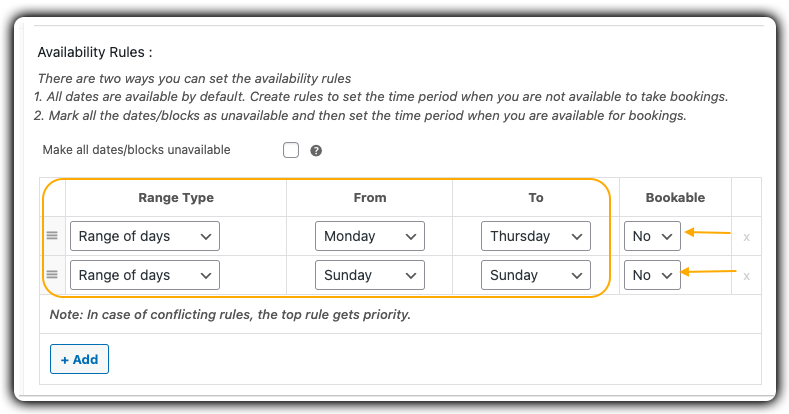
Along with availability, you can also set the duration of each session (e.g., 45 minutes or 1 hour) to maintain consistent scheduling and allow for predictable guest flow.

Example: Offer 1-hour tasting sessions on Fridays and Saturdays between 3 PM and 8 PM.
Need help setting availability rules? See how to configure booking availability.
3. Limit the Number of Guests Per Session and Set Pricing
Avoid overcrowding and maintain a premium guest experience by setting booking limits for each time slot.

You can also set minimum and maximum participant numbers as needed. Along with guest limits, you can configure flexible pricing options based on participant count. Set flat rates or dynamic pricing per person, perfect for offering premium tastings or group discounts.
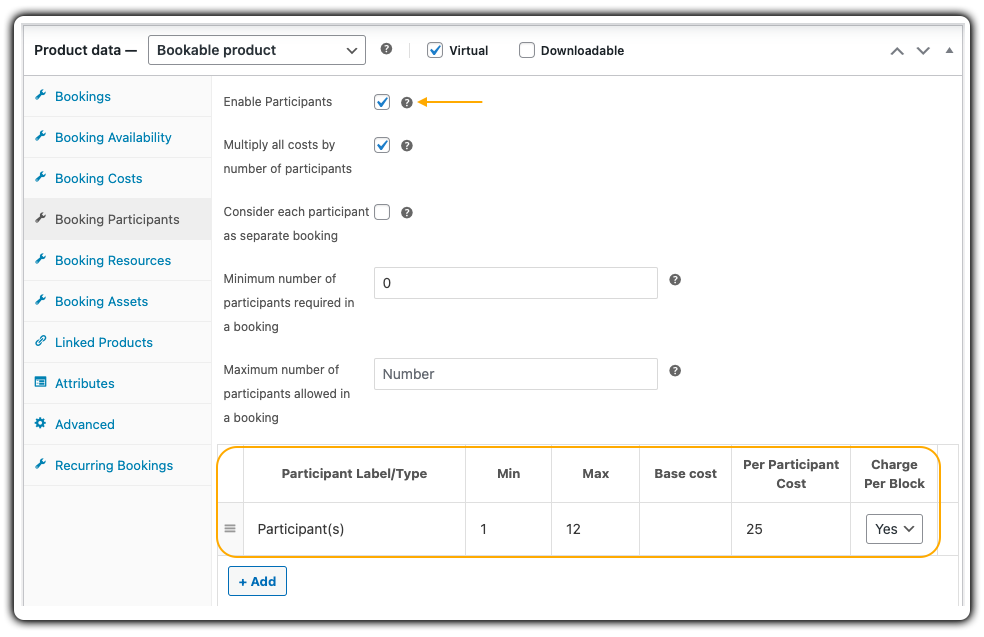
Example: Limit each session to 12 guests and charge $25 per person.
Learn how to control guest capacity: Set the booking participants.
4. Add Buffer Time for Setup and Cleanup
Insert buffer time between bookings to allow for room resets, glassware prep, or wine changes, ensuring a smooth flow between tastings.

Example: Add 20-minute buffers between 1-hour sessions.
Learn how to add buffer time: Set buffer time between bookings.
5. Offer Add-ons Like Food Pairings and Souvenirs
Upsell curated extras like cheese boards, dessert pairings, wine bundles, or branded glasses right from the booking page. Use Product Add-ons or Booking Resources to make the experience more personalized and profitable.

Example: Add an “Artisan Cheese Board” or “Branded T-Shirt & Tote Set” as paid add-ons during booking.
Learn how to offer extras during booking: Set booking resources.
This is exactly how the wine tasting reservation experience appears on your website’s frontend:

6. Let Guests Add Bookings to Their Google Calendar
Customers can add their reservation to Google Calendar directly from the confirmation page, helping them remember their tasting session and reducing no-shows.

Enable this feature here: Sync bookings with Google Calendar
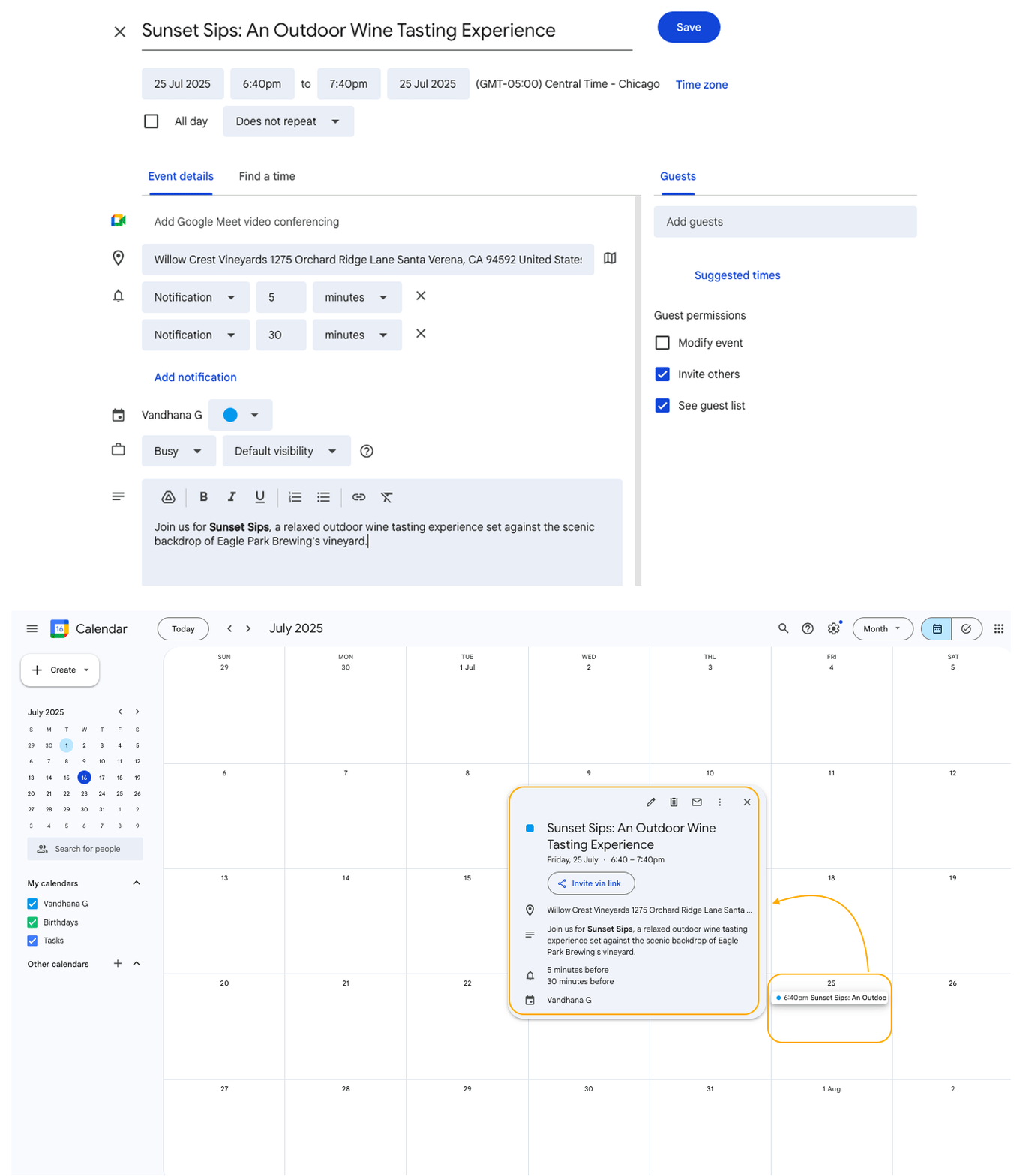
Real-World Case Study: Running Weekend Wine Tastings in Sonoma, California
Let’s say you run a boutique winery in Sonoma, California, offering weekend wine tasting sessions, private tastings for couples, small group tours, and premium food pairing experiences. During peak seasons, you host up to 10 sessions per day, split across indoor and outdoor spaces.
The Challenges You’ll Face
- You manually confirm every reservation via phone or email, making it hard to track availability in real time.
- Overbookings happen when group tastings overlap with pre-scheduled private sessions.
- There’s no consistent buffer between bookings, so staff scramble to reset tables and prepare wine flights.
- Customers often ask about cheese pairings or souvenir glasses, but you don’t have a way to offer these online.
- Reminder emails are sent manually sometimes late or missed, leading to last-minute no-shows.
- Your staff use a separate shared calendar to plan tastings, which often doesn’t match the latest bookings.
How It Can Be Solved
With the Bookings and Appointments for WooCommerce by PluginHive, you can automate your entire booking flow:
- Guests can view real-time availability and book directly from your website, no more double bookings or phone confirmations.
- Set different booking types with participant limits for private tastings, standard group sessions, or VIP experiences.
- Add prep and cleanup buffers between time slots so your team has time to reset.
- Offer optional add-ons like cheese boards or branded wine glasses during checkout using booking resources.
- Send automated confirmation and reminder emails, reducing no-shows and saving admin time.
- Sync your bookings with Google Calendar so your team is always up-to-date, no more scheduling conflicts.
The Bookings and Appointments for WooCommerce plugin turns your wine tasting business into a smooth, self-managed system that delights guests and frees up your team, just what you need to grow and scale without the chaos.
Final Thoughts
Managing wine tasting bookings manually can lead to scheduling errors, lost revenue, and poor guest experiences. With the Bookings and Appointments for WooCommerce plugin, you can automate your entire reservation flow, offering real-time availability, booking limits, upsells, reminders, and calendar sync, all from your WooCommerce store.
Whether you host weekend tastings, daily sessions, or seasonal events, the plugin gives you full control and flexibility to grow your wine business without the admin burden.
Need help setting it up? Reach out to PluginHive Support for expert guidance tailored to your business needs.
FAQs
1. Can I prevent overbookings for my wine tasting sessions using the Bookings plugin by PluginHive?
Yes. The Bookings and Appointments for WooCommerce plugin lets you define the maximum participants per session. Once that limit is reached, the time slot automatically becomes unavailable, ensuring you never overbook.
2. How do I offer both free and paid add-ons like cheese platters or souvenir glasses during booking?
You can set up these as Booking Resources or use PH Product Add-ons for WooCommerce with the Bookings plugin. This allows guests to choose optional extras at the time of booking, each with custom pricing or even free options.
3. Does the plugin support seasonal or event-specific availability?
Yes. You can create custom availability for wine festivals, holiday weekends, or seasonal events. Easily block or open specific dates and times without changing your core schedule.
4. How do I manage walk-in customers along with online bookings?
You can manually add walk-in reservations from the WooCommerce dashboard using the backend booking calendar. This keeps all reservations online and offline in one system and avoids conflicts.
5. Can I set different pricing for adults and children attending the wine tasting?
Yes. With the Bookings and Appointments for WooCommerce plugin, you can use person types to set different prices and rules for adults, children, or even pets, ideal for family-friendly wineries.
6. Is the booking plugin by PluginHive compatible with other WooCommerce plugins?
Yes. The plugin is designed to work seamlessly with WooCommerce extensions like WPML (for multilingual booking), WooCommerce Deposits, and popular payment gateways. For best results, check compatibility with your exact setup or reach out to PluginHive support.
