



Accurate parcel sizing is essential when shipping with Australia Post in WooCommerce. Shipping costs are calculated based on weight and dimensions, and even small measurement errors can lead to higher charges or delivery issues. For growing eCommerce stores, this directly affects profit margins and customer experience.
In this guide, you’ll learn how Australia Post packaging works when shipping with MyPost Business, how shipping costs are calculated, and how to choose the right package for your WooCommerce orders.
On This Page
- Why Parcel Size Matters for MyPost Business in WooCommerce
- Australia Post MyPost Business Parcel Size Categories Explained
- How to Configure Australia Post MyPost Business Parcel Dimensions in WooCommerce
- Real-World Use Case
- Conclusion
- FAQs
Why Parcel Size Matters for MyPost Business in WooCommerce
When using Australia Post MyPost Business, parcel size directly affects how much you pay for shipping. Rates are calculated based on the greater of actual weight (dead weight) or cubic weight (volumetric weight). If your parcel is large but lightweight, you may be charged based on its dimensions rather than its physical weight.
For WooCommerce stores, incorrect or missing product dimensions can lead to:
- Higher shipping charges due to inaccurate cubic calculations
- Checkout rate mismatches
- Reduced profit margins
- Delivery delays or surcharge adjustments
By entering accurate product weight and dimensions in WooCommerce, you ensure that MyPost Business calculates rates correctly. This keeps shipping costs predictable and protects your margins as order volume grows.
Australia Post MyPost Business Parcel Size Categories Explained
With Australia Post MyPost Business, parcel size and type help determine how your shipment is priced and processed. MyPost Business offers both flat-rate packaging options and standard parcel services, each suited to different package sizes and shipping needs.
1. Flat-Rate Satchels and Boxes
MyPost Business provides a range of predefined satchel and box sizes with fixed weight limits (typically up to 5 kg). These include:
- Small, Medium, Large, and Extra Large Flat-Rate Satchels: ideal for documents, clothing, and compact goods.
- Small to Extra Large Flat-Rate Boxes: suitable for fragile or bulkier items that benefit from more protective packaging.
Each size has specific external dimensions and a maximum weight of 5 kg, making them easy to select and price when creating MyPost Business labels.
2. Standard Parcel Services (BYO Packaging)
If you’re using your own packaging instead of Australia Post’s flat-rate types, you can send parcels using standard parcel codes such as:
- Express Post Parcels (by weight bracket)
- Parcel Post Parcels (by weight bracket)
These categories are typically defined by service type (e.g., Express vs Standard) and parcel weight ranges, and are priced based on actual or dimensional weight.
3. International Parcel Options
For global shipments, MyPost Business supports parcel services such as International Standard and International Express parcels. International pricing and parcel categories depend on destination zones and parcel weight/size.
4. Key Size Limits to Know
For Australia Post MyPost Business parcels, the maximum weight is generally 20 kg, and packages must stay within allowable girth and dimension limits to avoid surcharges or undeliverable status. When using flat-rate MyPost Business packaging, your parcel must fit the declared satchel or box size and weigh no more than 5 kg to qualify for that pricing.
Understanding these Australia Post MyPost Business parcel categories helps WooCommerce merchants choose the best packaging strategy, whether using flat-rate options for predictable costs or their own packaging with live calculated rates.
How to Configure Australia Post Packaging in WooCommerce: With MyPost Business
Configuring parcel dimensions in your WooCommerce store is simple with the PH Australia Post MyPost Business Shipping Plugin for WooCommerce. This plugin connects your store directly with Australia Post MyPost Business and calculates shipping rates based on how your products are packed.
To configure the plugin in your WooCommerce store, refer to this guide: Setting Up Australia Post Shipping Plugin for WooCommerce .
With this plugin, you can choose from three primary packing methods depending on your business requirements.
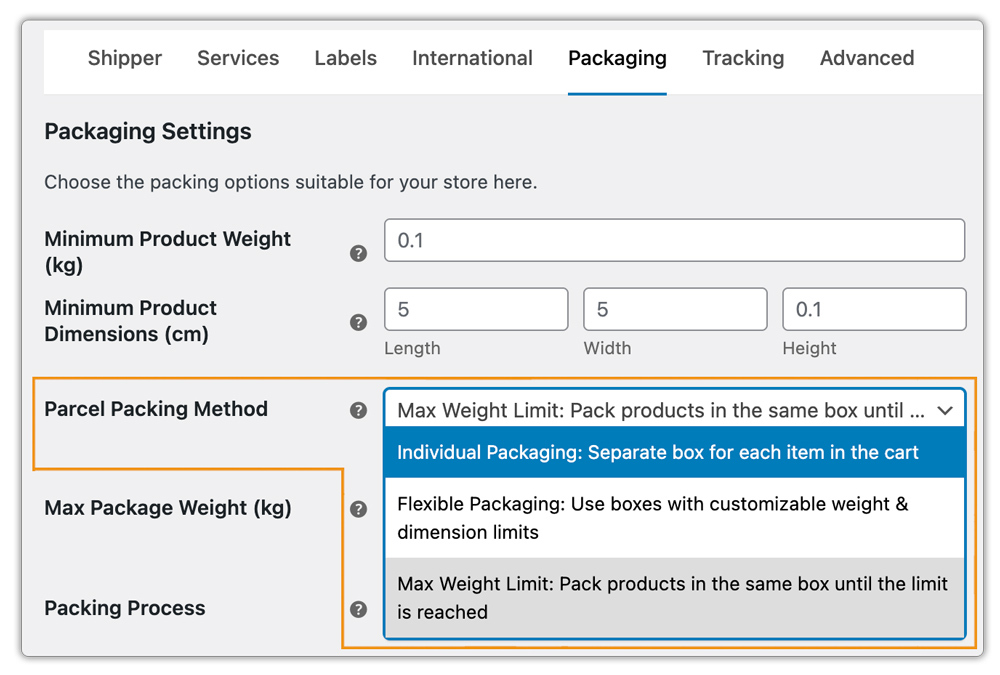
1. Pack Products Individually
In this option, each item in the cart is packed separately. The total shipping cost is calculated by adding the shipping cost of each product.
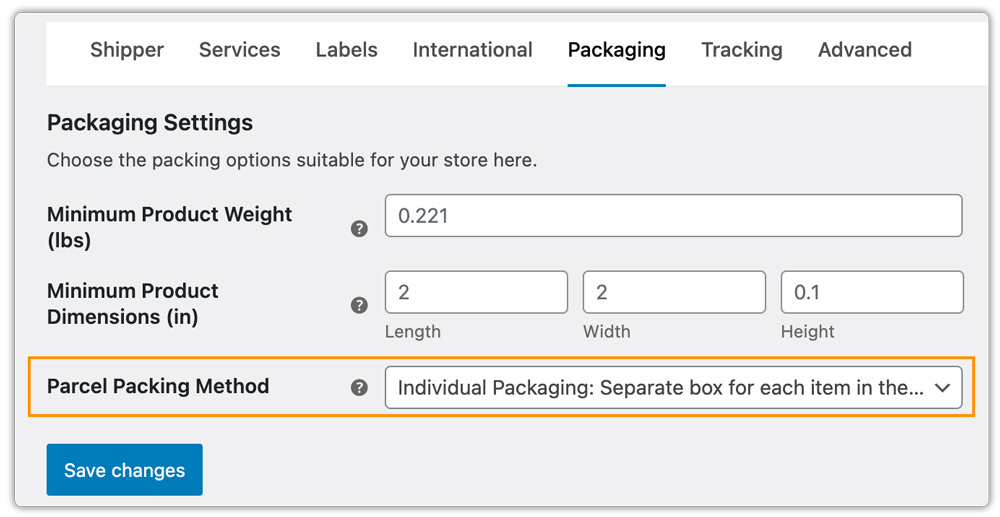
2. Pack Products Purely Based on Weight
In this option, the plugin sums up the total weight of all items in the cart and sends it to the MyPost Business API to retrieve rates. You can define a maximum weight per package. The plugin packs products into a parcel until it reaches the weight limit, then automatically creates a new package if needed. It also lets you choose whether to pack heavier or lighter items first.
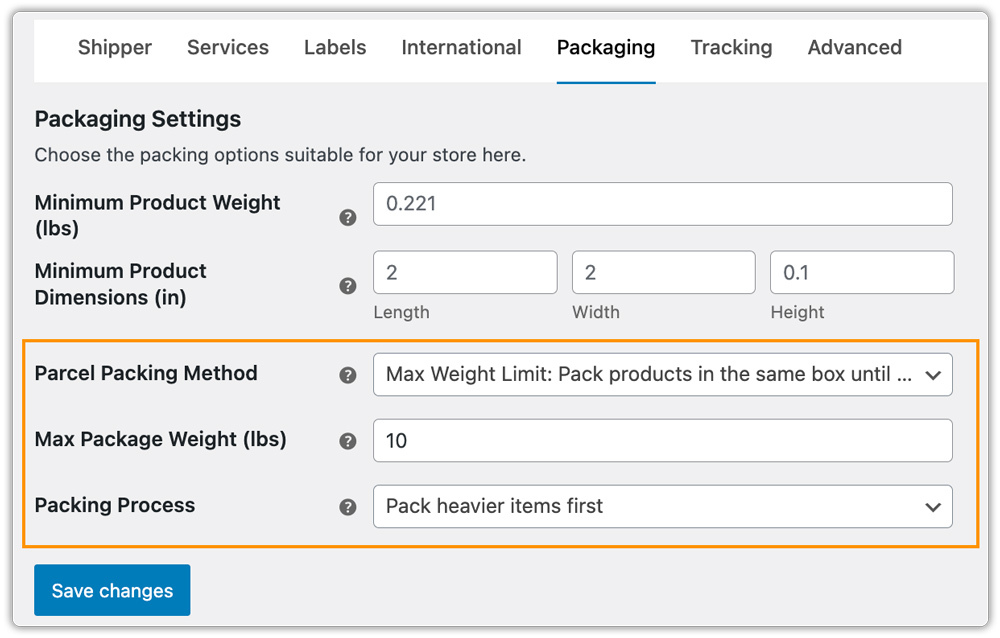
3. Pack Products Using Australia Post MyPost Business Boxes
If packing items individually doesn’t fit your workflow, you can use predefined MyPost Business flat-rate boxes or satchels, or define your own box sizes. You can select multiple boxes, and the plugin will automatically select the best-fit box based on the product dimensions added in WooCommerce.
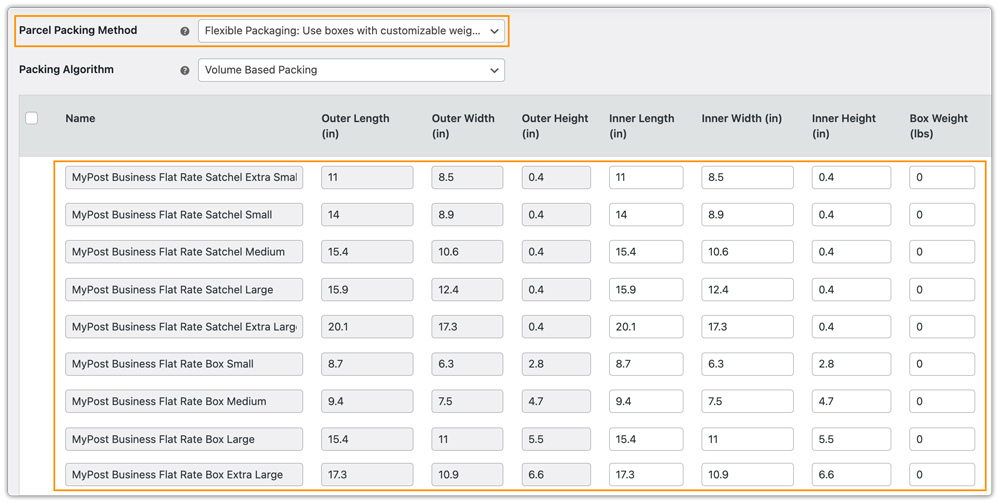
4. Use Your Own Custom Box Dimensions
If you use your own packaging, you can define custom box dimensions inside the plugin settings. The plugin then calculates the best fit and requests accurate MyPost Business shipping rates accordingly.
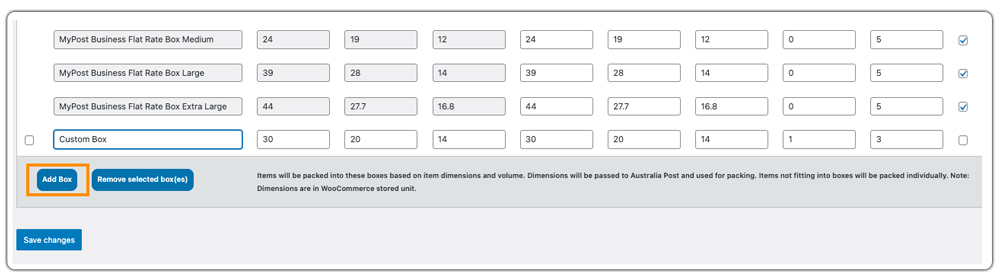
The plugin then calculates the best fit and requests accurate MyPost Business shipping rates accordingly.
Real-World Use Case: An Australian Store Fixing Its Packaging Headache
An Australian WooCommerce store selling lifestyle and gift products was managing shipments manually through the Australia Post MyPost Business portal. At first, this worked. But as order volume increased, packaging problems started affecting both costs and operations.
Problems the Store Was Facing
- Incorrect cubic charges: This occurred because the system recorded incorrect dimensions, causing some lightweight but bulky products to receive higher shipping rates.
- Overpacking items: Staff often used larger boxes than necessary, increasing cubic weight and shipping costs.
- Manual rate mismatches: The checkout shipping estimate sometimes differed from the final label cost in MyPost Business.
- Time-consuming fulfillment: Order details had to be re-entered manually into the MyPost Business portal.
- Unpredictable margins: Shipping costs varied frequently due to inconsistent packaging decisions.
The core issue wasn’t Australia Post pricing; it was the lack of structured packaging configuration inside WooCommerce.
How the Store Fixed It
The store integrated Australia Post MyPost Business directly into WooCommerce using the PH Australia Post MyPost Business Shipping Plugin for WooCommerce. After integration, they:
- Added accurate product weights and dimensions
- Configured official MyPost Business flat-rate satchels and boxes
- Set up custom box dimensions for commonly used packaging
- Enabled automatic box selection for best-fit packing
- Defined maximum weight limits per parcel
The plugin now automatically calculates actual or cubic weight and selects the right packaging for each order. As a result, the store shows accurate live rates at checkout, reduces overpacking costs, and maintains a more controlled and predictable shipping workflow.
Conclusion
Selecting the right parcel size helps control shipping costs and improve order accuracy in WooCommerce. Configure your store according to Australia Post MyPost Business requirements to avoid extra charges and display accurate live rates at checkout.
For assistance with setup or configuration, contact PluginHive Support.
FAQs
Q. Can I combine Australia Post MyPost Business live rates with free shipping or flat rates?
Yes. Even when using accurate parcel sizing and live rates from Australia Post MyPost Business, you can still create flexible shipping rules. For example, you can offer free shipping above a certain cart value or add flat-rate options using the WooCommerce Table Rate Shipping Pro Plugin.
Q. Do I need to enter product dimensions in WooCommerce for accurate packaging?
Yes. Correct weight and dimensions are essential for proper box selection and accurate cubic weight calculation. Without them, shipping rates may be higher or mismatched at checkout.
Q. Can multi-vendor WooCommerce stores configure packaging separately?
Yes. With the WooCommerce Multi-Vendor Shipping Addon, each vendor can configure their own packaging rules, box sizes, and shipping origin to ensure accurate MyPost Business rate calculations.
Q. Can I provide tracking for MyPost Business shipments?
Yes. Basic tracking is supported within the plugin. For advanced tracking updates and automated customer notifications, you can integrate with the WooCommerce Shipment Tracking Pro Plugin.
