




WooCommerce is a trusted platform for educators, coaches, and course creators looking to sell digital products, memberships, and learning experiences online. But when it comes to scheduling live sessions, whether one-on-one coaching calls or recurring classes, managing everything manually through emails or spreadsheets can quickly become inefficient and error-prone. Issues like double bookings, missed appointments, time zone confusion, and disconnected payment workflows create unnecessary friction for both you and your learners. In this article, we’ll show you how you can combine WooCommerce with a powerful booking plugin to streamline your online course or coaching platform, automate session scheduling, and eliminate manual headaches so you can focus more on teaching and growing your business.
Table of Contents
- Challenges of Managing Online Courses and Coaching Bookings
- Seamlessly Handle Online Session Bookings with WooCommerce
- Real-World Use Case
- Final Thoughts
- FAQs
Challenges of Managing Online Courses and Coaching Bookings
Running online courses or coaching via WooCommerce can get messy without the right booking setup. Here are the common challenges that slow down both educators and learners:
- Double Bookings & Overlapping Sessions: Manual tracking often results in overlapping sessions, particularly when availability isn’t updated in real-time.
- Time Zone Confusion: When sessions aren’t adjusted for each student’s time zone, it leads to late arrivals, rescheduling, or no-shows.
- No Recurring Booking Support: Courses that run weekly or monthly need multiple sessions. Without recurring booking options, every session must be booked manually.
- No Automated Reminders: Without confirmation and reminder emails, students may forget sessions. Manual follow-ups take extra time.
- Can’t Upsell Study Materials: Coaches often want to offer extras, such as PDFs or additional study materials. Without upselling options, you miss easy revenue.
- Instructor Availability Is Hard to Track: If you’re working with multiple instructors, it’s difficult to manage who’s available when, without a proper resource management system.
These issues not only reduce efficiency but also damage the customer experience. To grow sustainably and appear professional, you need a system that simplifies booking, automates availability, and connects seamlessly with WooCommerce.
Seamlessly Handle Online Session Bookings with WooCommerce
The Bookings and Appointments for WooCommerce plugin transforms your online education or coaching site into a streamlined booking system fully integrated with WooCommerce. Whether you offer private coaching or group courses, this plugin helps automate session scheduling, handle global time zones, accept payments, and eliminate no-shows.
To get started, ensure the plugin is installed and configured properly. Follow this quick setup guide
- Display a Clean, Student-Friendly Booking Calendar
Using the plugin, you can display a clean, responsive calendar for different offerings right on your product pages. Clients simply pick their preferred slot, see real-time availability, and complete the booking seamlessly.
You can choose from 3 calendar styles (inline or on-click) and customize the look to match your site. Want to learn more about calendar design options? Visit: Customize your calendar display
- Handle Time Zones
Your students may come from different time zones. The plugin automatically detects their local time and displays session availability accordingly, no manual conversion needed.

For instance, a student in the UK and another in the US will both see available slots in their respective local times, avoiding confusion or missed sessions.
- Control Availability & Add Buffer Time
Define the exact days and times you’re available for bookings. Easily block holidays, weekends, or personal time off.

Add buffer time before or after each session to avoid back-to-back bookings and give yourself room to prepare or rest.
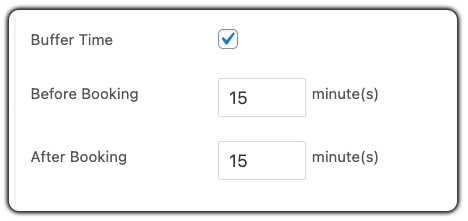
Need help setting it up? Check these quick guides:
- Offer Fixed, Recurring, or Flexible Time Slots
You can offer:
1. Fixed slots (e.g., Mondays at 10 AM)

Set pricing the way your business needs – flat rates, per session, or tiered pricing models are all supported.
To learn how to configure booking costs step by step, refer to this guide: How to Set Booking Costs Using WooCommerce Bookings
2. Open availability windows (e.g., choose any 30-minute slot between 10 AM–6 PM)

3. Offer multi-session courses like ‘Digital Marketing classes every Tuesday at 7 PM’ using the PH Recurring Bookings Add-on along with the main bookings plugin.

To set this up step by step, refer to this guide: Recurring Online Courses – WooCommerce Bookings
These are just a few use cases; the Bookings and Appointments for WooCommerce plugin is flexible enough to adapt to your unique course structure, coaching workflow, or training program.
- Manage Instructor Availability Using Assets
If you have multiple coaches or mentors, assign each as a resource (asset). The plugin ensures no double-booking and only shows available slots.

Want to assign instructors to sessions? Follow this simple guide.
- Collect Student Info or Offer Extras
Use the PH Product Add-Ons for WooCommerce plugin to collect important student information, like skill level, preferred topics, or learning goals. You can also offer optional extras such as PDFs or workbooks, which can be sent via email after the booking is confirmed, adding more value to each session. Just make sure to run those materials through a grammar checker before sending; typos in paid content don’t leave a great impression.
Want to add custom fields or extras? Check out this guide.
This is exactly how the online session booking experience appears on your website’s frontend:

- Collect Full or Partial Payments with Ease
Let students pay the full amount upfront or just a deposit using the PH Deposits for WooCommerce plugin, perfect for high-value or multi-session bookings.
Want to allow deposits for your bookings? Learn how it works.
- Send Automated Email Confirmations & Reminders
Automatically send confirmation emails and session reminders with all the necessary info like joining links or prep steps, so students stay informed.

See how to do it here
With this setup, your WooCommerce-powered education business is ready to scale, offering a frictionless, professional, and fully automated booking experience for learners around the globe. You can also enhance virtual learning sessions with a lecture AI note taker to automatically capture meeting summaries, important discussion points, and session insights for students and instructors.
Real-World Use Case: Running a Virtual Fitness Coaching Business with WooCommerce
Let’s say you run an online fitness coaching business. You offer one-on-one video sessions, small group strength classes via Zoom, and monthly wellness programs, all bookable through your WooCommerce store.
The Challenges You Will Face
- Clients from different time zones often book overlapping time slots or misunderstand session times. You’re constantly rescheduling or sending manual confirmations.
- Managing recurring programs like 4-week fitness challenges or daily workout check-ins becomes tedious when clients have to book each session separately.
- Limited instructor availability isn’t reflected in real-time, leading to double-bookings or missed sessions, especially when managed through spreadsheets or emails.
- Lack of structured payment flow forces you to send invoices manually or collect payments separately from session booking, leading to lost revenue.
- No automation for session reminders results in frequent no-shows, and your team spends hours every week following up with clients manually.
How It Can Be Solved
With the Bookings and Appointments for WooCommerce plugin by PluginHive, you can streamline everything:
- Allow clients to book one-on-one or group sessions directly from your WooCommerce store, with real-time availability and automatic time zone handling.
- Use the Recurring Bookings add-on to let clients book a complete 4-week fitness program with multiple sessions in one go, no repeated scheduling needed.
- Set up booking availability and buffer time to reflect instructor availability, block last-minute bookings, and prevent session overlaps.
- Collect full or partial payments during the booking process using the PH Deposits for WooCommerce plugin, making it easier to confirm attendance and reduce cancellations.
- Enable automated email notifications so clients receive confirmations and reminders without your team having to send manual follow-ups.
With WooCommerce and PluginHive’s booking plugin, your fitness coaching business runs smoothly, clients book online, you get paid upfront, and your schedule stays conflict-free.
Final Thoughts
Managing online courses, coaching sessions, or training programs doesn’t have to be chaotic. With Bookings and Appointments for WooCommerce by PluginHive, you can automate your entire scheduling process, whether you’re running one-on-one coaching, group classes, or recurring programs.
From handling time zones to collecting payments and reducing no-shows, the plugin brings structure and professionalism to your online education business, all within your WooCommerce store.
Need help setting it up? Reach out to PluginHive Support for expert guidance tailored to your business needs.
Frequently Asked Questions
1. Can WooCommerce Booking handle both private coaching and group classes?
Yes. With PluginHive’s Bookings and Appointments for WooCommerce plugin, you can create separate bookable products for one-on-one coaching and group sessions, with configurable participant limits to suit each format.
2. How do I set up recurring course bookings in WooCommerce Booking?
Install the PH Recurring Bookings add-on to enable recurring booking patterns (daily, weekly, monthly). Configure rules on the product page to allow students to enroll in full programs with one click
3. Does WooCommerce Booking support bookings on non-adjacent days?
Yes. Using availability settings and the Multiple Non-Adjacent Bookings add‑on, you can create complex schedules, like classes on Mondays and Thursdays only.
4. How do booking time zones work in WooCommerce Booking?
The plugin auto-detects a student’s time zone and adjusts availability accordingly. You can also choose whether to display customer or store time zone in your calendar.
5. Can I add buffer time between coaching sessions?
Absolutely. Under buffer settings, you can insert prep time before and after each session, preventing back-to-back bookings and giving you downtime between appointments.
6. Can I restrict bookings, cancellations, or allow rescheduling in WooCommerce Booking?
Yes. With built-in rules, you can set booking lead times (e.g., 12-hour notice), cancellation deadlines, and buffer rules to control when learners can modify their sessions.
