


Booking notes in WooCommerce are small but powerful tools that allow customers to share important details when making a reservation or appointment. Whether it’s a special request, a preference, or additional instructions, these notes help businesses understand and cater to their customers better. By paying attention to booking notes, store owners can deliver a more personalised and seamless experience, leading to happier customers and smoother operations.
For any business using the Bookings And Appointments for WooCommerce plugin, leveraging booking notes can make a significant difference. They not only reduce errors and miscommunications but also help build trust and loyalty with customers. In this article, we’ll explore what booking notes are, their benefits, and ways to use them effectively to improve your business.
Table of Contents
- Understanding Booking Notes in WooCommerce
- Add and Manage Booking Notes in WooCommerce
- Real-World Examples
- Best Practices for Using Booking Notes
- Conclusion
- FAQs
Understanding Booking Notes in WooCommerce
Booking notes in WooCommerce allow customers to share important details when making a booking or reservation. These notes can include special requests, preferences, dietary restrictions, accessibility needs, or requests for specific staff. By paying attention to these notes, businesses can provide a more personalised and seamless experience.
Benefits of Using Booking Notes for Your Business
- Enhanced Customer Experience: Tailor services to meet customer preferences and expectations.
- Reduced Errors: Important details are communicated upfront, minimising mistakes.
- Better Planning: Staff and resources can be allocated efficiently based on customer instructions.
- Stronger Customer Relationships: Acting on customer notes builds trust and loyalty.
Booking notes are a simple but powerful way to understand customer needs and deliver a smoother, more efficient service. For WooCommerce-based businesses, using them effectively can lead to happier customers and smoother operations.
Add and Manage Booking Notes in WooCommerce
Booking notes in WooCommerce give customers a way to share important details while making a booking, such as special requests or preferences. With the Bookings And Appointments for WooCommerce plugin, setting up and displaying booking notes is simple and highly customizable.
Before we begin, ensure that the Bookings And Appointments for WooCommerce plugin is installed and properly configured on your store. If you haven’t set it up yet, check out the setup guide to get started.
Once your plugin is ready, you can enable booking notes and customise how they appear on your booking products. The key settings in the plugin include:
- Enable Booking Notes: Turn on this option to allow customers to add notes during the booking process.
- Booking Notes Label: Customise the label for the notes field to match your business style, for example, “Special Requests” or “Preferences.”
- Make “Notes” Mandatory: Decide whether adding a note is optional or required for the booking.
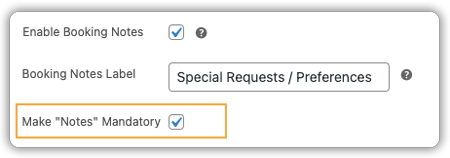
After enabling and customising these settings, the booking notes field will appear on the product page, allowing customers to provide important details before completing their booking.

Managing Booking Notes:
- Booking notes are visible within each order’s details on the WooCommerce Orders page.

- You can export booking notes along with order details to CSV using the plugin for reporting or record-keeping.
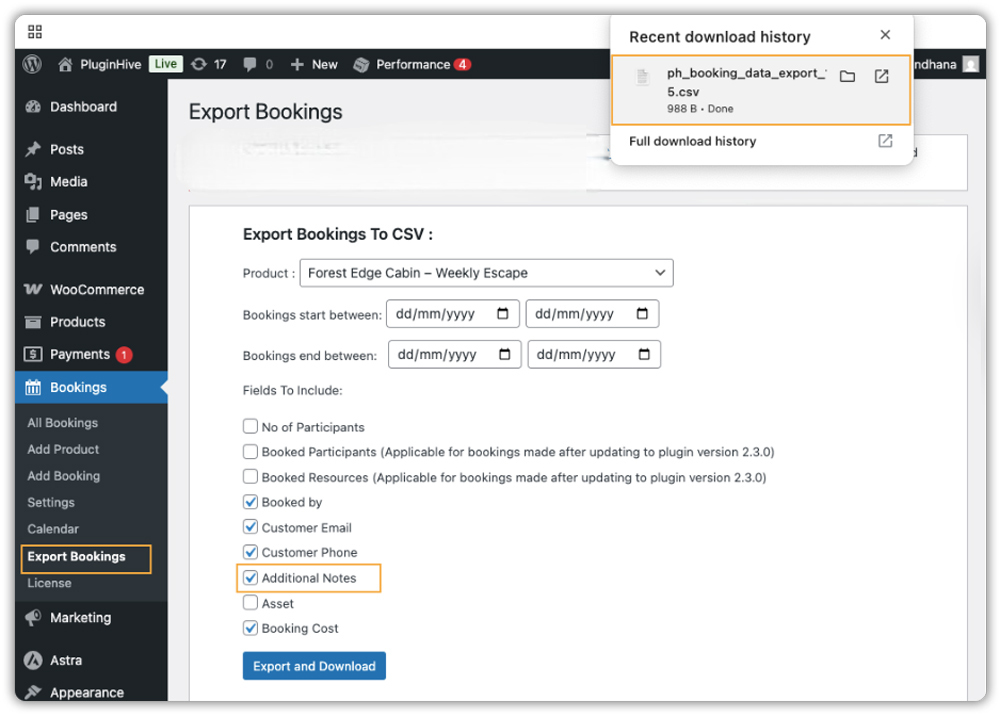

- Review notes before confirming bookings to ensure smooth operations and personalised service.
Using booking notes effectively helps reduce errors, improve customer satisfaction, and streamline your WooCommerce booking workflow.
Real-World Example: Managing Special Requests in a WooCommerce Restaurant
Let’s say you run a WooCommerce-based restaurant, offering table reservations and dining experiences online. Customers often have unique requests like dietary restrictions, birthday setups, or seating preferences that need to be addressed to ensure a smooth experience.
The Challenges You’ll Face
- Customers may have dietary restrictions or allergies that need careful handling.
- Special occasions like birthdays or anniversaries require additional preparation.
- Seating preferences vary and need to be coordinated properly.
- Handling all these details manually increases the risk of errors or missed requests.
How WooCommerce Bookings Solves This
With the Bookings And Appointments for WooCommerce plugin, you can:
- Enable booking notes for customers to add special instructions during reservation.
- Customers can add special requests in the booking notes field during the reservation.
- Staff can review these notes while preparing for the booking.
The Results
- Streamlined service with fewer errors and missed requests.
- Personalised experience for each customer, improving satisfaction.
- Enhanced overall dining experience, leading to happier customers and repeat bookings.
Best Practices for Using Booking Notes
Booking notes are a handy feature that helps you capture important customer details, personalise services, and reduce errors. Here are some best practices to follow:
- Keep it Concise: Encourage customers to be brief. For your own notes, use short, clear phrases so your team can quickly understand the message.
- Use Clear Labels: Customise the notes field label (e.g., “Special Requests” or “Preferences”) so customers know exactly what information to provide.
- Make Notes Mandatory When Needed: For services that require essential information, consider making notes mandatory to avoid missing critical details.
- Use Product Add-Ons for Extra Options: Combine booking notes with the PH Product Add-Ons for WooCommerce plugin. This lets you offer extra options like checkboxes, dropdowns, or additional services for customers to choose from.
- Act on Common Requests: Use notes to identify recurring requests and improve your service offerings over time.
Following these best practices ensures that booking notes add real value to your business, helping you deliver personalised experiences, reduce errors, and maintain efficient operations.
Conclusion
Booking notes in WooCommerce are a simple yet powerful feature that helps you capture important customer details, personalise services, and reduce errors. Using the Bookings And Appointments for WooCommerce, you can enable, label, and manage booking notes easily, making the booking process smooth for both your team and your customers.
Need help setting up your WooCommerce store and getting the most out of booking features? Reach out to PluginHive Support for expert guidance and assistance. They can help you get everything running seamlessly.
FAQs
1. Is it possible to make the booking notes mandatory in WooCommerce?
Yes, you can configure the booking notes field to be mandatory for your WooCommerce bookings.
2. Can I customise the label for the booking notes field?
Yes, you can customise the label to something more specific, like “Special Requests” or “Preferences.”
3. Can I view booking notes in the WooCommerce admin dashboard?
Yes, booking notes can be viewed within the order details in the WooCommerce admin dashboard.
4. Is it possible to export booking notes to a CSV file?
Yes, you can export booking notes along with order details to a CSV file for reporting or analysis.
5. Are there plugins that enhance booking notes functionality?
Yes, plugins like PH Product Add-Ons for WooCommerce allow you to offer additional options alongside booking notes.
