



Most WooCommerce store owners focus on getting the booking. Very few have a system for what happens after it. A well-timed follow-up email – sent after the service is done can quietly become one of the most effective retention tools your store has.
The Bookings and Appointments for WooCommerce plugin by PluginHive has this built in. This article walks you through what post-booking follow-up emails are, why they matter, and exactly how to set them up.
On This Page
- What Are WooCommerce Follow-Up Emails?
- Why Use Automated Follow-Up Emails for WooCommerce Bookings?
- Types of Follow-Up Emails You Can Send After WooCommerce Bookings
- How to Send Automated Follow-Up Emails After WooCommerce Bookings
- Example Scenario
- Tips for Writing Effective WooCommerce Bookings Follow-Up Emails
- Conclusion
- FAQs
What Are WooCommerce Follow-Up Emails?
A WooCommerce follow-up email is an automated message sent to a customer after their booking is completed. It goes out after the appointment or service is done – not before.
This is different from a reminder email. A reminder email goes out before the booking to reduce no-shows. A follow-up email is sent after the booking to maintain the relationship.
This article focuses entirely on post-booking follow-ups. For pre-booking reminders, refer to the WooCommerce Booking Reminder Emails guide.
With the Bookings and Appointments for WooCommerce plugin, follow-up emails are fully automated. You configure them once, and they go out to every customer after each completed booking, with no manual effort.
Why Use Automated Follow-Up Emails for WooCommerce Bookings?
Most service businesses put all their effort into getting the booking and very little into what comes after. That’s a missed opportunity. Here is why post-booking WooCommerce email automation matters:
- Get more reviews: asking right after a completed session, while the experience is fresh, gets far more responses than asking days later.
- Bring customers back: a rebook invite at the right moment gives customers a direct, easy path to their next appointment.
- Save time: you configure the email once; the plugin sends it automatically after every completed booking, no matter how busy you are.
- Build customer loyalty: consistent post-service communication shows professionalism and that you care about the experience beyond the transaction.
- Reduce manual follow-up: no longer need to remember to send individual emails or chase customers one by one.
By automating these emails, you can keep customers engaged without any manual effort.
Types of Follow-Up Emails You Can Send After WooCommerce Bookings
Not all follow-up emails serve the same purpose. Here are the most effective types to use after a completed WooCommerce booking:
- Thank-You Email: acknowledges the customer for choosing your service and leaves a positive last impression
- Review Request Email: asks the customer to leave a review while the experience is fresh; includes a direct link to make it easy
- Rebooking Email: invites the customer to schedule their next appointment with a direct link to your booking page
- Discount or Offer Email: includes a discount code or special offer for their next visit to give them a reason to return sooner
- Feedback Email: asks the customer how their experience went; useful for service improvement, and shows you care about their opinion
You don’t need to send all of these. One focused email with one clear purpose almost always outperforms an email trying to do too many things at once.
How to Send Automated Follow-Up Emails After WooCommerce Bookings
The follow-up email feature is built into the Bookings and Appointments for WooCommerce plugin.
To get started, go to WordPress → Bookings → Settings from your WordPress dashboard and open the Reminder and Follow-up Emails section. Check the Enable Follow Up Emails checkbox to turn it on.
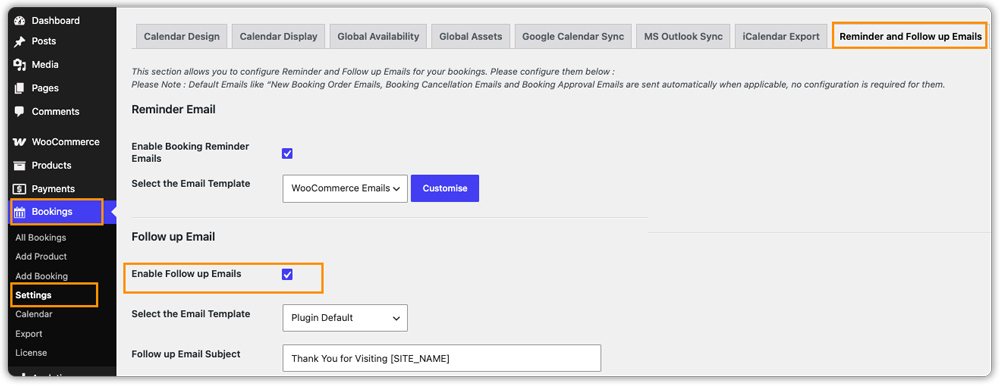
When setting up your follow-up email, you can choose between two email templates. Plugin Default uses the plugin’s own email layout, while WooCommerce Emails matches the styling of your existing WooCommerce store emails. Choose whichever feels like a better fit for your store.
Once enabled, you’ll see three fields to fill in – the email subject, the email content, and the send time. For the subject line, a simple option like “Thanks for Booking with Us!” works well. To personalize the email automatically for each customer, use placeholders such as [CUSTOMER_NAME] and [SITE_NAME] in the content.
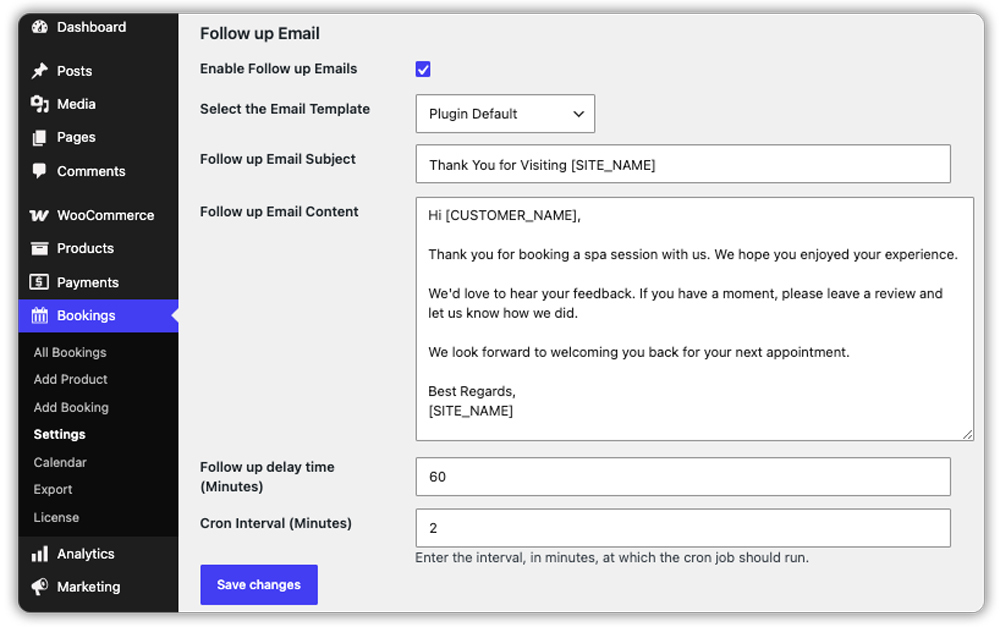
When configuring the send time, specify the number of minutes after the booking is completed before the email is sent. For example, entering 60 will trigger the email one hour after the booking is confirmed.
Once you’ve filled in the details, save your settings. From this point, every time a booking is marked as completed, the plugin automatically sends the follow-up email to your customer based on the time you set – no manual work needed on your end.
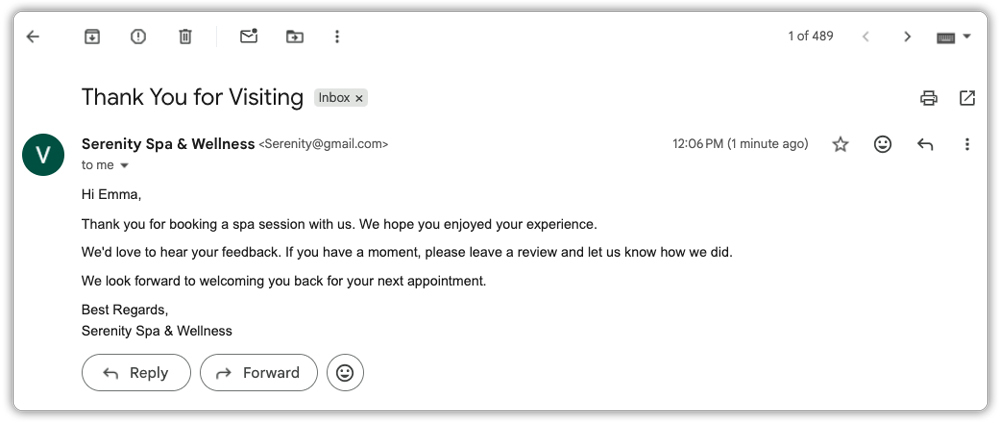
Here’s what the email looks like when it lands in the customer’s inbox.
For a full walkthrough of each setting, refer to the WooCommerce Bookings Email Notifications guide.
Example Scenario: WooCommerce Booking Follow-Up Emails
Let’s say you run a WooCommerce store offering personal training sessions. Customers book a session online, complete it, and that’s typically the last touchpoint they have with your business until they decide to book again – if they remember to.
Challenges you’re probably facing:
- No consistent way to thank customers after each session
- Reviews are rare because you never get around to asking
- Repeat bookings are unpredictable – some customers come back, many don’t
- As session volume grows, following up manually becomes impossible
How the Bookings and Appointments plugin solves this:
With the follow-up email configured in the Bookings and Appointments for WooCommerce plugin:
- A thank-you email goes out automatically 24 hours after every completed session, addressed to the customer by name with their booking details included
- The email includes a review link and a direct link to book their next session
- Every customer gets the same quality of follow-up, whether it’s a quiet week or your busiest month
Results:
- More reviews collected consistently without manual chasing
- Repeat bookings increase as customers get a timely, direct nudge to rebook
- Customers feel valued after every session, not just during it
- Your follow-up process runs reliably without depending on anyone remembering to send emails
Once post-booking follow-up emails are set up, customer retention is no longer something you manage manually – it becomes part of how your WooCommerce store operates.
Tips for Writing Effective WooCommerce Bookings Follow-Up Emails
Getting the most from WooCommerce automated follow-up emails comes down to a few simple choices. For more on managing all your booking email types, see the WooCommerce Bookings Email Notification guide.
- Send within 24 hours of completion: The sooner you follow up after a completed appointment, the more likely the customer is to respond. Don’t wait days – the moment passes quickly.
- One email, one goal: If you want a review, ask only for a review. If you want a rebook, focus only on that. Mixing multiple asks in one email weakens all of them. Use separate follow-up emails with different timing if you want to achieve both.
- Use dynamic tags: Tags like [customer_name] and [booking_details] make every email feel personal, even though it’s automated. A personalised email gets read; a generic one gets deleted.
- Make the action one click: Whether it’s a review link or a booking page link, include it directly in the email body. Don’t ask customers to search for it.
- Always preview before going live: A follow-up email with a broken tag or formatting issue reflects poorly on your business. Test it with a real booking before it goes out to actual customers.
These small decisions make a real difference in whether your follow-up emails get ignored or acted on.
Conclusion
Post-appointment follow-up emails are one of the highest-return, lowest-effort things you can set up for your WooCommerce booking store. A well-timed thank-you, review request, or rebook invite sent automatically after every completed service consistently brings more reviews, more repeat customers, and a more professional experience overall. The Bookings and Appointments for WooCommerce plugin has everything you need built in. Set it up once and let it work for every booking that follows. If you need help configuring it for your store, reach out to the PluginHive support team.
FAQs
Q. Can WooCommerce follow-up emails help increase repeat bookings?
Yes. Sending personalized follow-up emails with rebooking links, special offers, or reminders can encourage customers to return and book again.
Q. Can I personalize WooCommerce follow-up emails?
Yes. You can include customer names, booking details, and custom messages to make follow-up emails more relevant and engaging.
Q. What types of businesses can benefit from WooCommerce automated follow-up emails?
Any booking-based business can benefit, including hotels, rentals, fitness trainers, consultants, salons, healthcare providers, and event organizers.
