


Running a pet care business comes with its own set of challenges. Managing grooming sessions, boarding stays, training classes, or vet appointments often involves juggling phone calls, walk-ins, and last-minute cancellations. Without a proper system, overbookings, missed appointments, and scheduling errors can disrupt operations and impact customer trust. This is where PH WooCommerce Bookings and Appointments can make a difference. Specifically designed for pet services providers, the plugin streamlines appointment management, optimises resource allocation, and automates notifications all from a single platform. In this article, we’ll show how WooCommerce Bookings can help pet care businesses save time, reduce errors, and provide a smooth, professional booking experience for every client.
Table of Contents
- Challenges in Managing Pet Service Bookings
- Streamlining Pet Care Services with WooCommerce Bookings
- Real-World Example
- Best Practices & Tips
- Conclusion
- FAQs
Challenges in Managing Pet Service Bookings
Managing appointments for pet care services comes with several unique challenges that can disrupt daily operations if not handled efficiently:
- Manual Scheduling Errors: Keeping track of bookings on paper or spreadsheets is prone to mistakes. Double-bookings or missed appointments can frustrate customers and create chaos for staff.
- Limited Resources: Grooming tables, kennels, training rooms, and staff are all finite resources. Without proper management, it’s easy to overcommit and strain your team.
- Multiple Service Types: Pet care businesses often offer a variety of services grooming, boarding, walking, training, and vet visits. Each service has different durations, availability, and pricing, making scheduling more complex.
- Last-Minute Cancellations & No-Shows: Sudden cancellations or no-shows can leave resources idle and impact revenue. Managing these manually can be time-consuming and stressful.
- Complex Pricing Models: Different services, peak hours, weekends, holidays, and long-term bookings require flexible pricing. Handling this manually increases the risk of errors and inconsistencies.
These challenges highlight the need for an organised system that can handle bookings efficiently, reduce errors, and provide a smooth experience for both staff and pet owners.
Streamlining Pet Care Services with WooCommerce Bookings
Managing pet appointments manually can be time-consuming and prone to errors. With the WooCommerce Bookings and Appointments plugin, you can automate your booking workflow, save time, and provide a seamless experience for pet owners.
To get started, make sure the PluginHive Bookings plugin is installed, activated, and configured correctly. Follow this quick setup guide .
Here’s how the plugin helps you streamline bookings for pet care services:
- Manage Availability Accurately
Show real-time availability for grooming, boarding, training, or vet visits right on your service pages. Define your operating hours, block off holidays, and adjust staff schedules to ensure customers always see the correct time slots when booking.

Need help setting up slot availability? Check out this guide.
- Manage Appointment Duration, Buffer, and Cancellations
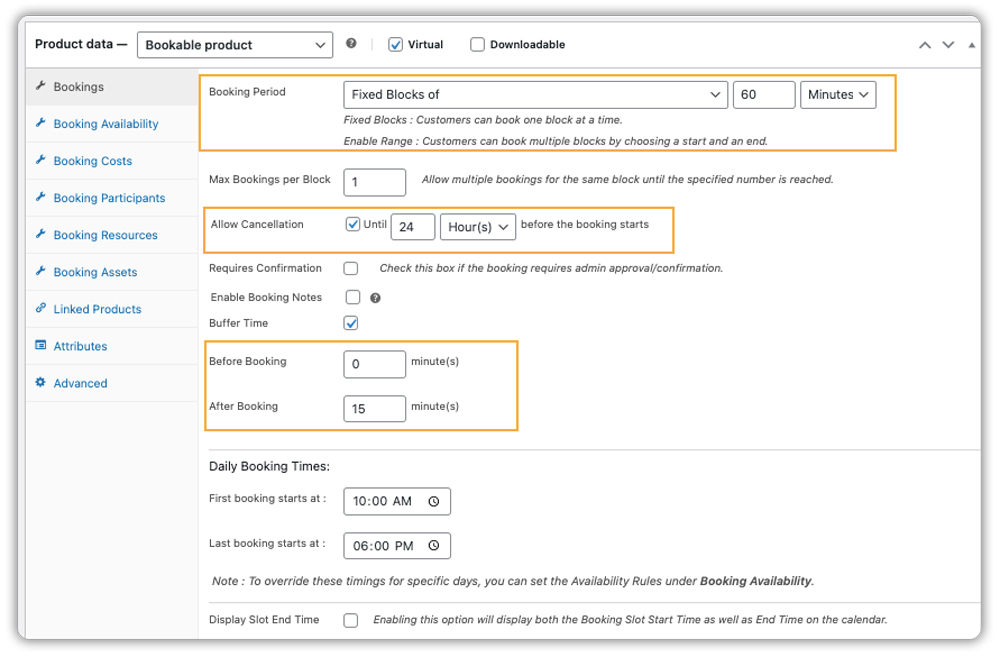
Offer flexible appointment durations hourly, daily, or multi-day based on your services, and add buffer times between bookings to allow for cleaning, setup, or preparation.
Learn how to set buffer time between the two bookings.
At the same time, set flexible cancellation rules, such as requiring notice 24 hours before the appointment, to keep your schedule organized and protect your business.
Check this guide for cancellation setup.
- Offer Flexible and Dynamic Pricing
Set different prices based on the day or time, such as higher rates on weekends or holidays, helping you maximize revenue for your pet services.

Learn how to set booking costs here.
- Allow Multiple Pets per Booking
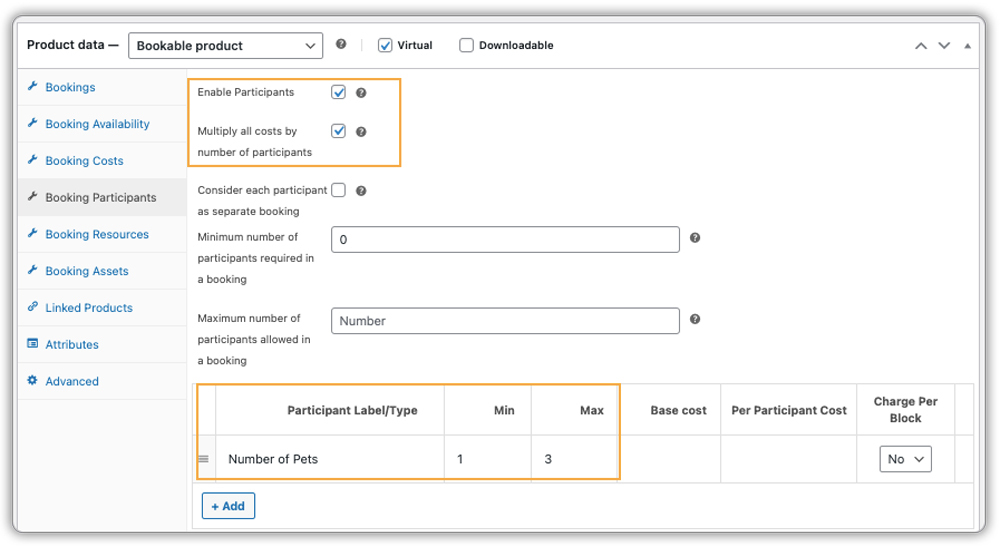
You can let customers book for more than one dog at a time. Enable Booking Participants, create a field called “Number of Dogs”, and set the minimum and maximum values as needed for your business. Turn on “Multiply All Costs by Number of Participants” so the price updates automatically. This makes booking multiple pets quick and easy.
To know more about setting up booking participants, check out this step-by-step guide.
- Manage Assets and Staff Efficiently
Assign resources like kennels, grooming tables, or trainers to each booking. The system automatically prevents over-allocation, keeping staff workload balanced.

See how to manage assets.
- This is how the pet grooming booking experience appears on your website’s frontend:

- Send Automated Email Notifications and Reminders
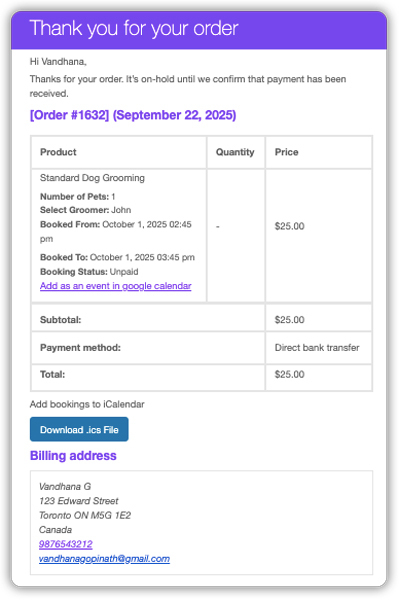
Notify pet owners instantly when they book or reschedule, and send reminders before the appointment. This reduces no-shows and builds trust.
Learn how to set up email notifications and booking reminders here.
- Sync Bookings with Google Calendar
Automatically sync all bookings to your Google Calendar. Staff and pet owners can also add appointments to their calendars with one click from the confirmation page.

Learn how to sync bookings with Google Calendar.
You can also sync bookings to iCal or Outlook. To learn more, check out these guides:
With these features, your WooCommerce store is fully equipped to handle pet service bookings efficiently, saving time, reducing errors, and providing a smooth experience for both your team and your clients.
Apart from these, the plugin also offers features like requiring confirmation, adding booking notes, managing resources, and accepting full or partial payments to make managing your pet services even easier.
Want to see how it works in action? Watch this quick video to get a clear overview of the PluginHive Bookings plugin in use.
Real-World Example: Running a Pet Grooming Service with WooCommerce
Let’s say you own a pet grooming salon offering services like bathing, trimming, nail clipping, and styling. Customers usually reach out through phone calls, texts, or social media messages to book appointments. While this works at the start, as your customer base grows, it becomes increasingly difficult to manage everything manually.
The Challenges You Will Face
- Double-bookings or overlapping slots due to manual scheduling.
- Time wasted responding to phone calls and messages instead of focusing on pet care.
- Difficulty managing multiple staff members and grooming stations.
- Missed payments or confusion when collecting fees separately.
- Lack of a centralized system to track bookings and customer history.
How It Can Be Solved
With the WooCommerce Bookings and Appointments Plugin, these challenges can be solved effortlessly:
- Customers can directly book available time slots online without contacting you.
- Payments are collected upfront during booking, reducing cancellations and no-shows.
- The system automatically prevents overlapping appointments.
- A centralised calendar helps you manage staff schedules and grooming stations efficiently.
- Complete booking records are stored in your WooCommerce dashboard for easy access.
By using the WooCommerce Bookings and Appointments Plugin, your pet grooming service runs more smoothly. Customers enjoy the convenience of booking and paying online, while you save time, avoid scheduling errors, and focus on delivering top-quality care to pets.
Best Practices to Streamline Pet Service Bookings
Efficient pet service bookings go beyond simply setting up an online calendar. By implementing a few best practices, you can optimize operations, build trust with pet owners, and deliver a personalized experience for every pet.
1. Showcase Your Facilities and Staff: Include high-quality images of your grooming stations, kennels, or trainers. Visuals help pet owners feel confident in your services and create trust before they even book an appointment.
2. Encourage Reviews and Feedback: After each service, request customers to leave reviews or provide feedback. Positive reviews enhance credibility, while constructive feedback helps you improve offerings and attract new clients.
3. Keep Your Availability Up-to-Date: Regularly update service times, staff schedules, and resource availability. Accurate scheduling prevents overbooking, ensures smooth operations, and gives pet owners reliable information when booking.
4. Personalize Customer Interactions: Use booking information to tailor services for each pet. Note dietary needs, medical history, or special preferences to provide a customized experience. Tools like PH Product Add-Ons for WooCommerce make it easy to collect these details upfront.
By following these practices, your pet care business can provide a seamless booking experience, reduce errors, and improve overall customer satisfaction. Implementing these steps also helps optimize staff workload and resource utilization, ultimately supporting business growth.
Conclusion
Managing pet care service bookings can be challenging, but with the right tools and practices, it doesn’t have to be. WooCommerce Bookings and Appointments helps pet care businesses automate scheduling, manage resources, and reduce errors, saving time and improving overall efficiency. By keeping availability updated, showcasing your facilities, and personalizing services, you can deliver a seamless experience that builds trust and satisfaction among pet owners.
Need help getting started? Reach out to PluginHive Support for personalized setup assistance for your pet service business. Our team can guide you through configuration, help optimise your booking workflow, and ensure your online booking system is tailored to your unique services.
FAQs
1. Can I manage pet service bookings online using WooCommerce?
Yes. WooCommerce Bookings allows you to set up online booking systems for services like grooming, boarding, and training.
2. Can I require confirmation before a pet service booking is final?
Yes. WooCommerce Bookings allows you to require admin confirmation before a booking is considered confirmed. This lets you review availability, staff, or other constraints first.
3. Can customers cancel bookings themselves?
Yes. If you configure the cancellation policy, customers can cancel their bookings within the set timeframe. Once cancelled, the slot becomes available for others.
4. Does WooCommerce Bookings support multi-day bookings (e.g., boarding) for pets?
Yes. You can set bookable products with multi-day durations, making services like overnight boarding or extended pet stays possible.
