


Managing a yoga, Pilates, or meditation studio isn’t just about offering great classes; it’s about handling bookings, tracking instructor schedules, preventing overbookings, and ensuring your clients can easily reserve their spots. Doing all of this manually or across different platforms can be time-consuming and frustrating.
If your studio runs on WooCommerce, the Bookings and Appointments for WooCommerce plugin by PluginHive lets you turn your website into a complete booking system. In this article, we’ll show how wellness studios can automate their class schedules, offer group and private sessions, and accept payments online, all without leaving WooCommerce.
Table of Contents
- Booking Challenges Faced by Wellness Studios
- Streamline Your Wellness Studio with WooCommerce Bookings
- Real-World Example
- Final Thoughts
- FAQs
Booking Challenges Faced by Wellness Studios
Operating a yoga, pilates, or meditation studio is deeply fulfilling, but managing the business side, especially bookings, can quickly become overwhelming. Without the right tools in place, even the most well-run studios face avoidable scheduling issues that hinder growth and client satisfaction.
Common booking difficulties include:
- Manual Scheduling and Errors: Using spreadsheets, notebooks, or back-and-forth messaging to track class bookings and instructor availability is time-consuming and prone to errors. Missed updates or accidental overlaps can easily disrupt your schedule.
- Lack of Client Booking Flexibility: Clients today expect to book, reschedule, or cancel sessions online at their convenience. Without a user-friendly booking system, studios risk losing clients to more tech-savvy competitors.
- Instructor Scheduling Conflicts: Assigning the right instructor to each session manually can be cumbersome, especially in team-based studios. Without a centralized schedule, overlaps and confusion are common.
- Disconnected Payment Processes: Handling bookings separately from payments creates extra work. Collecting cash or manually following up on online transfers leads to delays, errors, and friction in the client experience.
- Missed Reminders and No-Shows: Without automated confirmations and reminders, clients may forget their appointments, leading to empty spots, revenue loss, and wasted instructor time.
These challenges underscore the need for a smart, automated booking system that’s built for the way wellness studios operate.
Streamline Your Wellness Studio with WooCommerce Bookings
Running a wellness studio that offers yoga, Pilates, or meditation sessions means constantly managing class schedules, coordinating instructors, and staying on top of bookings. The Bookings and Appointments for WooCommerce plugin by PluginHive simplifies this entire process, making it easy for your customers to reserve classes while you stay focused on what you do best: delivering transformative wellness experiences.
To get started, ensure the plugin is installed and configured properly. Follow this quick guide.
Once your Plugin is set up, here’s how it solves the key challenges your wellness studio faces.
- Manage Daily Class Availability and Recovery Time
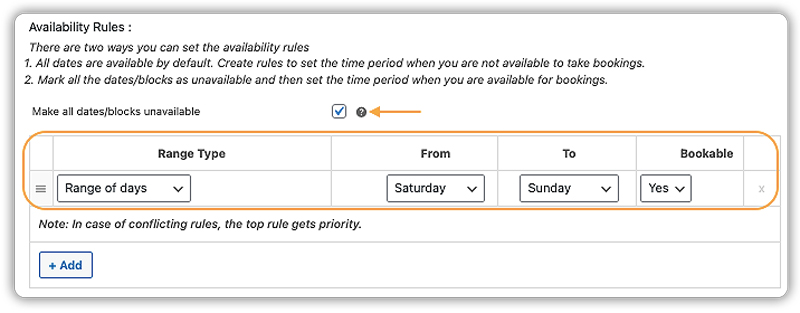
Set which days of the week you’re open for bookings, such as weekday morning yoga or weekend Pilates. You can also block out specific dates for studio maintenance or instructor leave.
Add short gaps between classes to give yourself or your team time to reset, clean the space, or prepare for the next group, especially important for back-to-back meditation sessions where a quiet setup matters.
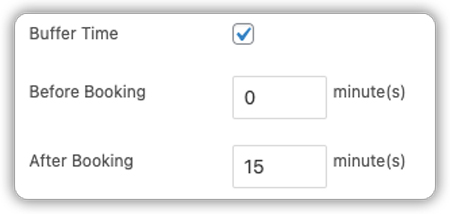
Want to learn more? Check out how to manage availability and rest time between classes.
- Schedule Classes with Ease
Whether it’s a morning Vinyasa flow or a weekend mindfulness retreat, you can set different timings and durations for each class. This ensures your studio runs on a flexible and organized schedule.

- Set Flexible Pricing Based on Time & Demand
Charge a flat rate for drop-in sessions or adjust pricing based on weekends or peak hours. Custom pricing options let you reflect demand in real time.
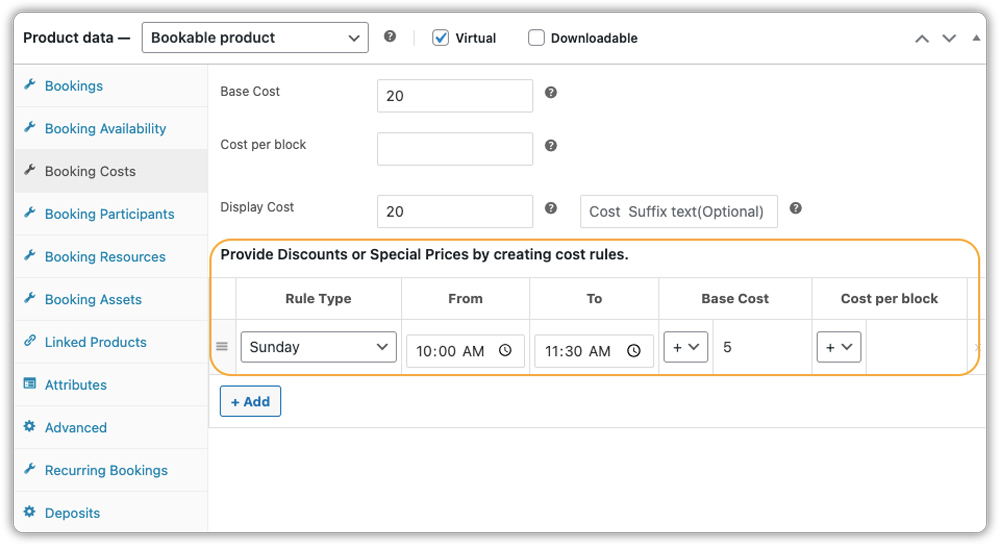
To configure custom booking costs, see this guide. Want to offer recurring classes like weekly yoga flows? Use the PH Recurring Bookings Add-On alongside the main plugin.
- Let Clients Book Their Favorite Instructor
Use Booking assets to auto-assign instructors or let clients pick their preferred teacher. It’s a smooth way to manage availability and keep things flexible.
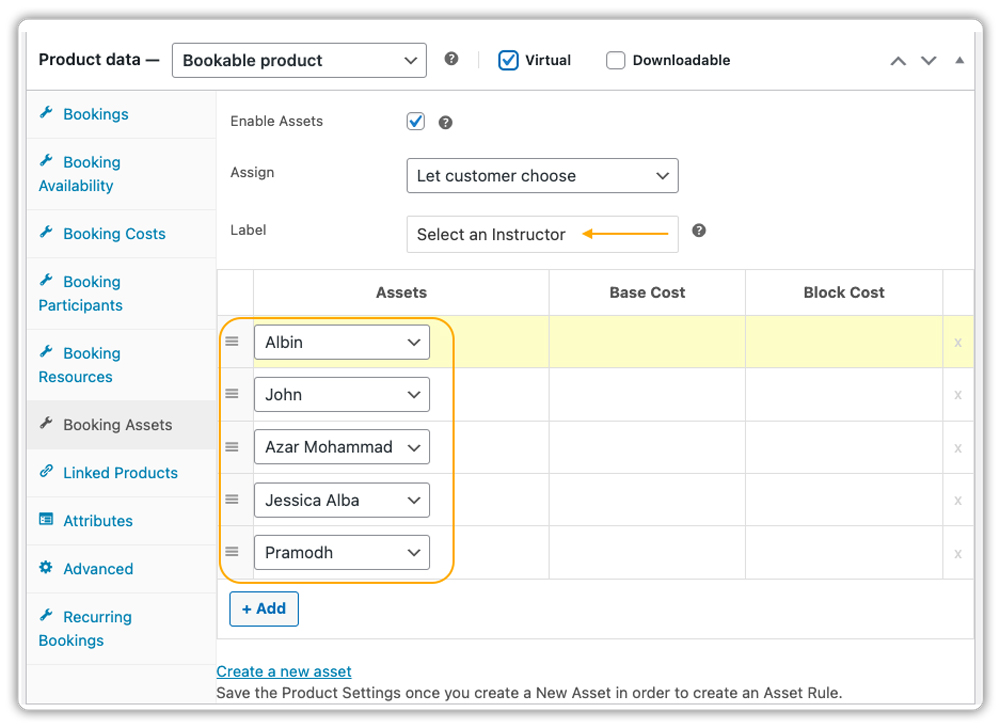
Running a multi-instructor yoga centre? See how to manage the instructors.
- Collect Preferences & Offer Session Extras
Want to know if your client prefers attending in person or joining online? Or need to check if they’ll bring their own yoga mat or require accessibility support? You can add such questions to the booking page using Booking Resources.
See how to use booking resources.

For more flexibility, like asking additional questions, gathering preferences, or offering extras like yoga props, aromatherapy, or post-session guided audios, use the PH Product Add-Ons for WooCommerce. It works seamlessly with bookings to help you customize the form to your needs.
Want to add custom fields or extras? Check out this guide.
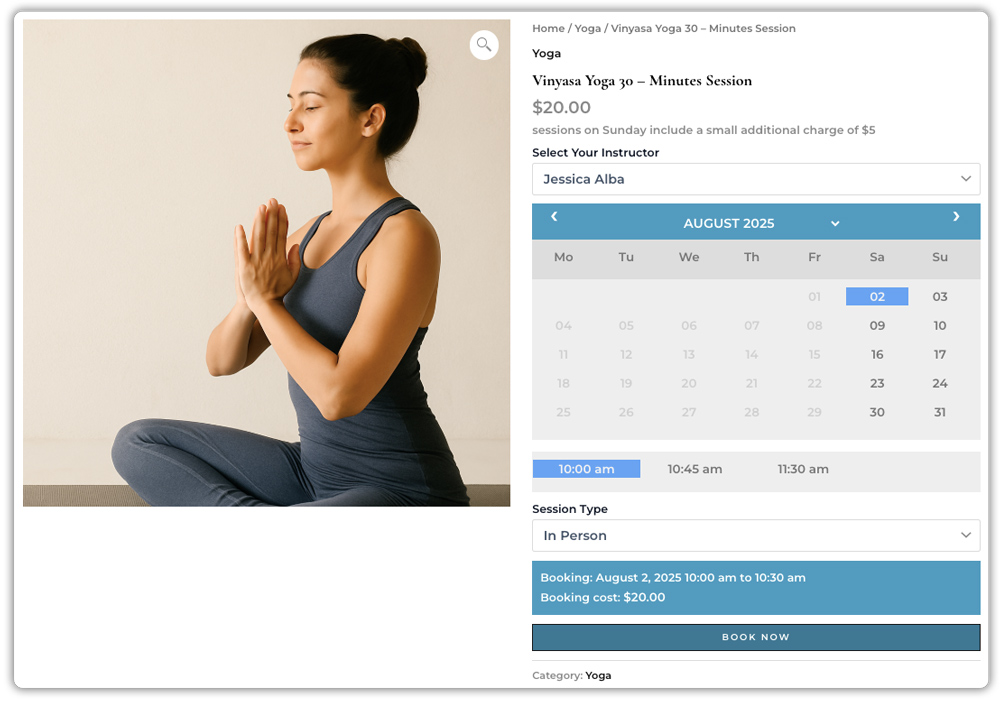
Here’s exactly how your clients will see and book a wellness session on your website:
- Collect Full or Partial Payments Online
Let clients pay the full amount when booking or allow partial deposits, especially helpful for high-value packages or retreat bookings. The PH Deposits for WooCommerce plugin integrates easily, giving your studio more flexibility and reducing the chance of no-shows.
Learn how to set upfront deposits for your wellness classes.
- Flexible Cancellation Options
With WooCommerce Bookings, you can set cancellation rules, like allowing cancellations up to 24 or 48 hours before a class. This prevents last-minute dropouts and protects your schedule.

See how to manage booking cancellations.
- Send Confirmations and Gentle Reminders Automatically
Once a session is booked, your client receives a confirmation email with class details, location (or Zoom link), and what to bring. You can also schedule reminders a few hours or days before the class to reduce drop-offs, especially useful for early morning yoga or meditation bookings.
Want to reduce no-shows? See how to set automated reminders.

With the PluginHive’s Bookings and Appointments for WooCommerce plugin in place, your yoga, Pilates, or meditation studio runs smoother, from class scheduling to payments and client communication. No more spreadsheets, back-and-forth messages, or missed bookings. Just a professional, peaceful experience that reflects the calm your studio stands for.
Real-World Example: Managing a Yoga & Wellness Studio with WooCommerce
Let’s say you run a yoga and wellness studio offering daily group classes, one-on-one Pilates rehab sessions, and weekend mindfulness retreats. You want clients to book these online through your WooCommerce site.
The Challenges You Face
- You’re juggling bookings across emails, WhatsApp, and spreadsheets, which often leads to double bookings or missed sessions.
- Group sessions, private classes, and workshops all need different pricing models and participant limits, but there’s no system to manage them all in one place.
- Clients want to book a 10-class pack or recurring weekend sessions, but your current setup requires them to book each one individually.
- Instructor availability isn’t clearly shown, which creates confusion when clients book a time slot that’s already taken.
- No-shows are frequent because reminders aren’t going out automatically.
How WooCommerce Bookings Helps
With the Bookings and Appointments for WooCommerce plugin by PluginHive, you can streamline your entire setup:
- Display all your sessions from group classes to private appointments with clear time slots, real-time availability, and instructor schedules.
- Use flexible pricing rules: $20 for a drop-in, $150 for a 10-class pass, or $75 for a one-on-one session. You can also set participant-based pricing for private group bookings.
- Define group size and duration for each class, and use buffer time to avoid back-to-back scheduling errors.
- Allow clients to book recurring sessions (like a 5-day meditation series) in one go using the PH Recurring Bookings Add-On, no manual rebooking required.
- Accept full or partial payments upfront using the PH Deposits for WooCommerce plugin, and reduce no-shows with automated email reminders.
- Reflect instructor unavailability instantly by customizing booking availability and setting rules for time-off.
This way, you eliminate booking conflicts, offer a seamless client experience, and run your studio more efficiently, all from your WooCommerce store.
Final Thoughts
Whether you run a small yoga class studio, offer private Pilates sessions, or host guided meditation classes, managing bookings manually can quickly drain your time and energy. The Bookings and Appointments for WooCommerce plugin brings structure to your wellness business, helping you set class schedules, limit group sizes, offer flexible pricing, and accept payments online with ease.
From real-time availability to automatic email reminders, you’ll spend less time on admin and more time doing what you love, helping people feel better in their bodies and minds.
Need help setting it up? Reach out to PluginHive Support for expert guidance tailored to your business needs.
Frequently Asked Questions
1. Can I manually add bookings in the WooCommerce Bookings plugin?
Yes. The Bookings and Appointments for WooCommerce plugin lets you create bookings manually from your WordPress dashboard under Bookings → All Bookings. This is useful for handling phone or email reservations alongside online ones.
2. Does WooCommerce Bookings support multiple locations or studios?
Yes. You can create separate bookable products for each studio or location using the Bookings and Appointments for WooCommerce plugin. You can also manage shared resources like instructors across locations with controlled availability and buffer times.
3. Can WooCommerce Bookings sync with Google Calendar?
Yes, there’s a two-way Google Calendar sync option. This keeps your WooCommerce booking calendar and Google Calendar in sync for both studio owners and clients. (Outlook sync and iCal export are also supported.)
4. How can I offer discounts using the WooCommerce Bookings plugin?
You can create dynamic pricing rules based on group size, date, or day of the week. This helps you run weekend offers or seasonal promotions easily.
5. Does WooCommerce Bookings allow booking approvals before payment?
Yes. You can enable a “Requires Confirmation” setting in the Bookings and Appointments for WooCommerce plugin. This lets you approve bookings first; only then is a payment link sent to the customer.
