



When a customer needs something fast, their shipping choice at checkout is make-or-break. If your WooCommerce store doesn’t offer a reliable express option, you’re leaving those sales and that loyalty on the table. For Canadian store owners, Canada Post Xpresspost is the go-to solution for time-sensitive deliveries, covering domestic, USA, and international destinations.
This article shows you how to offer Xpresspost on your WooCommerce store, why it’s worth enabling, and how to set it up without any manual rate lookups or label printing headaches.
On This Page
- What Is Canada Post Xpresspost?
- Why Offering Xpresspost Can Directly Boost WooCommerce Sales
- How to Offer Canada Post Xpresspost on Your WooCommerce Store
- Example Scenario
- Tips to Get the Most Out of Xpresspost in WooCommerce
- Conclusion
- FAQs
What Is Canada Post Xpresspost?
Canada Post Xpresspost is a tracked, fast-delivery service available for domestic shipments within Canada, to the USA (Xpresspost USA), and to international destinations (Xpresspost International).
For domestic orders, delivery typically lands within 1–2 business days to major urban centres. Key features include:
- Guaranteed delivery date with on-time delivery assurance
- Full tracking from pickup to delivery
- Signature confirmation available for high-value items
- Coverage for loss or damage included
- Available for parcels and envelopes of various sizes
For WooCommerce Canada stores, Xpresspost sits between Expedited Parcel (standard, lower cost) and Priority (premium, fastest). It’s the sweet spot for customers who need their order quickly but aren’t willing to pay for the most expensive option.
Why Offering Xpresspost Can Directly Boost WooCommerce Sales
Shipping options at checkout directly influence whether a customer completes a purchase. When buyers have urgent needs – a birthday gift, a last-minute business order, a replacement part, a slow shipping option is enough for them to abandon the cart and find another store.
Here’s what offering Canada Post Xpresspost does for your WooCommerce store:
- Reduces cart abandonment: Customers with deadlines convert when they see a fast, guaranteed option at checkout
- Builds trust: The on-time delivery guarantee gives buyers confidence in your store’s reliability
- Opens up a new customer segment: Businesses ordering supplies, legal professionals needing documents, and gift buyers all look specifically for express services
- Improves repeat purchases: Customers who needed fast delivery once are likely to return when they need it again
Pairing Xpresspost with a standard option like Expedited Parcel gives your customers flexibility. Those who aren’t in a rush can save on shipping, while urgent buyers get the speed they need. This combination is one of the simplest ways to increase WooCommerce sales without changing your products or pricing.
How to Offer Canada Post Xpresspost on Your WooCommerce Store
The Canada Post Shipping Plugin for WooCommerce with Print Label connects your WooCommerce store directly to Canada Post and takes care of everything – showing live rates at checkout, printing shipping labels, and keeping customers updated with tracking details.
Display Live Xpresspost Rates at Checkout
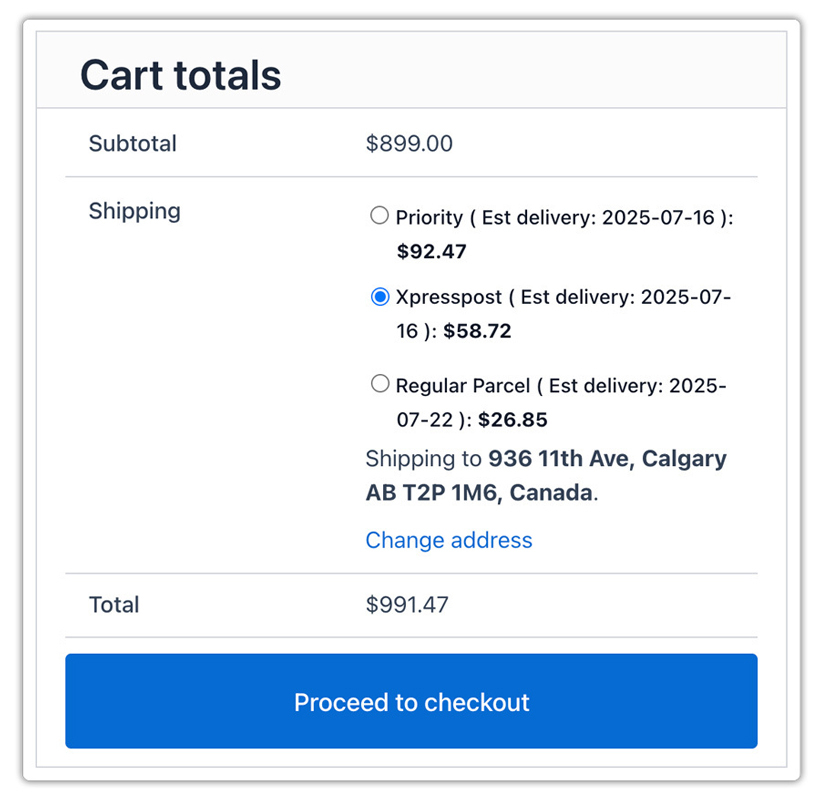
Go to WooCommerce > Settings > Shipping > Canada Post and enable Xpresspost under Rates and Services. You can also turn on Xpresspost USA or Xpresspost International if you ship beyond Canada. The plugin fetches live rates from Canada Post based on the customer’s postal code, package weight, and dimensions, so the price shown at checkout is always accurate and up to date.
Print Canada Post Shipping Labels
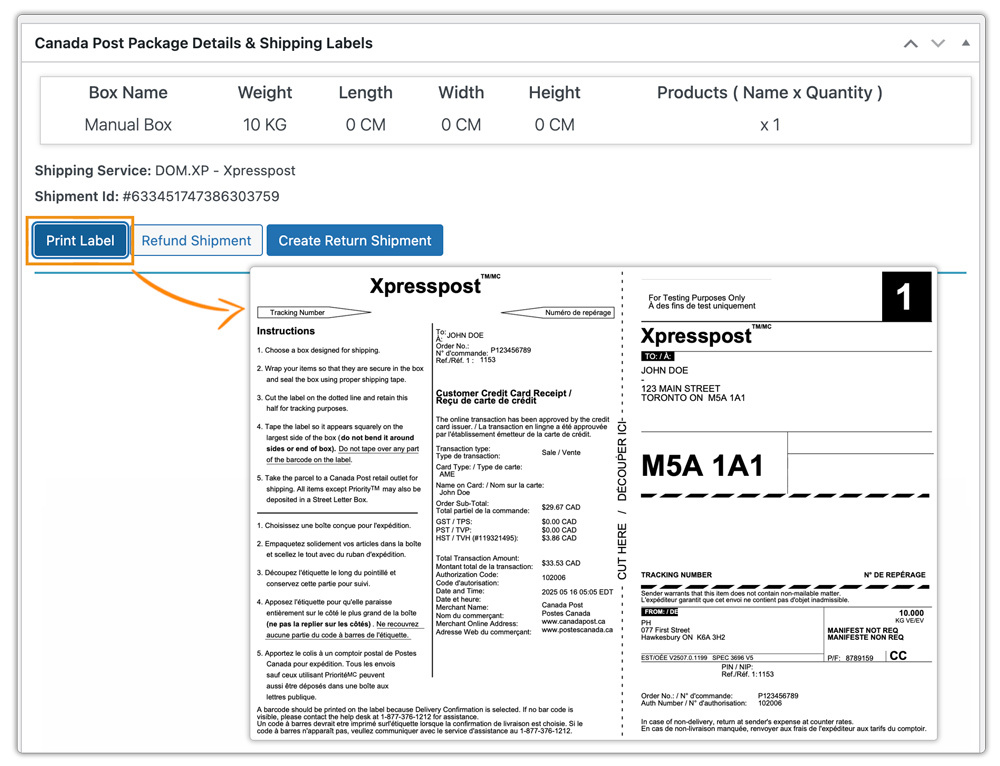
Once an order is placed, generate and print the Canada Post shipping label directly from your WooCommerce order page – no logging into the Canada Post portal separately. You can print labels one at a time or in bulk, making it easy to handle multiple Xpresspost orders on busy days.
Automated Tracking for Customers
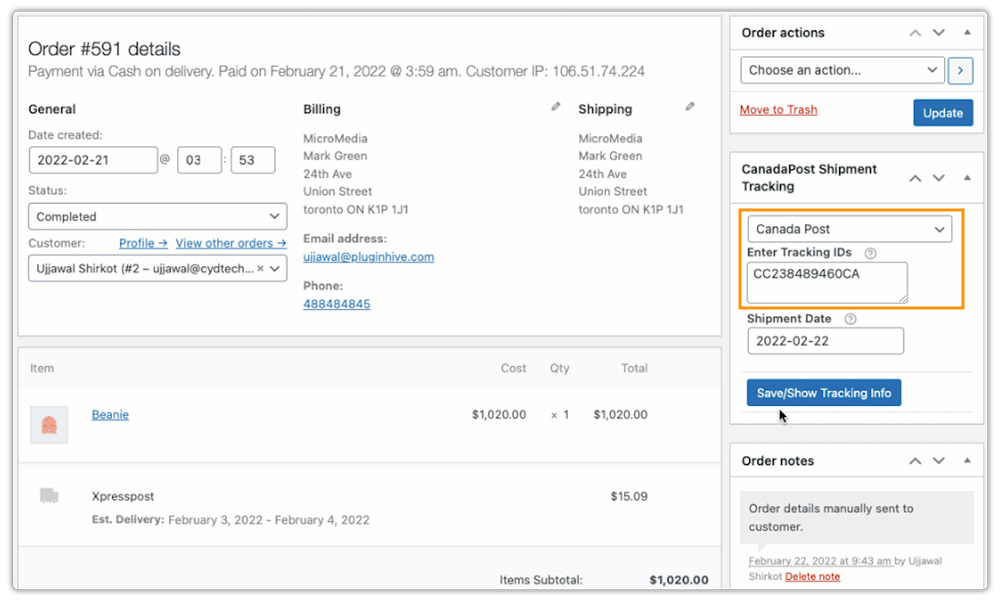
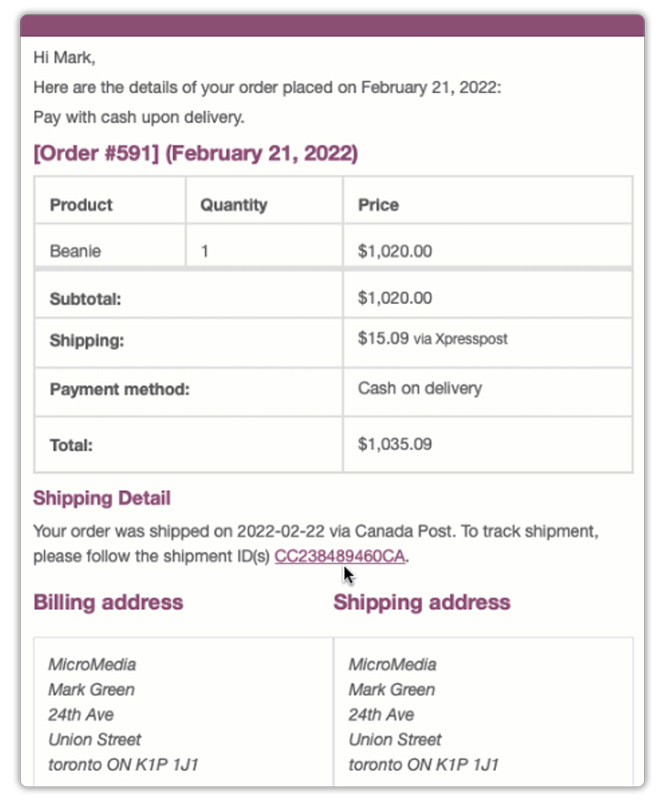
When a label is generated, a Canada Post tracking number is automatically attached to the order and sent to the customer via email. Buyers can follow their Xpresspost shipment without needing to contact you – which means fewer support queries and a better post-purchase experience.
Once these three things are in place, your WooCommerce store is fully ready to offer Canada Post Xpresspost and handle urgent orders from checkout to delivery.
Example Scenario: How a WooCommerce Store Uses Canada Post Xpresspost
Let’s say you run a WooCommerce store selling gifts or specialty products across Canada, and you’ve been noticing cart abandonment close to holidays or weekends.
Challenges you’re probably facing:
- Customers are dropping off at the shipping step because there’s no fast delivery option visible
- You’re getting emails asking, “Can I get this by Friday?” but have no quick shipping to offer
- You’re losing sales to competitors who show faster shipping choices at checkout
How the Canada Post Shipping Plugin helps:
The Canada Post Shipping Plugin for WooCommerce with Print Label lets you display Xpresspost alongside your standard services at checkout. Urgent buyers see a fast option, choose it, and complete the order. Labels print directly from WooCommerce, and tracking is sent to customers automatically.
Results:
- Fewer abandoned carts from time-sensitive buyers
- Customers who need speed pay for it – you don’t absorb the cost
- Less time spent on manual fulfillment and support queries
Once Xpresspost is live on your store, capturing urgent orders becomes a natural part of how your WooCommerce store operates.
Tips to Get the Most Out of Xpresspost in WooCommerce
Getting the most from Canada Post Xpresspost comes down to a few setup choices that are easy to overlook, and this Canada Post services comparison guide is useful if you’re deciding which services to pair together.
- Enable Xpresspost alongside Expedited Parcel, not instead of it: The goal is choice. Customers who aren’t in a hurry will pick Expedited. Urgent buyers will pick Xpresspost. Both orders are complete.
- Add product dimensions and weight accurately: Xpresspost rates are calculated based on package size and weight. If your products don’t have accurate dimensions in WooCommerce, the rates shown at checkout may be off.
- Use the estimated delivery date display: The plugin can show expected delivery dates at checkout. For Xpresspost orders, this is particularly useful, seeing “Arrives by Thursday” is a strong motivator for urgent buyers.
- Consider enabling Xpresspost USA if you ship cross-border: WooCommerce Canada stores with US customers can offer Xpresspost USA for fast 2–3-day delivery. Learn more in the WooCommerce shipping to the US with Canada Post guide.
- Test checkout from a customer’s perspective: After enabling services, place a test order to a major Canadian postal code and confirm Xpresspost is showing correctly with accurate rates.
These small setup steps make a real difference in whether urgent buyers see a fast option and whether they complete the purchase.
Conclusion
Offering Canada Post Xpresspost on your WooCommerce store is one of the most direct ways to serve customers who need fast delivery and to capture sales you’d otherwise lose to stores that do. With the Canada Post Shipping Plugin for WooCommerce with Print Label, setting up Xpresspost takes minutes, and the automation handles rates, labels, and tracking from that point on. If you need help with configuration or have questions specific to your store, reach out to the PluginHive support team.
FAQs
Q: How long does Canada Post Xpresspost?
Canada Post Xpresspost delivers within 1–2 business days to most major urban centres in Canada. Delivery times may vary slightly depending on the origin and destination postal codes.
Q: What is Xpresspost USA Canada Post?
Xpresspost USA is a Canada Post service that delivers parcels from Canada to the United States in 2–3 business days. It includes full tracking and is a reliable option for WooCommerce stores shipping cross-border orders to US customers.
Q: Is Xpresspost faster than Priority?
No – Priority is Canada Post’s fastest domestic service, with next-business-day delivery between major centres. Xpresspost delivers within 1–2 business days, making it the second-fastest option and a cost-effective choice for urgent orders that don’t require Priority speed.
