



Running a WooCommerce store with Australia Post MyPost Business should simplify shipping, but without the right setup, you end up with wrong rates, labels that won’t print, and customers with no idea where their parcel is. Most of these problems come down to configuration gaps. This guide covers the most common ones and how to fix them using the PH Australia Post MyPost Business Shipping for WooCommerce plugin.
On This Page
- Understanding Australia Post MyPost Business Integration in WooCommerce
- Common Woo Delivery Problems & Fixes with Australia Post MyPost Business
- Problem #1: Australia Post MyPost Business Rates Not Showing at Checkout
- Problem #2: Can’t Generate or Print Australia Post MyPost Business Labels
- Problem #3: Customers Not Receiving Tracking Updates
- Problem #4: Difficulty Managing Packaging and Box Selection
- Problem #5: Shipping Costs Charged by the Carrier Are Higher Than Checkout Rates
- Top Companion Plugins for Australia Post MyPost Business on WooCommerce
- Conclusion
- FAQs
Understanding Australia Post MyPost Business Integration in WooCommerce
Australia Post MyPost Business is a free account for Australian businesses offering up to 40% off domestic and 35% off international postage based on sending volume. WooCommerce doesn’t connect to it natively — without a plugin, you’re manually checking rates and copying tracking numbers by hand. The PH Australia Post MyPost Business Shipping for WooCommerce plugin connects your account directly to WooCommerce, handling live rates, label printing, and tracking from within the admin.
Common WooCommerce Delivery Problems & Fixes with Australia Post MyPost Business
Problem #1: Australia Post MyPost Business Rates Not Showing at Checkout
Customers may sometimes see no shipping rates, incorrect flat rates, or checkout errors instead of accurate live shipping charges. This usually happens due to incorrect carrier configuration, missing product shipping details, or shipping zones not being set up properly.
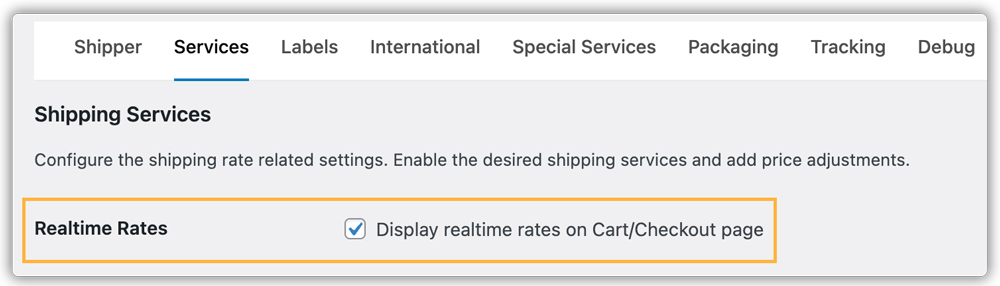
Fix: The Australia Post MyPost Business Shipping Plugin helps resolve this by connecting your WooCommerce store directly with Australia Post MyPost Business to fetch live shipping rates at checkout. You can configure your MyPost Business API credentials and enable live rates to display real-time carrier rates automatically.

Problem #2: Manual Shipping Label Creation Slowing Down Fulfilment
Creating shipping labels manually through carrier portals, updating tracking numbers, and processing shipments outside WooCommerce can become time-consuming and error-prone as order volume increases.
Fix: The Australia Post MyPost Business Shipping Plugin allows you to generate shipments and print shipping labels directly from the WooCommerce order page. It also supports bulk shipment processing and bulk label printing, helping stores automate fulfilment workflows and reduce manual work.

Problem #3: Customers Not Receiving Tracking Information
Customers often contact support for shipment updates when tracking numbers are not shared automatically after dispatch.
Fix: The Australia Post MyPost Business Shipping Plugin automatically generates and assigns tracking numbers when shipments are created. Tracking details can be added to WooCommerce order emails and displayed in the customer’s account page, allowing customers to track orders without contacting support.


Read here for more info on Australia Post tracking – Australia Post Tracking Status in WooCommerce
Problem #4: Difficulty Managing Packaging and Box Selection
Packing orders manually without predefined box sizes can lead to inefficient packaging, incorrect shipping charges, and delays during fulfilment. This becomes even more difficult when orders contain multiple products with different sizes and weights.
Fix: The Australia Post MyPost Business Shipping Plugin supports multiple packing methods, including individual packing, weight-based packing, and box packing using custom box dimensions.

When it comes to box packaging, the plugin automatically selects suitable boxes or MyPost Businessiness satchels while calculating shipping rates and generating labels. This helps improve packaging accuracy.

Problem #5: Shipping Costs Charged by the Carrier Are Higher Than Checkout Rates
Many WooCommerce stores face situations where the shipping amount charged by the carrier is higher than the rate shown to customers at checkout. This usually happens because of incorrect product weights and dimensions, improper packaging setup, invalid unit configuration, or inaccurate carrier account settings.
Fix: The Australia Post MyPost Business Shipping Plugin helps reduce rate mismatches by fetching live carrier rates based on accurate shipment data.

The plugin also includes a debug mode to help identify configuration or API-related issues, making it easier to troubleshoot incorrect shipping rates and ensure more accurate Australia Post pricing at checkout.

Top Companion Plugins for Australia Post MyPost Business on WooCommerce
The PH Australia Post MyPost Business Shipping Plugin covers rates, labels, and tracking. These companion plugins fill the remaining gaps:
- Estimated Delivery Date Plugin for WooCommerce: Shows delivery dates on product pages and cart, not just at checkout.
- Shipment Tracking Pro for WooCommerce: Adds live shipment tracking to WooCommerce order emails and the customer account page. It also supports multiple carriers if your store ships using different shipping providers.
- PH Multi-Vendor Shipping Plugin for WooCommerce: Calculates rates per vendor for marketplace stores based on each vendor’s origin address.
- PH Hide Shipping Methods & Rate Adjustment for WooCommerce: Show or hide specific Australia Post MyPost Business services by cart value or destination.
- PH Table Rate Shipping Pro Plugin for WooCommerce: Layer conditional flat rates on top of live rates: useful for free shipping thresholds.
Conclusion
Reliable shipping is a major part of running a successful WooCommerce store. From displaying accurate checkout rates to managing packaging, tracking, and fulfilment efficiently, even small configuration issues can create delays, extra costs, and a poor customer experience. A well-configured setup not only saves operational time but also helps provide a smoother and more professional delivery experience for your customers.
Need help with other configurations? Contact PluginHive Support.
FAQs
Q. Do I need an Australia Post MyPost Business account to use this plugin?
Yes. A MyPost Business account with an approved merchant token is required for live rates, label generation, and tracking.
Q. Why are my Australia Post MyPost Business rates different from what I’m charged?
This usually happens because product dimensions or weight are missing or incorrect. Australia Post MyPost Business uses cubic weight calculations, so inaccurate shipping details can result in incorrect rates at checkout.
Q. Can I ship international orders using Australia Post MyPost Business in WooCommerce?
Yes. You can use Australia Post MyPost Business international services directly from WooCommerce. The setup also supports customs-related information such as HS tariff codes, country of manufacture, and product descriptions required for international shipping.
Q. Can I print labels in bulk for multiple WooCommerce orders?
Yes. Bulk shipment creation and bulk label printing are supported directly from the WooCommerce Orders page. You can select multiple orders at once and generate or print labels together.
Q. Can I use the plugin with other WooCommerce shipping plugins?
Yes. The plugin can work alongside other WooCommerce shipping and fulfilment plugins, depending on your store setup and workflow requirements. If you want to use multiple carriers within your store, you can use the WooCommerce Shipping Services Plugin.
