


Service businesses lose real money every time a client cancels at the last minute or simply doesn’t show up. Whether you offer coaching sessions, home repairs, salon appointments, or consulting packages, a missed booking means that slot is gone, along with the income. Without an upfront payment policy, your business carries all the financial risk.
WooCommerce deposits let you collect a partial payment at the time of booking, so every confirmed appointment comes with real commitment. In this article, you’ll learn why service businesses need deposits, how they work, and how to set them up using PH Deposits for WooCommerce.
Table of Contents
- Why WooCommerce Service-Based Businesses Need Deposits
- Types of Service Businesses That Benefit Most from WooCommerce Deposits
- How WooCommerce Deposits Work for Service Bookings
- Real-World Example: Using WooCommerce Deposits for a Service Business
- Tips for Running a Smoother Service Business with WooCommerce Deposits
- Conclusion
- FAQs
Why WooCommerce Service-Based Businesses Need Deposits
When a product order is cancelled, you still have the product. When a service slot is cancelled, you lose that time permanently. Here is why deposits make a real difference:
- Clients who pay upfront show up. A deposit creates a financial commitment; customers are far less likely to cancel or no-show once they have already paid.
- Deposits improve cash flow. WooCommerce partial payments give you income before the service is delivered, covering costs like supplies, staff, or overhead.
- They filter out uncommitted clients. Serious customers pay without hesitation. Those who were never truly committed tend to drop off at the deposit step.
- They protect your preparation time. For custom work, consulting, or event-based services, deposits ensure your upfront effort is always compensated.
Deposits are not just a payment tool; they are a commitment tool. Every service business that schedules time in advance should have one.
To understand the full picture, read about the benefits of using deposits in your WooCommerce store
Types of Service Businesses That Benefit Most from WooCommerce Deposits
If your business involves scheduling time or committing resources before delivery, deposits are worth enabling. Here is a quick overview by business type:
| Business Type | Why WooCommerce Deposits Help |
|---|---|
| Salons & spas | Reduce last-minute cancellations on appointment slots |
| Coaching & consulting | Secure session fees upfront before time is committed |
| Home repair & maintenance | Cover material costs before starting work |
| Cleaning services | Confirm recurring bookings with a holding payment |
| Event planning & catering | Lock in large-scale bookings early in the planning process |
| Freelancers & agencies | Get partially paid before project work begins |
| Photography & videography | Protect time and equipment investment before shoot day |
| Legal & financial advisors | Confirm client intent before preparing documents or advice |
| Pet grooming & vet services | Secure appointment slots with high cancellation risk |
The common thread: when a service slot goes unfilled, there is no way to recover that revenue. Deposits ensure every booking is backed by real commitment from the start.
How WooCommerce Deposits Work for Service Bookings
WooCommerce does not include deposit functionality by default. PH Deposits for WooCommerce fills that gap, letting you collect partial payments at booking while handling the remaining balance automatically.
Before getting started, make sure PH Deposits for WooCommerce is installed and activated. You can follow the setup guide to configure everything for your store.
Here is how the deposit process works for a service-based WooCommerce store:
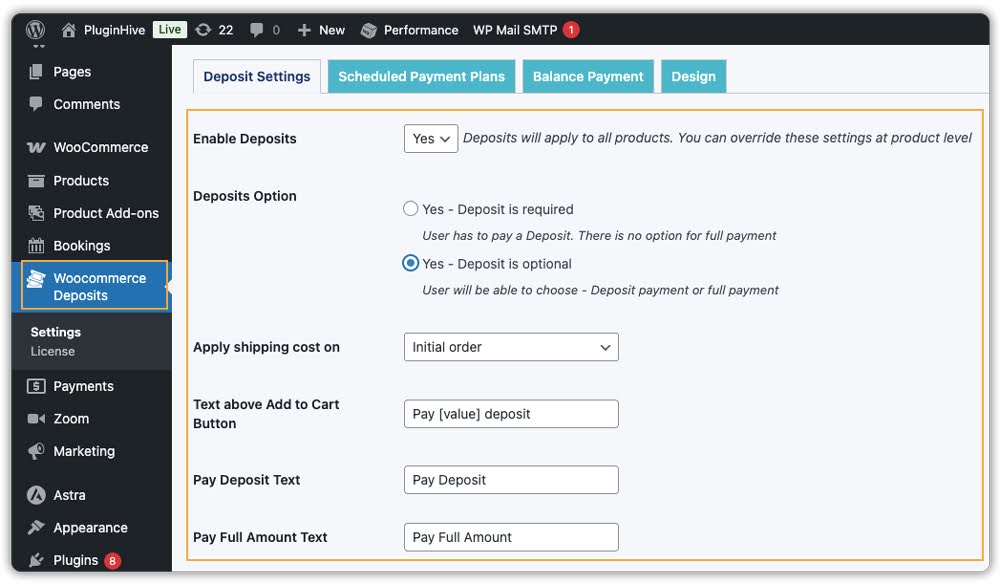
Give customers a payment choice
You can make deposits mandatory or let customers decide between paying a deposit, a payment plan, or the full amount at checkout. Customers see the deposit amount, the remaining balance, and when it is due, all on the product page before they book.
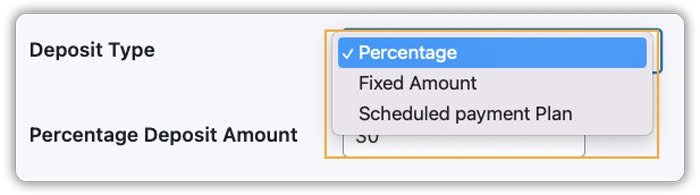
Set the deposit amount
Choose a fixed amount (e.g., $50 upfront for a $200 cleaning service), or a percentage (e.g., 30% of a $600 consultation fee).
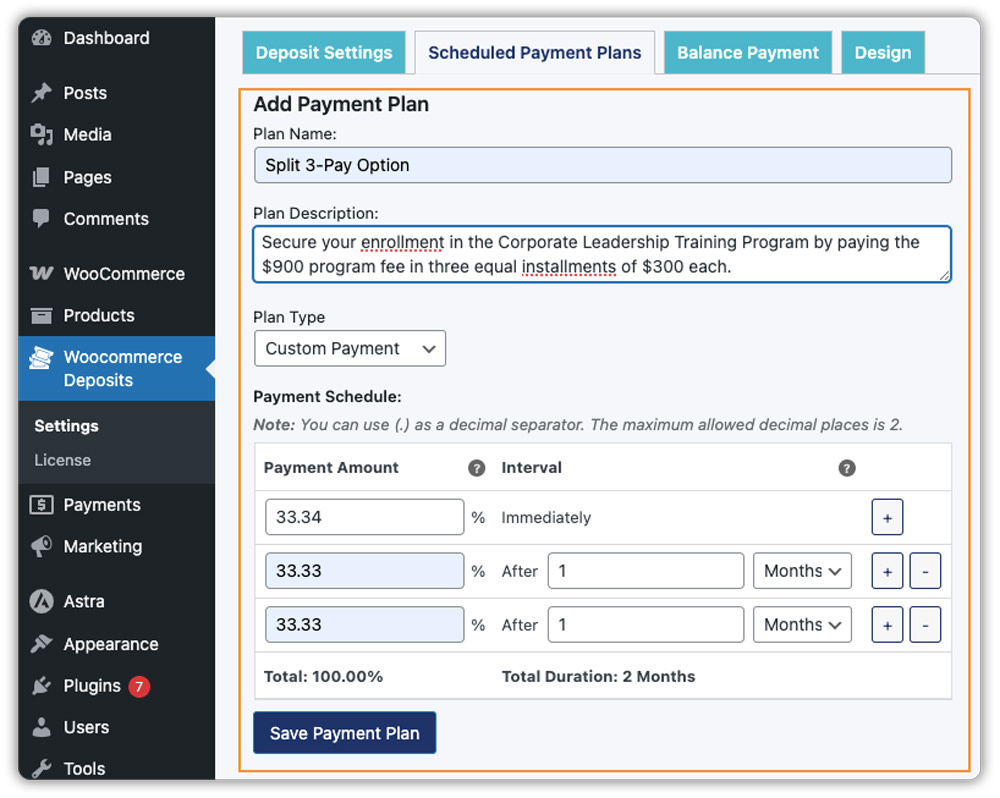
Set up a payment plan for higher-value services
For higher-value services, you can split the total into multiple installments using a payment plan. For example, the remaining balance can be scheduled weekly, monthly, or on a custom timeline, making it easier for customers to manage larger service payments.
Not sure which option fits your business? This guide on WooCommerce Deposits vs Payment Plans breaks down the key differences.
Apply deposit rules globally or per service
You can apply any of these rules across your entire store or set different options for individual services.
Example: A coaching business offers a $900 program. They set up three monthly payments of $300 – the first is collected at checkout, and the remaining two are charged automatically on schedule.


Track balances from your dashboard
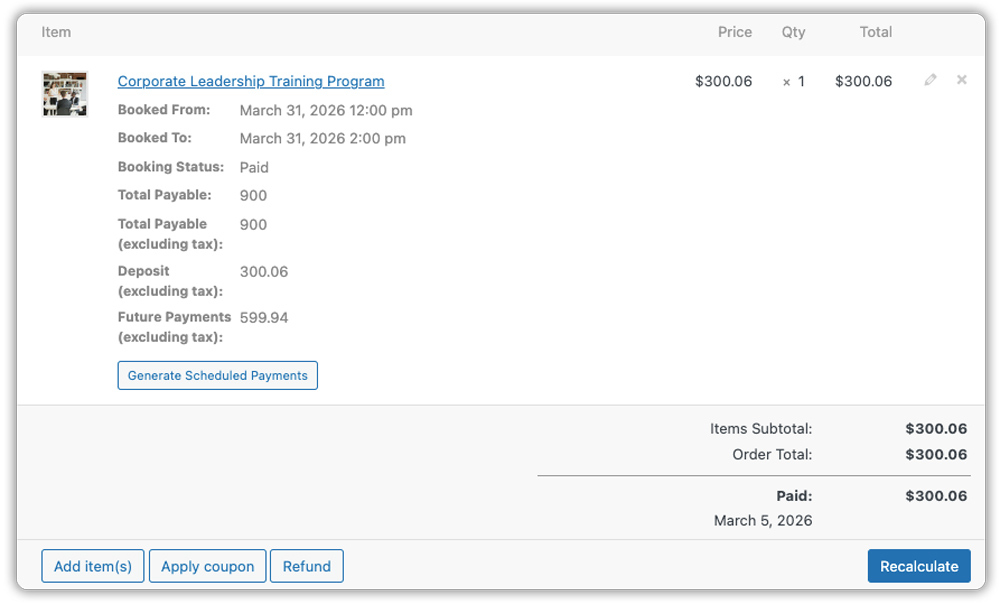
Every deposit order shows the amount paid and the remaining balance. You can see exactly which bookings are fully paid and which have outstanding amounts, all from your WooCommerce orders dashboard.
Collect the remaining balance automatically
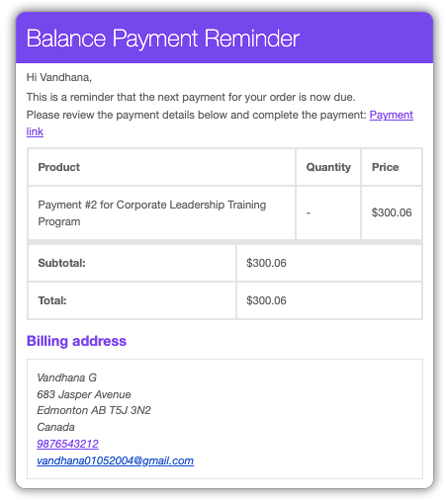
The plugin sends email reminders to customers before the balance is due, with a direct payment link so they can pay in one click. No manual follow-up needed on your end.
Once set up, the entire payment process runs on its own, deposits come in at booking, balances are tracked automatically, and reminders go out on schedule so you can focus on delivering your service.
Real-World Example: Using WooCommerce Deposits for a Service Business
Let’s say you run a WooCommerce store offering home interior design consultations, with sessions priced at $600 each.
The Challenges You Will Face
- Clients book sessions enthusiastically but cancel hours before the appointment, leaving you with an empty slot and no income for that time.
- You cannot plan your schedule confidently without knowing which bookings are truly confirmed.
- Chasing the full payment after a session is completed feels uncomfortable and wastes time.
- One last-minute cancellation can disrupt your entire day and affect your monthly revenue.
How It Can Be Solved
With PH Deposits for WooCommerce, you can turn this into a smoother, more predictable workflow:
- Set a 30% deposit ($180) collected at checkout, with the remaining $420 due 48 hours before the session.
- Clients see the full payment breakdown on the product page before they book, no surprises at checkout.
- The plugin automatically sends a balance reminder with a direct payment link, so clients pay on time without you having to follow up.
- Day-of cancellations drop significantly because clients who have already paid are far more likely to show up or cancel with enough notice to rebook the slot.
As a result, your schedule becomes more reliable, cash flow arrives before the service date, and you spend less time chasing payments.
Tips for Running a Smoother Service Business with WooCommerce Deposits
Deposits become even more effective when paired with the right tools. Here are a few practices and plugins that work well together for service-based WooCommerce stores:
- Give customers a choice where possible. Let customers decide between paying a deposit or the full amount at checkout. Some clients prefer to clear the balance upfront, and giving them that option can increase conversions without removing the deposit entirely.
- Display your cancellation policy on the service page. Add a short note explaining what happens if a client cancels after paying the deposit. This sets clear expectations upfront and protects your business from last-minute cancellations.
- Use payment plans for premium packages. For high-ticket services like coaching programs or long-term retainers, PH Deposits for WooCommerce lets you split the total into weekly or monthly installments, making the price more accessible without any manual tracking on your end.
- Pair deposits with a booking system. If you handle appointments or scheduled sessions, Bookings and Appointments for WooCommerce works alongside PH Deposits to give you a complete setup. Clients pick a time slot, pay the deposit, and the booking is confirmed automatically.
- Automate Zoom meetings for online services. If you offer virtual consultations, coaching, or online classes, the Zoom Integration for WooCommerce Bookings add-on automatically generates a Zoom meeting link for every confirmed booking and sends it to the client, no manual setup needed after each payment.
When your deposits, booking system, and payment schedule all work together, managing your WooCommerce service store becomes a lot simpler.
Conclusion
Accepting deposits is a practical way for WooCommerce service businesses to secure bookings, reduce no-shows, and improve cash flow, without requiring full upfront payment. PH Deposits for WooCommerce handles partial payments, balance tracking, and automated reminders all in one place. If you need help with setup, the PluginHive support team is ready to assist.
FAQs
1. Can I accept deposits for services without asking for full payment upfront in WooCommerce?
Yes. With PH Deposits for WooCommerce, you can collect a fixed amount or a percentage of the service price at checkout and let customers pay the remaining balance later. You can also give customers the choice between paying a deposit or paying in full, whichever works best for your service.
2. Can clients book multiple sessions on different days and pay a single deposit at checkout?
Yes. You will need the Bookings and Appointments for WooCommerce plugin along with the Multiple Non-Adjacent Bookings add-on and PH Deposits plugin. This allows clients to select several sessions across different dates in one checkout, with a single deposit covering the entire set of bookings from the start.
3. Can I refund a deposit if a client cancels?
Yes, deposits can be refunded, but it needs to be done manually from the order in your WooCommerce dashboard. This is also why having a clear cancellation policy on your service page is important, so clients know the terms before they book.
4. Does PH Deposits for WooCommerce work with my existing payment gateway?
Yes. The plugin works with standard WooCommerce payment gateways. Both the deposit and the remaining balance are processed through the same gateway your store already uses; no additional payment setup required.
