



Wholesale orders in WooCommerce often involve large quantities, higher order values, and customers who expect flexible payment terms. Unlike regular retail customers, wholesale buyers may not be ready or willing to pay the full amount upfront for bulk purchases. This creates challenges for store owners who rely on confirmed payments to plan inventory, production, and fulfillment.
The PH WooCommerce Deposits plugin helps solve this problem by allowing wholesale customers to place orders using partial payments. With deposits enabled, buyers can secure products instantly while paying the balance later, and store owners gain better clarity and commitment on large orders. In this article, we’ll look at how WooCommerce deposit options make wholesale ordering easier and how you can set up a deposit system in your store.
Table of Contents
- Why Wholesale WooCommerce Stores Need Deposit Options
- How to Offer Deposits for Wholesale WooCommerce Orders
- Real-World Example
- Tips for Streamlining Wholesale Orders on WooCommerce
- Conclusion
- FAQs
Why Wholesale WooCommerce Stores Need Deposit Options
Wholesale orders come with unique financial and operational demands. Offering deposit payments can significantly improve how these orders are placed, managed, and fulfilled. Here’s why:
- Attract More Wholesale Buyers: Large upfront payments can be a barrier. Deposits lower the immediate cost, encouraging more wholesalers to place orders.
- Increase order confidence: A partial payment signals a confirmed order, reducing last-minute cancellations.
- Improve operational planning: With an upfront deposit, store owners can confidently plan inventory, packaging, and fulfillment.
- Simplify B2B relationships: Flexible payment terms create trust, helping maintain long-term wholesale partnerships.
By offering deposit payments, wholesale stores can make ordering smoother and more reliable for both buyers and sellers. In the next section, we will see how you can offer a solution like this in WooCommerce.
How to Offer Deposits for Wholesale Orders in WooCommerce
WooCommerce does not provide deposit capabilities by default. With the PH WooCommerce Deposits plugin, you can easily enable partial payments, scheduled plans, and customized deposit rules tailored to wholesale workflows. Here’s how you can set it up easily.
Note: Before starting, ensure the PH Deposits plugin is installed, activated, and configured properly. You can follow the setup guide to get everything ready.
1. Enable Deposit Payments for Wholesale Products
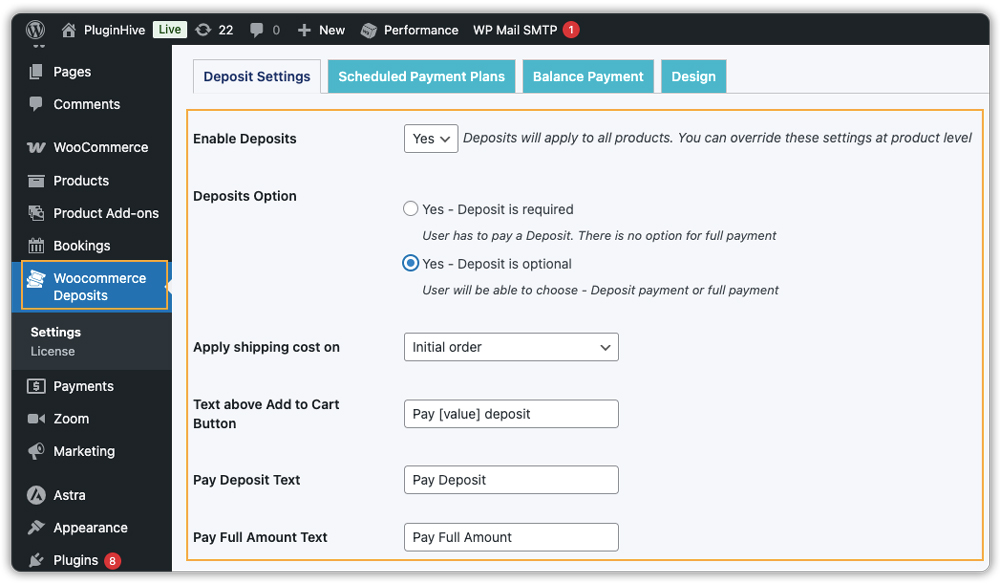
In the plugin settings, turn on deposits for your wholesale products. You can make deposits mandatory for all buyers or optional, letting customers choose between full payment and partial payment. You can also customize the messages and buttons on product pages so it’s clear how much they need to pay upfront.
2. Set the Deposit Amount
Next, decide how much customers should pay upfront. You can set a Percentage-based deposit (e.g., 20% upfront) or a fixed deposit amount (e.g., $500). Percentage deposits let buyers pay a portion of the price, while fixed deposits require a specific amount per product.

3. Create Scheduled Payment Plans (Optional)
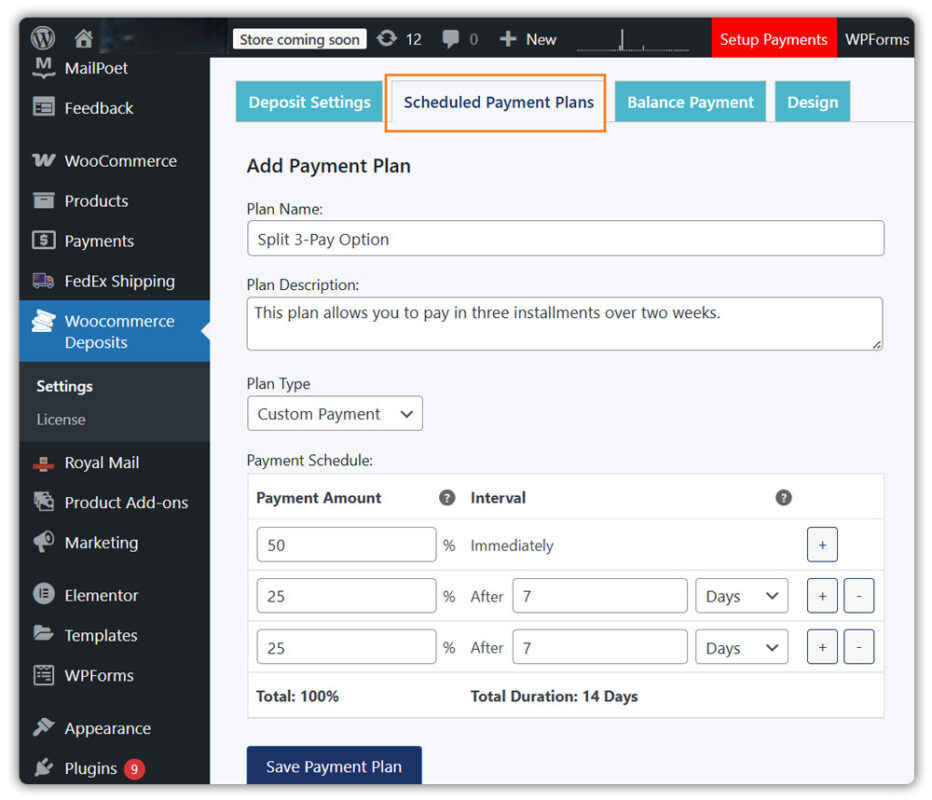
For high-value or recurring wholesale purchases, you can enable scheduled payment plans that let buyers pay the remaining balance over time, whether daily, weekly, or monthly. This is especially useful for distributors placing regular restock orders, corporate clients who need internal approval before completing full payment, and buyers purchasing expensive bulk inventory.
4. Customize Deposits for Individual Products
You can also set different deposit rules for individual products. Simply edit a product, go to the Deposits tab, and either inherit the storewide settings or create custom rules. Choose the deposit type percentage, fixed, or scheduled plan based on the product. This gives you control over how deposits are applied across your wholesale catalogue.

For example, let’s say you sell a wholesale pack of 20 office chairs priced at $6,000. You can let buyers place the order by paying just a 20% deposit. They pay $1,200 now and the rest later. This makes big purchases easier for your wholesale customers and gives you a confirmed order without waiting for full payment.

5. Manage Orders and Balance Payments
The plugin helps manage remaining payments in different ways. You can keep the balance in the same order, create a separate order for the remaining amount, or generate individual orders per product.

Automated email reminders notify customers about upcoming payments, ensuring that balances are paid on time and keeping your wholesale operations smooth.

By configuring deposits this way, you can set up WooCommerce deposits for wholesale orders easily. This allows buyers to pay partially while giving your store better cash flow and a simpler, more reliable order management system.
Real-World Example: Using Deposits for WooCommerce Wholesale Orders
Let’s say you run a WooCommerce store that sells office furniture in bulk to companies, co-working spaces, or government offices. A single order can easily reach thousands of dollars, and every confirmed order plays a major role in your monthly revenue.
The Challenges You Will Face
- Buyers delay confirming large orders because the full cost feels too heavy upfront.
- You can’t plan stocking or production confidently without a partial payment to secure the order.
- Managing multiple pending balances manually becomes stressful and time-consuming.
- One sudden cancellation can disrupt your entire workflow and affect revenue.
- And above all, building trust with new wholesale clients is not easy when payment terms feel rigid.
How It Can Be Solved
With the PH WooCommerce Deposits plugin, you can turn these challenges into a smoother, more predictable workflow:
- Allow customers to pay a fixed or percentage deposit upfront.
- Give buyers the option to choose a deposit or full payment, improving flexibility.
- For bigger accounts, you can enable scheduled payment plans, allowing them to pay the balance gradually.
- The plugin sends automatic reminder emails, so you don’t have to chase clients for payments.
As a result, more orders get confirmed, customers feel more comfortable placing large orders, and your wholesale operations become easier to manage.
Tips for Streamlining Wholesale Orders on WooCommerce
Deposit payments are just one part of managing wholesale orders efficiently. Here are a few ways to improve your workflow further:
- Promote Your Deposit Option: Highlight “Pay a Deposit” in marketing emails, B2B onboarding pages, and product descriptions so wholesale buyers know upfront that flexible payments are available.
- Set Clear Delivery Expectations: Wholesale buyers often place large orders and want to know when they will arrive. An estimated delivery date plugin can provide accurate timelines, improving customer confidence and reducing support inquiries.
- Offer Smart Shipping Rules: For bulk orders, you can set flexible shipping rates using a table rate shipping plugin. This helps you manage shipping costs efficiently while offering attractive options for wholesale buyers.
- Integrate Reliable Shipping Solutions: Large wholesale orders require dependable shipping. Using plugins like ODFL, TForce Freight, or DHL Freight Sweden for WooCommerce ensures smooth shipping management, accurate costs, and timely deliveries.
- Provide Easy Shipment Tracking: Giving buyers the ability to track their orders builds trust. A shipment tracking plugin allows customers to see their order status at any time, reducing support requests and increasing satisfaction.
Following these tips can make deposits work harder for your WooCommerce wholesale store. By combining flexible payments with clear delivery information, reliable shipping, and smart marketing, you can improve customer experience, increase order confirmations, and simplify large order management.
Conclusion
Using deposit payments in WooCommerce lets wholesale store owners offer more flexibility to buyers while making the ordering process easier to manage. With the PH WooCommerce Deposits plugin, you can handle large orders efficiently, provide clear payment choices, and deliver a seamless buying experience for wholesale clients.
If you need help setting up deposit payments or optimizing wholesale orders in your WooCommerce store, the PluginHive support team is always ready to assist.
FAQs
Q: Does WooCommerce support deposit payments out of the box?
A: No. WooCommerce does not include deposit or partial payment features natively. You need a plugin like PH WooCommerce Deposits to enable this.
Q: Can I offer deposit payments only for wholesale products and not for the entire store?
A: Yes, PH WooCommerce deposit plugins let you enable deposits globally or only on selected products. That way, only specified wholesale items use deposit payments while retail or low-value items remain normal.
Q: What happens if a buyer doesn’t complete the balance payment after the deposit?
A: If the balance isn’t paid, the order remains partially unpaid. As a store owner, you can use email reminders to prompt payment. It’s important to communicate balance due terms clearly to wholesale buyers before accepting deposit orders.
Q: Is the deposit payment option visible to customers before checkout so they clearly know they are paying a deposit?
A: Yes PH deposit plugin displays the deposit breakdown on the product page, cart, and checkout. This ensures transparency, so wholesale buyers understand exactly what they pay upfront and what remains due.
Q. How do wholesale buyers pay the remaining balance in WooCommerce when I use the PH Deposits plugin on my store?
A: After a buyer places a deposit order, the PH Deposits plugin automatically sends them a balance payment link via email. They can click the link and complete the remaining payment directly through your WooCommerce store’s checkout.
