



Offering deposits in WooCommerce helps you sell high-value, custom, or made-to-order products without requiring customers to pay the full amount upfront. By allowing partial payments, you reduce purchase hesitation and encourage customers to commit earlier. Deposits are commonly used for custom products, pre-orders, reservations, and services delivered at a later stage.
At the same time, deposits change how payments and orders are managed in your store. When they aren’t set up properly, they can lead to confusion around balance payments, missed deadlines, and extra manual follow-ups. In this article, we’ll cover 5 common mistakes to avoid when offering deposits in WooCommerce and share practical ways to ensure your payment setup works smoothly from day one.
Table of Contents
- Mistake #1: Not Choosing the Right WooCommerce Deposits Plugin
- Mistake #2: Limiting Payment Flexibility in WooCommerce Deposits
- Mistake #3: Not Understanding WooCommerce Deposit Payment Options
- Mistake #4: Forgetting to Send Balance Payment Reminders
- Mistake #5: Manually Managing Balance Payments
- Conclusion
- FAQs
Mistake #1: Not Choosing the Right WooCommerce Deposits Plugin
WooCommerce does not support deposits or partial payments by default. This means the plugin you choose becomes the foundation of your entire deposit setup. If the plugin is too basic, you will struggle with limited deposit rules, poor balance payment handling, or unclear order tracking. Over time, this leads to manual work, payment delays, and a confusing experience for customers.
Example
Suppose you sell a $2,000 custom product and collect a 30% deposit upfront. If your deposits plugin doesn’t handle balance payments automatically, you have to chase customers, send payment links, and track unpaid amounts manually. This takes extra time and often leads to delayed payments.
Solution
Choose a WooCommerce deposits plugin that can support real payment scenarios from the start. Look for features such as:
- Multiple payment options (fixed amounts, percentages, or custom payment plans)
- Automatic creation of balance payment orders
- Scheduled payment reminders with customizable email templates
- Both mandatory and optional deposit modes for flexibility
- Clear tracking of deposits and remaining balances
- Compatibility with other WooCommerce extensions
- Easy-to-customize UI that matches your store design
- Reliable support and regular updates
The PH Deposits for WooCommerce plugin handles all of this without making things complicated. It takes care of deposit setup, balance collection, and email reminders automatically, so you can focus on running your store instead of chasing payments.

Mistake #2: Limiting Payment Flexibility in WooCommerce Deposits
Deposits are intended to facilitate payments, not complicate them. When you limit how customers can pay by forcing deposits on every product or restricting payment options, checkout can feel frustrating. Some customers want to pay in full, while others prefer to split payments. When those choices aren’t available, many customers hesitate or leave without completing the purchase.
Example
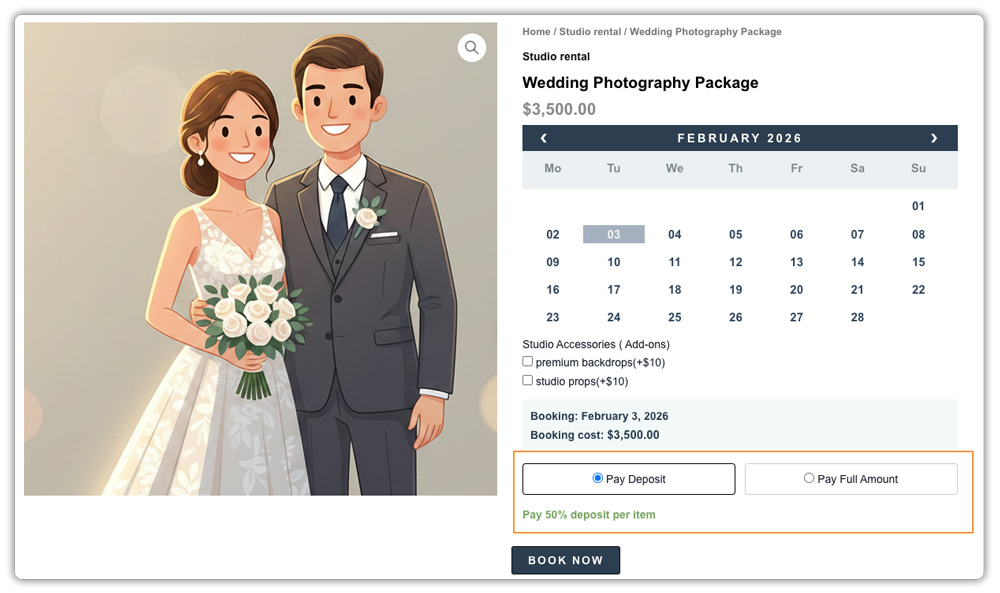
Let’s say you run a photography studio offering wedding packages for $3,500. Some couples want to secure their date with a small deposit and pay the rest later. Others are ready to pay the full amount right away. If your store forces deposits on everyone, full-pay customers get frustrated. If you only allow full payment, customers who need flexibility won’t book at all.
Solution
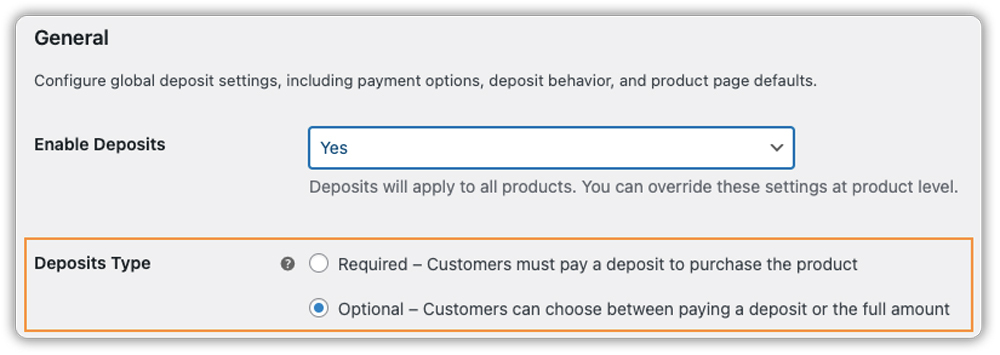
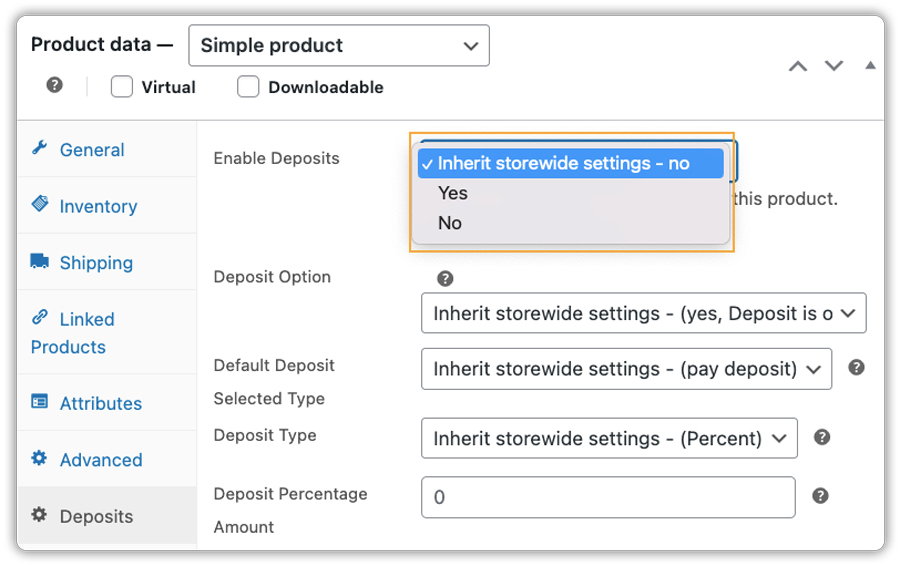
Keep your WooCommerce deposit setup flexible. With the PH deposits plugin, you can:
- Set deposits as optional or mandatory when needed
- Apply different deposit rules to different products
- Let customers choose between paying a deposit or the full amount
Giving customers control over how they pay builds trust and reduces checkout friction. When payment options feel flexible, deposits become a helpful choice instead of a barrier.
Mistake #3: Not Understanding WooCommerce Deposit Payment Options
WooCommerce deposit plugins offer different ways to collect deposits, such as percentage-based, fixed amounts, or custom values. When these options aren’t clearly understood, store owners may choose the wrong one. Since each deposit type works best in different situations, using the wrong option can confuse customers or slow down checkout.
Example
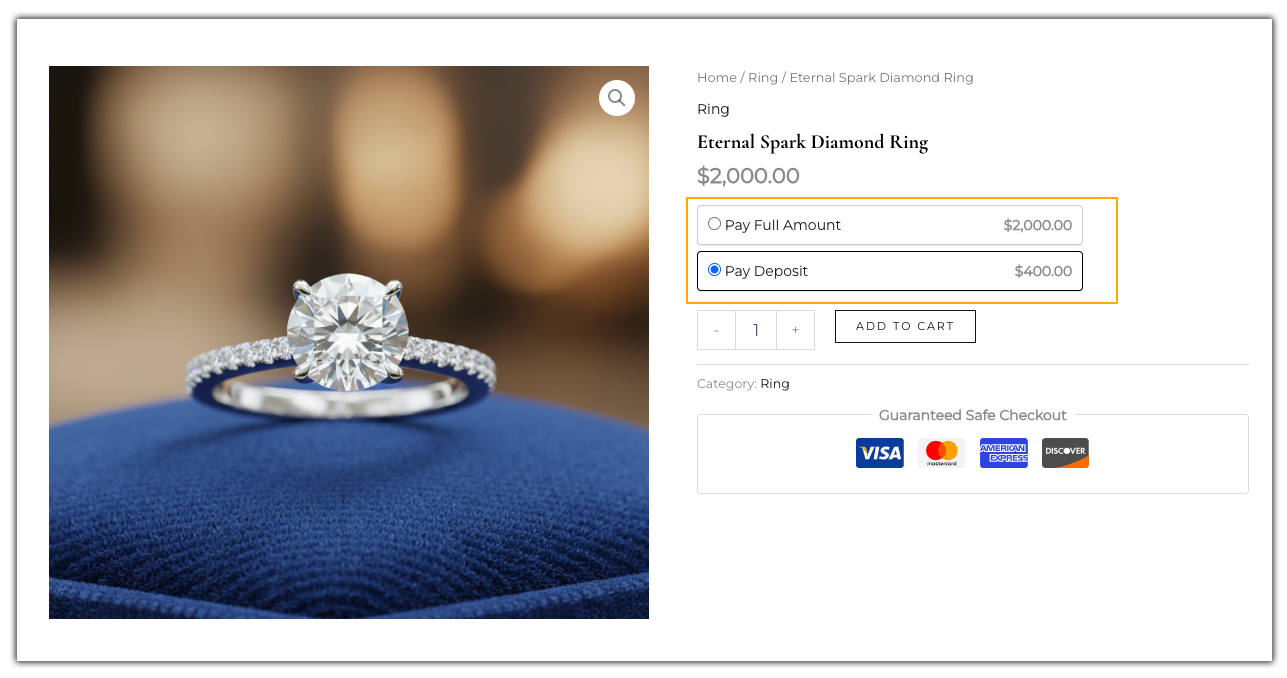
Let’s say you sell products at different price points. For a $300 item, a fixed $30 deposit feels reasonable. For a $2,000 product, the same fixed amount feels too low, and a percentage-based deposit makes more sense. When one deposit type is used everywhere, customers may feel unsure about how much they’re paying and why.
Solution
Match the deposit option to your product pricing. With the PH deposits plugin, you can:
- Apply different deposit types to different products.
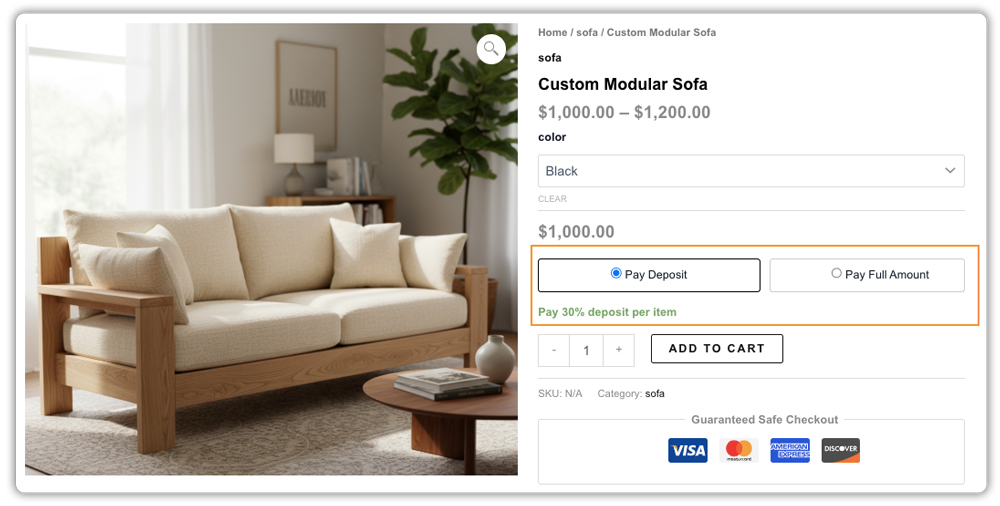
- Use percentage deposits for products with varying prices
- Set fixed deposit amounts for consistently priced items or services
- Create custom payment plans when customers need multiple installments
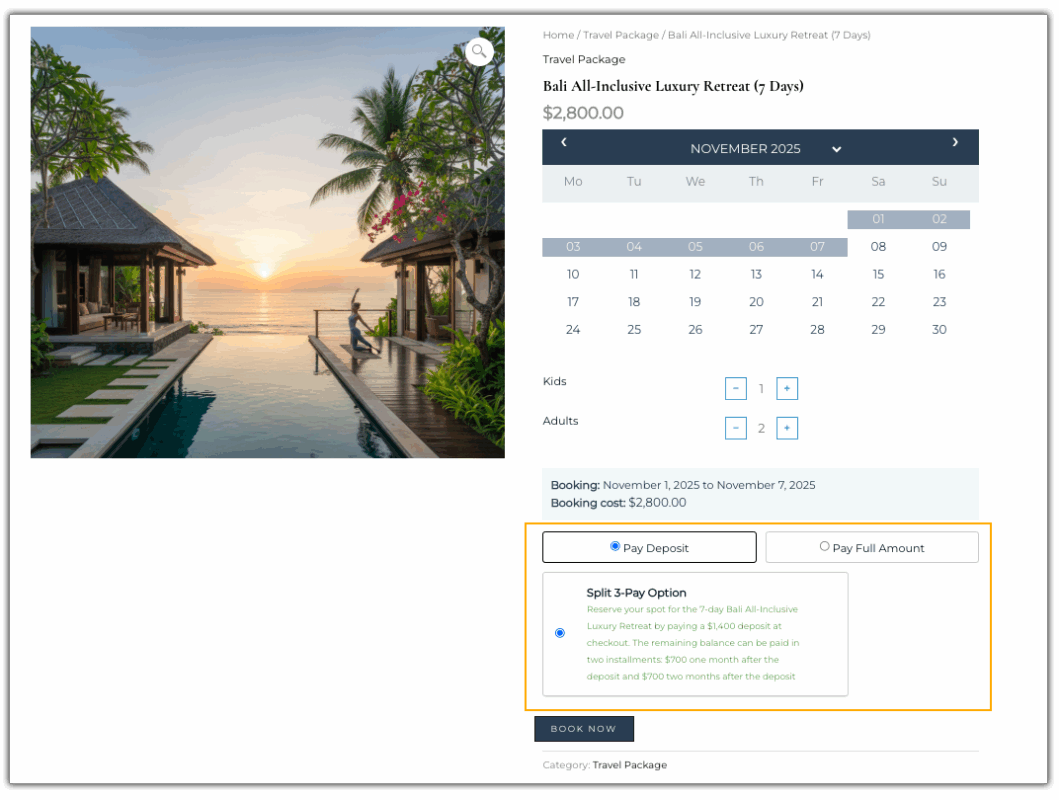
Using the right deposit option makes payments clearer for customers and easier to manage for your store.
Mistake #4: Forgetting to Send Balance Payment Reminders
When customers aren’t reminded about upcoming balance payments, they often forget to pay on time. This leads to delayed payments, follow-up emails, and unnecessary stress for both you and your customers. Without clear, timely reminders, deposits stop being helpful and quickly turn into extra manual work.
Example
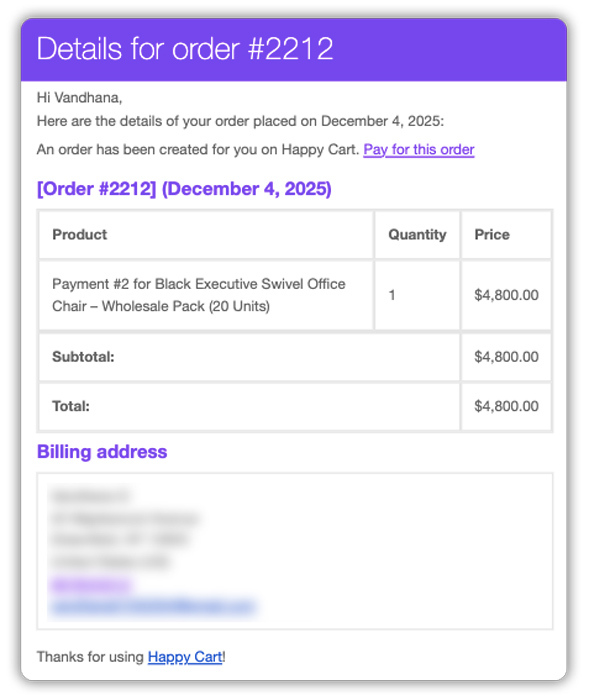
Suppose you accept wholesale orders with a certain deposit, and the remaining balance is due before the order is shipped. A retailer places a large wholesale order months in advance and pays the deposit.
Without reminder emails in place, the balance payment deadline is missed. As the shipping date approaches, you’re forced to follow up manually, payments are rushed, and fulfillment gets delayed – despite the buyer intending to complete the payment. What should be a smooth wholesale transaction turns into an avoidable bottleneck.
Solution
Automate reminders so balance payments never get overlooked. With the PH Deposits plugin, you can:
- Send automatic reminder emails before balance payments are due
- Schedule reminders at the right time, not too early, not too late
- Include direct payment links in reminder emails for quick checkout
- Customize email templates to match your brand voice
- Add clear descriptions so customers understand the payment timeline
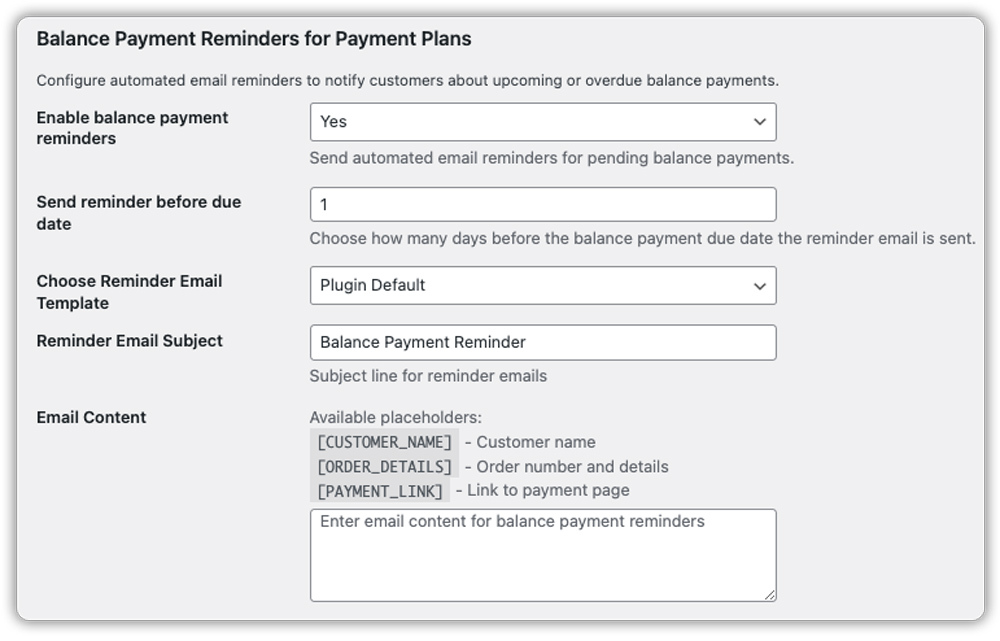
The plugin automatically handles balance payment reminders with flexible scheduling and customizable emails. Customers receive timely notifications with payment links, making it easy to pay on time without you having to chase them manually.
Mistake #5: Manually Managing Balance Payments
Collecting a deposit is only the first step. The real challenge begins when it’s time to manage the remaining balance. Without a proper system in place, balance payments quickly turn into extra work. You’re creating invoices by hand, checking spreadsheets, and trying to remember which orders are fully paid and which aren’t. As your order volume grows, this approach becomes hard to keep up with.
Example
Suppose you run a home renovation business and take 50% deposits on $10,000 projects. In a busy month, 20 customers pay their deposits.
Now comes the admin work, creating 20 balance invoices, sending payment links one by one, updating order statuses, and double-checking spreadsheets before scheduling work. Miss a step, and you risk starting a project that hasn’t been fully paid for. The issue isn’t the customers, it’s the lack of a system to manage everything smoothly.
Solution
Remove the manual work from balance payment management. With the PH Deposits plugin, you can:
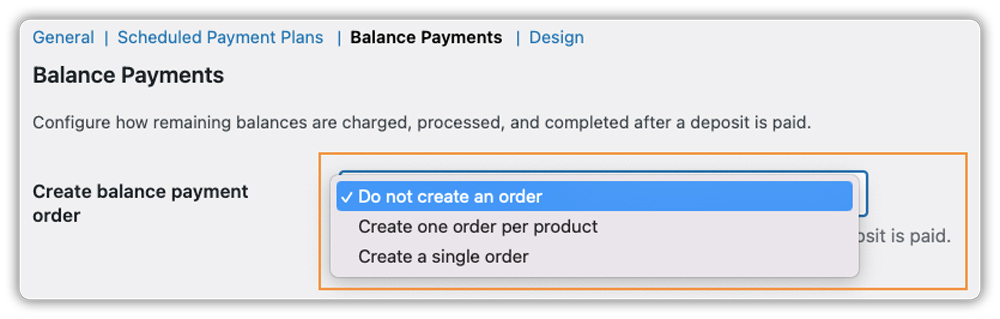
- Automatically create balance payment orders once a deposit is paid
- Keep deposits and balance payments linked under a single order
- See partial and completed payment status directly in WooCommerce
- Update order statuses automatically when the final payment is received
- View the full payment history in one place
- Stop relying on spreadsheets and manual checks
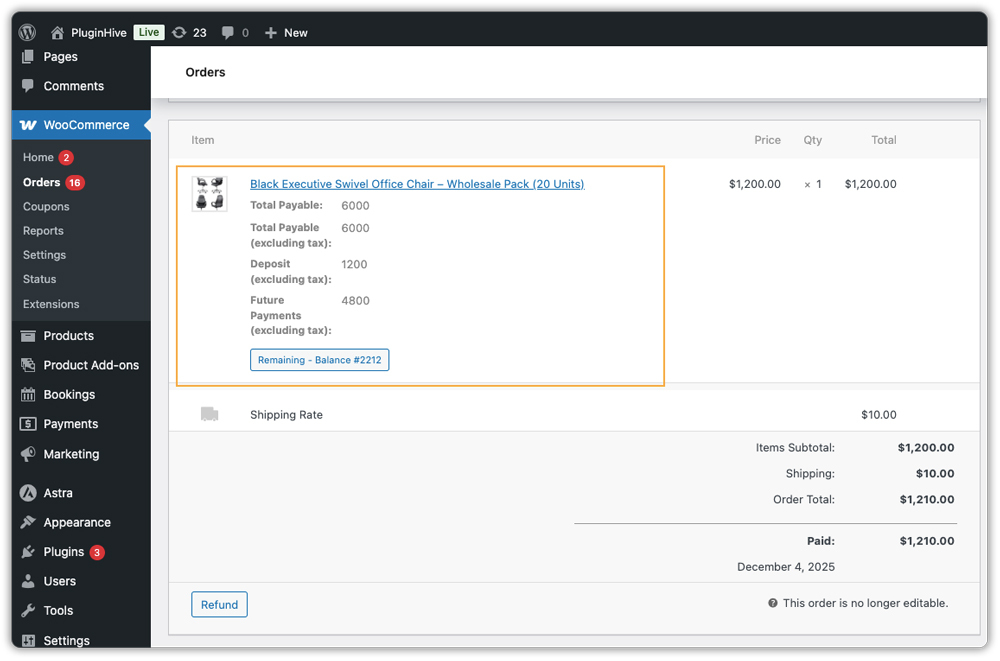
The plugin turns balance payments into a clean, organized process. Deposits, balances, and order statuses stay connected and updated automatically. You always know which orders are pending, partially paid, or complete, so you can focus on delivering the work instead of managing payments.
Conclusion
Avoiding these common deposit mistakes helps keep your cash flow steady and your checkout experience professional. When payment options are flexible, reminders are automated, and costs are clearly shown upfront, customers feel more confident completing their purchase. A well-set deposit system doesn’t just secure orders, it builds trust and makes handling high-value sales much easier.
With the PH Deposits for WooCommerce plugin, deposit setup and management are simplified. If you need help at any point, the PluginHive support team can guide you in setting up the plugin and configuring deposits the right way.
FAQs
1. Does WooCommerce have a built-in deposit feature?
No, WooCommerce does not support partial payments out of the box. You need a dedicated solution like the PH Deposits plugin to set up deposit rules, fixed or percentage-based payments, and automated balance collections.
2. Can I offer deposits for services like appointments or rentals?
Yes, this is a great way to reduce no-shows. By using the PH Deposits plugin alongside the WooCommerce Bookings and Appointments plugin, you can require a deposit upfront to secure a time slot, ensuring that only serious customers occupy your calendar.
3. How do I combine shipping with deposits in WooCommerce?
A common approach is to collect the full shipping cost along with the deposit at checkout. To show accurate rates, you can use the WooCommerce Shipping Services plugin to calculate real-time shipping charges from carriers like FedEx, UPS, USPS, and others.
4. Can I offer deposits on personalized or custom-made items?
Yes, this is where deposits work best. With PH Product Add-Ons, customers choose their custom options before checkout, and the PH Deposits for WooCommerce plugin calculates the deposit based on the final customized price.
