


A WooCommerce store connected to FedEx doesn’t usually break with a warning. The connection just stops authenticating, a token expires or gets revoked, or FedEx-side credentials change, and FedEx rates quietly disappear from checkout, or labels stop generating, with nothing on your dashboard flagging it. Most stores only catch this when a customer complains about missing shipping options or an order sits unshipped. This guide covers why silent connection failures are so costly, what usually causes them, and how to get notified the moment your FedEx connection drops using the FedEx Shipping Plugin for WooCommerce with Print Label.
On This Page
- Why a Silent FedEx Connection Failure Is a Bigger Problem Than It Looks
- What Causes a WooCommerce FedEx Connection to Fail
- Notify on Connection Lost: WooCommerce’s New FedEx Alert
- Before vs After: How a Broken FedEx Connection Plays Out
- What the WooCommerce FedEx Plugin Can Do to Keep Shipping Reliable
- Real-World WooCommerce Use Case
- Conclusion
- FAQs
Why a Silent FedEx Connection Failure Is a Bigger Problem Than It Looks
When FedEx rates vanish from checkout, customers don’t see an error. They just see fewer, or no, shipping options. Many will abandon the cart rather than ask why. When label generation fails after checkout, the order can sit in your queue looking normal until someone tries to ship it.
Neither problem necessarily announces itself. Without something actively watching the connection, the first sign is often indirect: a drop in completed orders, a customer asking about shipping, or a pile of unshipped orders discovered days later.
What Causes a WooCommerce FedEx Connection to Fail
FedEx connections using the modern REST API rely on authentication tokens that expire and need to be refreshed or re-issued.
A connection can stop working when:
- The authentication token expires without renewing.
- The connection is revoked on FedEx’s side.
- Account-level changes invalidate the existing credentials.
These issues can happen without any action on the WooCommerce side, which is exactly why they are easy to miss.
Notify on Connection Lost: WooCommerce’s New FedEx Alert
The simplest way to catch a silent failure is to have your WooCommerce store monitor the FedEx connection and alert someone when authentication stops working.
Instead of waiting for customers or staff to discover missing rates or failed labels, an email alert can notify the person responsible for shipping as soon as the FedEx connection fails.
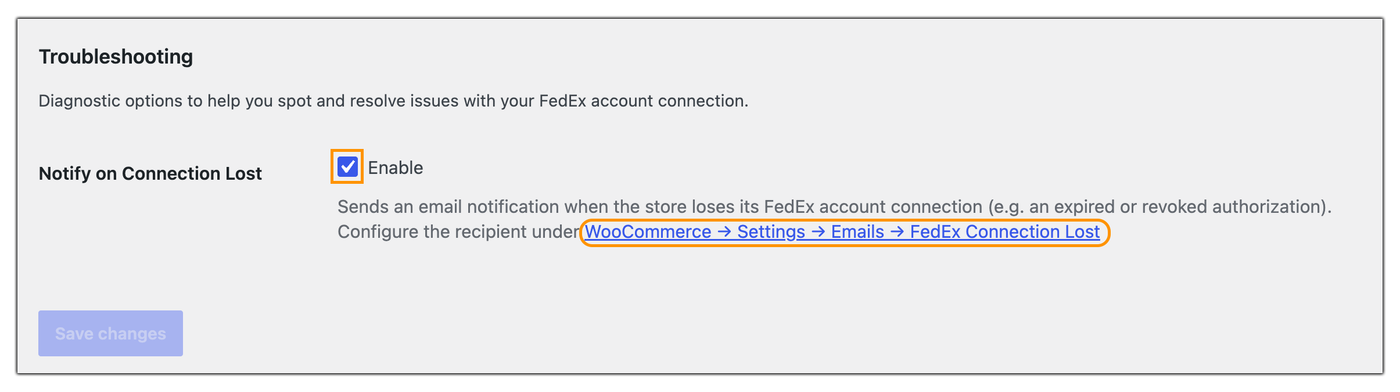
The FedEx Shipping Plugin for WooCommerce with Print Label can help with this through its Notify on Connection Lost feature. When the FedEx connection stops working, the feature sends an email alert to a configured recipient.
You can enable it under Advanced → Troubleshooting.

The recipient email is configured separately under WooCommerce → Settings → Emails → FedEx Connection Lost.
This gives your team a chance to reconnect the account before the issue affects more orders.
Before vs After: How a Broken FedEx Connection Plays Out
| Aspect | Without Connection Monitoring | With Connection Monitoring |
|---|---|---|
| How You Find Out | Usually through a customer complaint or missed order | An email when the connection stops working |
| Time to Reconnect | Depends on when someone notices | The team can act as soon as the alert arrives |
| Orders Affected | Potentially every order until the issue is discovered | Limited to the period before the alert is acted on |
What the WooCommerce FedEx Plugin Can Do to Keep Shipping Reliable
The FedEx Shipping Plugin for WooCommerce with Print Label helps automate key shipping tasks, from displaying live rates at checkout to generating shipping labels and sharing tracking details. Its Notify on Connection Lost feature adds another layer of visibility by alerting your team when the FedEx connection stops working.
With connection alerts enabled, your team can respond sooner to authentication issues instead of relying only on customer complaints or manual order checks. Keeping your FedEx account connected helps reduce disruptions to checkout and order fulfillment.
Real-World WooCommerce Use Case
A mid-sized apparel store shipping exclusively through FedEx had its connection quietly fail overnight after a token expired. Rates disappeared from checkout, but the team did not notice until the next morning.
By then, several orders had gone through without the FedEx shipping option being available.
How the Store Prevented a Repeat
The store started using the FedEx Shipping Plugin for WooCommerce with Print Label and enabled connection-loss notifications, which directed the alerts to its operations inbox. The next time an authentication issue occurred, the team received an email as soon as the connection stopped working. They could then reconnect the account before the issue affected a full day’s orders.
The Result
- The connection was restored within the hour instead of remaining unnoticed overnight.
- The team had a way to know when the same problem happened again.
- Shipping staff could respond to connection failures before they caused prolonged disruption.
Conclusion
A FedEx connection failure can be easy to overlook because nothing may appear broken on the WooCommerce side. The longer the connection remains down, the more orders can be affected. Having a connection-loss alert in place gives your team an early warning and lets them act before a temporary authentication issue turns into missed shipping options, delayed fulfillment, or customer complaints.
If the connection is not working as expected or you need help troubleshooting it, you can contact PluginHive Support for assistance.
FAQs
Q. Does Notify on Connection Lost work for every FedEx connection type?
It’s available for stores using a REST-connected FedEx account. If your store is still on the older SOAP connection, reconnecting through FedEx’s REST API is what enables this and other recent plugin updates.
Q. Will I still get FedEx rates and labels while the connection is down?
No. Once the connection stops authenticating, both live rates and label generation stop working until it’s reconnected. That’s exactly why an immediate alert matters more than a delayed one.
Q. Does this notification replace checking my order queue regularly?
It’s meant to catch the failure faster, not replace normal order monitoring. Pair it with a quick daily glance at orders awaiting shipment so nothing slips through in the window before you act on the alert.
Q. Why am I not seeing FedEx rates at WooCommerce checkout?
FedEx rates may not appear because of incorrect API credentials, missing product weight or dimensions, or other configuration issues. For a detailed troubleshooting checklist, see Why FedEx Rates Don’t Show in WooCommerce & How to Fix It.
Q. Do product weight and dimensions affect FedEx rates?
Yes. FedEx uses shipment details such as weight and package dimensions when calculating shipping costs. Missing or inaccurate product data can result in incorrect rates or prevent rates from being returned.
Q. Why are some FedEx services missing at checkout?
Only services available for the shipment and enabled in your WooCommerce shipping configuration will appear. Account restrictions, destination, package details, and service availability can also affect which FedEx options are returned.
