



Shipping products to Mexico through your WooCommerce store isn’t just about picking a courier, it requires smart decisions about delivery speed, costs, and how each option fits your customer’s expectations. Whether you’re sending small parcels or heavy freight, FedEx offers multiple international shipping services, each with different pricing and transit times.
In this guide, we’ll compare all the FedEx International shipping services available to Mexico. You’ll also see how the WooCommerce FedEx Shipping Plugin helps you display accurate, real-time shipping rates in the WooCommerce checkout.
On This Page
- Overview of FedEx Shipping Services to Mexico
- FedEx to Mexico Shipping Services Comparison
- How to Offer Real-Time FedEx Shipping Rates for Mexico in WooCommerce
- Tips to Reduce FedEx Shipping Costs to Mexico
- Conclusion
- FAQs
Overview of FedEx Shipping Services to Mexico
Shipping from the U.S. to Mexico offers a wide range of FedEx services tailored to different delivery speeds, budgets, and package sizes. Here’s a breakdown of the main services available for cross-border shipping to Mexico:
1. Economy Options (Cost-effective, slower delivery)
- FedEx International Economy®
- Budget-friendly delivery service for less urgent shipments.
- Estimated delivery: 2–5 business days to Mexico.
- FedEx International Connect Plus (FICP)
- Reliable and economical day-definite service with no residential surcharges.
- Estimated delivery: 2–5 business days.
2. Express Options (Fastest delivery times)
- FedEx International Priority®
- Time-definite service is ideal for urgent shipments.
- Delivery to Mexico in 1–3 business days.
- FedEx International First®
- Early delivery service for select locations in Mexico.
- Delivery is typically by morning, within 1–3 business days.
3. Freight Options (Heavy or bulky shipments)
- FedEx International Priority® Freight
- Fast shipping for large/heavy freight items.
- Delivery within 1–3 business days to Mexico.
- FedEx International Economy® Freight
- More economical option for freight, ideal for less time-sensitive shipments.
- Delivery within 4–6 business days.
- FedEx International Deferred® Freight
- Economic deferred option for freight shipping with extended transit time.
- Delivery is 2+ days longer than Economy Freight.
FedEx to Mexico Shipping Services Comparison
Let’s compare the major FedEx services available for shipping to Mexico and see which option best fits your business needs.
| Feature | FedEx International Priority® | FedEx International Economy® | FedEx International Connect Plus (FICP) | FedEx Freight® Priority |
|---|---|---|---|---|
| Delivery Time | 1–3 business days | 2–5 business days | 2–5 business days | 1–3 business days |
| Delivery Type | Time-definite, door-to-door | Cost-effective, door-to-door | Day-definite, door-to-door | LTL (Less-than-Truckload), door-to-door |
| Weight Limit | Up to 68 kg (150 lbs) | Up to 68 kg (150 lbs) | Up to 70 lbs | Over 68 kg (150 lbs) |
| Residential Delivery | Available | Available | Available | Available |
| Residential Surcharge | May apply | May apply | No residential surcharges | Not applicable |
| Package Size Limits | Up to 150 lbs | Up to 150 lbs | Up to 150 lbs | Varies based on LTL service |
| Ideal For | Time-sensitive shipments | Less urgent, cost-effective | E-commerce shipments | Heavy or bulky items |
| Shipping Price | High | Moderate | Low | Varies (High for heavy items) |
These FedEx services are tailored for shipping to Mexico, giving WooCommerce store owners the flexibility to align delivery speed, shipping cost, and package type with their business goals.
Now let’s look at how real-time FedEx pricing works in WooCommerce and how you can display accurate shipping rates for Mexico-bound orders at checkout.
How to Offer Real-Time FedEx Shipping Rates for Mexico in WooCommerce
Offering real-time FedEx shipping rates for Mexico in your WooCommerce store helps provide customers with accurate, dynamic shipping costs based on their location and cart contents. The WooCommerce FedEx Shipping Plugin simplifies shipping and generates compliant FedEx shipping labels directly from your store.
To get started and configure the plugin, follow this detailed guide – PluginHive FedEx Shipping Guide for WooCommerce .
Once you’ve configured the plugin in your store,
- To display real-time FedEx rates at checkout in WooCommerce for your Mexican customers, simply enable the real-time rates in the plugin settings.

2. You can choose to offer a variety of FedEx shipping services to Mexico, including options like FedEx International Priority, FedEx International Economy, and others, depending on the delivery speed and cost that best suit your business needs.

3. Now, Customers will be able to see live FedEx shipping rates at the WooCommerce cart and checkout.

4. The FedEx plugin not only shows real-time rates but also auto-generates required shipping documents like labels, commercial invoices, and customs declarations for Mexico, saving time and minimizing errors.
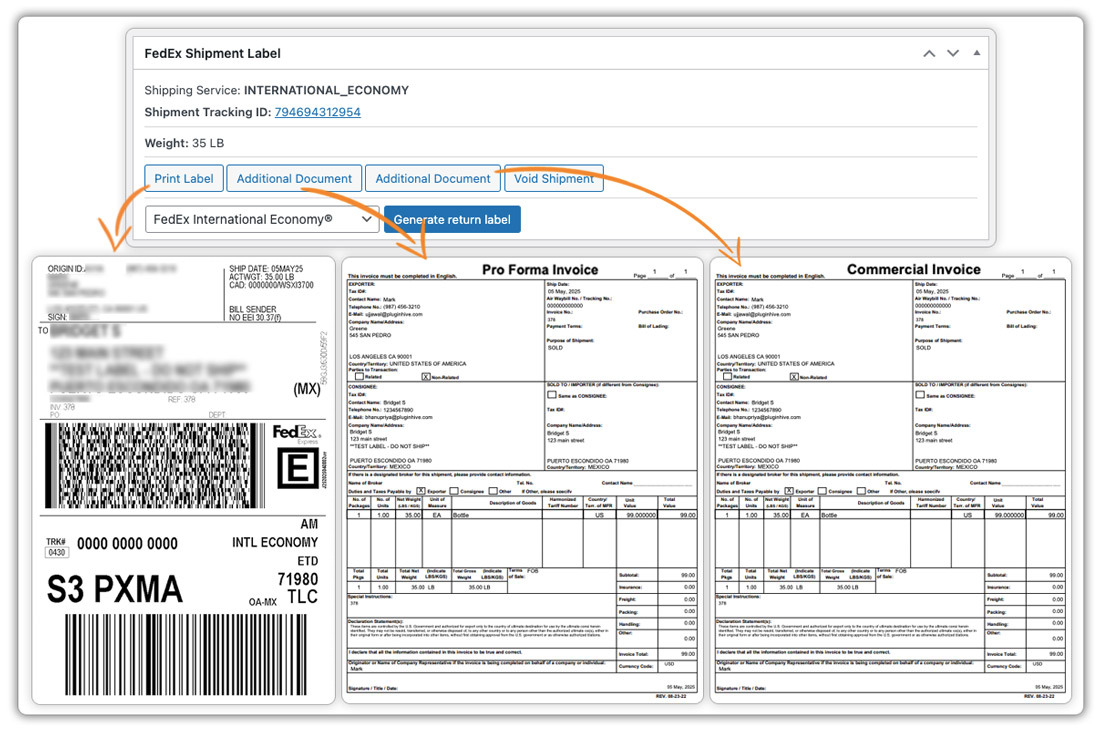
For full details on generating compliant documents for Mexico shipments, visit this guide.
Tips to Reduce FedEx Shipping Costs to Mexico
- Opt for more economical services like FedEx International Economy® or FedEx International Connect Plus (FICP).
- Ship to business addresses to avoid residential delivery fees.
- Ensure packages are properly packed and weighed to prevent size or weight discrepancies.
- Combine multiple orders into one shipment to save on per-package costs.
- Use FedEx’s volume-based discounts or negotiate a rate for frequent shipments.
- Leverage the WooCommerce FedEx plugin to display accurate, real-time shipping rates, avoiding overcharges.
Conclusion
Shipping to Mexico through your WooCommerce store with FedEx offers a variety of service options suited for different needs. By using the WooCommerce FedEx Shipping Plugin, you can easily display real-time rates, select the best shipping service, and automatically generate compliant shipping documents. This streamlined process ensures accuracy and efficiency, reducing time and costs for shipping to Mexico.
For setup assistance or questions, visit PluginHive Support.
FAQs
- Which FedEx service is the cheapest for shipping to Mexico from the U.S.?
FedEx International Economy® and FedEx International Connect Plus (FICP) are the most affordable options for shipping to Mexico, offering budget-friendly solutions for less urgent shipments.
- Can I use FedEx for both domestic and international shipping in WooCommerce?
Yes, the WooCommerce FedEx Shipping Plugin supports both domestic and international shipping, allowing you to manage all your FedEx shipments from within your store.
- Is FedEx insurance available for shipments to Mexico with FedEx?
Yes, FedEx offers additional insurance options for international shipments, including shipments to Mexico, to cover any potential loss or damage during transit. You can enable the insurance option directly in the plugin settings to add coverage for your shipments.
- Are FedEx delivery times to Mexico guaranteed?
FedEx offers time-definite services like FedEx International Priority® for guaranteed delivery within 1-3 business days, though other services, such as FedEx International Economy®, may not guarantee delivery times.
- How do I handle returns for FedEx shipments to Mexico?
The Plugin supports return shipping for international shipments. You can generate FedEx return labels for your customers and include them with their orders, simplifying the return process for customers in Mexico.
