


Free shipping is one of the most powerful tools for reducing cart abandonment in a WooCommerce store, but for Canadian merchants shipping with Canada Post, offering it profitably is a real challenge. Canada Post rates vary based on package weight, dimensions, destination, and service type. Applying free shipping blindly across all orders can quickly erode your margins.
The good news is that WooCommerce free shipping with Canada Post is completely achievable when you use the right tools and apply it selectively. This guide covers the key challenges, the two most effective setup methods, best practices to protect your margins, and a practical example of how it works in a real store.
Table of Contents
- Why Offering Free Shipping with Canada Post Is Challenging in WooCommerce
- How to Offer Canada Post Free Shipping in WooCommerce
- Tips for Managing Free Shipping Smarter in WooCommerce
- Real-World Example
- Conclusion
- FAQs
Why Offering Free Shipping with Canada Post Is Challenging in WooCommerce
WooCommerce’s built-in free shipping feature is essentially a flat rate set to $0. It has no connection to Canada Post’s API and cannot factor in actual shipping costs. This creates several practical problems for Canadian merchants:
Key Challenges:
- WooCommerce Limitations: WooCommerce cannot fetch real Canada Post rates on its own, so you cannot base free shipping on actual shipping costs without a plugin.
- Heavy/Oversized Product Fees: Bulky or heavy items trigger extra charges that can wipe out your profit when shipping for free.
- Higher Costs for Remote Locations: Deliveries to rural or northern regions often include additional surcharges, turning “free shipping” into a costly commitment.
- Conditional Free Shipping Needs: Minimum order values, specific products, or province-based rules require logic.WooCommerce doesn’t support advanced conditions by default.
- Customer Expectations: Customers expect fast, free shipping, but offering it universally isn’t realistic when rates vary so much.
These challenges make it clear that offering free shipping with Canada Post requires a strategic, controlled approach, not a blanket offer. In the next section, we’ll explore practical ways to set up Canada Post free shipping in WooCommerce without risking your margins.
How to Offer Canada Post Free Shipping in WooCommerce
Offering Canada Post free shipping in WooCommerce is completely possible as long as you apply the right method that fits your store’s needs. Below are the most effective approaches and how they work.
Using the WooCommerce Canada Post Plugin to Offer Free Shipping
The Canada Post Shipping Plugin for WooCommerce with Print Label lets you display accurate, real-time shipping rates for each order. To offer free shipping, you can use the plugin’s rate adjustment feature to reduce the cost of any Canada Post service by 100%, making it appear as a free shipping option at checkout.

This way, the customer sees free shipping at checkout, while the actual Canada Post rate is still used in the background.
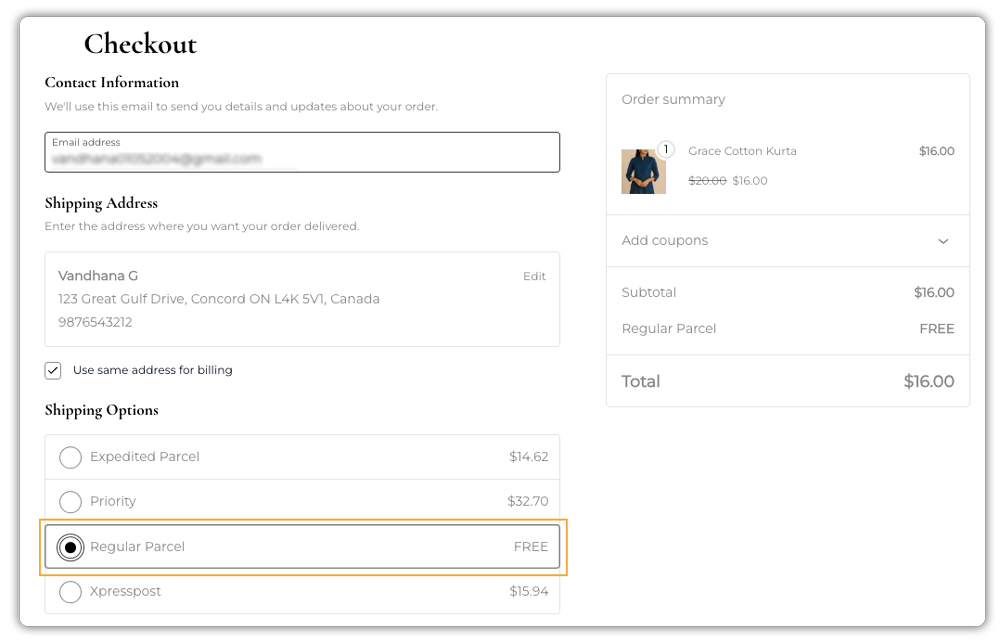
Advantages:
- Real-time Canada Post rates based on weight, dimensions, and destination
- Allows free shipping for specific services without losing control of costs.
- No manual calculations needed
- Works even when rates change over time
Note: To offer free shipping using this method, ensure the Canada Post Shipping Plugin is installed, activated, and configured. For detailed setup instructions, refer to this guide: Setting Up WooCommerce Canada Post Shipping Plugin.

Using WooCommerce Shipping Services (WSS)
If your store ships with multiple carriers, not just Canada Post, the WooCommerce Shipping Services (WSS) plugin gives you more flexible control over free shipping. You can create detailed rules based on order total, weight, destination, or product type. This lets you decide exactly when free shipping should apply.

Once an order qualifies, WSS maps your WooCommerce free shipping method to the correct Canada Post service and displays it on the cart and checkout pages.
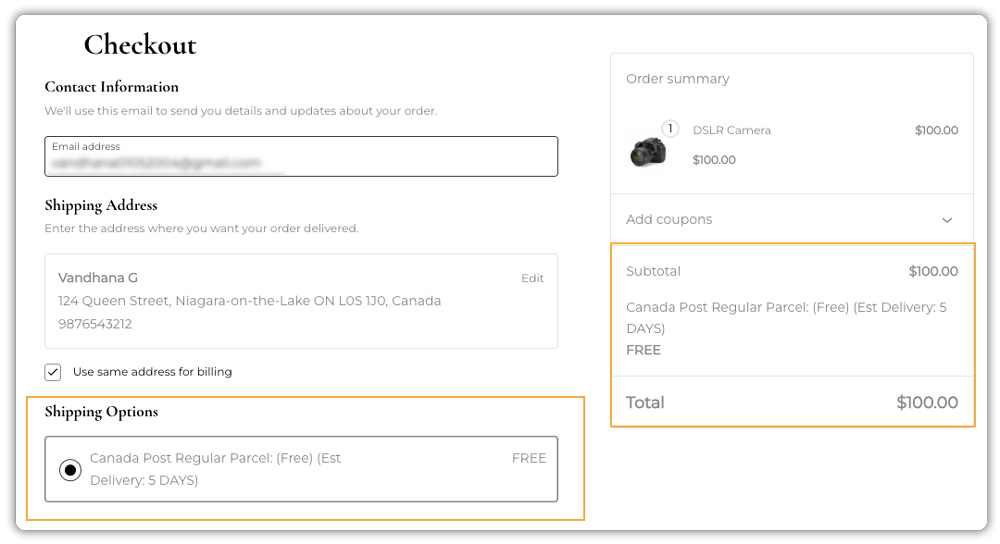
Advantages:
- Works with Canada Post and other carriers
- Lets you apply free shipping (or discounts) based on detailed criteria like cart value, weight, or zone.
- Automates complex shipping logic
- Flexible rules let you control exactly which orders get free shipping, helping protect your margins.
Note: Before using WSS, make sure it is installed, activated, and configured properly. For setup instructions and configuration options, you can refer to: WSS Setup Guide.
You can offer free shipping with Canada Post in WooCommerce without hurting your profits. By choosing the right approach for your store, you can provide free shipping in a smart and sustainable way. This keeps your customers happy while protecting your bottom line.
Tips for Managing Free Shipping Smarter in WooCommerce
Free shipping can boost sales, but without proper control, it can hurt your profits. Here are simple ways to manage it effectively:
- Control Which Orders Get Free Shipping: Use the PH Table Rate Shipping Pro plugin to control when free shipping should apply. You can base it on order value, weight ranges, product categories, or shipping classes. The Canada Post plugin can still handle labels and tracking, while Table Rates handles the free-shipping logic.
- Exclude Heavy or Expensive Items: With the PH Hide Shipping Methods & Rate Adjustment plugin, prevent bulky or high-cost products from triggering free shipping. This ensures only lightweight, profitable orders qualify, helping you avoid unnecessary shipping losses.
- Encourage Bigger Orders With Add-Ons: Even when offering free shipping, suggest relevant add-ons for products using the PH WooCommerce Product Add-Ons plugin. This increases average order value without affecting your shipping costs.
- Review Your Free Shipping Threshold Periodically: Shipping costs can fluctuate due to fuel surcharges or seasonal changes. Regularly reviewing and adjusting your free shipping minimum ensures your offer remains profitable and aligns with your business goals.
By using these strategies, you can make your free shipping offer smarter and more sustainable. The right combination of rules, exclusions, and add-ons helps you delight customers, encourage larger orders, and keep your profits healthy.
Real-World Example: Offering Free Shipping Without Losing Margin in WooCommerce
Consider a WooCommerce store selling a mix of lightweight stationery items and heavier ceramic gifts. The store wants to offer free shipping on orders over $199, but ceramic products are expensive to ship, and including them in the free shipping offer reduces per-order profitability.
The setup:
- The Canada Post Shipping Plugin fetches accurate live rates for every order at checkout
- The PH Hide Shipping Methods & Rate Adjustment Plugin hides the free shipping option when heavy ceramic items are in the cart
How it plays out:
- A customer adds $210 worth of planners and pens → free shipping appears at checkout → margins remain healthy
- A customer adds a $220 ceramic gift box → free shipping is hidden automatically → standard Canada Post rates display instead
The store provides a compelling free shipping offer to the right customers while protecting margins on orders where shipping costs are too high to absorb.
Conclusion
Free shipping with WooCommerce Canada Post is completely achievable and profitable when it’s done with the right tools and smart rules. By understanding your shipping costs and using plugins like the WooCommerce Canada Post Shipping Plugin or WooCommerce Shipping Services Plugin, you can provide customers with the convenience they expect while still protecting your margins.
No matter the size of your store, a well-planned free-shipping strategy boosts conversions, improves customer satisfaction, and supports long-term growth. And if you need help configuring any of the options discussed in this guide, the PluginHive Support Team is always ready to assist you in setting everything up smoothly.
FAQs
Q1: Does the WooCommerce built-in Free Shipping feature use real Canada Post rates?
A: No. WooCommerce’s native Free Shipping is a simple flat rate of $0.00. It doesn’t connect to the Canada Post API or calculate actual shipping costs. To offer real-time free shipping based on accurate rates, you need the WooCommerce Canada Post plugin and can adjust its rates accordingly.
Q2: Can I offer free shipping for specific products in WooCommerce using the PluginHive Canada Post plugin?
A: Yes. By combining the PH Hide Shipping Methods & Rate Adjustment plugin with the Canada Post plugin, you can set rules to offer free shipping only for certain products, categories, or shipping classes, while ensuring other items are charged accurate shipping rates.
Q3: Does offering free shipping in WooCommerce affect how Canada Post calculates shipping rates?
A: No. Free shipping simply hides the shipping cost from customers at checkout. The WooCommerce Canada Post plugin still calculates accurate shipping costs in your admin panel when generating labels and managing fulfilment.
Q4: Can WooCommerce offer free shipping only for certain locations while using the Canada Post plugin?
A: Yes. You can configure shipping zones to provide free shipping for local areas or specific provinces, while other regions continue to be charged standard Canada Post rates.
