


Once a WooCommerce store crosses into dozens or hundreds of orders a day, the way fulfillment happens has to change. Printing labels one at a time and manually updating order status and tracking for every shipment isn’t a workflow; it’s a bottleneck. Australia Post MyPost Business has the tools to fix this, but only if your WooCommerce store is actually set up to use them.
On This Page
- Where High-Volume WooCommerce Stores Lose Time on Fulfillment
- Bulk and Automatic Label Generation in WooCommerce
- How to Set Up Fast Fulfillment with Australia Post MyPost Business in WooCommerce
- Real-World WooCommerce Use Case
- Conclusion
- FAQs
Where High-Volume WooCommerce Stores Lose Time on Fulfillment
Most fulfillment slowdowns come from the same handful of places, regardless of what a store sells:
- Printing labels one order at a time, opening each WooCommerce order individually to generate a label
- Manually copying tracking numbers into customer emails or spreadsheets
- Manually updating order status once a parcel has actually shipped
- Re-entering the same product weight and dimension data because it wasn’t set up correctly the first time
- Checkout stalling for customers when live rates fail to return, with no fallback in place
None of these are Australia Post problems; they’re workflow problems. The PH Australia Post MyPost Business Shipping for WooCommerce plugin has the tools to solve all five, but it depends on your WooCommerce store being configured to use them properly.
Bulk and Automatic Label Generation in WooCommerce
The single biggest time saver for high-volume stores is bulk label printing. Instead of opening each WooCommerce order individually to generate a label, the PH Australia Post MyPost Business Shipping for WooCommerce plugin lets you select multiple orders from the WooCommerce Orders page and generate all their labels in a single action.
The plugin also supports automatic label generation. It generates shipping labels as soon as an order reaches a defined status, so no one needs to open the order or trigger the action manually. For stores with a high, steady order flow, this removes label generation from the fulfillment queue entirely.
Let’s see how to configure it in the Woo store!
How to Set Up Fast Fulfillment with Australia Post MyPost Business in WooCommerce
Once the PH Australia Post MyPost Business Shipping for WooCommerce is installed and your MyPost Business account is connected, a few settings changes are what actually turn on the speed features described above.
Add a Fallback Rate
In the Services tab, set a fallback shipping rate. The plugin shows this rate to customers if MyPost Business doesn’t return a live rate, keeping checkout moving instead of stalling. This is especially important for high-volume stores, where even a small percentage of failed rate lookups can add up to lost orders.

Verify Product Weight and Dimensions Are Set Correctly
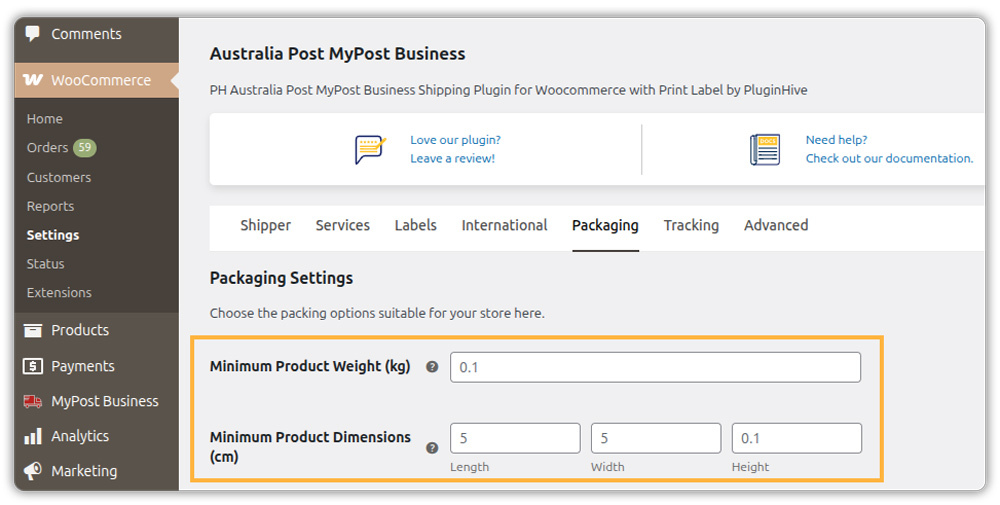
Bulk and automatic label generation depend entirely on accurate product data. Make sure every product has weight and dimensions entered and confirm your minimum weight and dimension settings are configured correctly in the plugin’s Packaging tab.
Turn On Automatic Label Generation
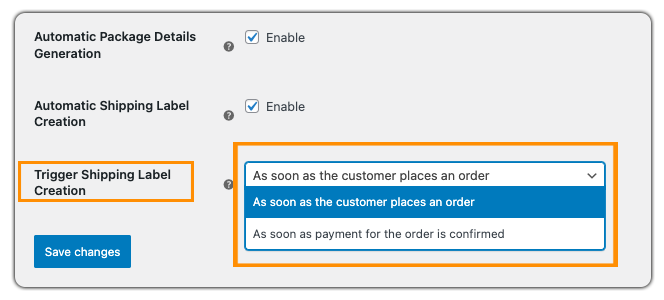
In the plugin’s Label settings, enable automatic label generation and choose the order status that should trigger it — commonly Processing. Once set, new orders reaching that status will have their MyPost Business label generated without anyone needing to open the order.
Bulk Label Printing
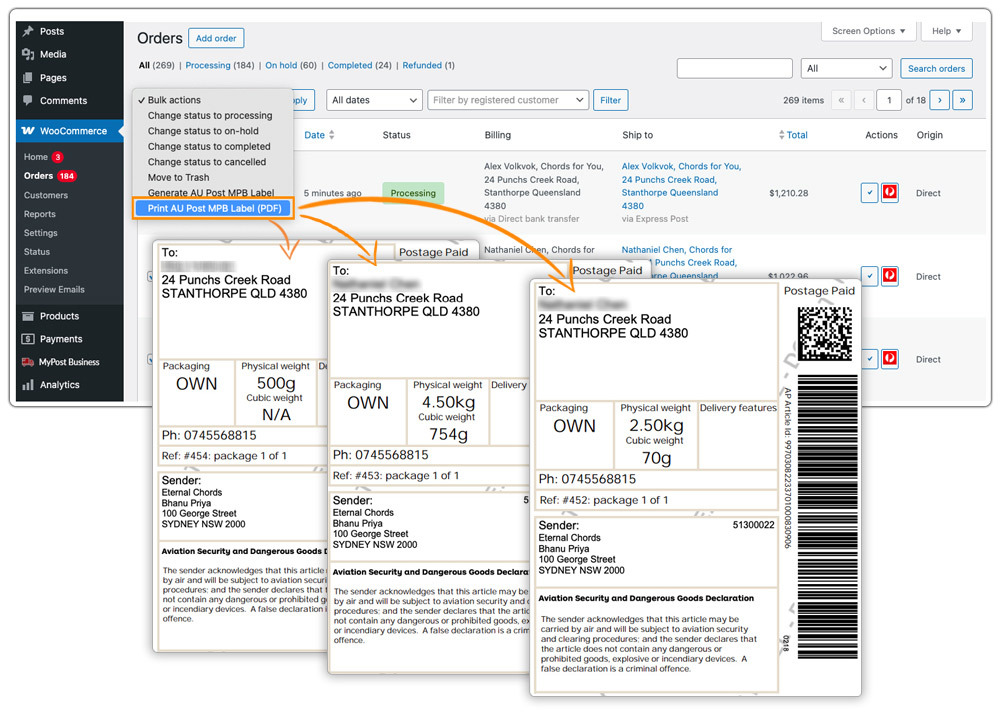
The plugin makes bulk label printing available directly from the WooCommerce Orders page as soon as you activate it—no separate setting is required. Select multiple Processing orders and apply the Print Labels bulk action to generate all their labels at once
To learn more about Australia Post MyPost Business tracking in WooCommerce, read this — WooCommerce Order Tracking with Australia Post.
Real-World WooCommerce Use Case
A WooCommerce store selling pet supplies across Australia processed around 150 orders a day during peak periods. The fulfillment team opened each order individually in WooCommerce, generated one Australia Post label at a time, updated the order status manually, and copied each tracking number into a spreadsheet before syncing it to customer emails. During busy periods, label printing alone took nearly three hours, and customers often received tracking updates a full day later.
How the Plugin Helped
The store switched to bulk label printing through the PH Australia Post MyPost Business Shipping for WooCommerce plugin, filtering Processing orders each morning and afternoon, selecting them in bulk, and generating all labels for that batch in a single action. Tracking numbers also reached customers through WooCommerce’s order emails immediately.
The Result
- Label printing time dropped from roughly three hours to under twenty minutes per batch during peak periods.
- Tracking updates reached customers within minutes of a label being generated, instead of being delayed by a day.
- Staff time freed up by the new workflow was redirected to packing and quality checks rather than administrative tasks.
Conclusion
Speeding up fulfillment at scale isn’t about working faster manually; it’s about removing the manual steps altogether. Bulk label printing and automatic label generation with tracking updates combine to take hours out of a high-volume WooCommerce store’s daily fulfillment routine. The Australia Post MyPost Business Shipping for WooCommerce brings all of this into WooCommerce directly, so fulfillment scales with order volume instead of becoming the bottleneck that limits it.
Need help setting up bulk fulfillment for your store? The PluginHive support team is here.
FAQs
Q. How many orders can I process in one bulk label printing batch?
The plugin does not impose a fixed limit on batch size. However, if you process several hundred orders at once, split them into smaller batches to avoid Australia Post API request timeouts. Most high-volume stores process 50 to 100 orders per batch throughout the day, which keeps requests fast and reliable.
Q. How can I show fewer, more relevant shipping options to speed up checkout for high order volumes?
The PH Hide Shipping Methods & Rate Adjustment for WooCommerce lets you show or hide specific Australia Post services based on cart value, weight, destination, or product type, reducing checkout decision time for customers and keeping your shipping zone configuration clean at scale.
Q. Can I show estimated delivery dates to reduce customer support queries at high volume?
Yes. The Estimated Delivery Date Plugin for WooCommerce displays delivery estimates on product pages, cart, and checkout, reducing the volume of delivery timing questions that reach customer support during high order volume periods.
Q. Can WooCommerce marketplaces speed up Australia Post fulfillment across multiple vendors?
Yes. The PH Multi-Vendor Shipping Plugin for WooCommerce calculates Australia Post rates separately per vendor based on each vendor’s origin address, and bulk label printing works across vendor orders within the same fulfillment workflow.
