


Creating shipping labels manually is one of the most time-consuming parts of WooCommerce order fulfilment. For stores handling a steady volume of FedEx shipments, switching back and forth between WooCommerce and the FedEx portal for every order slows everything down. By enabling automatic FedEx shipping label generation within WooCommerce, you can remove this extra step and significantly speed up your order fulfilment process. This article explains how FedEx label automation works in WooCommerce and how to configure it using the FedEx Shipping Plugin for WooCommerce with Print Label.
On This Page
- What Is Label Auto-Generation in WooCommerce?
- How FedEx Label Automation Works in WooCommerce
- Real-World Use Case: WooCommerce Store Shipping Apparel with FedEx
- Best Practices for FedEx Shipping Label Automation in WooCommerce
- Conclusion
- FAQs
What Is Label Auto-Generation in WooCommerce?
Label auto-generation lets the store automatically create shipping labels when customers place orders or when order statuses change, without requiring the store owner to generate labels manually. The FedEx Shipping Plugin for WooCommerce with Print Label integrates directly with FedEx APIs to handle shipping rates, label creation, and tracking within your WooCommerce dashboard. This removes the need to log into FedEx separately for each shipment.
This feature becomes especially valuable for stores managing a high number of daily orders, where even small inefficiencies can add up quickly. Instead of juggling multiple systems, everything — from checkout rates to label printing — is managed in one place.
How FedEx Label Auto-Generation Works in WooCommerce
After installing the FedEx Shipping Plugin for WooCommerce with Print Label, FedEx services and label generation are fully integrated into your WooCommerce Orders page.
The plugin provides the following automation options:
- Generate Packages Automatically After Order Received: Enable this setting to let the plugin create shipment packages as soon as customers place orders, apply your configured packaging rules automatically, and remove the need to assign packaging manually for every order.
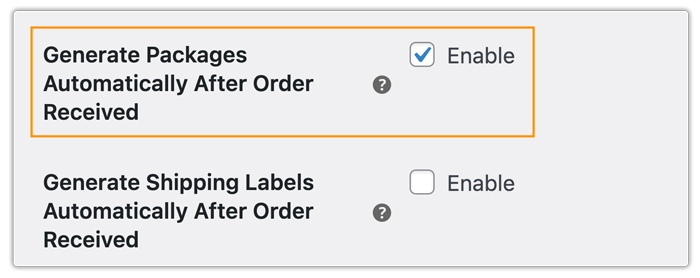
- Generate Shipping Labels Automatically After Order Received: Enable this option to let your store automatically create WooCommerce FedEx shipping labels for incoming orders, reduce manual work, and speed up dispatch.
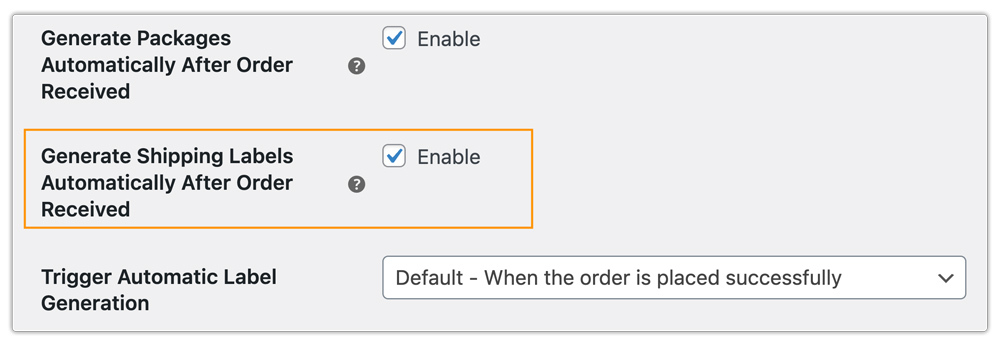
- Trigger Automatic Label Generation: This option controls when the label is generated. You can choose to generate labels immediately after order placement or only after payment confirmation. The label is then stored within the order and is ready to print at any time.
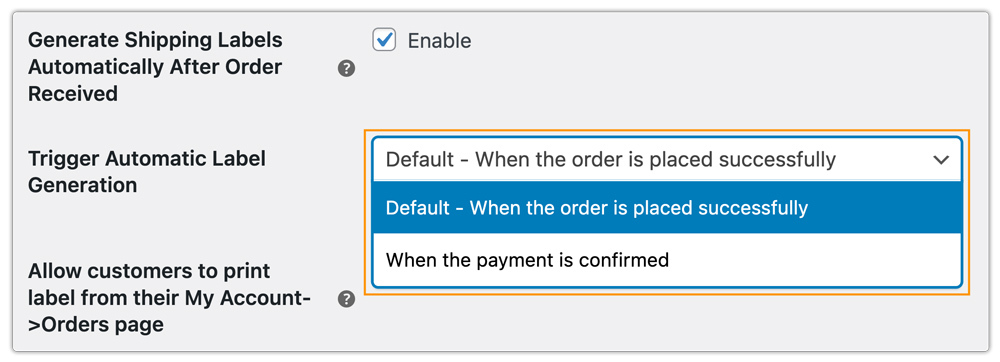
Once an order is placed, the package and label are generated automatically (depending on your settings). You can access the order from your WooCommerce dashboard and print the label directly — there’s no need to visit the FedEx portal.
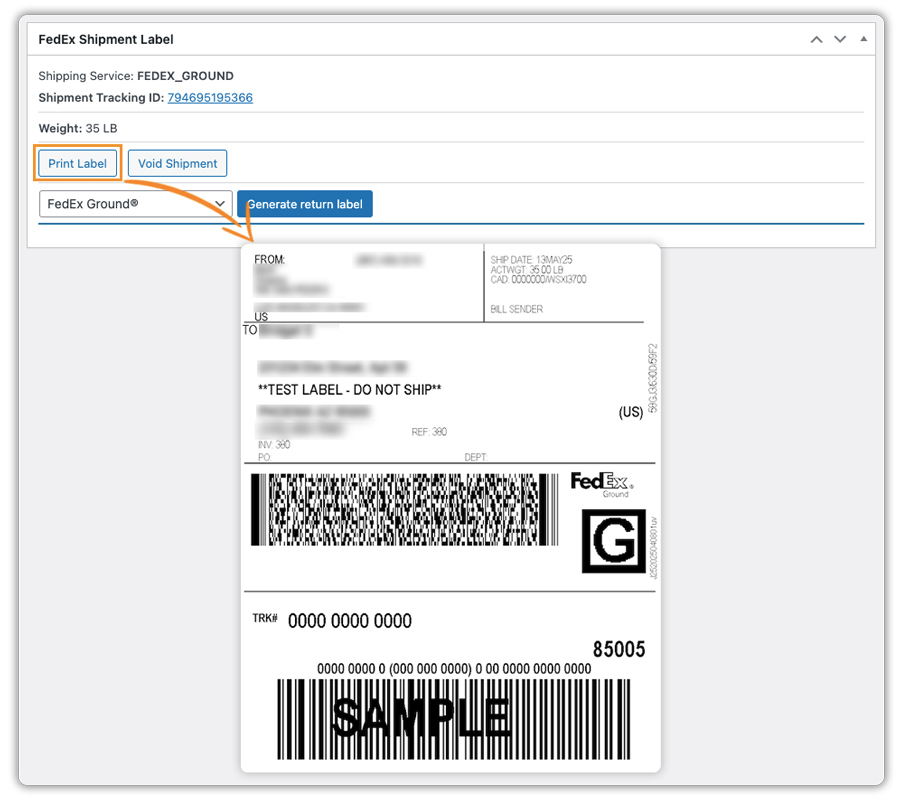
Real-World Use Case: WooCommerce Store Shipping Apparel with FedEx
An online apparel store selling t-shirts, jackets, dresses, and accessories was processing between 80 and 120 FedEx shipments per day. The team relied on manually generating each label through the FedEx portal, which quickly became time-consuming and error-prone.
They were facing several challenges:
- Differences between the shipping method selected at checkout and the one used during manual label creation.
- Incorrect weight and package selection led to billing adjustments from FedEx.
- Slower order processing during peak sales periods.
The Solution
The store implemented the FedEx Shipping Plugin for WooCommerce with Print Label and enabled automatic label generation. They configured accurate product weights and set up packaging rules for different apparel types (lightweight items vs bulkier jackets). With automation in place, the store team instantly generated FedEx labels after each order, selected the correct shipping service every time, added tracking numbers to orders automatically, and immediately shared them with customers.
The Outcome
- Order fulfillment became faster and more consistent.
- The team reduced errors caused by incorrect weights and service mismatches and handled peak order volumes more efficiently.
- Customer queries about order status also dropped due to timely tracking updates.
To learn more about the effectiveness of printing shipping labels through the FedEx Shipping Plugin, check out this video.

Best Practices for FedEx Shipping Label Automation in WooCommerce
To get the most out of FedEx automation, it’s important to set up your store correctly. Ensure all products have accurate weights and dimensions, as incorrect data is the most common cause of shipping errors and billing adjustments. Plan for bulk label printing during peak sales periods to avoid processing orders individually.
You can further enhance your workflow by combining the FedEx plugin with the following add-ons:
- Shipment Tracking Pro for WooCommerce: Automatically sends FedEx tracking details to customers as soon as you generate a label, so you no longer need to send tracking emails manually or handle repeated order status questions.
- Estimated Delivery Date Plugin for WooCommerce: Displays accurate, customizable delivery estimates on product pages and at checkout, so you can set clear customer expectations before customers place an order.
- PH WooCommerce Multi-Vendor Shipping Addon: If your store has multiple vendors, this addon ensures each vendor can generate and manage their own FedEx labels independently from a single WooCommerce setup.
- PH Table Rate Shipping Pro Plugin for WooCommerce: Useful for stores that want to blend live FedEx labels with flat-rate or tiered pricing rules for specific product categories or order sizes.
Conclusion
Automating FedEx shipping label generation in WooCommerce is a practical way to streamline WooCommerce order fulfillment and reduce manual workload. The FedEx Shipping Plugin brings the entire process into one centralized system. For stores handling regular shipments, this setup quickly improves efficiency and reduces operational errors.
If you need assistance with setup or configuration, you can reach out to PluginHive Support.
FAQs
Q. Do I need a FedEx account to auto-generate labels in WooCommerce?
Yes. You need an active FedEx account with API credentials. Without these, the plugin cannot connect to FedEx or generate labels.
Q. Can I auto-generate labels for multiple carriers alongside FedEx?
Yes. WooCommerce supports multiple carrier integrations simultaneously via the WooCommerce Shipping Services plugin, which lets your store generate shipping labels automatically across multiple carriers from a single dashboard.
Q. What happens if an order is cancelled after the label is auto-generated?
You can void the generated FedEx label from within WooCommerce, depending on FedEx cancellation policies and time limits.
Q. Can I use this setup for international shipping with FedEx?
Yes. You can use the plugin to ship internationally with FedEx and generate the required shipping documents, as long as you enable international shipping on your FedEx account.
Q. What if the payment fails? Will a label still be generated?
No. The plugin generates labels only after you successfully receive payment, as long as you set the trigger to “payment confirmed.”
