



When you manage WooCommerce checkout effectively, you improve customer experience, increase conversions, and boost order value. Irrelevant shipping options or incorrect rates often confuse customers and lead to abandoned carts. To keep checkout clean and accurate, you need the right plugin to control shipping visibility and pricing.
Not every WooCommerce hide shipping method plugin gives you the same level of control. This comparison of PH Hide Shipping Methods & Rate Adjustment for WooCommerce by PluginHive and Hide Shipping Method for WooCommerce by Dotstore breaks down what each plugin offers and helps you choose the right fit for your store.
On This Page
- Overview of Both WooCommerce Hide Shipping Methods Plugins
- Core Feature Comparison: What Each WooCommerce Hide Shipping Methods Plugin Can Actually Do
- Ease of Setup: Which Plugin Gets You Configured Faster
- Pricing and Overall Value
- Support and Scalability
- Final Verdict: Which Plugin Should You Choose
Overview of Both WooCommerce Hide Shipping Methods Plugins
PH Hide Shipping Methods & Rate Adjustment for WooCommerce by PluginHive
PluginHive designed the PH Hide Shipping Methods & Rate Adjustment for WooCommerce plugin for store owners who want full control over checkout behavior, including both shipping visibility and pricing.
Within the same plugin, you can hide shipping methods, display them conditionally, and adjust their rates, so there’s no need for you to rely on multiple plugins to manage shipping rules and costs.
Hide Shipping Method for WooCommerce by Dotstore
Dotstore designed the Hide Shipping Method for WooCommerce plugin to focus on one core function: hiding shipping methods based on predefined conditions. It handles this use case reliably, but its capabilities stop there.
You cannot use this plugin to conditionally display shipping methods or adjust shipping rates. It strictly controls which methods get hidden at checkout, making it suitable only for stores with basic shipping visibility needs.
Core Feature Comparison: What Each WooCommerce Hide Shipping Methods Plugin Can Actually Do
When comparing the WooCommerce Hide Shipping Methods Plugin, the key difference is not just the conditions they support, but what actions you can take based on those conditions.
Here is a clear comparison of PH Hide Shipping Methods & Rate Adjustment and Hide Shipping Method for WooCommerce based on their actual capabilities.
Feature Comparison
| Feature | PH Hide Shipping Methods & Rate Adjustment for WooCommerce | Hide Shipping Method for WooCommerce |
|---|---|---|
| Conditional hiding of shipping methods | Yes, hides methods based on conditions | Yes, hides methods based on conditions |
| Conditional display (showing specific methods) | Yes, lets you decide which shipping methods are shown based on conditions | No, only hides methods; it cannot control which methods are shown based on conditions |
| Shipping rate adjustment | Yes, adjusts shipping cost (fixed or percentage) | No, cannot modify shipping rates |
| Cart-based conditions (subtotal, weight, quantity) | Yes, supports cart total, weight, and item count | Yes, supports cart total, weight, and item count |
| Product-based conditions (category, shipping class) | Yes, supports category and shipping class rules | Yes, supports category and shipping class rules |
| User-based conditions (user roles) | Yes, supports user role rules | Yes, supports user role rules |
| Location-based conditions | Yes, supports location-based rules | Yes, supports location-based rules |
| Coupon-based conditions | Yes, supports coupon-based rules | Yes, supports coupon-based rules |
| Time-based conditions (day and time) | Yes, supports day and time rules | Yes, supports day and time rules |
| Debugging and rule validation | Yes, includes logs for troubleshooting | No, no built-in logging |
Both plugins support the same core conditions. The real difference is in what actions you can take based on those conditions. PluginHive’s PH Hide Shipping Methods & Rate Adjustment for WooCommerce plugin lets you hide, show, and adjust shipping rates, all with built-in debug logging to help validate rules. Dotstore’s Hide Shipping Method for WooCommerce covers hiding only, which works well for straightforward use cases but falls short when your store needs more control.
Ease of Setup: Which Plugin Gets You Configured Faster
Both plugins follow a rule-based setup – define a condition, set an action, and the plugin applies it at checkout. The difference is in how each organises the workflow and what it covers.
PH Hide Shipping Methods & Rate Adjustment for WooCommerce
- Adds a Hide Shipping tab to the WordPress dashboard after activation.
- Two separate tabs inside one for hide/show rules, one for rate adjustment, keeping both functions clearly organised.

- Rules are built by selecting a condition (the parameter) and the action to apply. Both tabs follow the same setup flow, so once you configure one rule, adding more is straightforward.

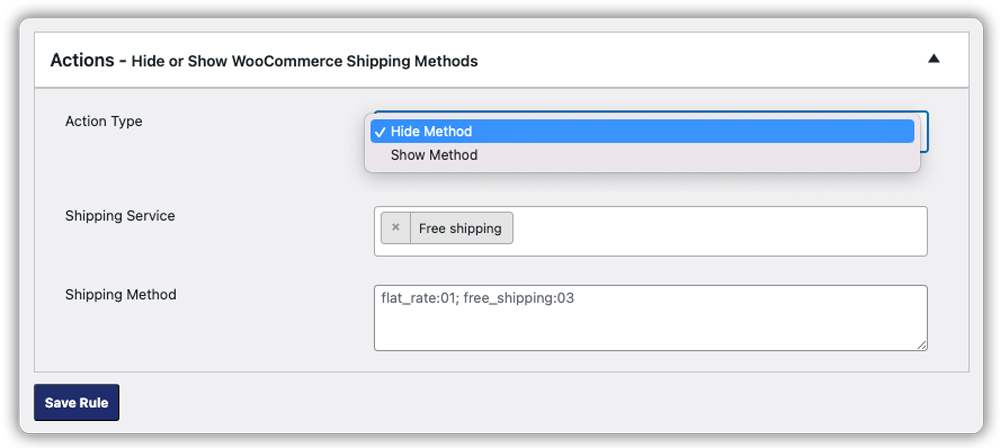
- To target any shipping method, whether a WooCommerce default or a third-party carrier service, you can identify the method using browser developer tools and enter its HTML value in the rule.

- A built-in debug mode lets you quickly check whether your rules are working as expected, making it easier to identify and fix any issues.

Hide Shipping Method for WooCommerce by Dotstore
- Adds a Hide Shipping section to the WordPress dashboard after activation.
- Rules are grouped into categories – Location, Cart, Product, User, and Time-Based.
- Covers hiding only – no setup for conditionally showing methods or adjusting rates.
- Same as PluginHive’s plugin, all shipping method IDs must be entered manually by inspecting the checkout page HTML.
- No debug mode. Troubleshooting requires manual front-end testing.
Setting up either plugin takes just a few minutes. Where PluginHive’s plugin stands out is in what happens after setup – the debug logs give you a clear view of how your rules are running, so you spend less time guessing and more time getting the configuration right.
Pricing and Overall Value
| Plugin | Single Site Pricing | Money-Back Guarantee | What’s Included |
|---|---|---|---|
| PH Hide Shipping Methods & Rate Adjustment for WooCommerce | $79/year | 30 days | Hide, show, and rate adjustment – all in one plugin |
| Hide Shipping Method for WooCommerce | $189/year | 14 days | Visibility – hiding only, no rate adjustment |
PluginHive’s Hide Shipping Methods & Rate Adjustment for WooCommerce plugin is priced at $79/year, less than half the cost of Dotstore’s Hide Shipping Method for WooCommerce plugin at $189/year, and delivers significantly more. It covers hiding, showing, and rate adjustment from a single interface. Dotstore’s plugin handles only the hiding aspect, and stores that need rate adjustment on top of visibility control would require a separate solution, further increasing the overall cost.
Support and Scalability
PH Hide Shipping Methods & Rate Adjustment by PluginHive for WooCommerce
PluginHive offers ticket-based support with fast response times, detailed step-by-step documentation, and Zoom or Google Meet calls for complex configuration scenarios. The plugin is rated 5/5 by verified buyers and is part of PluginHive’s broader WooCommerce shipping ecosystem, making it a natural fit for stores already using PluginHive’s carrier plugins like UPS, FedEx, Canada Post, DHL and more.
Hide Shipping Method for WooCommerce by Dotstore
Dotstore offers ticket-based support alongside a help centre with guides and tutorials. The plugin is rated 4.8/5 by verified buyers.
Final Verdict: Which Plugin Should You Choose
Both plugins help you control which shipping methods appear at checkout, but the difference in capability and price is clear. The PH Hide Shipping Methods & Rate Adjustment plugin covers hiding, showing, and adjusting shipping rates from a single interface at $79/year, making it the more complete and cost-effective choice for WooCommerce stores that need full control over their checkout shipping experience. For help with setup, refer to the setup documentation or reach out to PluginHive Support.
