


The festive season drives major sales for WooCommerce stores, with 73% of online merchants earning over 20% of their annual sales during November-December and nearly 28% making 30-50% in this window. Black Friday alone sees a 98% spike in shipments compared to an average day. With this surge comes challenges like shipping delays, stock shortages, and higher customer queries.
This guide shares simple, effective ways to manage high-volume orders and keep your WooCommerce operations running smoothly during the festive season and holiday rush.
On This Page
- Common Challenges During Holiday Order Surges in WooCommerce
- Managing High-Volume WooCommerce Orders During the Festive Season
- How To Automate Shipping in Your WooCommerce Store
- Automating WooCommerce Order Processing and Shipping
- Real-World Use Case
- Conclusion
- FAQs
Common Challenges During Holiday Order Surges in WooCommerce
The festive season often brings a sudden spike in orders, and WooCommerce stores can face several challenges if they aren’t prepared:
- Inventory Management Issues: High order volumes can quickly deplete stock, leading to overselling or stockouts. Keeping inventory updated in real-time is crucial to avoid disappointing customers.
- Delayed Order Processing: Manually handling hundreds of orders can slow down fulfillment. Without automation, packing and labeling each order can take hours, delaying shipments.
- Shipping Errors and Delays: Incorrect shipping labels, missed pickups, or delays from courier services can increase during peak season, affecting customer satisfaction.
- Increased Customer Queries: More orders mean more questions about shipping times, order tracking, and returns. Without proper communication, your support team can become overwhelmed.
- Returns and Exchanges: Holiday shoppers often return gifts, increasing the load on your returns process. Managing returns efficiently is essential to maintain trust and avoid errors.
Understanding these challenges is the first step in preparing your WooCommerce store for the festive rush.
Managing High-Volume WooCommerce Orders During the Festive Season
Handling a surge of holiday orders becomes much easier when your WooCommerce store follows a streamlined, well-organized workflow. Here’s how to stay in control during peak season:
Streamline Your Order Fulfillment Workflow
- Create a clear pick–pack–ship process for your team. Set up dedicated packing stations, use standardized packaging, and keep essential materials ready.
- This reduces handling time and minimizes fulfillment errors.
Use Batch Processing for Faster Fulfillment
- Instead of processing orders individually, group them by product type, shipping method, or delivery zone.
- Batch picking and bulk label printing allow you to fulfill large volumes more efficiently and maintain consistency.
Keep Inventory Updated in Real Time
- Sync your inventory system with WooCommerce to ensure stock levels update automatically as orders come in.
- This helps prevent overselling, improves reorder planning, and ensures customers see accurate product availability during peak sales.
Choose Reliable Carriers for Peak Season
Selecting the right carrier based on your region is crucial for timely holiday deliveries. Reliability, pickup schedules, and seasonal capacity should guide your choice to avoid shipment delays.
How To Automate Shipping in Your WooCommerce Store
Automation is one of the most effective ways to handle holiday order spikes. Automating shipping labels, rate calculation, tracking updates, and pickups helps reduce manual work and errors significantly. Below is how WooCommerce stores across different regions can automate their shipping:
- U.S. WooCommerce stores can automate shipping using:
- FedEx carrier via WooCommerce Shipping Plugin for FedEx
- UPS carrier via WooCommerce Shipping Plugin for UPS
- USPS and DHL carrier via the Multi-Carrier Shipping Plugin for WooCommerce
- Canadian WooCommerce stores: Canada Post → Canada Post Shipping Plugin for WooCommerce
- WooCommerce stores in the United Kingdom: Royal Mail → PH Royal Mail Shipping with Tracking for WooCommerce
- Australian WooCommerce stores: Australia Post → PH Australia Post MyPost Business Shipping for WooCommerce
- WooCommerce stores in the Nordic countries: PostNord → PH PostNord Shipping Plugin for WooCommerce
- Indian WooCommerce stores: Blue Dart or multiple carriers → WooCommerce Shipping Services Plugin
With automated shipping, you reduce processing delays and keep your holiday fulfillment operations running smoothly, even during peak load. Let’s see how these tools can help you with seamless shipping.
Automating WooCommerce Order Processing and Shipping in the Festive Season (With FedEx)
The WooCommerce Shipping Plugin for FedEx with Print Label helps streamline the entire fulfillment process by connecting your store directly with FedEx. It retrieves real-time rates, generates labels, supports bulk printing, schedules pickups, and provides tracking, all inside WooCommerce itself.
Note: If you’re new to the plugin, start with this quick setup guide: FedEx Plugin Setup for WooCommerce.
Here’s how automation works with the FedEx shipping plugin:
- It displays real-time FedEx shipping rates at the cart and checkout pages, ensuring customers always see accurate, up-to-date shipping costs.

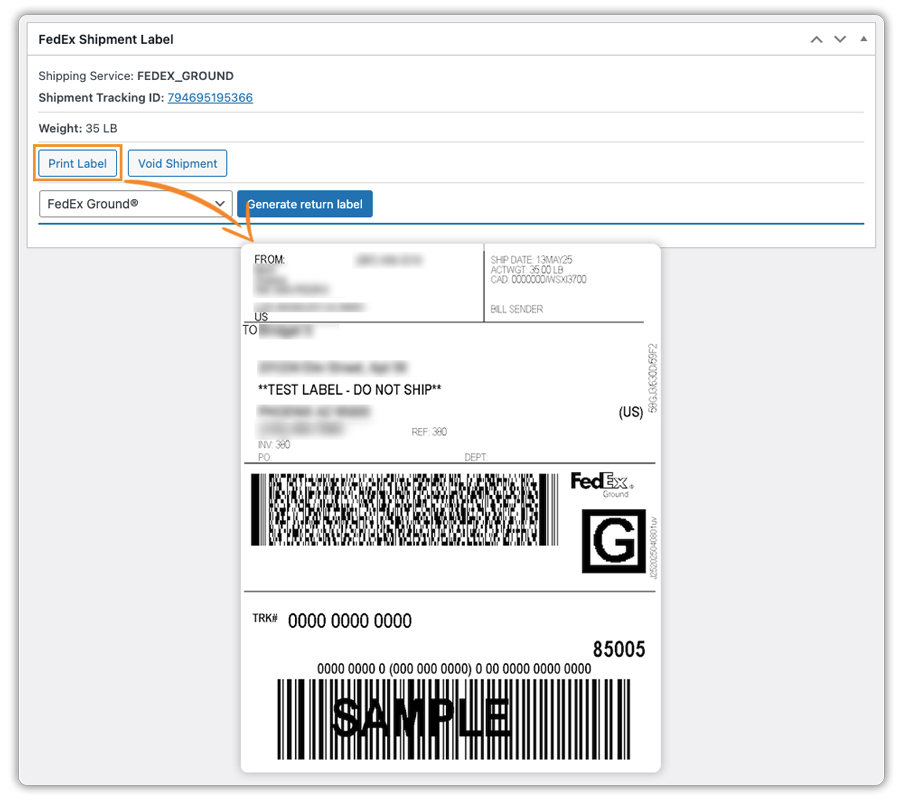
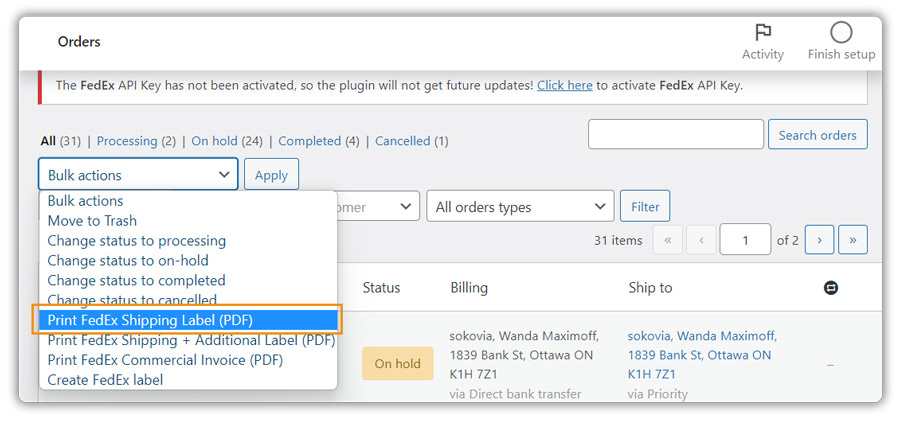
- You can generate and print FedEx shipping labels directly from the WooCommerce order page without visiting the FedEx website, eliminating manual data entry and saving time.
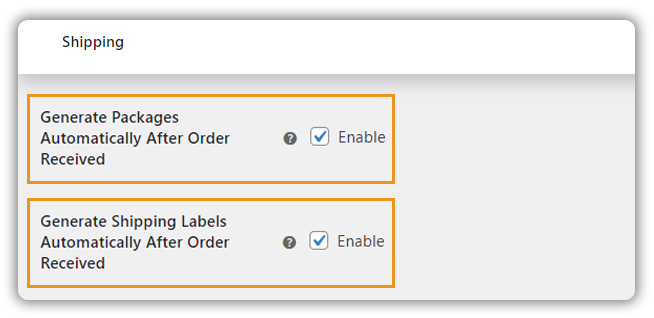
- You can enable automatic labels generation in the plugin settings, which helps you remove the need to print each one individually, a huge time-saver during peak season.
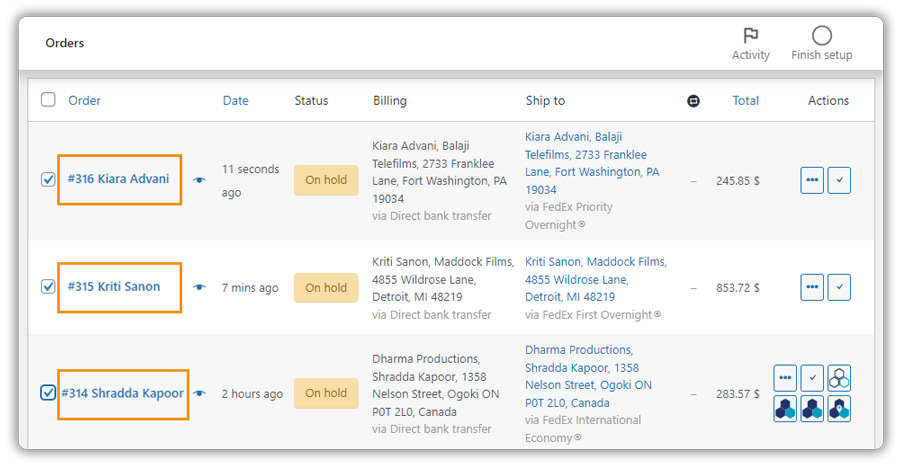
- The plugin supports bulk label printing, allowing your team to print labels for multiple orders at once and significantly speed up fulfillment during the holiday rush.
- You can request FedEx pickups from within WooCommerce, so you don’t have to contact FedEx separately or switch platforms.

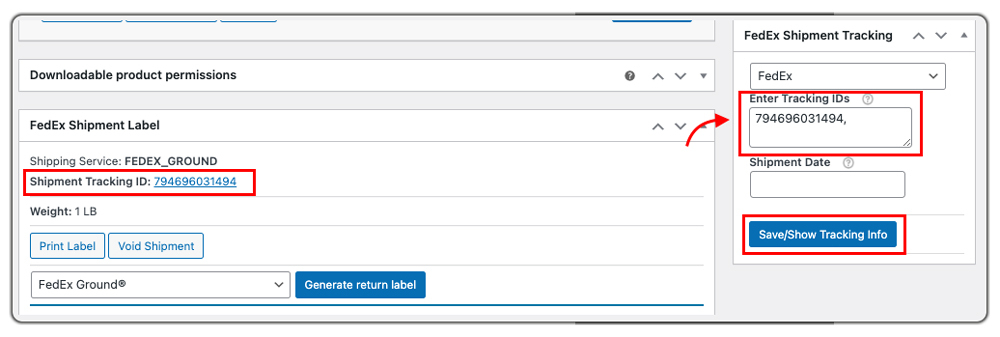
- Shipment tracking updates appear inside the WooCommerce order page, helping store owners and customers stay informed without manual tracking checks.
Similarly, you can automate the shipping process with other plugins, too.
All of this makes holiday order processing seamless, accurate, and much faster while delivering a smooth experience even during peak festive sales.
Real-World Use Case: How a WooCommerce Store Sped Up Fulfillment During the Festive Season
A California-based WooCommerce lifestyle brand saw a massive surge in orders during the Black Friday and Christmas season. While the sales numbers were impressive, their team struggled to keep up with the fulfillment workload. Before automation, they relied heavily on manual steps, copying customer details into the carrier website, generating labels one by one, updating tracking numbers manually, and coordinating pickups through email. As order volume grew, this workflow quickly became unmanageable.
Once the store enabled automated shipping using the WooCommerce FedEx Shipping Plugin, their entire fulfillment process transformed:
- Real-time FedEx rates automatically appeared at checkout, reducing customer confusion and eliminating miscalculations.
- The team started printing shipping labels directly inside WooCommerce, with no need to log in to FedEx.
- Bulk label printing allowed them to print 50-80 labels at once, cutting fulfillment time by more than half.
- Labels were auto-generated as soon as orders were ready, eliminating repetitive work during peak load.
- FedEx pickups were scheduled from inside WooCommerce, ensuring all shipments left on time, every day.
- Tracking updates synced automatically, reducing customer support tickets and improving the post-purchase experience.
Results?
- Fulfillment speed improved by nearly 60% during peak holiday sales.
- Order errors dropped significantly, thanks to fewer manual steps.
- On-time deliveries increased, leading to better customer reviews.
- The team handled the entire festive rush smoothly without hiring extra staff.
This real-world scenario shows how automation can turn a chaotic holiday season into a streamlined, predictable, and highly efficient operation.
Conclusion
Managing holiday order spikes becomes much easier when your WooCommerce store runs on clear workflows, real-time inventory updates, and automated shipping. These steps help you process orders faster, avoid errors, and keep customers happy during the busiest time of the year.
If you need help fine-tuning your plugin setup, our support team is here to assist.
FAQs
- Can I track my shipments inside my WooCommerce store only?
Yes. During the busy holiday season, tracking everything in one place is essential. For detailed tracking, like showing updates in emails or the customer’s My Account page, you can use the WooCommerce Shipment Tracking Pro Plugin.
- Can I hide certain shipping methods based on the box or package size?
Yes. This is especially helpful during the festive rush when you want to avoid slow or costly services. The PH Hide WooCommerce Shipping Methods & Rate Adjustment Plugin can help you do so.
- Can I set different shipping rates based on cart weight, quantity, or product class?
Absolutely. Holiday orders vary a lot, light gift items vs bulky bundles. Using the WooCommerce Table Rate Shipping Pro Plugin, you can set flexible pricing for them.
- Can I edit or override the estimated delivery date shown at checkout because of holiday delays?
Yes. Since carriers often face delays during December, you can override or customize delivery dates using the Estimated Delivery Date Plugin for WooCommerce.
