


If you’re building an eLearning website on WordPress and want to sell courses, accept payments, and manage enrollments seamlessly, combining WooCommerce with an LMS (Learning Management System) plugin is one of the most powerful setups available.
This combination lets you handle everything in one place, from course creation and progress tracking to checkout, coupons, and subscriptions. You can create structured online courses, automate enrollments, offer free or paid lessons, and even run memberships, all using the familiar WooCommerce dashboard.
In this guide, we’ll explore the best WooCommerce LMS plugins in 2025, comparing their features, pricing, and use cases so you can choose the right one for your online course business.
Article Contains:
- What Is a WooCommerce LMS Plugin?
- How to Choose the Right WooCommerce LMS Plugin
- The Best WooCommerce LMS Plugins
- Conclusion
- FAQs
What Is a WooCommerce LMS Plugin?
A WooCommerce LMS plugin combines the power of WooCommerce and WordPress’s leading eCommerce solution — with a Learning Management System (LMS) to create and sell online courses directly from your website.
In simple terms, WooCommerce handles payments, orders, and checkout, while the LMS manages course content, lessons, progress tracking, quizzes, and student enrollment. This integration turns your WordPress site into a complete eLearning business platform.
Here’s how it works in practice:
- You create a course (with lessons, quizzes, and materials) inside your LMS.
- That course is linked to a WooCommerce product.
- When a student buys the product through WooCommerce, they automatically get access to the course inside your LMS.
This setup lets you:
- Sell one-time courses, subscriptions, or memberships.
- Use WooCommerce coupons, discounts, and tax settings.
- Accept payments via PayPal, Stripe, Razorpay, and hundreds of other gateways.
- Manage enrollments and course access automatically without manual work.
Because WooCommerce is flexible and widely supported, pairing it with a compatible LMS plugin gives you complete control over your eLearning store, helping you scale easily as your courses and student base grow.
How to Choose the Right WooCommerce LMS Plugin
Selecting the right LMS plugin for WooCommerce isn’t just about features; it’s about finding a solution that aligns with your business goals, teaching style, and scalability needs. Whether you’re launching a single course or building a full eLearning marketplace, consider the following factors before deciding:
1. WooCommerce Integration Quality
The key factor is how seamlessly the LMS integrates with WooCommerce. Choose a plugin with an official add-on that links courses to WooCommerce products automatically. This keeps payments, enrollments, and access perfectly synced while letting you use WooCommerce’s checkout, coupons, taxes, and analytics without extra setup.
2. Payment Flexibility
If you plan to sell recurring subscriptions, course bundles, or installment payments, check for compatibility with WooCommerce Subscriptions or Memberships.
Some LMS plugins also support one-time payments, multiple currencies, or third-party payment gateways. The more flexible your payment setup, the easier it will be to scale and appeal to global learners.
3. Course Features and Learning Tools
Evaluate the depth of the learning experience. A good LMS should offer features like drip content, quizzes, assignments, certificates, prerequisites, and instructor management.
If you plan to run graded quizzes, offer certificates, or use conditional logic for course progression, these features are must-haves. Drip content and prerequisite controls are especially useful for pacing student learning and improving engagement.
4. User Experience (UX)
A clean and intuitive course player can make a big difference in learner satisfaction. Look for responsive design, easy navigation, and compatibility with mobile devices.
The student dashboard should allow learners to track progress, resume lessons, and access certificates effortlessly. A good UX not only enhances engagement but also reduces support requests.
5. Pricing and Add-ons
While some LMS plugins offer free versions, many advanced features like WooCommerce integration, certificates, or analytics are locked behind paid add-ons or bundles.
Compare the total cost of ownership, including plugin licenses, payment extensions, and required WooCommerce add-ons (like Subscriptions). Choose a setup that fits your current budget but can scale as your student base grows.
6. Support & Ecosystem
When issues arise, timely support is crucial. Pick an LMS plugin with active documentation, responsive support, and a strong user community.
Also, consider its compatibility with page builders like Elementor, Divi, or Gutenberg, which helps you create professional-looking course pages without custom coding.
7. Scalability and Performance
If you expect your platform to grow, choose an LMS that performs well under load. Scalability depends on both your hosting environment and the plugin’s database efficiency.
Check whether the plugin can handle hundreds or thousands of students, supports caching/CDN integrations, and works smoothly with video hosting platforms like Vimeo or Bunny.net. A scalable LMS will save you from costly migrations later.
The Best WooCommerce LMS Plugins (Detailed Comparison)
1. Tutor LMS

Tutor LMS is a powerful, lightweight, and robust WordPress plugin that lets you create, manage, and sell online courses with ease. It offers an intuitive course builder, advanced quiz options, and flexible monetization with both WooCommerce and native eCommerce support. Whether you’re an individual instructor or running a large eLearning platform, Tutor LMS gives you all the tools you need to grow.
Key Features
- An advanced course builder with lessons, quizzes, and assignments
- Individual frontend dashboard for both instructors and students
- 10+ Advanced quiz system with multiple question types
- Extensive add-ons for certificates, content drip, prerequisites, and more
- Multi-instructor support with earnings management, commission rates, etc
- WooCommerce integration for course sales, memberships, and subscriptions
Pricing: The core Tutor LMS plugin is free to download and use, and you can download it from WordPress.org. However, the Tutor LMS Pro version starts at $199/year for a single site (with lifetime options available)
Best Suited For: Tutor LMS is best suited for online educators seeking an all-in-one solution to launch professional eLearning sites with minimal setup. It’s ideal for both solo instructors and multi-instructor marketplaces, as well as subscription-based course platforms.
2. Good LMS – Learning Management System WordPress Plugin

Good LMS is a powerful Learning Management System (LMS) plugin by GoodLayers designed for creating, managing, and selling online and onsite courses directly from your WordPress site. It offers a complete course management system with student and instructor dashboards, quiz functionality, and certification options. With integrated payment gateways like PayPal, Stripe, and Authorize.net, it simplifies enrollment and payment collection. Whether you’re teaching online, running workshops, or selling training packages, Good LMS helps streamline your entire eLearning workflow.
Key Features:
- Create and sell online or onsite courses with ease
- Supports PayPal, Stripe, Paymill, and Authorize.net payments
- Dedicated instructor, student, and transaction dashboards
- Built-in certificate and badge system for course completion
- Manual payment approval and tracking for offline transfers
Pricing: A Good LMS is available on CodeCanyon for $32 with 6 months of premium support and lifetime updates. Extended support for 12 months can be added at a discounted rate.
Best For: Perfect for educators, training institutes, and corporate trainers looking to monetize courses through WordPress. Ideal for those offering both in-person and online classes. A great choice if you need a reliable, one-time purchase LMS plugin without recurring fees.
3. Fox LMS Plugin
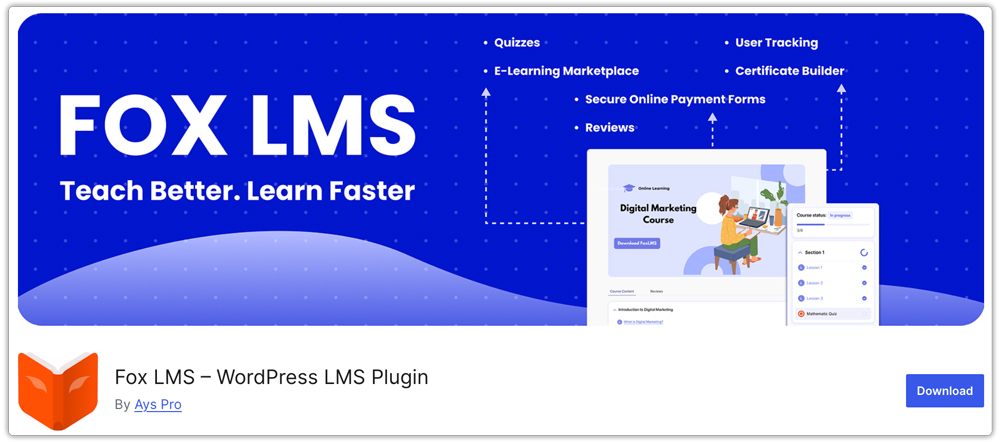
Fox LMS Plugin is a tool for creating and managing eLearning websites effortlessly. This is a perfect e-learning solution for educators, course creators, and training businesses. Via the Fox LMS, you can turn your WordPress website into an impressive eLearning platform featuring courses, lessons, quizzes, certificates, and more.
It is time to easily generate, manage, and sell online courses directly from your website.
Key Features:
- Create and sell unlimited courses, lessons, and quizzes with no restrictions
- Build quizzes, track learner progress, and issue completion certificates
- Manage unlimited students and instructors through dedicated dashboards
- Monetize courses with secure payments, guest checkout, and transaction history
- Customize easily with Elementor support, lesson attachments, analytics, coupons, and email notifications
Pricing: Fox LMS offers a 14-day free trial so you can test its full premium features without commitment.
Best For: Fox LMS is best for WordPress site owners who want to easily create and sell online courses, for businesses and teams managing employee training and skill development, and for educators looking to build a scalable e-learning platform or online course marketplace.
4. Masteriyo LMS – Online Course Builder for WordPress

Masteriyo LMS – a fast, easy-to-use WordPress LMS that helps create online courses that look good and provide an awesome learning experience for users. Full-proof features for eLearning websites that allow users to create basic course-selling websites to complex, multi-instructor eLearning platforms like Udemy or Skillshare. Integrations for WooCommerce, payments, marketing, page builders, automation, and more, alongside constant updates, an active community, and technical support, ensure an awesome eLearning journey.
Key Features:
- Create courses with Videos, Quizzes, Certificates, Live Classes, Assignments, and more.
- Multiple currencies, recurring payments, revenue sharing, coupon support, and more to better monetize the courses.
- Integrations to WooCommerce, SureCart, Elementor, Bricks Builder, PayPal, Stripe, Razorpay, and many more.
- Course control features like Content-drip, Prerequisites, Course Start, and End date.
- User profiles, automated email updates, login session management, social logins, FAQ, Group courses, 2FA, and many more features for a better user experience and management.
Pricing: Free version allows unlimited courses, video lessons, quizzes, certificates, PayPal, WooCommerce Integration, and base versions of advanced features, ensuring people can start earning without spending a penny. Jump to PRO version unlocks the full potential of the plugins & also multi-license support, providing flexible pricing for agencies.
Best For: The plugin is best suited for individuals or educators who want to create courses as a passive income stream, internal corporate trainings, universities and schools who want to dive into eLearning, as well as entrepreneurs who want to create eLearning platforms with revenue sharing, groups, multiple instructors, and such!
5. Academy LMS

Academy LMS is a powerful and user-friendly WordPress plugin for creating and managing complete eLearning platforms. Instructors can build engaging courses with videos, quizzes, assignments, and live classes, while students can enroll, track progress, and earn certificates. It offers full control over multi-instructor management, monetization, subscriptions, and course bundles, with seamless integrations like StoreEngine, SureCart, and Paid Memberships Pro. With built-in analytics and reporting, Academy LMS is perfect for launching online schools, training centers, or eLearning marketplaces.
Key Features
- Create interactive courses with lessons, videos, quizzes, and assignments.
- Allow multiple instructors to create and manage their own courses.
- Sell courses, bundles, or memberships via SureCart or StoreEngine.
- Host real-time sessions with students using live integrations.
- Simple, responsive, and intuitive interface for learners.
- Track revenue, enrollments, and course performance.
- Works seamlessly with leading WordPress plugins and page builders.
- Accessible across all devices and languages.
- Automatically award certificates upon course completion.
Pricing: Academy LMS offers flexible pricing options with Yearly, Lifetime, and Unlimited plans to suit different needs. The Yearly plan starts at $119 per year, while the Lifetime plan starts at $357 for one-time access. For those managing multiple websites, the Unlimited plan is available at $999, allowing use on unlimited sites. All plans include every feature of Academy LMS, ensuring you get the full set of tools and capabilities regardless of which plan you choose.
Best For: Academy LMS is perfect for educators and instructors who want to build and sell online courses with ease. It’s an ideal solution for schools and training institutes looking to create structured eLearning environments, as well as businesses and organizations that need to deliver employee or client training programs. Coaches and consultants can use it to offer personalized learning and coaching sessions, while content creators can easily monetize their expertise through engaging video lessons and tutorials
Conclusion
Choosing the best WooCommerce LMS plugin depends on what kind of learning experience you want to create and how you plan to monetize it.
If you’re building a large-scale online academy or corporate training site, go for a feature-rich LMS that offers advanced tools for quizzes, certificates, and group management. If you’re just starting out or selling a few digital courses, a lightweight plugin with solid WooCommerce integration may be all you need.
WooCommerce gives you complete control over your checkout, subscriptions, and payment gateways, while your LMS takes care of lessons, progress tracking, and learner engagement. Together, they form a powerful foundation for building, managing, and scaling your eLearning business on WordPress.
Before you decide, think about your must-have features, budget, and technical comfort level. Start small, test the integration, and grow gradually — that’s the most efficient way to create a profitable and professional online learning platform.
Frequently Asked Questions (FAQs)
1. Can I sell online courses using WooCommerce?
Yes, WooCommerce can be used to sell online courses when connected with an LMS plugin. It handles all the eCommerce essentials, including checkout, payments, and order management, while the LMS manages lessons, progress, and certificates. Together, they let you sell single courses, bundles, or even full memberships.
2. Do I need WooCommerce if my LMS already supports payments?
Not always, but WooCommerce offers much greater flexibility. It allows you to use multiple payment gateways, discount coupons, taxes, and subscription options. If you want to run a professional course store or accept recurring payments, WooCommerce integration is highly recommended.
3. Can I offer subscriptions or recurring access to courses?
Yes. Many WooCommerce LMS plugins integrate with WooCommerce Subscriptions, allowing you to charge learners monthly or annually for continued access. It’s perfect for academies, membership sites, or coaching programs where content is updated regularly.
5. Are WooCommerce LMS plugins suitable for large eLearning websites?
Absolutely. With reliable hosting and proper optimization, WooCommerce LMS setups can handle thousands of students and concurrent enrollments. Most premium plugins are designed for scalability, so you can easily expand your course catalog and student base without switching platforms.
