


Fulfilment involves the same essential tasks for every order: confirm what the customer chose, pack the parcel, create the shipping label, arrange pickup or drop-off, and send tracking details. Skipping one of these steps can lead to shipping delays, reprinted labels, and customer queries about missing parcels. For Canadian WooCommerce merchants, managing these tasks through a consistent process makes daily shipping easier to handle. Whether you ship five orders a day or hundreds, a fulfilment checklist helps you catch errors before parcels leave your warehouse.
This guide walks through each stage of fulfilling WooCommerce orders with Canada Post, using the Canada Post Shipping Plugin for WooCommerce with Print Label.
On This Page
- Why a Fulfilment Checklist Matters for WooCommerce Orders
- Canada Post Fulfilment Checklist at a Glance for WooCommerce Stores
- How to Automate Canada Post Order Fulfilment in WooCommerce
- Real-World WooCommerce Use Case
- Conclusion
- FAQs
Why a Fulfilment Checklist Matters for WooCommerce Orders
When you use Canada Post for your WooCommerce orders, they pass through several stages via Canada Post before reaching the customer. When these tasks are handled manually without a standard process, small mistakes can easily go unnoticed.
For example, an incorrect product weight can affect shipping costs. An incomplete international shipping address or missing customs information can delay processing. A label generated with the wrong service may also create unnecessary costs or delivery problems.
A fulfilment checklist helps your team:
- Reduce shipping errors: Verify order details, package dimensions, and service selection before generating labels.
- Avoid repeated work: Catch missing information before packing and labelling instead of correcting it later.
- Process orders faster: Follow the same sequence for every order rather than deciding what to do next each time.
- Keep customers informed: Ensure tracking details are available and shared after shipment processing.
- Prepare shipments properly: Complete the necessary shipment transmission and manifest tasks for applicable Canada Post accounts.
The goal is simple: every order should move through a clear process, from payment confirmation to shipment handover.
Canada Post Fulfilment Checklist at a Glance for WooCommerce Stores
Use this checklist before processing your daily WooCommerce orders.
| Fulfilment stage | What to check |
|---|---|
| Order verification | Confirm payment status, products, quantities, and shipping address. |
| Shipping service | Verify the selected Canada Post service and delivery requirements. |
| Package preparation | Check product quantity, packaging, parcel weight, and dimensions. |
| Shipping label | Generate the label using the correct shipment details. |
| Customs documentation | Verify product descriptions, values, country of manufacture, and other required details for international shipments. |
| Shipment transmission | Transmit eligible shipments and generate the required manifest when applicable. |
| Pickup or drop-off | Confirm how and when parcels will be handed over to Canada Post. |
| Tracking notification | Check that the tracking number is attached to the order and shared with the customer. |
| Final order check | Confirm that the parcel is packed, labelled, and ready for dispatch. |
Keep this list near your packing station or use it as a standard operating procedure for your fulfilment team.
How to Automate Canada Post Order Fulfilment in WooCommerce
A consistent checklist helps you process orders without missing important tasks. The Canada Post Shipping Plugin for WooCommerce with Print Label lets you manage shipping rates, labels, and tracking from your WooCommerce dashboard. With this plugin, you can simplify your WooCommerce order fulfilment by:
1. Verifying the WooCommerce Order
Before fulfilment, open the order and check:
- Payment status, products, and quantities.
- The customer’s shipping address and postal code.
- The selected Canada Post shipping service.
- Any special delivery instructions.
The plugin retrieves shipping rates based on shipment information, including the destination and package details. Verify the order information before creating the shipment to avoid corrections later.

2. Generating and Printing the Canada Post Shipping Label
Once the order is verified and packed, generate the shipping label from the WooCommerce order page. The plugin also supports bulk label generation for eligible orders.
Attach the label securely and keep the barcode visible and readable. When processing multiple orders, match each label to its parcel before dispatch to prevent mix-ups.

3. Complete Customs Documentation for International Orders
For international shipments, check the required customs information before dispatch. This may include:
- Detailed product descriptions and quantities.
- Declared product values.
- Country of manufacture or origin, as applicable.
- Sender and recipient details.
- Other documents required for the destination and shipment type.
The Canada Post plugin supports commercial invoice generation for applicable international shipments. You can also configure product-level country and province of manufacture details.

4. Transmit Shipments and Generate the Manifest
A shipping label identifies an individual shipment, while a manifest consolidates eligible shipments for handover to Canada Post. With the plugin, you can transmit eligible shipments and generate the applicable manifest from WooCommerce.

Domestic and international shipments may require separate manifests. Follow the requirements applicable to your Canada Post account, and complete any required manifest steps before handover.
5. Arrange Pickup or Prepare Parcels for Drop-Off
Once the parcels are labelled and the required shipment processing is complete, sign in to your Canada Post business account and request a pickup.
Verify that the required pickup request has been accepted. If you use drop-off instead, prepare the parcels and complete the applicable handover process. Keep a record of any orders that could not be dispatched.
6. Confirm Tracking Details and Notify Customers
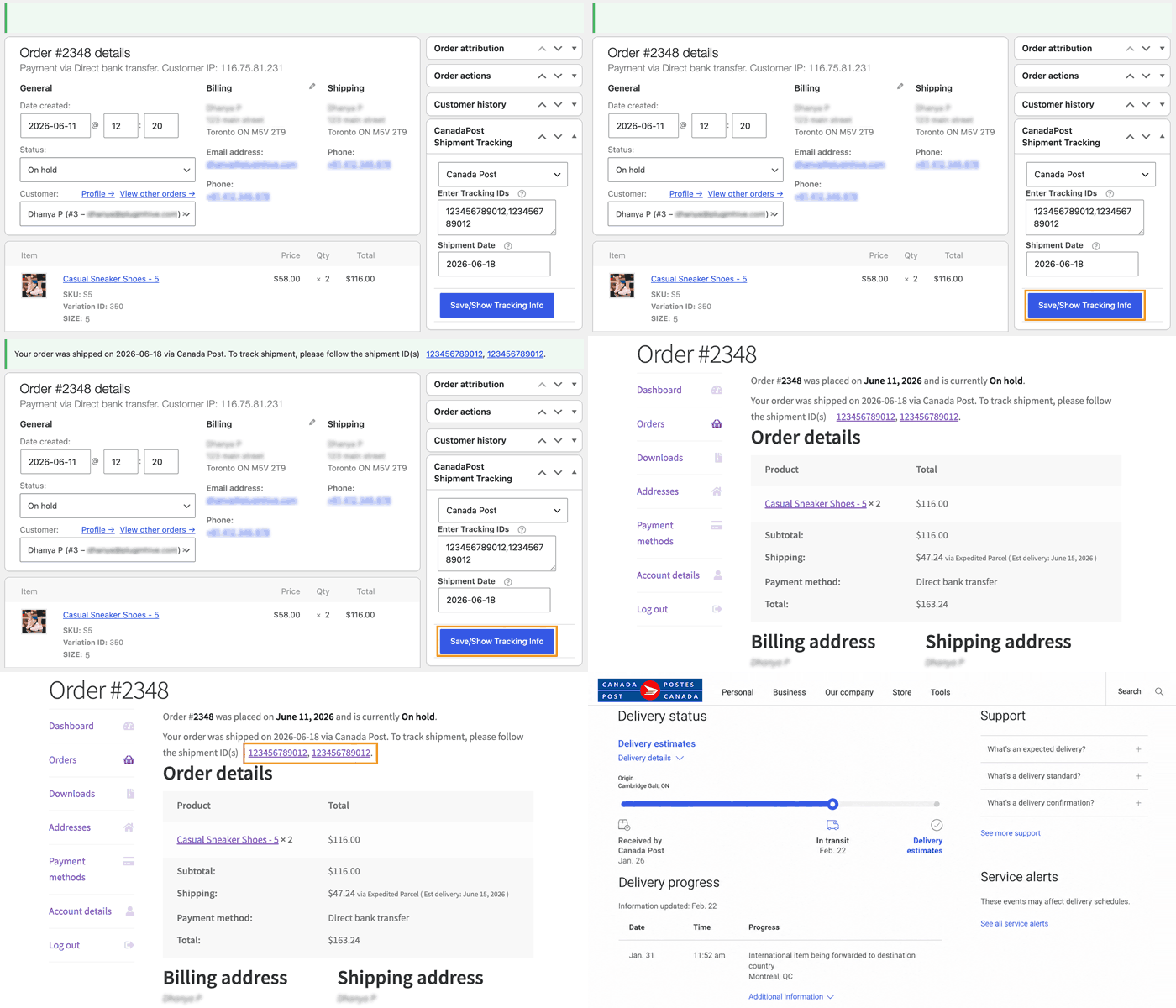
After generating the label, check that the tracking number is attached to the correct WooCommerce order and that the tracking link is available.
The plugin can add tracking information to orders and send tracking notifications according to your configuration.
Real-World WooCommerce Use Case
Consider a Canadian home accessories store that processes 40 orders each business day, shipping both within Canada and to the United States.
Previously, the team checked addresses during packing, entered parcel details while creating labels, and searched for tracking numbers whenever customers contacted support. International orders were sometimes delayed because customs information was missing.
The store introduced a standard fulfilment checklist using the Canada Post Shipping Plugin for WooCommerce with Print Label to manage labels and tracking from its dashboard.
The updated workflow helped the team simplify key fulfilment tasks:
- Faster label creation: They generated labels directly from WooCommerce and processed multiple orders in bulk.
- Easier customs processing: They generated commercial invoices for eligible international shipments and configured product origin details.
- Smoother dispatch: They transmitted eligible shipments and generated manifests from WooCommerce.
- Simplified tracking: They added tracking details to orders and automated customer notifications.
This helped the store reduce repetitive work, avoid common fulfilment errors, and process orders more efficiently.
Conclusion
A reliable fulfilment process depends on completing each task in the right order. Use a checklist that suits your order volume and dispatch schedule, and review it regularly as your shipping requirements change. Automating repetitive tasks can further simplify fulfilment and help your team manage growing order volumes.
If you need help setting up or troubleshooting your WooCommerce shipping workflow, contact PluginHive Support.
FAQs
Q. Can I print Canada Post shipping labels directly from WooCommerce?
Yes. The Canada Post Shipping Plugin lets you generate shipping labels from your WooCommerce dashboard and supports bulk label generation for eligible orders.
Q. Do I need a manifest for every Canada Post shipment?
No. Manifest requirements depend on your Canada Post account and shipping process. Where a manifest is required, the plugin supports generating one for eligible shipments. Follow the requirements applicable to your account and shipment type.
Q. Can I automate Canada Post order fulfilment for multiple WooCommerce orders?
Yes. The Canada Post Plugin supports bulk label generation for eligible orders and helps manage shipping labels and tracking within WooCommerce. Accurate product dimensions, appropriate packing settings, and configured shipping services can further reduce repetitive work.
Q. Does generating a Canada Post shipping label mean the parcel has been shipped?
Not necessarily. A label can be generated before the parcel is handed over to Canada Post. Check the pickup or drop-off status and tracking updates to confirm that the carrier has received the shipment.
Q. Can I hide certain shipping methods at WooCommerce checkout?
Yes. The PH Hide Shipping Methods & Rate Adjustment for WooCommerce plugin lets you show, hide, or adjust shipping methods based on different conditions. This helps you display relevant shipping options to customers.
Q. Can I set custom shipping rates instead of using Canada Post live rates?
Yes. The PH Table Rate Shipping Pro Plugin for WooCommerce lets you configure shipping costs based on conditions such as destination, weight, quantity, product category, and cart subtotal.
Q. Can I manage shipping for multiple vendors in a WooCommerce marketplace?
Yes. The PH Multi Vendor Shipping Addon for WooCommerce integrates supported shipping solutions with multi-vendor platforms such as Dokan, WCFM, and WC Vendors. Depending on the shipping integration, it supports vendor-specific shipping rates and helps manage shipping labels and tracking for eligible carrier services.
