


Asking customers to pay the full amount upfront for expensive products or advance bookings is one of the biggest reasons for cart abandonment. When shoppers face a high checkout total, they often hesitate or delay their purchase. Offering a WooCommerce pay later option solves this problem by allowing buyers to secure their order today with a partial deposit or flexible payment plan, and pay the remaining balance later.
In this guide, we will explore how pay-later payments work in WooCommerce, the key benefits they bring to your business, and the different ways you can offer them. You will also learn how to easily set up flexible payment options in your store using the PH Deposits for WooCommerce plugin by PluginHive to reduce checkout friction and boost your conversions.
On This Page
- What Is WooCommerce Pay Later?
- Benefits of Offering Flexible Payment Options in WooCommerce
- Ways to Offer Pay-Later Payments in WooCommerce
- How to Configure WooCommerce Pay-Later Options in Your Store
- Best Practices for Offering Pay-Later Payments in WooCommerce
- Conclusion
- FAQs
What Is WooCommerce Pay Later?
WooCommerce pay later is a checkout approach where an order is placed without collecting the full amount at that moment. The customer pays an initial amount and settles the remaining balance through one or more later payments. You can consider the order fully paid once the customer completes every payment. It is also called partial payments, split payments, or instalments. Since WooCommerce expects the full order total in one payment by default, a plugin is needed to keep track of what the customer has paid and what is still due.
Here is how an order moves through the process:
- Order placed – The customer pays the first amount at checkout, and the order is saved with a partially paid status
- Balance pending – The remaining amount is tracked as a balance order linked to the original order until it is due
- Order completed – Once the final payment is received, the order moves to its final status
Now that you know how pay-later payments work in WooCommerce, let’s look at the benefits they bring to your business.
Benefits of Offering Flexible Payment Options in WooCommerce
Offering pay later does more than make checkout easier for your customers. Here is what it does for your business:
- Larger order values: When the cost is spread out, customers are more willing to pick the premium model, a bigger package, or add extra items instead of settling for the cheapest option
- Commitment secured upfront: A deposit shows the customer is serious before you order materials, start production, or hold a date for a booking
- Earlier cash flow: Part of the payment reaches you when the order is placed rather than at delivery, which helps cover supplier and production costs while the order is being fulfilled
- Predictable incoming payments: Each remaining payment has a due date, so you can see how much money is expected and when
These benefits apply to whichever pay-later method you choose, so let’s look at the different ways you can offer pay-later payments in your WooCommerce store.
Ways to Offer Pay-Later Payments in WooCommerce
There are four common ways to offer pay later in a WooCommerce store. Each works differently and suits a different type of product.
1. Deposits
The customer pays a fixed amount or a percentage of the product price at checkout, and the rest is due later as a single payment. For example, a 20% deposit on a $500 sofa means the customer pays $100 at checkout and $400 later.
Best for: made-to-order products, high-value items, and advance bookings.
2. Scheduled Payment Plans
After an upfront payment, the remaining amount is divided into several instalments on dates you set, anywhere from daily to yearly. For example, a high-priced piece of jewellery can be paid with an upfront amount followed by four monthly payments. To see how this differs from a simple deposit, read WooCommerce Deposits vs Payment Plans, or take a look at how monthly instalment plans work.
Best for: expensive products where even the remaining balance is too large to pay in one go.
3. BNPL Services
Services such as Afterpay, Klarna, Zip, and PayPal Pay Later pay you the full amount, and the customer repays the provider. You do not collect or track the instalments yourself. For a full comparison with deposits, see WooCommerce Deposits vs BNPL.
Best for: standard, ready-to-ship products.
4. Pay by Invoice
The customer places the order without paying anything upfront and pays against an invoice within an agreed period. The order stays unpaid until the money arrives, so you need to track and follow up on these payments yourself.
Best for: trusted repeat customers such as businesses, schools, and wholesale buyers.
Deposits and payment plans give you the most control over the amounts, the schedule, and the products they apply to. In the next section, let’s look at how to configure deposits using the PH Deposits for WooCommerce plugin.
How to Configure WooCommerce Pay-Later Options in Your Store
To offer the deposits and payment plans covered above, you can use the PH Deposits for WooCommerce plugin by PluginHive. It keeps track of payments in the background, while you stay in control of how customers pay, where the options appear, and how the balance is collected. Here is what that control looks like in your store.
Control How Customers Pay
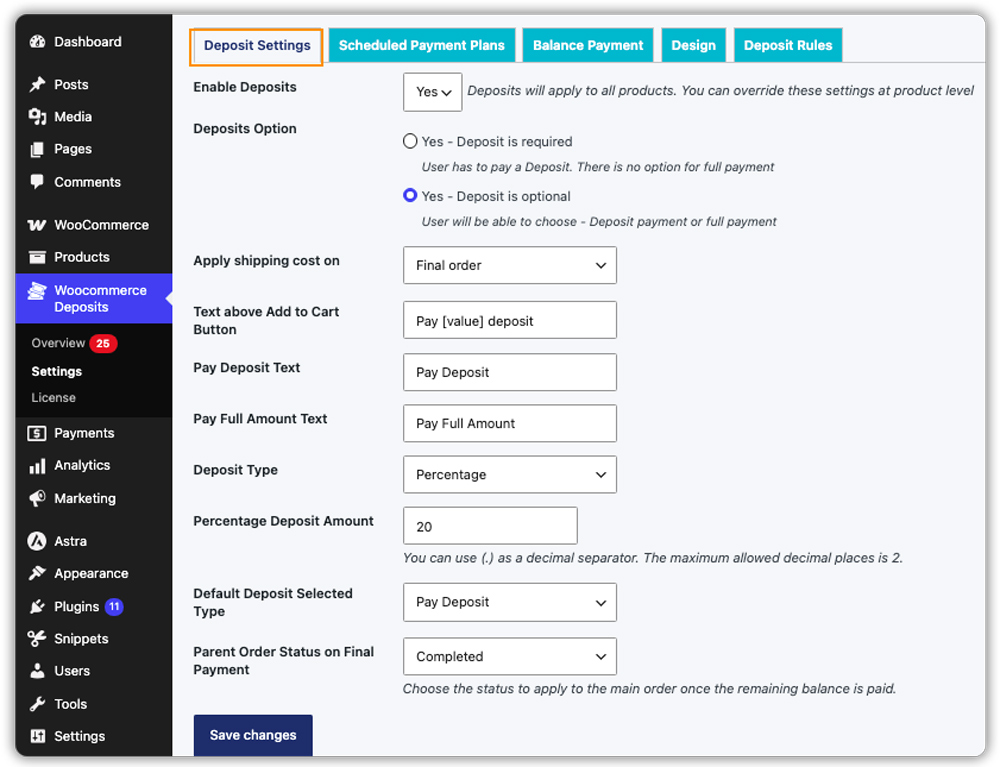
First, enable deposits in the plugin settings and decide whether customers must pay a deposit or can choose to pay in full. You can set a fixed deposit amount, a percentage of the product price, or split the remaining balance into scheduled payments.
Choose Where Pay Later Applies
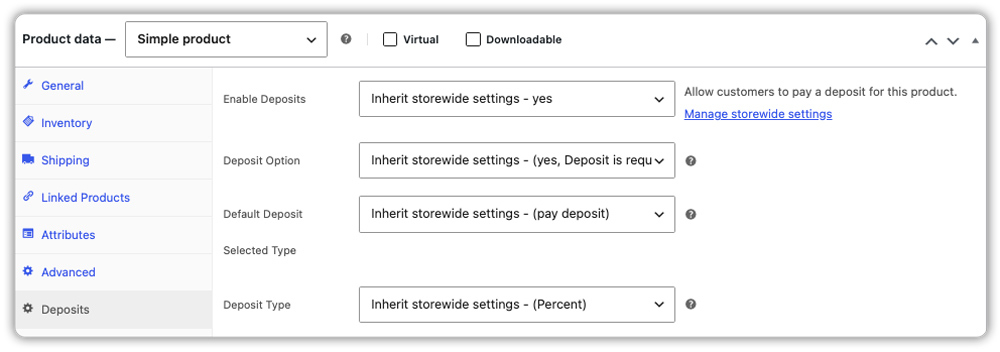
You do not have to offer pay later on everything. Apply it across your whole store, switch it on for individual products, or limit it to specific product categories and user roles. The same plugin also handles partial payments on bookable products.

Collect the Balance Without Chasing Customers
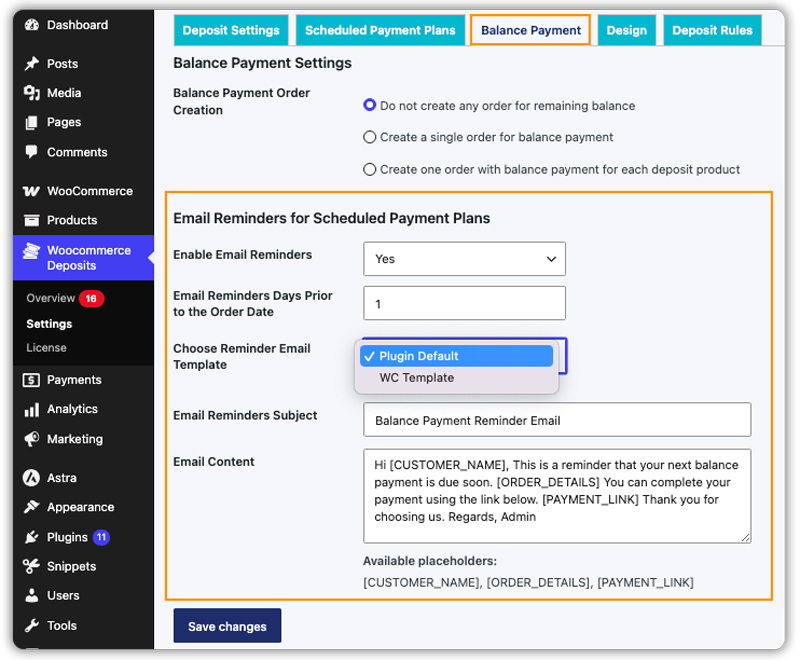
Once the first payment is made, the plugin can create the balance order automatically, or you can create it yourself when the time comes. Automatic payment reminders go out before each due date, and each one includes a payment link, so customers can pay in one click. You choose when the reminder is sent and what the email says.
Keep Customers Informed at Checkout
On the product page, customers see the deposit or payment plan option, and you can edit the wording to match your store.

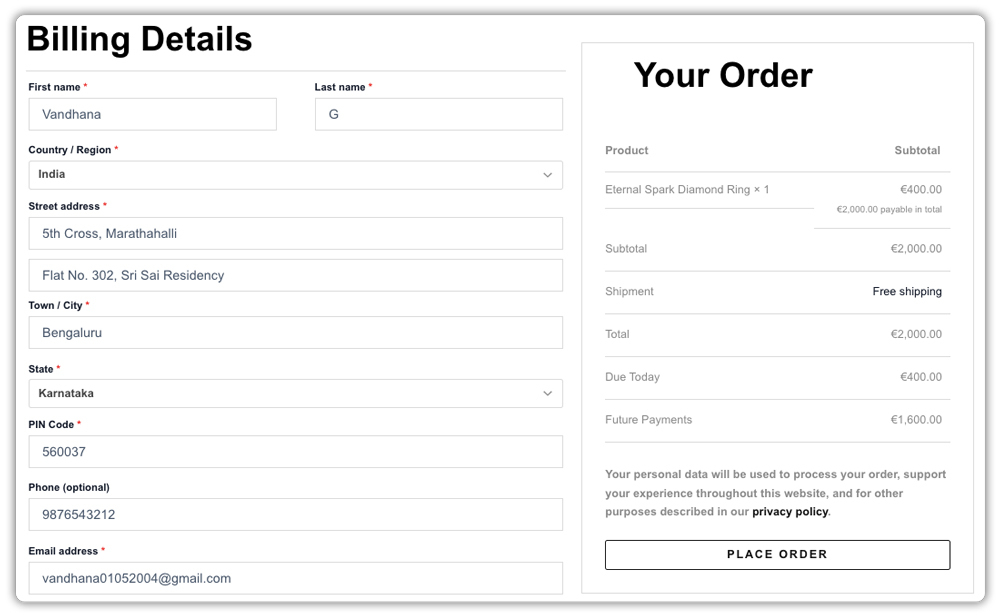
In the cart and at checkout, they see what is due today and what remains, so there are no surprises later.
Cart page

Checkout page
Track Every Deposit in One Place
The Overview dashboard gives you a summary of deposit revenue and order statuses.

Along with it, a table lists every deposit order, where you can search, filter, send a reminder, or mark an offline payment as paid.

For step-by-step instructions on each setting, refer to the PH Deposits for WooCommerce setup guide .
Best Practices for Offering Pay-Later Payments in WooCommerce
To manage pay-later orders smoothly, set clear payment rules and keep track of outstanding balances. Follow these best practices to make the process easier for both you and your customers.
- Set Clear Payment Terms: Explain payment due dates, cancellation policies, and refund conditions before customers place an order.
- Choose Suitable Products: Offer pay-later options on products that suit your business model, such as high-value items, custom-made products, or advance bookings.
- Send Timely Payment Reminders: Notify customers before their balances are due and include a direct payment link to make completing payments easier.
- Monitor Outstanding Balances: Review unpaid and overdue orders regularly so you can follow up on pending payments and keep your records organized.
- Test the Payment Process: Place a test order to verify that the initial payment, remaining balance, and subsequent payments work correctly.
Following these practices helps you manage pay-later orders efficiently and maintain a clear payment process for your customers.
Conclusion
Offering a WooCommerce pay later option is one of the most effective ways to remove pricing barriers, reduce cart abandonment, and increase your store’s overall revenue. By breaking down large totals into manageable deposits, you empower your customers to make purchases they might otherwise delay due to budget constraints.
With the PH Deposits for WooCommerce plugin by PluginHive, offering flexible payments is a straightforward process that keeps the entire customer experience on your website. Take control of your payment structures today, offer your buyers the financial flexibility they crave, and watch your high-ticket sales and booking conversions grow. If you need help getting started, contact PluginHive support.
FAQs
Q: How do I offer pay later in WooCommerce?
You need a plugin because WooCommerce only takes full payment by default. With PH Deposits for WooCommerce, you choose a deposit or payment plan and apply it to your products.
Q: Does PayPal Pay Later work with WooCommerce?
Yes. The official PayPal Payments extension for WooCommerce lets you offer PayPal Pay Later at checkout. It works like other BNPL services, where the provider handles repayment instead of you.
Q: Can I offer both deposits and payment plans in the same store?
Yes. With PH Deposits for WooCommerce, you can use deposits for some products and payment plans for others.
Q: What happens if a customer does not pay the remaining balance?
The order stays partially paid until the balance is received. Reminder emails with a payment link go out before the due date, and the Overview dashboard shows which orders are still pending so you can follow up.
