


Selling high-value products is great – until customers abandon their carts because the full price feels like too much at once. That’s a common problem for WooCommerce store owners selling furniture, electronics, custom products, or services. The fix isn’t always lowering your prices. Sometimes, it’s just giving customers a way to spread payments out.
WooCommerce monthly installments let your customers pay in smaller amounts over time while you collect reliable, scheduled payments. This article walks you through exactly how to set that up in WooCommerce using the PH Deposits for WooCommerce plugin – no subscriptions required, no complex workarounds.
On This Page
- Why Offer WooCommerce Payment Plans?
- How to Offer WooCommerce Payment Plans With Monthly Installments
- Real-World Use Cases for WooCommerce Monthly Installments
- Example Scenario
- Tips for Creating Effective WooCommerce Payment Plans
- Conclusion
- FAQs
Why Offer WooCommerce Payment Plans?
Price is one of the biggest reasons customers don’t complete a purchase. When someone sees a $600 product, and they don’t have $600 available right now, they leave. But if you offer them three monthly installments of $200, the decision gets much easier.
Here’s why WooCommerce payment plans make sense for your store:
- Reduce cart abandonment – spreading the cost removes the biggest barrier to purchase for high-ticket items
- Secure orders upfront – customers commit to the purchase even if the full amount isn’t paid yet
- Improve cash flow – you receive scheduled payments at predictable intervals instead of chasing late invoices
- Reach more customers – people who couldn’t afford your product outright can now buy it
- Reduce cancellations – when a customer has already paid something, they’re far less likely to cancel
WooCommerce monthly installments work especially well for stores where product prices are high enough to cause hesitation, but low enough that customers don’t need formal financing.
How to Offer WooCommerce Payment Plans With Monthly Installments
The PH Deposits for WooCommerce plugin lets you configure WooCommerce deposits, split payments, and scheduled payment plans all from one place. Here’s how to set up monthly installments step by step.
Step 1: Configure Global Deposit Settings
Go to WooCommerce Deposits → Deposits Settings to set the default deposit behavior for your store. Under Deposit Type, select Scheduled Payment Plan.
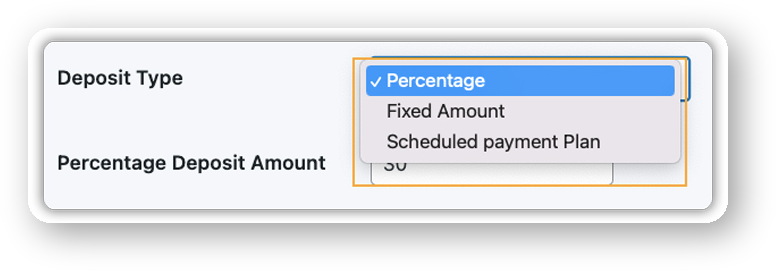
From here, choose whether installments are optional, meaning customers can still pay in full, or mandatory, where everyone follows the plan.
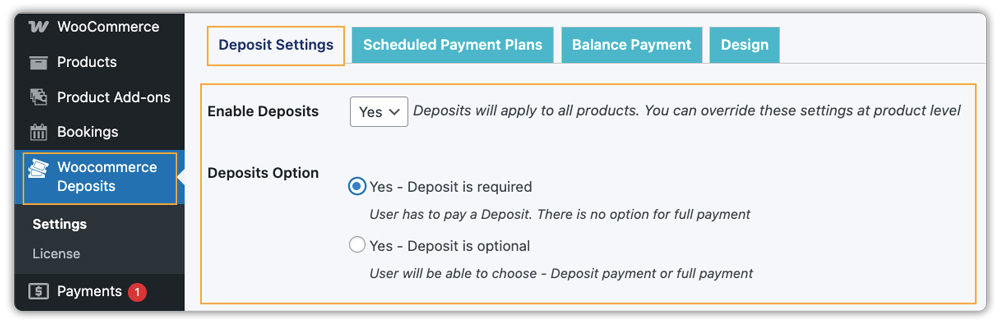
You can also decide at this stage whether to apply the settings globally across all products or limit them to specific ones.
Step 2: Create a Monthly Installment Plan
Navigate to WooCommerce Deposits → Scheduled Payment Plans → Add Payment Plan. From here, you can build a plan that fits your products:
- Set the installment interval – choose Monthly
- Define the number of payments – for example, 3 monthly installments
- Set the deposit amount – a percentage of the total price or a fixed amount collected at checkout
- Add a plan description – e.g., “Pay in 3 equal monthly installments. First payment due today.”
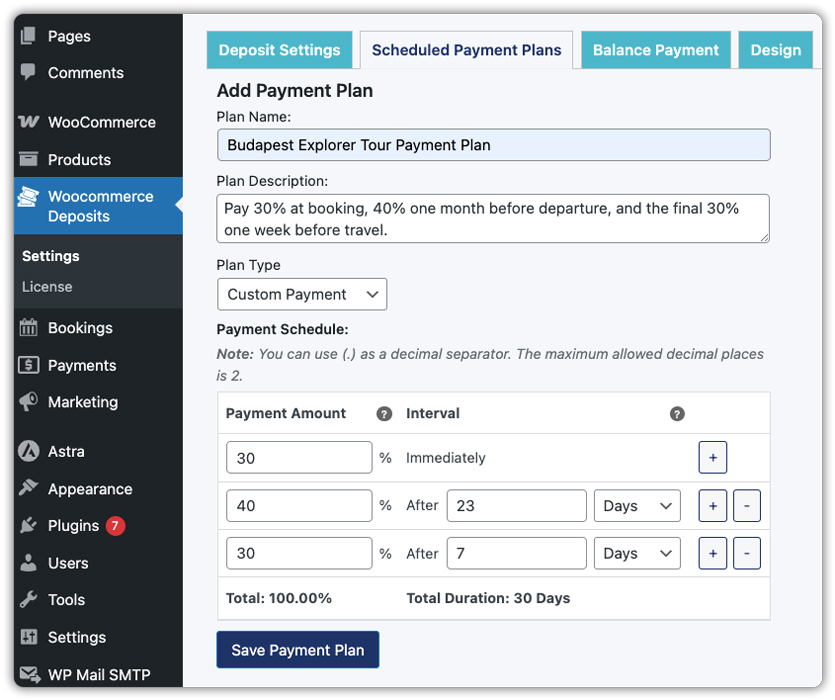
This description shows on your product page so customers know exactly what they’re agreeing to before they buy.
Step 3: Assign the Plan to Products
Once your plan is ready, go to the product you want to apply it to, open the Deposits tab in the Product Data section, and assign the installment plan to that product.
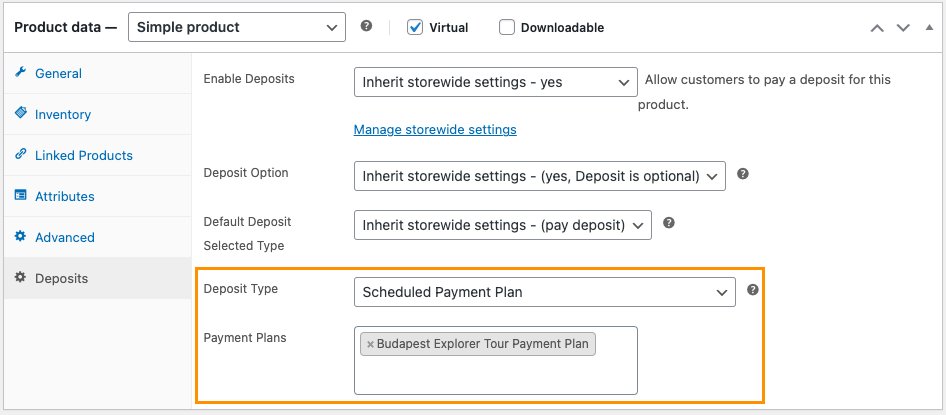
If you want the same plan to apply across your entire store, you can set that from the global deposit settings, which is useful when most of your products follow the same payment structure.
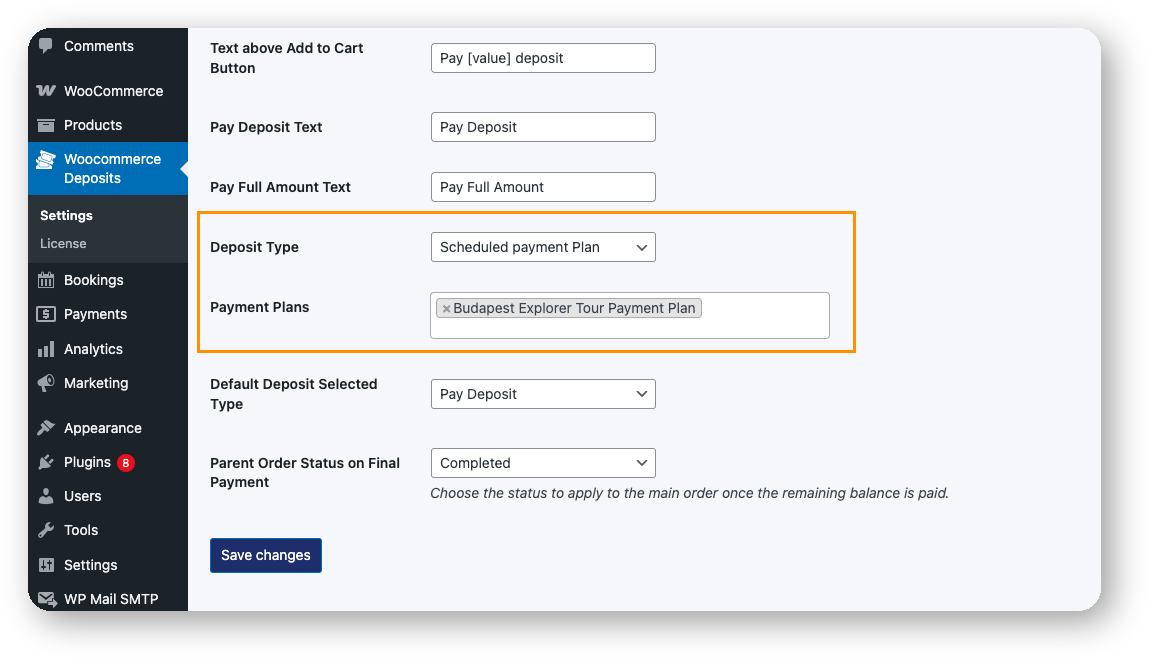
Step 4: Set Up Automated Payment Reminders
Go to the plugin’s reminder settings and configure how many days before the due date the reminder email should go out. You can also customize the email content to match your store’s tone.
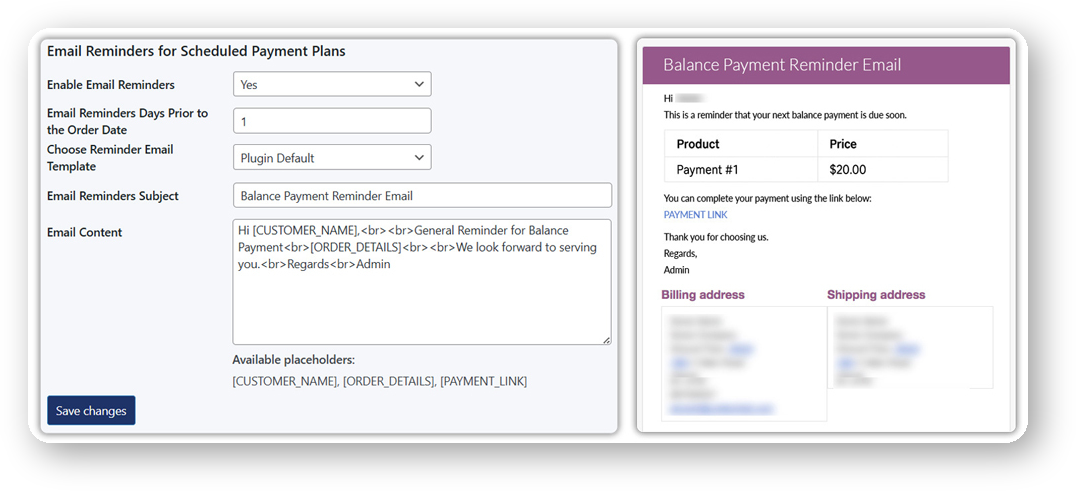
Customers receive an email with the upcoming installment amount and a direct payment link they can use from their WooCommerce account page – no manual follow-up needed on your end.
For a detailed walkthrough of how reminders work, see the WooCommerce Deposits automatic payment reminders guide.
Step 5: Test the Checkout Flow
Before going live, place a test order to verify that the deposit amount shows correctly at checkout, the installment plan is clearly displayed, and the automated reminder is scheduled as expected. Once everything checks out, your WooCommerce payment plan is ready for customers.
Real-World Use Cases for WooCommerce Monthly Installments
Monthly WooCommerce installment payments work across a wide range of store types. For a deeper look at how deposits and payment plans benefit different business models, see the top benefits of using deposits in your WooCommerce store.
- Furniture and home goods – customers pay in 3–4 installments for a sofa, dining set, or custom-built item
- Electronics and gadgets – split the cost of high-value tech purchases over 2–3 months
- Jewelry and accessories – offer flexible WooCommerce deposits on custom or luxury pieces
- Online courses and training programs – let students pay monthly installments instead of a large upfront fee
- Rental businesses – collect a deposit now and schedule balance payments before the rental period ends
- Custom or made-to-order products – require a deposit upfront to confirm the order, with the balance due on delivery
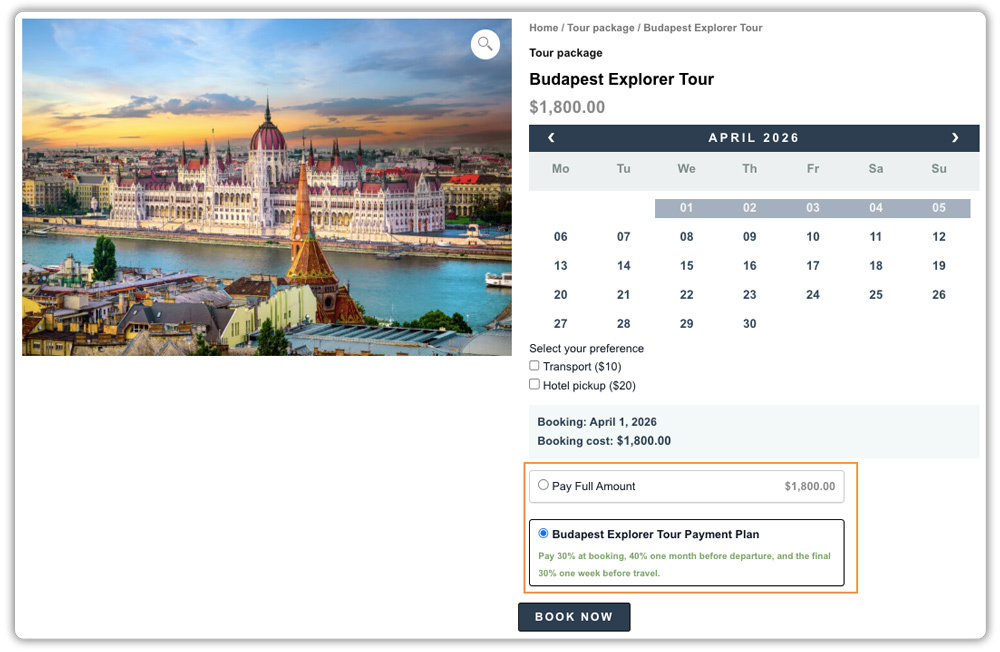
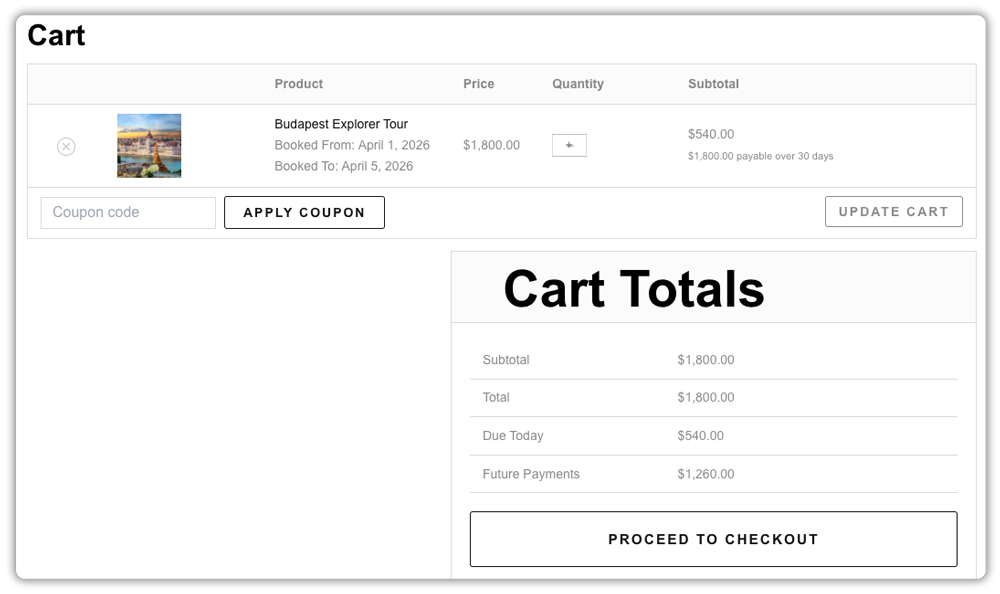
- Travel and tour bookings – Let customers book vacation packages or tours with an upfront payment and pay the remaining amount in monthly installments.
Example Scenario: How a Home Furniture Store Wins More Orders With WooCommerce Payment Plans
Let’s say you run a WooCommerce store selling custom furniture with an average order value above $800, and you’re seeing customers add items to cart but not complete checkout. Here’s what you’re likely dealing with.
Challenges You’re Probably Facing
- Customers leave because the full amount feels too high at once
- You’re losing orders to competitors who offer flexible payments
- Custom orders can’t move forward without full payment, slowing production
- Cash flow is inconsistent because orders come in unpredictably
How PH Deposits for WooCommerce Solves This
The PH Deposits for WooCommerce plugin lets you set up monthly installments directly on each product page. Customers pay a first installment at checkout and the remaining balance is split into scheduled monthly payments with automated reminders sent before each due date.
Results
- Fewer abandoned carts on high-value products
- Custom orders move faster because customers commit at checkout
- Payments arrive on schedule without manual follow-up
- Cash flow becomes more predictable month to month
Once your WooCommerce payment plan is set up, collecting monthly installments becomes part of how your store operates, not something you manage order by order.
Tips for Creating Effective WooCommerce Payment Plans
Setting up WooCommerce payment plans is straightforward, but how you structure them makes a real difference in whether customers use them and whether payments come in on time. These tips will help you get the most out of monthly installments from day one.
- Keep the installment structure simple: Two to three monthly installments is the sweet spot for most products. A complex plan with too many steps makes customers overthink the commitment and adds more touchpoints for you to manage.
- Offer installments only where price is a real barrier: Not every product needs a payment plan. Reserve monthly installments for higher-ticket items where the upfront cost genuinely stops customers from buying. Applying them too broadly can dilute their impact and complicate your checkout for no reason.
- Be transparent about what customers owe and when: Use the plan description field to spell out the exact amounts and due dates, for example, “First payment today, followed by 2 equal monthly payments.” Customers are more likely to follow through when the terms are clear upfront, and you’ll face fewer disputes later.
- Set reminder emails earlier than you think you need to: Sending a reminder 5–7 days before the due date gives customers enough time to arrange payment without feeling rushed. A last-minute reminder the day before often leads to missed payments and unnecessary back-and-forth.
Getting these details right upfront means fewer missed payments, a smoother experience for your customers, and less admin work for you over time.
Conclusion
WooCommerce payment plans with monthly installments are one of the most practical ways to convert customers who want your product but aren’t ready to pay the full amount at once. With the PH Deposits for WooCommerce plugin, you can create flexible installment plans that are automated and easy to manage without needing subscriptions or complex integrations. If you need help getting set up or have questions about configuring your payment plans, reach out to the PluginHive Support Team.
FAQs
Q: What is a monthly installment?
A monthly installment is a fixed payment made once a month toward a total balance. In WooCommerce, the first payment is collected at checkout, and the remaining amounts are scheduled and collected automatically each month until the full amount is paid.
Q: Can payment be made in installments in WooCommerce?
Yes, but not natively. The PH Deposits for WooCommerce plugin adds this functionality — letting you create monthly installment plans, assign them to specific products, and automate payment reminders without needing a subscriptions plugin.
Q: What’s the difference between a WooCommerce deposit and a payment plan?
A deposit is a partial upfront payment with the balance due in one go later. A payment plan splits the total into multiple scheduled payments over time. Deposits suit situations where early commitment matters; payment plans work better when affordability is the barrier. The WooCommerce Deposits vs Payment Plans guide covers this in detail.
Q: Which payment method is best for WooCommerce?
It depends on your store’s needs. WooCommerce supports gateways like Stripe, PayPal, and bank transfer natively. If you sell high-value products, pairing any gateway with a plugin like PH Deposits for WooCommerce lets you offer monthly installments alongside standard checkout which helps reduce cart abandonment and improve conversions.
