



Did you know that 80% of consumers are more likely to buy from brands that offer personalized experiences? Today’s shoppers don’t just want products; they want items that feel made for them. In fact, from engraved gifts to custom apparel, personalization has become a key driver of buying decisions in e-commerce.
Therefore, for WooCommerce store owners, this represents a real opportunity. Fortunately, you don’t need a big budget or complex development to offer it. With the right setup, customers can personalize products directly on your store, leading to higher conversions, larger order values, and stronger loyalty. This guide explains why personalization works and how the PH Product Add-ons for WooCommerce plugin makes it simple to set up.
Table of Contents
- Why Personalized Products Increase Sales in WooCommerce
- How to Offer Personalized Products in WooCommerce
- Real-World Examples of Personalized WooCommerce Products That Drive Conversions
- Best Practices for Pricing Personalized Products in WooCommerce
- Conclusion
- FAQs
Why Personalized Products Increase Sales in WooCommerce
Personalization changes how customers feel about a product, and that emotional connection often drives purchasing decisions more than price or promotions.
- Customers Pay More for Personalized Items: Research by Deloitte shows that 1 in 5 shoppers interested in personalization are willing to pay up to a 20% premium. As a result, something as simple as adding a name can turn a standard $10 product into a higher-value item without hesitation.
- Personalization Reduces Cart Abandonment: When shoppers enter a name, choose a color, or upload a photo, they become emotionally invested in the product, making it harder to leave the cart unfinished.
- It Builds Long-Term Customer Loyalty: A positive experience with a personalized purchase like a custom birthday gift encourages customers to return for future occasions such as anniversaries, holidays, and special events.
- It Creates a Strong Competitive Edge: While many WooCommerce stores compete mainly on price, offering customization gives shoppers a unique reason to choose your store beyond simply being the cheapest option.
- Personalization Drives Measurable Revenue Growth: According to McKinsey, companies that excel at personalization generate up to 40% more revenue from those efforts, proving that even small custom options like a gift note or engraving field can make a meaningful difference.
When a product feels personal, it feels more valuable, and customers are willing to pay for that added meaning, which is why personalization remains one of the highest-return strategies in ecommerce.
How to Offer Personalized Products in WooCommerce
WooCommerce doesn’t include built-in tools for product personalization. That’s where the PH Product Add-ons for WooCommerce plugin comes in; it lets you add custom fields to any product page so customers can share exactly what they want before checkout.
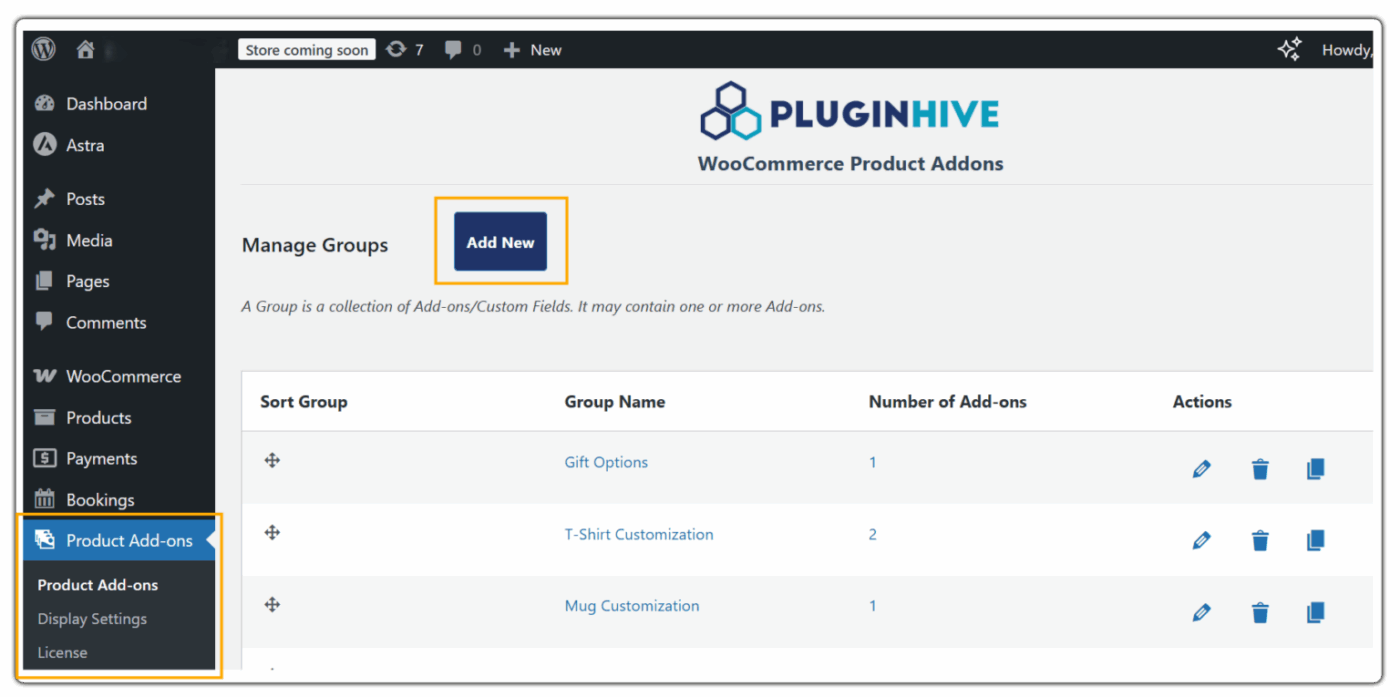
1. Create a New Addon Group: Go to WordPress Admin Dashboard → Product Add-Ons Plugin → Add New. Name your group based on what you’re selling.
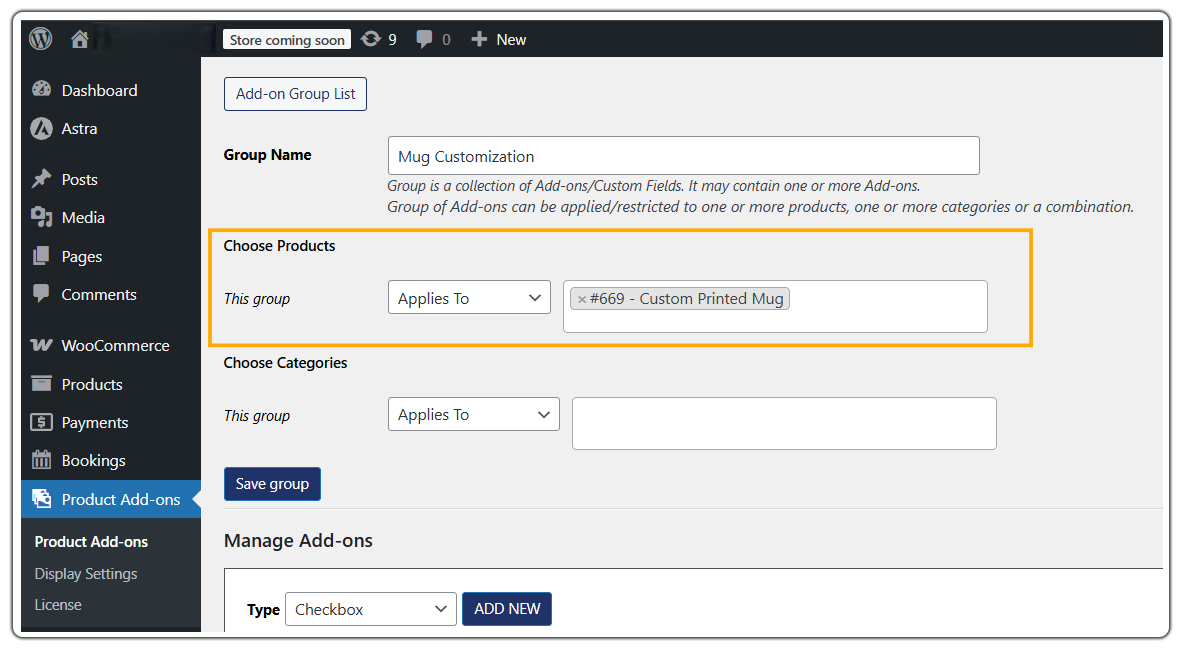
2. Assign it to Products or Categories: After that, select which products should display the custom fields. For instance, you can apply them to a single product or an entire category.
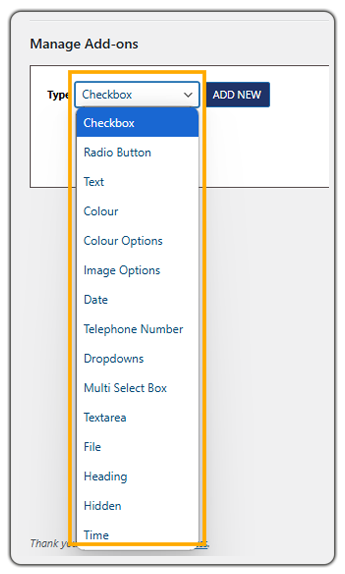
4. Add New Fields: Now, add the fields customers need. Additionally, set clear labels and mark required fields where necessary.
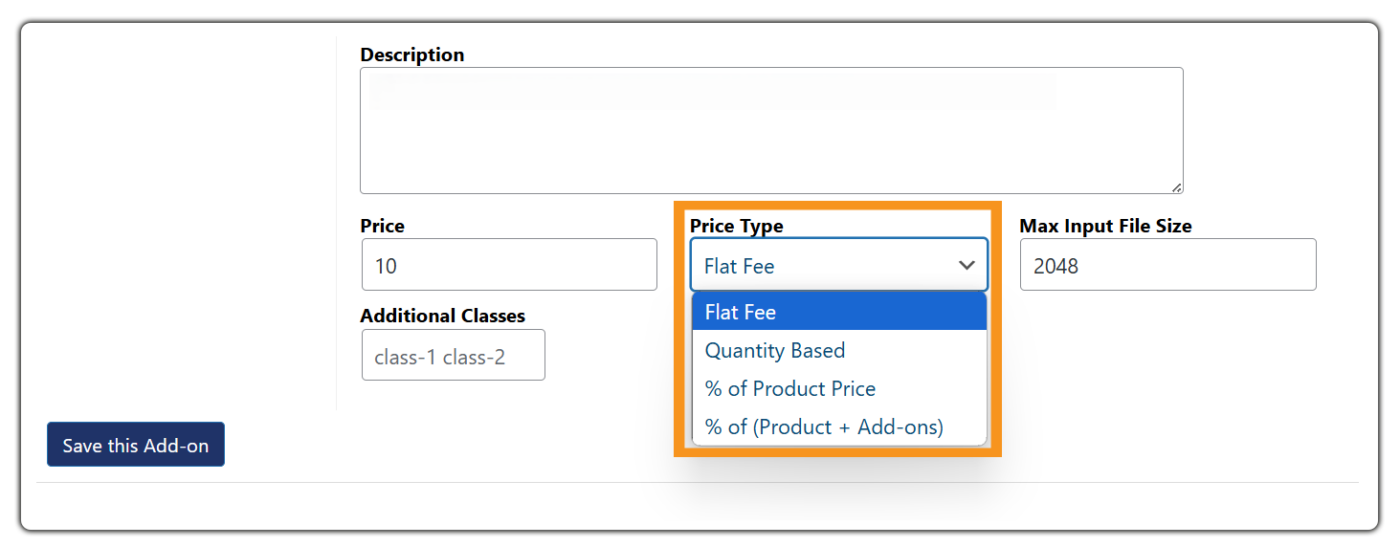
5. Set Pricing: Then, assign pricing to any option, whether it’s a flat fee, a per-character charge, or a percentage of the base product price. Meanwhile, the cart total updates in real time as customers make their selections.
6. Use Conditional Logic (Optional): If you want to keep your product pages clean, conditional logic helps show or hide fields dynamically. For example, when a customer selects “Add Text,” a text field appears; alternatively, choosing “Upload a Design” reveals a file upload field instead.
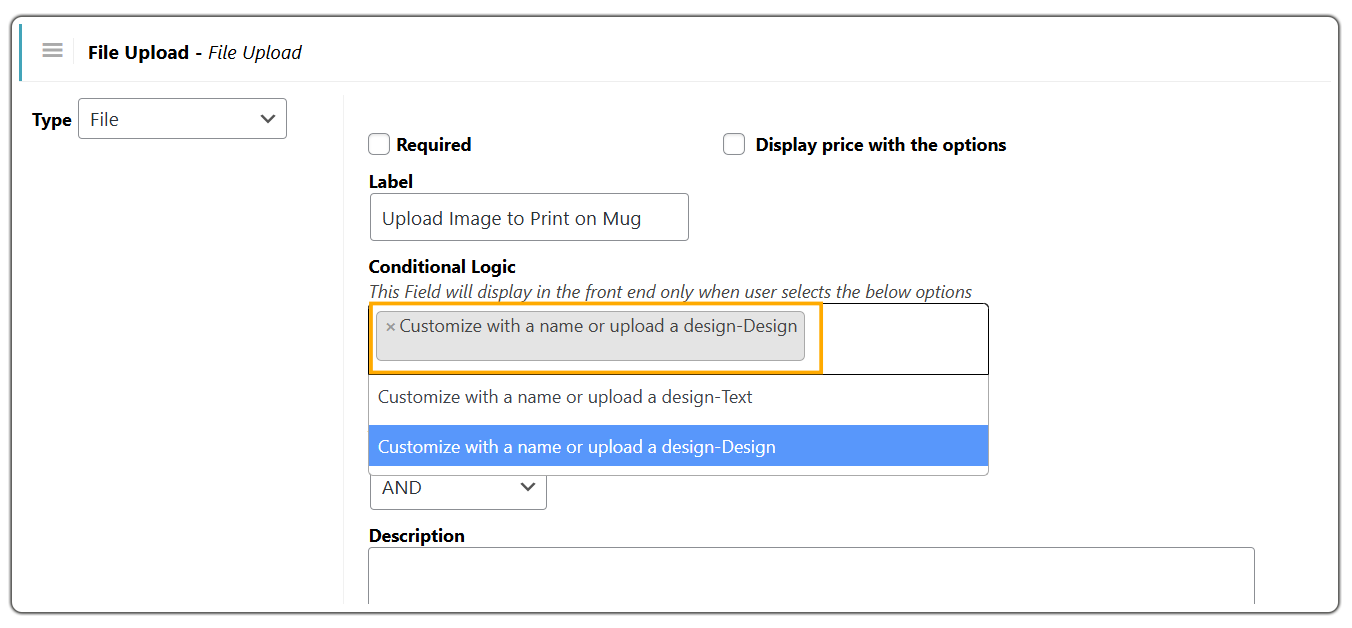
7. Save and Review: Preview the product page to confirm all fields appear correctly, then save.
Consider a store selling custom-printed mugs. At first, the customer sees a simple prompt: “Customize with a name or upload a design.” Next, they select either “Text (+$3.00)” or “Design (+$5.00).” Immediately, the relevant field appears, and at the same time, the price updates live. Because the experience feels clear and responsive, the customer already feels invested before clicking Add to Cart.
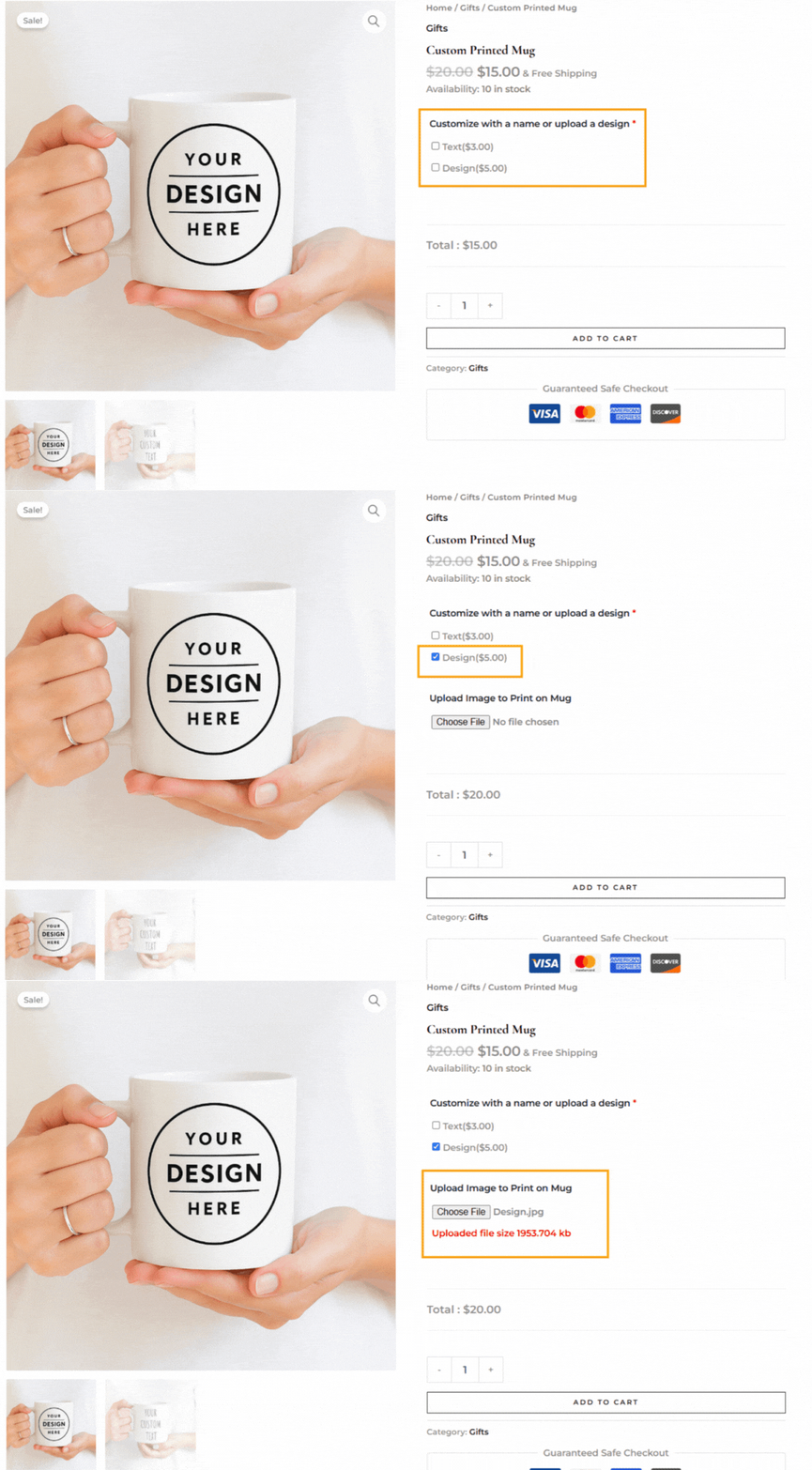
Need help with configuration? For a step-by-step walkthrough, refer to the setup guide for PH WooCommerce Product Addons. It covers everything you need to get started.
Real-World Examples of Personalized WooCommerce Products That Drive Conversions
In fact, personalization works across almost every product category. With the PH Product Add-ons for WooCommerce plugin, you can offer it for any product type without complex setups.
| Product Type | Personalization Examples | Why It Converts |
|---|---|---|
| Gifts & Keepsakes | Name engraving, custom messages, photo prints | High emotional value encourages customers to pay more for meaningful items |
| Apparel & Accessories | Custom text, logo upload, color or size options | Shoppers enjoy expressing identity and style through personalized clothing |
| Food & Beverage | Custom packaging, dietary selections, flavor choices | Personal touches improve presentation and make products feel premium |
| Home Décor | Custom dimensions, material choices, personalized prints | Buyers want products tailored to their space and aesthetic preferences |
| Stationery & Print | Names, event details, font selection | Personalization makes these products functional and unique for each customer |
| B2B & Corporate | Logo uploads, bulk input fields, custom specifications | Businesses require branded products that match their exact requirements |
| Subscription Boxes | Preference surveys, product selections, and delivery frequency | Customized experiences increase retention and recurring revenue |
When applied thoughtfully, personalization transforms everyday products into experiences customers feel connected to, which is what drives conversions and long-term engagement.
Best Practices for Selling Personalized Products in WooCommerce
Selling personalized products works best when the experience feels simple, clear, and easy for customers to follow. A few smart practices can help you offer customization without adding confusion or extra steps.
- Add Only the Fields You Truly Need: Every extra field adds friction, so include only the information required to fulfill the order. Fewer, well-chosen options usually convert better than long forms.
- Use Visual Choices Whenever Possible: Color swatches, image selections, or dropdowns make decisions faster than long text inputs, improving the overall shopping experience.
- Show Delivery Dates Upfront: Personalized items often take longer to prepare, so displaying estimated delivery timelines using the Estimated Delivery Date Plugin for WooCommerce by PluginHive helps set expectations and reduces support queries.
- Offer Flexible Shipping Options for Custom Orders: Since personalized products may vary in size or handling time, using PluginHive’s Shipping Plugin for WooCommerce helps display accurate live rates and delivery choices at checkout.
When personalization is structured thoughtfully, customers feel more confident making choices and completing their purchase. Keeping things clear and streamlined helps turn custom options into consistent sales growth.
Conclusion
As a result, personalized products give customers a reason to choose your store, spend more, and come back again. When shoppers can add a name, pick a color, upload an image, or write a custom message, the product stops feeling generic and starts feeling made for them, and that’s what drives conversions and higher order values in WooCommerce.
With the PH Product Add-ons for WooCommerce plugin, you can offer meaningful customization on any product without complex development or a big budget. Start simple, keep your fields clear, and build from there. If you need help setting up this in your WooCommerce store, the PluginHive support team is ready to assist you with configuration and guidance.
FAQs
- Does personalization increase sales in WooCommerce?
Yes. 76% of consumers are more likely to buy from stores that offer personalized experiences, and it can increase sales by 5–25% on average. Even simple options like adding a name or choosing a color can improve conversions and order value. - What is the easiest way to add personalized product options in WooCommerce?
Use the PH Product Add-ons for WooCommerce plugin. It lets you add custom fields, text inputs, dropdowns, file uploads, and color swatches to any product page without any coding. - Can I sell custom products in WooCommerce without creating separate listings?
Yes. With the PH Product Add-ons for WooCommerce plugin, you add custom fields to a single product, and customers fill in their preferences, size, color, text, or image at the time of purchase. One product listing handles all the variations. - Can I charge extra for personalized options in WooCommerce?
Yes. Each field can carry its own price, flat fee, per-character charge, or a percentage of the product price. The total updates live on the page as customers make their selections.
