


Running an online print shop isn’t the same as selling off-the-shelf products. Every order is different: a customer wants their logo on 250 business cards, another wants a photo printed on canvas, and a third wants a t-shirt in a specific size with their own artwork on the front. Default WooCommerce product pages aren’t built to collect that kind of detail.
In this guide, you’ll learn what a WooCommerce print shop actually needs, the challenges most store owners run into, and exactly how to set up your store to accept custom print orders including file uploads, pricing options, and product variations – without touching a single line of code.
On This Page
- What Is a WooCommerce Print Shop?
- Popular Print Products You Can Sell with WooCommerce
- Common Challenges When Accepting Print Orders Online in WooCommerce
- How to Accept Print Orders Online with WooCommerce
- Best Practices for Running a WooCommerce Print Shop
- Conclusion
- FAQs
What Is a WooCommerce Print Shop?
A WooCommerce print shop is simply a WooCommerce store that takes orders for printed products and produces or fulfills them based on details the customer provides at checkout. This could be a screen printing business, a stationery shop, a photo lab, or a promotional merchandise store
For example, some print shops operate entirely online, while others have a physical location and use their WooCommerce store to accept web-to-print orders alongside walk-in customers. Either way, the core requirement is the same: customers need a way to specify exactly what they want printed, and store owners need that information organized clearly for production.
Popular Print Products You Can Sell with WooCommerce
Almost any product that involves customization or printing on demand can be sold through a WooCommerce print shop. Some of the most common categories include:
- Business cards and stationery – with options for paper finish, quantity, and single or double-sided printing
- Custom t-shirts and apparel – with size, color, and text or a logo placement
- Photo prints and canvas wraps – based on customer-uploaded images
- Signs, banners, and vinyl stickers – with size and material choices
- Personalized gifts – mugs, tote bags, phone cases, and similar items with custom text or images
- Letterheads and marketing materials – with template selection or custom artwork uploads
Regardless of the product you sell, each one needs the same basic building blocks: a way to collect customer input, price those options correctly, and keep order details organized for fulfillment.
Common Challenges When Accepting Print Orders Online in WooCommerce
Out of the box, WooCommerce is built for straightforward products with fixed prices and simple variations like size or color. Print shops usually need more flexibility than that, which creates a few recurring problems:
- No way to collect custom details: WooCommerce doesn’t include a built-in way to let customers upload artwork, enter custom text, or choose print-specific options like finish or turnaround time.
- Rigid, one-size pricing: Print costs often change based on quantity, size, paper type, or add-on services – but standard product pricing doesn’t flex to match.
- Cluttered product pages: Cramming every possible print option into separate product listings makes the catalog hard to browse and hard to manage.
- Order details get lost: Without a structured way to capture customization inputs, custom instructions often end up buried in order notes instead of clearly attached to the order.
- No conditional options: Many print products need certain fields to appear only when relevant – for example, showing an artwork upload field only if the customer picks “double-sided printing.” Standard WooCommerce products can’t do this.
Fortunately, these gaps can be solved with the right product customization tools and it’s where product customization tools come in.
How to Accept Print Orders Online with WooCommerce
Before you begin, think about what information you need from your customers, such as what they want printed, the quantity, and any special instructions. Once that’s clear, the PH Product Add-ons for WooCommerce plugin lets you easily add fields like text boxes, dropdowns, file uploads, and color pickers, so customers can provide everything you need before checkout.
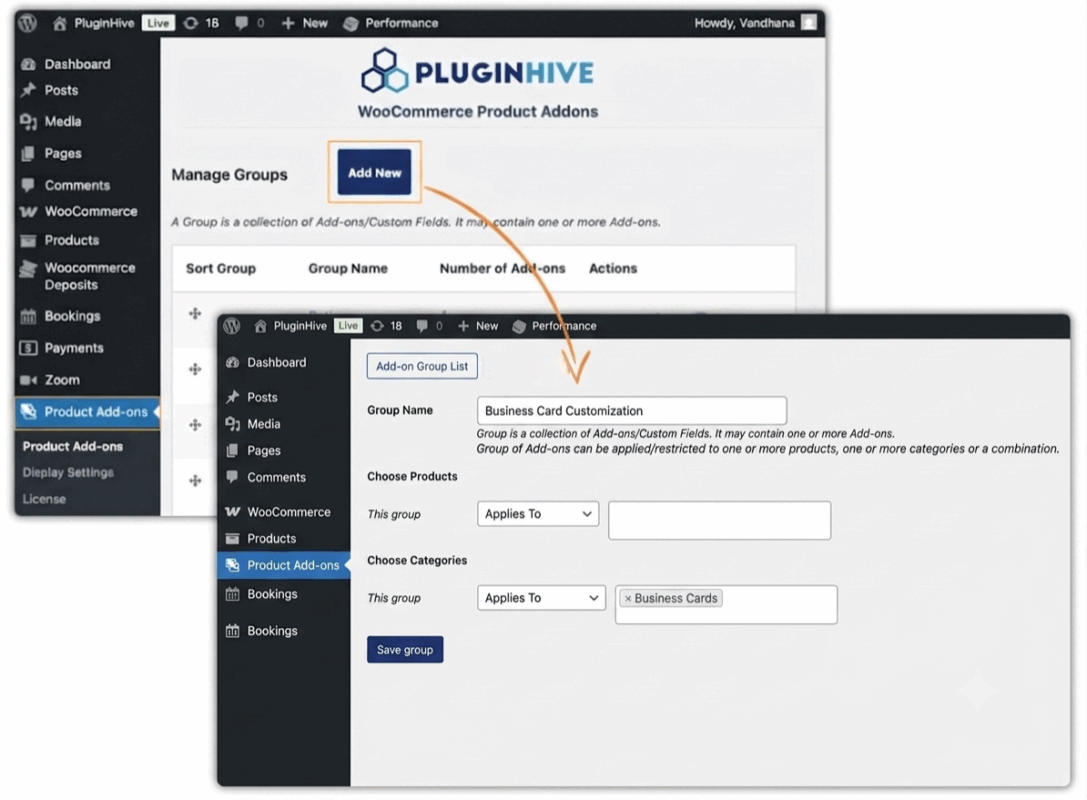
1. Create a Group and Assign It to Your Products
First, create a group and give it a name, like “Business Card Options” or “Canvas Print Options.” This keeps things organized and stops you from repeating the same setup for every product. Then assign that group to a single product, a few similar ones, or a whole category.
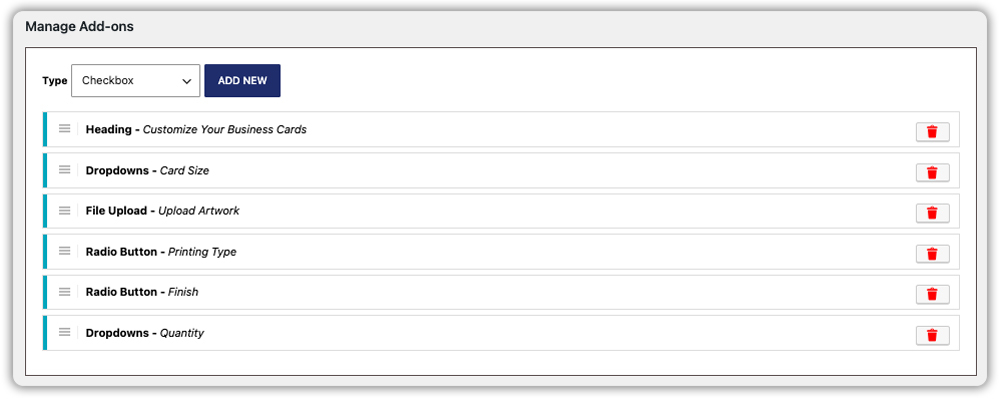
2. Add the Fields Your Product Needs
This is where you decide what customers actually need to tell you. A few common ones:
| Field Type | Best For |
|---|---|
| Dropdown | Print size, quantity tiers, paper type |
| File Upload | Customer photos, logos, or artwork |
| Radio Buttons | Finish (matte/glossy), single- vs. double-sided printing |
| Color Options | Ink color, product color choices |
| Text / Text Area | Custom text, names, or short print messages |
| Checkbox | Optional extras like rush printing or gift wrapping |
| Heading | On-page notes, like file size or format |
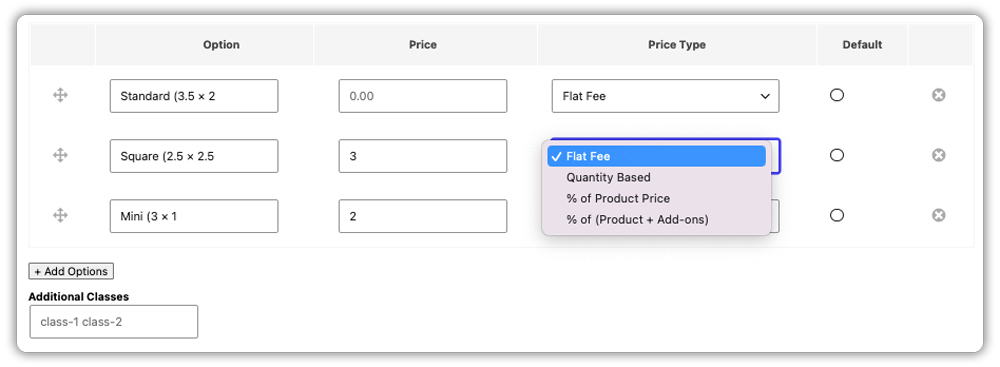
3. Set Pricing for Each Choice
Match the pricing method to the cost behind it – a flat fee for one-off services like rush processing, per-unit pricing for anything that scales with quantity like bulk business cards, and per-character pricing for custom text printed on a product, like a name or short message. The total then updates automatically as customers make their selections.
Example Scenario: Custom Business Card
Let’s say you’re selling custom business cards. Here’s how you could set up the product:
- Card Size – Dropdown (Standard, Square, Mini)
- Upload Artwork – Required file upload for the customer’s logo or design
- Printing Type – Radio buttons (Single-sided or Double-sided)
- Finish – Radio buttons (Matte or Glossy)
- Rounded Corners Optional checkbox with an additional charge
- Express Printing – Optional checkbox for faster turnaround
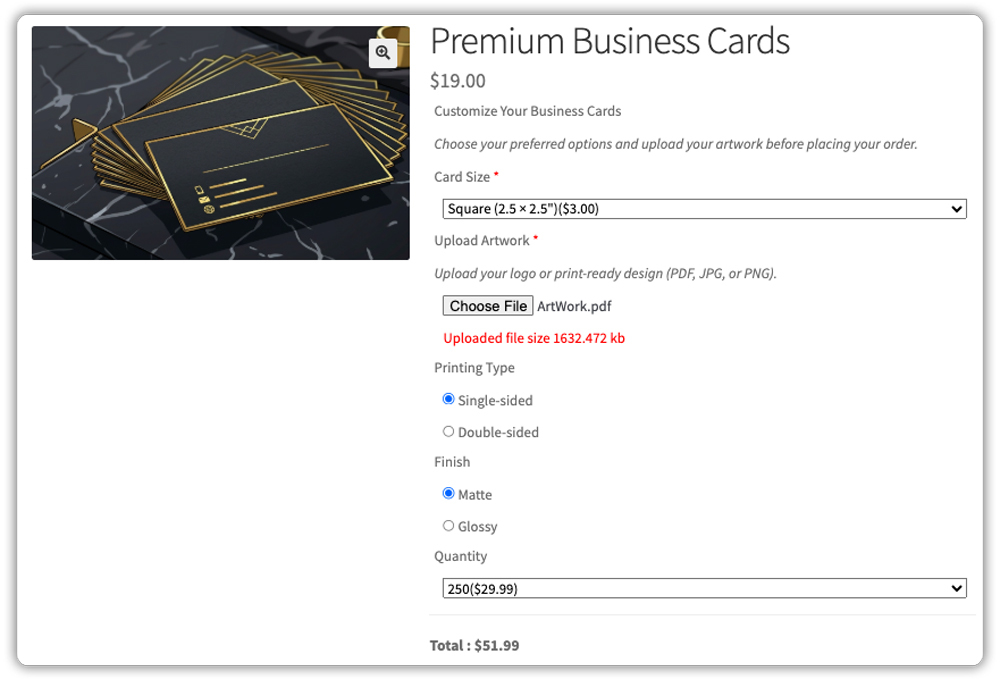
This setup collects everything you need to print the order while keeping the product page clean and easy to navigate. Customers only see the options they need, making the ordering process quick and straightforward.
Best Practices for Running a WooCommerce Print Shop
Once your product pages are set up, a few additional best practices can make a real difference in how smoothly orders move from checkout to fulfillment.
- Group fields by product type: Don’t reuse one giant add-on group for every product. Keep t-shirt options separate from canvas print options so customers only see fields relevant to what they’re buying.
- Use conditional logic wherever possible: Only show a file upload field when a customer actually needs to upload something, and only show a color dropdown when it applies. This keeps product pages clean and reduces customer confusion.
- Show visual options where it helps: For products with visible variations – like frame finishes, ink colors, or template designs image-based add-ons let customers see exactly what they’re choosing instead of guessing from a text label.
- Price add-ons realistically. Match your pricing method to the actual cost driver – flat fee for a rush service, per-character pricing for engraving, or quantity-based pricing for bulk print runs.
- Make critical fields mandatory. If you can’t fulfill an order without an artwork upload or a required field, mark it mandatory so customers can’t check out without providing it.
These small adjustments make a noticeable difference in how smoothly your WooCommerce print shop handles day-to-day orders, especially as your product catalog grows.
Conclusion
Ultimately, a successful WooCommerce print shop comes down to giving customers a clear way to specify what they want printed while giving yourself a clean, organized way to receive and price those orders. With PH Product Add-ons for WooCommerce, you can offer business cards, custom apparel, photo prints, and more all without needing custom development work. If you’d like help setting this up for your specific print products, reach out to PluginHive Support.
FAQs
Q: Is WooCommerce suitable for a small online print shop?
Absolutely. WooCommerce is a flexible and scalable platform that works well for both small print businesses and growing print shops. With the right plugins, you can easily manage custom orders, pricing, and customer uploads from a single store.
Q: Can I create a WooCommerce print shop without coding?
Yes. With WooCommerce and a product customization plugin like PH Product Add-ons for WooCommerce, you can create a print shop that accepts custom orders, artwork uploads, and personalized options without writing any code.
Q: How can customers upload artwork in a WooCommerce print shop?
You can use a File Upload field to let customers upload logos, photos, PDFs, or other print-ready files directly from the product page. This keeps all the files attached to the order, making it easier to process print jobs.
