


When you want to let customers personalize products in WooCommerce – whether that’s adding custom text, uploading artwork, selecting options, or choosing paid extras you’ll likely come across two popular plugins: PH Product Add-ons for WooCommerce by PluginHive and Product Add-Ons by Woo, the official WooCommerce extension.
Both plugins let you add custom product options without writing code, but they take different approaches to customization, store management, and long-term flexibility. In this comparison, we’ll look at their features, ease of use, pricing, support, and overall value to help you decide which one best fits your store.
On This Page
- PH Product Add-ons vs Product Add-Ons for WooCommerce: Overview
- WooCommerce Product Add-ons Plugin Feature Comparison: PluginHive vs Woo
- Ease of Setup & User Experience
- Pricing & Value Comparison
- Support & Integrations
- Final Verdict
PH Product Add-ons vs WooCommerce Product Add-Ons: Overview
PH Product Add-ons for WooCommerce by PluginHive
This plugin gives store owners everything needed to build rich, fully personalized product pages:
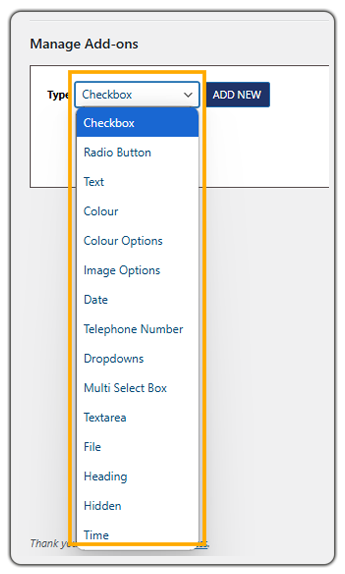
- 15 Field Types: Checkbox, Radio Button, Text, Colour, Colour Options, Image Options, Date, Telephone Number, Dropdowns, Multi-Select Box, Textarea, File Upload, Heading, Hidden, and Time.
- Reusable Addon Groups: Create a set of fields once, duplicate it in a single click, and assign it to individual products or entire categories at once, making it fast to roll out consistent customization across a growing catalog.
- Native Conditional Logic: Fields can dynamically appear or hide based on a customer’s earlier selection, with no extra plugin needed.
- Customer Rating: Rated 4.85/5 based on customer reviews on the PluginHive website.
Product Add-Ons for WooCommerce (Official Extension)
Product Add-Ons by Woo is the official WooCommerce extension for adding extra product options and customization fields.
- 9 Field Types: Covers only the basics – dropdowns, checkboxes, text fields, file uploads.
- Global or Per-Product Application: Add-ons can be applied across the catalog or to individual products.
- No Conditional Logic: Woo’s own documentation recommends purchasing a separate Gravity Forms license plus the Gravity Forms Product Add-Ons extension to get that functionality.
- Customer Rating: Rated 3.4/5 on the WooCommerce marketplace.
WooCommerce Product Add-ons Plugin Feature Comparison: PluginHive vs WooCommerce
Both plugins let you add custom fields to WooCommerce products, but the depth of what they offer differs significantly. Here’s how they stack up, feature by feature.
| Feature | PH Product Add-ons for WooCommerce | Product Add-Ons for WooCommerce |
|---|---|---|
| Number of Add-on Field Types | 15 | 9 |
| Built-in Conditional Logic | Yes, native | No – requires buying Gravity Forms separately |
| Global Add-on Groups (Bulk Apply) | Yes | Yes |
| Per-Product Add-ons | Yes | Yes |
| Apply by Product Category | Yes | Yes |
| One-Click Add-on Group Duplication | Yes | No |
| Pricing: Flat Fee | Yes | Yes |
| Pricing: Quantity-Based | Yes | Yes |
| Pricing: Percentage of Product Price | Yes | Yes |
| Pricing: Percentage of Product + Other Add-ons | Yes | No |
| Pricing: Per-Character Pricing | Yes | No |
| Restrict File Upload Types (JPG/PNG/PDF, etc.) | Yes | No |
| Restrict Special Characters in Text Fields | Yes | Not offered |
| Custom Placeholder Text for Dropdowns | Yes | Not offered |
| Time Picker Field | Yes | No – only a Date Picker is offered, no separate Time field |
| WPML Multilingual Support | Yes | Not offered |
| Multi-Currency (WOOCS) Support | Yes | Not offered |
| HPOS Support | Yes | Yes |
| Cart & Checkout Blocks Compatible | Yes | Yes |
| WooCommerce Bookings Compatibility | Yes, native | Yes |
| Demo Available | Yes | No |
PH Product Add-ons for WooCommerce covers more ground natively – more field types, built-in conditional logic, per-character pricing, and file-type restrictions – all of which the official extension either doesn’t offer or requires an additional paid plugin to achieve.
Ease of Setup & User Experience
Feature lists only tell half the story – what actually matters is how easy each plugin is to configure, and whether it works the way store owners expect right out of the box. Here’s how the two compare in practice.
PH Product Add-ons for WooCommerce by PluginHive
The plugin has clear navigation for creating and managing Product Add-on Groups, making it easy for store owners to set up custom fields without digging through multiple menus.
From WooCommerce → Product Add-ons, you can create and manage add-on groups from a single screen.
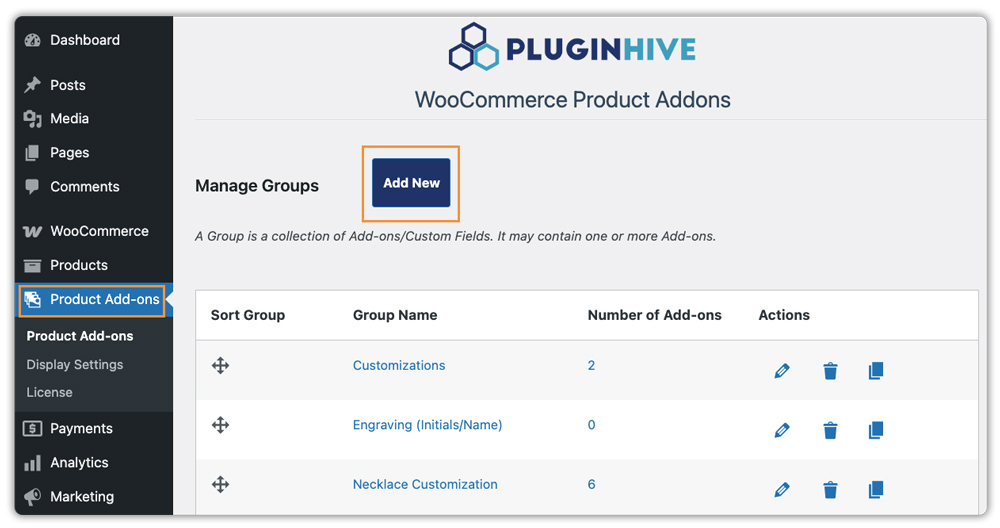
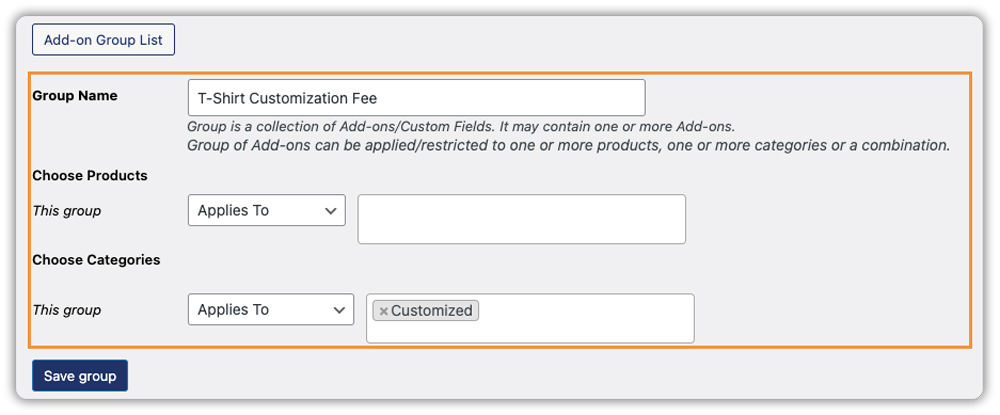
Once created, each group can be assigned to specific products, entire categories, or your whole store, making it easy to reuse the same customization options across multiple products.
Inside a group, you add fields from any of the 15 available types, each with its own configuration panel – required/optional toggles, price display, and conditional logic, so a field only shows up once a customer makes an earlier, related selection (e.g., wrapping-paper checkboxes appearing only after “Gift Wrapping” is chosen).
On the storefront, this shows up as a clean product page where prices update live as customers make selections – a $20 T-shirt with custom text and gift wrapping comes to $33.50 automatically, no manual calculation needed.

That same breakdown carries through to the cart, checkout, and order confirmation, so the customer sees exactly what they ordered.

On the backend, the same details show up directly on the WooCommerce Orders page, so store owners can see each customer’s selections at a glance, without extra digging.

The step-by-step setup guide walks through every field type with screenshots, making the plugin approachable even for non-technical store owners.
Product Add-Ons for WooCommerce (Official)
Setup is split across two screens depending on how widely an add-on needs to apply.
For add-ons used across multiple products, store owners go to Products → Add-Ons and create a Global Add-on – naming it, choosing a field type (dropdown, checkbox, text field, or file upload), and setting its pricing. Once saved, it can be applied to individual products, categories, or the entire catalog from the same screen.
For single-product add-ons, setup happens directly on that product’s edit screen, in a dedicated “Add-Ons” tab. Fields are added one at a time with the same basic settings – title, description, pricing type – but scoped only to that product.
Each field type has its own options: dropdowns let you set individual choices with a price attached to each, checkboxes can add a flat fee or percentage, and file uploads let customers attach an image or document, though with no control over file type or size.
A few rough edges show up once the store is live. On most themes besides Woo’s own Storefront, add-ons appear below the Add to Cart button, and moving them requires a theme template override rather than a plugin setting. Pricing display works the same way – only flat-fee prices show by default on cart and checkout pages, while quantity-based and percentage-based prices need a custom code filter to appear.
In both cases, matching what a store owner would expect out of the box means going beyond the plugin’s settings and into theme files or code.
Pricing & Value Comparison
Price alone rarely tells the full story – what matters is how much value a store owner gets for what they pay. Here’s how PH Product Add-ons for WooCommerce and the Product Add-Ons for WooCommerce compare at the same price point.
| Plugin | Price | Rating | What You Get |
|---|---|---|---|
| PH Product Add-ons for WooCommerce | $79/year | 4.85/5 | 15 field types, native conditional logic, per-character pricing, file-type restrictions, WPML & multi-currency support, 30-day money-back guarantee |
| Product Add-Ons for WooCommerce | $79/year | 3.4/5 | 9 field types, no conditional logic (Gravity Forms required separately), 30-day money-back guarantee |
At the same $79/year price, PH Product Add-ons simply includes more. Getting equivalent conditional-logic functionality on the official extension means paying for and maintaining an entirely separate plugin, Gravity Forms, plus its Product Add-Ons integration, which adds cost and complexity that PH Product Add-ons avoids by building it in from the start.
Support & Integrations
A plugin’s features are only part of the picture. The quality of support, compatibility with other tools, and long-term maintenance can have just as much impact on your WooCommerce store.
PH Product Add-ons by PluginHive
Support: PluginHive offers dedicated technical support through tickets, along with one-on-one Zoom or Google Meet sessions for more complex setup or configuration questions. The team also assists with customization requests when stores have requirements beyond the default features.
Integrations: Works seamlessly with other PluginHive solutions, including Bookings and Appointments for WooCommerce, PH Deposits for WooCommerce, and WooCommerce Shipping plugins, making it easy to build a connected workflow without compatibility concerns.
Long-Term Experience: Regular feature updates, responsive support, and compatibility with the PluginHive ecosystem make it a good fit for businesses planning to expand their store over time.
Product Add-Ons for WooCommerce
Support: Support is provided through Woo’s standard help channels. According to Woo’s support policy, customization requests, template modifications, and extended functionality are outside the scope of standard support and typically require a developer or agency.
Integrations: Integrates well with WooCommerce extensions such as WooCommerce Subscriptions and WooCommerce Bookings, making it suitable for stores already invested in the Woo ecosystem.
Long-Term Experience: The extension is regularly maintained by Woo, but stores with more specialized customization requirements may need additional extensions or custom development as their needs evolve.
Final Verdict
Both plugins do the same job at the same price, but only one gives you everything without needing a second plugin to fill the gaps. For WooCommerce stores that want a complete, ready-to-use product customization solution from day one, PH Product Add-ons for WooCommerce is the clear choice.
If you’ve decided to go with PH Product Add-ons for WooCommerce, you can reach out to the PluginHive support team – they’ll help you get set up and answer any questions along the way.
