


Selling digital products has become one of the most reliable ways to grow an online business, whether you offer eBooks, templates, music, digital art, online courses, or software. WooCommerce provides a solid foundation for delivering these digital products, but many store owners struggle to offer the level of personalization and flexibility customers expect today. A basic product page often isn’t enough to showcase different versions, formats, licenses, or value-added services.
Product addons address this challenge by allowing store owners to add customizable options directly to digital products. This improves the buying experience, increases customer satisfaction, and creates opportunities for upsells. In this article, we’ll look at the role addons play in improving digital product sales and the way solutions like PH Product Addons for WooCommerce help store owners create a more flexible, seamless, and conversion-focused shopping experience.
Table of Contents
- The Importance of Product Addons for WooCommerce Digital Products
- Popular Use Cases of Add-ons for Digital Products
- How to Enhance Your Digital Products Using Add-ons in WooCommerce
- Tips to Optimize WooCommerce Digital Product Addons for Higher Conversions
- Conclusion
- FAQs
The Importance of Product Addons for WooCommerce Digital Products
Product addons play a key role in helping WooCommerce store owners offer more value, flexibility, and personalization when selling digital products. Instead of providing a single version of a file or download, addons allow you to present multiple options and upgrades directly on the product page, giving customers the freedom to choose exactly what they need.
Key Benefits:
| Benefit | Description | Impact on Digital Sales |
|---|---|---|
| Increased Average Order Value (AOV) | You can offer paid upgrades, extended support, or complementary resources as simple add-on options. | Directly increases revenue per transaction. |
| Personalization | Allows customers to tailor the digital product to their needs, such as choosing formats or license types. | Reduces friction and improves customer satisfaction. |
| Bundling & Upselling | Creates seamless, contextual upsells that match the main digital product. | More effective than sending customers to separate product pages. |
| Data Collection | Add fields to gather important details before checkout, such as names, notes, or reference files. | Speeds up fulfillment and reduces manual follow-up steps. |
With PH Product Addons for WooCommerce, even a simple digital product can become a fully customizable product, enhancing your store’s appeal and competitiveness
Popular Use Cases of Add-ons for Digital Products
Product Add-ons make it easy to offer extra choices and small upgrades directly on the product page. This helps customers get exactly what they need while giving you more ways to increase your Average Order Value (AOV).
Here are some simple and effective ways digital product sellers use WooCommerce Product Addons:
- Software, Plugins & Digital Tools: Offer different license levels, extended support, installation services, or feature upgrades.
- Online Courses & Learning Materials: Include optional course bundles, 1-on-1 coaching, bonus worksheets, or certificates.
- Graphic Templates & Design Assets: Add source files, license types, customization options, or color/style variations.
- Music, Beats & Audio Files: Offer multiple licenses, high-quality formats, stems/project files, or mixing/mastering services.
The PH Product Add-ons for WooCommerce plugin makes these options easy to offer without creating separate products. Next, we’ll see how this plugin helps you bring these use cases to life.
How to Enhance Your Digital Products Using Add-ons in WooCommerce
Enhancing digital products is simple with the right add-ons. WooCommerce alone offers basic options, but PH Product Addons for WooCommerce allows you to create flexible, customised product pages that match exactly what your customers want. This approach works for digital products that are not instantly downloadable, such as items that are emailed or delivered manually after customization.
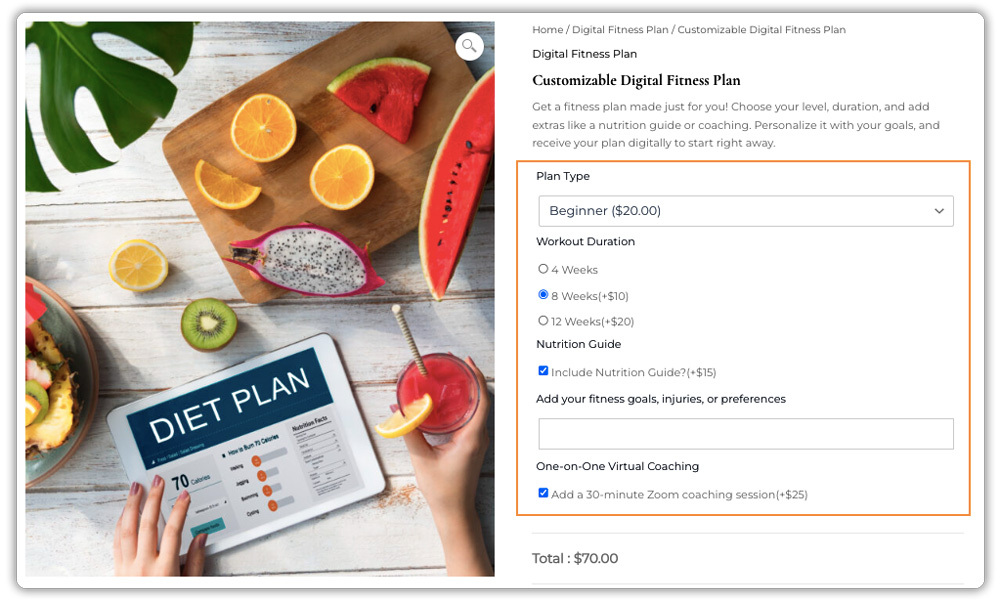
Adding Useful Options to a Digital Product
Here’s a simple implementation workflow using the WooCommerce Product Addons plugin:
Note: Before you begin, make sure the Product Add-Ons plugin is installed, activated, and properly configured. You can follow the detailed setup guide here: Set up WooCommerce Product Add-Ons.
- Choose a Digital Product: Select the product you want to enhance. This could be a music track, design file, template, eBook, or software tool.
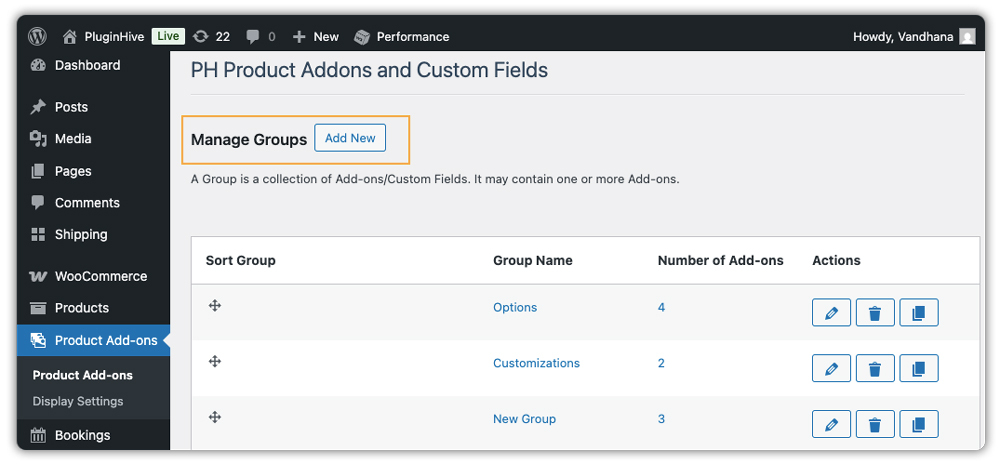
- Create an Addon Group: Go to Product Addons → Add New Group in your WordPress dashboard.
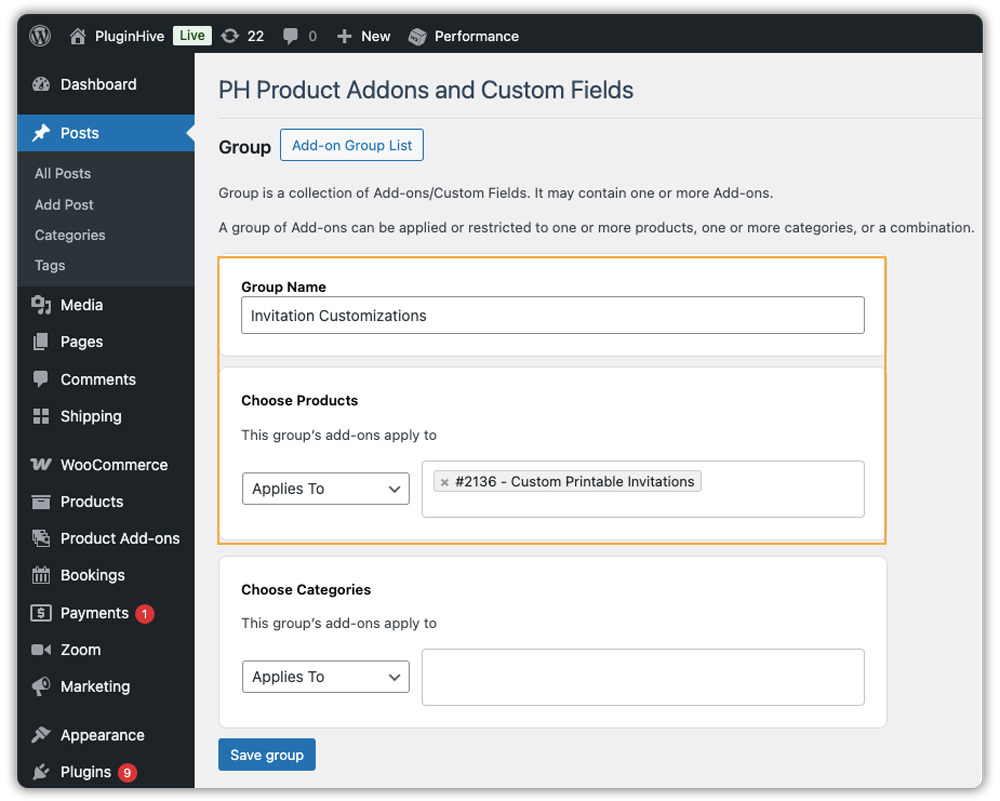
- Assign the Addon Group: Apply it to specific products or entire categories. If not assigned, it defaults to all products.
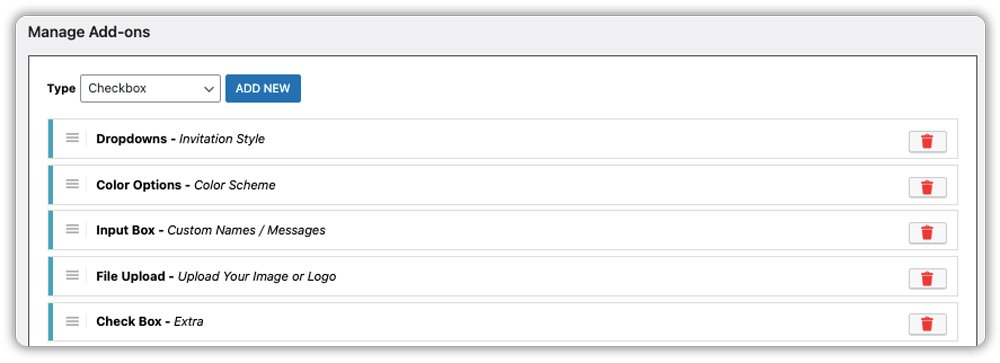
- Add Fields for Your Addons: Add the options you want customers to select, such as a dropdown for style, a text box for customization notes, a file upload for reference files, or a checkbox for premium add-ons. These fields make it easy for customers to choose what they need.
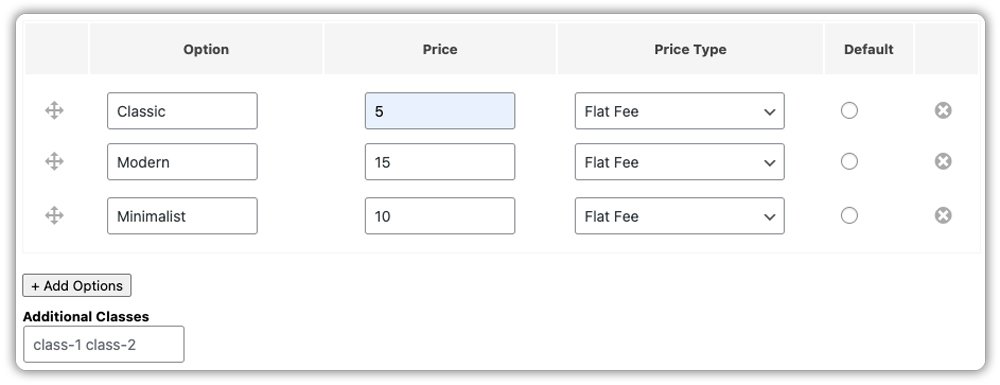
- Set Options & Pricing: Assign fixed, quantity-based, or percentage-based pricing. For example, Classic style – +$5, Modern style – +$15, Minimalist style – +$10. Prices are displayed instantly at the product page.
- Use Conditional Logic (Optional): Add a field called “Need Customisation?”
Show additional fields (text inputs, file uploads, extra fees) only if the customer chooses “Yes.”
This setup helps you create bundles, service upgrades, customization options, and premium add-ons all without creating separate product pages.
A Simple Real-World Example
Let’s say you sell digital printable invitations. Using add-ons, customers can choose the invitation style, select a colour scheme, add custom names or messages, and even opt for premium designs or extra copies.

All customer selections are saved in the WooCommerce order details, allowing you to quickly create the personalized product and email it directly to the customer.

Tips to Optimize WooCommerce Digital Product Addons for Higher Conversions
Digital product add-ons are a powerful way to increase value for your customers and boost your sales, but their true potential is unlocked when used strategically. Beyond simply offering extra options, these creative tips help you engage customers and encourage higher-value purchases:
- Offer Personalized Consultations: Help customers customize products, like printable invitations, with live guidance. Tools like WooCommerce Bookings and the Appointments plugin with Zoom for WooCommerce make it easy to schedule these sessions.
- Simplify Input with the Right Fields: Use the right field type for customer information. For example, a Date Picker for delivery dates or a short Text Input for names on personalized e-cards. This makes checkout easier and reduces errors.
- Introduce Limited-Time Add-ons: Offer seasonal or exclusive options to create urgency. Special designs, holiday editions, or premium features can encourage faster purchase decisions.
- Add Tutorial or Support Options: Give customers the choice to purchase tutorials, setup guides, or priority support. This builds trust, improves satisfaction, and reduces post-purchase questions.
Using these tips makes your digital product add-ons more useful and attractive. Better options and support help customers have a smoother experience and can boost your sales.
Conclusion
Digital product add-ons are a simple yet powerful way to increase value, offer personalization, and boost sales in your WooCommerce store. By adding options like license upgrades, customization fields, premium features, or support services, you can create a more engaging shopping experience and encourage higher-value purchases. The PH Product Addons plugin for WooCommerce makes it easy to implement these features, giving you full control over your digital products without complexity.
Getting started with add-ons is straightforward, and the right setup can significantly improve customer satisfaction and conversions. If you ever need guidance, the PluginHive Support is ready to help you set up your add-ons and make the most of your WooCommerce store.
FAQs
1. Can I use WooCommerce Product Addons for digital products like templates or e‑books?
Yes, the PH WooCommerce product addons plugin works well for digital products. You can allow customers to select options like license types, customization fields, or upload additional files when they buy. This enhances your digital offering and helps increase order value.
2. Will WooCommerce Product Addons work with both physical and digital products?
Yes, you can assign addon groups to specific products or entire categories. So even if you sell a mix of physical and digital products, you can control which addons apply where.
3. Can I add conditional logic to my WooCommerce digital product addons?
Yes, the PH WooCommerce product addons plugin supports showing or hiding fields based on customer selections. For example, you can display a file-upload field only if they choose a “Custom Design” license. This makes your addon options more dynamic and relevant.
4. What if I want customers to upload a file (for customization) when buying a digital product?
You can use a File Upload addon type (available in the PH product addon plugin), which allows customers to attach reference images, text files, logos, or other materials. Their uploaded files are saved in order, making fulfillment smoother.
