


If you run a UK-based WooCommerce store, shipping is more than a backend task; it directly shapes the customer experience. For most UK sellers, that means working with Royal Mail and Royal Mail Parcelforce. But WooCommerce doesn’t support either carrier out of the box. No built-in rates, no tracking, no automatic carrier selection based on parcel weight or size.
The PH Royal Mail Shipping with Tracking for WooCommerce plugin bridges that gap. This article covers how Parcelforce fits into your WooCommerce shipping setup, which services are available, and how to configure everything so your store handles mixed parcel sizes without manual work.
On This Page
- Understanding Royal Mail Parcelforce Shipping
- How to Add Royal Mail Parcelforce Services in WooCommerce
- Example Scenario
- Tips to Get the Most Out of Your Royal Mail WooCommerce Integration
- Conclusion
- FAQs
Understanding Royal Mail Parcelforce Shipping
Royal Mail Parcelforce is a subsidiary of the Royal Mail Group, operating as an express courier service. It’s built for larger, heavier parcels and time-sensitive deliveries where standard Royal Mail letter and small parcel services aren’t the right fit.
Here’s a quick look at the core Parcelforce services you can enable in WooCommerce:
- express9 – Next-day delivery by 9 AM within the UK
- express10 – Next-day delivery by 10 AM
- expressAM – Next-day delivery by midday
- express24 – Next-day delivery by the end of the day
- express48 – Two-day delivery for non-urgent parcels
- express48 Large – Two-day delivery for oversized or heavy items
- Global Priority, Global Express, Global Value – International options based on speed and budget
Parcelforce includes built-in tracking on every shipment, UK-wide coverage, and flexible pickup and drop-off options, making it a strong choice for WooCommerce stores handling mixed or heavy order profiles.
For most UK stores, the answer isn’t Royal Mail or Parcelforce, it’s both. Lightweight items go via standard Royal Mail services. Larger or urgent orders route through Parcelforce. The plugin handles this automatically based on weight, dimensions, and destination.
How to Add Royal Mail Parcelforce Services in WooCommerce
The PH Royal Mail Shipping with Tracking for WooCommerce plugin brings both Royal Mail and Parcelforce directly into your WooCommerce store. Once installed and your license is activated, here’s how to configure it.
For a complete field-by-field configuration walkthrough, refer to the official plugin setup guide.
Enable Royal Mail shipping rates: In the plugin settings, turn on real-time Royal Mail shipping rates.
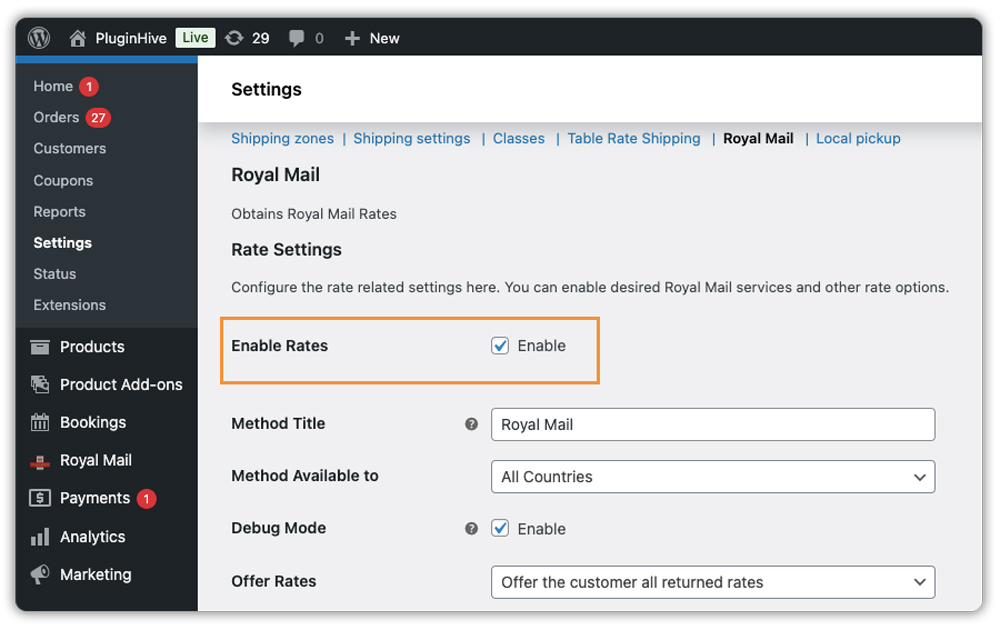
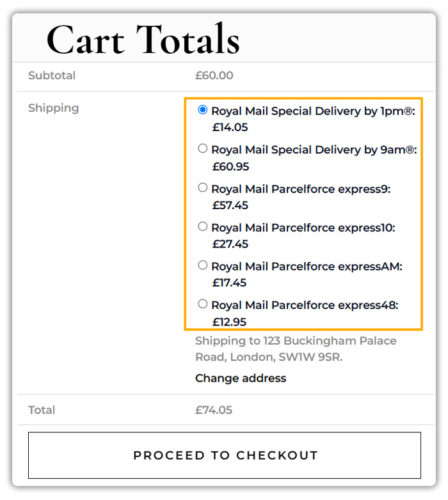
The plugin pulls official Royal Mail and Parcelforce rates based on product weight, dimensions, and destination address – and displays them at the WooCommerce cart and checkout page.
Configure parcel packing: Choose between weight-based packing or box packing. The plugin auto-classifies packages as letters or parcels based on the thresholds you set – so the right service and rate appear at checkout without any manual input.

Select your Parcelforce services: Under the shipping services section, enable the Parcelforce services relevant to your store – express24, express48, express48 Large, or international services. You can rename each service at checkout and add a fixed or percentage price adjustment per service to protect your margins.

Once saved, only the services you’ve enabled will appear to customers at checkout – based on their delivery address and cart weight.


Add tracking to your orders: Once an order is dispatched, you can manually add the Parcelforce tracking number directly from the WooCommerce order page.

The tracking detail is then included in the order completion email that goes out to the customer.

Example Scenario: Managing Royal Mail and Parcelforce Shipping for a UK WooCommerce Store
Let’s say you run a WooCommerce store selling home goods, some items are small (candles, accessories), and others are bulky (storage boxes, large décor pieces). Here’s what you’re likely dealing with.
Challenges You’re Probably Facing:
- You’re manually checking Royal Mail and Parcelforce rates for each order before dispatching
- Customers are seeing flat-rate shipping that doesn’t reflect the actual parcel size or weight
- Bulky items are being assigned Royal Mail letter rates, causing pricing errors and refund requests
- You’re adding tracking numbers to orders and notifying customers manually, one order at a time
- International orders require a separate lookup to identify the right service and cost
How the PH Royal Mail Shipping with Tracking Plugin Solves This:
The plugin takes care of rate calculation and carrier selection, removing the manual work at checkout.
- Lightweight items surface Royal Mail Tracked 24 or Tracked 48 at checkout
- Heavy or bulky items automatically show Parcelforce express48 or express48 Large instead
- International orders are matched to the correct Royal Mail service based on destination and weight
- Tracking numbers added to each order are included in the order completion email sent to the customer
Results:
- Customers see accurate, carrier-matched shipping options at checkout
- No more pricing errors from misclassified parcels
- Tracking details go out with every order completion email
- International shipping is calculated correctly without manual intervention
Once the plugin is set up, carrier selection and rate calculation are no longer things you handle order by order; they become part of how your WooCommerce store runs.
Tips to Get the Most Out of Your Royal Mail WooCommerce Integration
Getting Royal Mail and Parcelforce connected to WooCommerce is the first step. Getting them working well for your store is the next step. These tips help you avoid common configuration mistakes and make the most of the integration from day one.
- Set accurate product weights and dimensions: Royal Mail and Parcelforce rates are sensitive to weight and size. If your product data is incomplete or estimated, the rates displayed at checkout will be off. Update every product with precise weights and dimensions before enabling live rates.
- Enable only the services your customers actually need: The plugin lets you switch individual Royal Mail and Parcelforce services on or off. Keep your checkout clean. Too many options create hesitation at the point of purchase. Enable only the services that match your typical order profile.
- Use the handling fee option to protect your margins: You can add a fixed or percentage-based handling fee on top of carrier rates. This is the simplest way to recover packaging costs or account for carrier rate increases without touching your product pricing.
- Rename services to match what your customers understand: Labels like “express48” don’t mean much to a shopper. Renaming services to something like “Royal Mail Parcelforce – 2 Day Delivery” improves clarity at checkout and reduces pre-purchase support queries.
Getting these settings right up front saves you from rate discrepancies, customer complaints, and margin loss down the line. Test a few sample orders across different product weights and destinations before going fully live.
Conclusion
Royal Mail and Royal Mail Parcelforce together cover the full range of UK shipping needs from everyday small parcels to guaranteed express delivery for heavier items. The PH Royal Mail Shipping with Tracking for WooCommerce plugin brings both carriers into WooCommerce with accurate rates and smart parcel classification – so the right service shows up at checkout every time. If you need help configuring Parcelforce services or have questions about specific settings, reach out to the PluginHive support team.
FAQs
Q: Did Parcelforce and Royal Mail merge?
No. Parcelforce is a subsidiary of the Royal Mail Group – it operates as a separate express courier service under the same parent company.
Q: Is Parcelforce faster than Royal Mail?
Yes. Parcelforce focuses on express delivery with guaranteed next-day and timed options like express9, express10, and express24. Standard Royal Mail services like Tracked 48 are more economical but don’t offer the same delivery guarantees.
Q: Does Royal Mail Parcelforce support international shipping?
Yes. Parcelforce covers international deliveries through services like Global Priority, Global Express, and Global Value available alongside Royal Mail’s international services via the PH Royal Mail Shipping with Tracking for WooCommerce plugin.
