


Royal Mail price changes can directly affect your WooCommerce shipping costs and the rates you charge customers. If your store continues using outdated Royal Mail shipping rates, you could end up paying the difference yourself or charging customers more than necessary.
In this guide, you’ll learn why your WooCommerce Royal Mail shipping rates become outdated, what to check after a Royal Mail price change, and how to keep your shipping rates accurate using a few simple steps.
Table of Contents
- Why Do Royal Mail Price Changes Affect WooCommerce Shipping Rates?
- What to Check After Royal Mail Price Changes
- How to Update Royal Mail Shipping Rates in WooCommerce
- Tips to Keep WooCommerce Rates Updated After Royal Mail Price Changes
- Conclusion
- FAQs
Why Do Royal Mail Price Changes Affect WooCommerce Shipping Rates?
When Royal Mail changes its postage prices, your WooCommerce shipping charges don’t automatically change with them. This can leave a gap between the amount customers pay at checkout and what you actually pay for postage.
Here are some common reasons your Royal Mail shipping rates may become outdated:
- Old flat or manual shipping rates: Manually entered shipping prices stay the same until they are changed. For example, a £3.50 shipping charge entered before a price revision will remain £3.50 even if the actual postage cost increases.
- Royal Mail price revisions: Royal Mail revises its postage prices at different points during the year. If the latest prices aren’t reflected in your store, customers may still see the previous rates at checkout.
- Incorrect product weights and dimensions: Royal Mail shipping prices can vary based on parcel weight and size. If product details in WooCommerce are inaccurate or haven’t been updated, the calculated shipping charges may not reflect the actual postage cost.
- Differences in Royal Mail pricing options: Royal Mail offers different prices depending on how postage is purchased, including online and Post Office prices. If your store uses one price type while you pay another, the checkout charges may not match your actual postage expenses.
Identifying these issues will help you understand what needs to be reviewed after each Royal Mail price change.
What to Check After Royal Mail Price Changes
After a Royal Mail price update, a quick check in WooCommerce helps you avoid losing money on orders. Here is what to review:
- Shipping charges vs postage cost: Compare what customers paid for shipping on recent orders with what Royal Mail charged you. If customers pay £4 but postage now costs £4.50, you lose 50p on each order.
- Your pricing decision: Decide whether to raise your shipping charge, absorb the extra cost, or split it.
- Flat or manual rates: Update any Royal Mail prices you entered by hand in your WooCommerce shipping settings.
- Services and price type: Make sure the Royal Mail services in your store are still available, and that your store uses the same price type you pay (Online or Post Office).
- Checkout test: Add a product to the cart, enter an address, and check that the shipping rate looks right.
Doing this by hand after every price change takes time, which is why many store owners use a plugin to keep Royal Mail rates up to date.
How to Update Royal Mail Shipping Rates in WooCommerce
Fixing Royal Mail prices by hand after every change takes time. The PH Royal Mail Shipping with Tracking for WooCommerce plugin by PluginHive shows Royal Mail and Parcelforce rates at checkout based on the weight, size, and delivery address of each order. New Royal Mail prices reach your store through plugin updates.
Update the Plugin and Choose Your Price Type
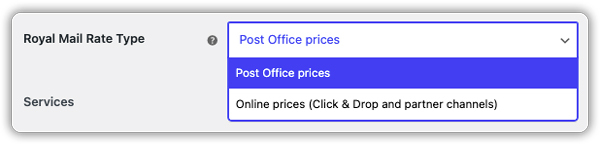
After a price change, update the plugin from your WordPress Plugins page. Then pick the Royal Mail price type you pay, either Post Office prices or Online prices. If you buy postage online, choose Online prices so checkout rates match your real cost.
Choose the Services to Offer
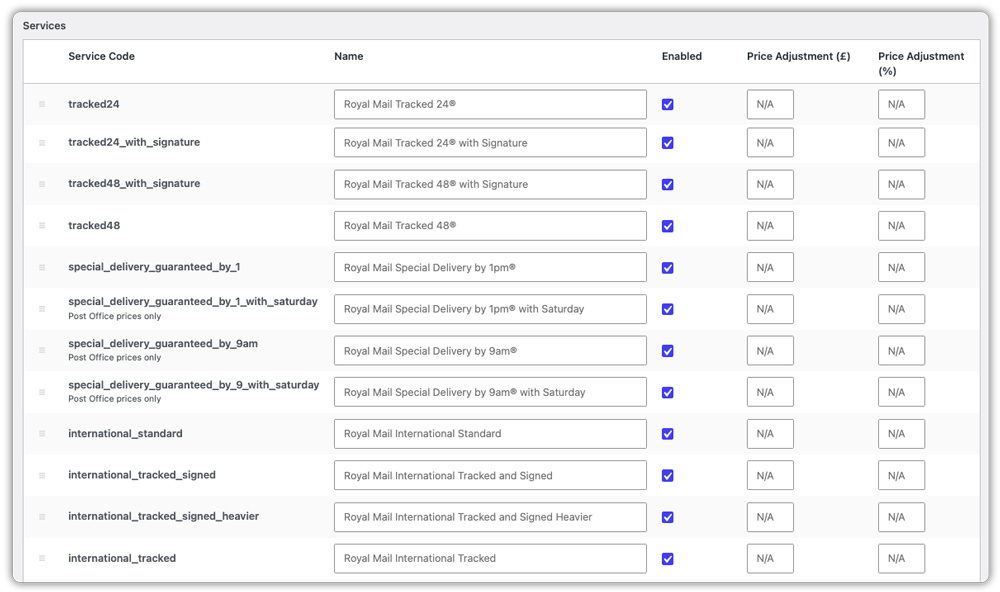
Turn each Royal Mail and Parcelforce service on or off. Services you turn off won’t appear at checkout. A few services have been removed because Royal Mail no longer publishes their prices, so check your list. See Royal Mail shipping options if you need help choosing.
Review Your Price Adjustments
You can add a handling charge or a small discount to any service using the £ and % fields. For example, if the Royal Mail rate is £5, adding £5 makes it £10, adding 10% makes it £5.50, and adding both makes it £10.50. A minus sign reduces the price. You set these amounts yourself, so review them after each price change.


Check Weights and Test Your Checkout
Royal Mail rates depend on weight, so make sure each product in WooCommerce has the right one. Then add a product to your cart, enter an address, and check the rates. If one looks wrong, turn on Debug Mode in the General tab.
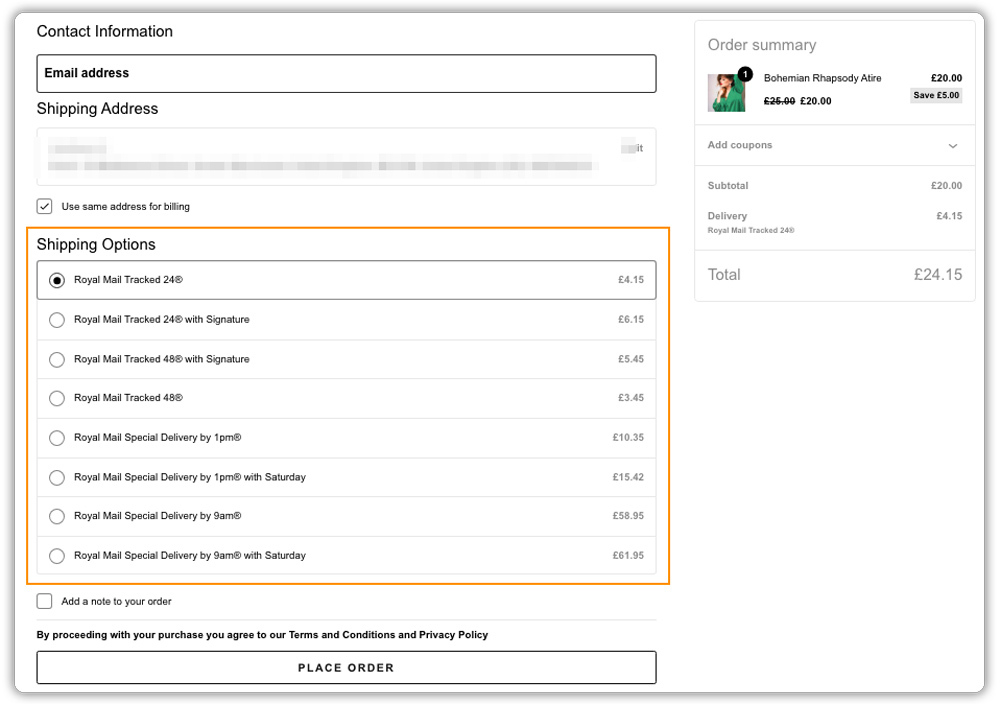
With these checks done, your WooCommerce shipping rates stay in line with the latest Royal Mail prices.
Tips to Keep WooCommerce Rates Updated After Royal Mail Price Changes
A few regular checks can help you avoid outdated shipping charges whenever Royal Mail changes its prices. Here are some simple practices to follow:
- Monitor Royal Mail price updates: Check the Royal Mail prices page for upcoming changes to postage rates.
- Keep your plugin subscription active: An active subscription gives you access to plugin updates that include supported pricing and service changes.
- Check plugin update notes: Review the changelog to see which shipping services or pricing-related changes are included in each update.
- Review your shipping adjustments: Check any additional charges you’ve configured to make sure they still cover your packaging and handling costs.
- Offer the cheapest rate: If you want to keep checkout simple, you can show customers only the cheapest Royal Mail rate instead of every available service.
These simple checks help keep your shipping rates accurate and avoid unexpected costs. For more ways to manage your expenses, read our guide on reducing Royal Mail shipping costs in WooCommerce.
Conclusion
Royal Mail price changes can affect your WooCommerce shipping costs and profit margins if your store continues using outdated rates. Regularly checking the latest postage prices, reviewing your shipping settings, and keeping your rates updated can help you avoid incorrect shipping charges and unexpected expenses.
The PH Royal Mail Shipping with Tracking for WooCommerce plugin by PluginHive makes it easier to display available Royal Mail shipping rates at checkout without manually entering every service price. With the right settings and regular updates, you can keep your shipping charges accurate as Royal Mail revises its prices. If you need help setting this up, the PluginHive support team is ready to assist you.
FAQs
Q: Have Royal Mail put their prices up?
Yes. Royal Mail changed its Online and Post Office prices from 7 April 2026, and its latest postage price change came into effect on 5 October 2026.
Q: What is changing with Royal Mail?
The 5 October 2026 change raised stamp prices for parcels, Royal Mail Tracked, Special Delivery Guaranteed and Signed For parcels, while first and second class letter stamps stayed the same. For example, a first-class medium parcel bought at a Post Office rose from £15.45 to £16.90. Check the Royal Mail prices page for the latest prices.
Q: Do I need to update Royal Mail shipping rates in WooCommerce manually?
If you use flat or manual rates, yes. With the PluginHive plugin, new Royal Mail prices come in through plugin updates, but you still need to review any price adjustments you have set.
Q: Is it cheaper to post Royal Mail online?
Often, yes. Buying postage online is often cheaper than paying at the Post Office counter. Royal Mail has separate Online and Post Office prices, so compare both for your service. In WooCommerce, the PluginHive plugin lets you choose which price type your checkout rates use.
