


When customers place urgent orders, delivery speed becomes just as important as the product itself. Whether it’s a last-minute gift, an important document, or a high-value purchase, customers often prefer a shipping option that offers both reliability and guaranteed delivery timelines.
This is where Royal Mail Special Delivery Guaranteed can help. It allows WooCommerce stores to offer a premium delivery option with tracking, delivery confirmation, and guaranteed delivery commitments. In this article, we’ll see how to offer Royal Mail Special Delivery Guaranteed in WooCommerce using the PH Royal Mail Shipping with Tracking for WooCommerce plugin. and create a smoother shipping experience for your customers.
On This Page
- What Is Royal Mail Special Delivery Guaranteed?
- Why Offer Royal Mail Special Delivery Guaranteed in WooCommerce?
- How to Set Up Royal Mail Special Delivery Guaranteed in WooCommerce
- Real-World Example
- Tips to Get More Out of Royal Mail Special Delivery in WooCommerce
- Conclusion
- FAQs
What Is Royal Mail Special Delivery Guaranteed?
Royal Mail Special Delivery Guaranteed is Royal Mail’s premium next-day service for UK domestic shipments. It’s designed for parcels and documents where late or lost delivery isn’t an option.
Here’s what the service includes:
- Guaranteed next-day delivery by 1 PM or by 9 AM for the premium option
- Full Royal Mail tracking from the moment you hand over the parcel
- Signature on delivery as standard – no contactless drop-offs
- Compensation cover starting from £750, with the option to increase it for higher-value items
- Available Monday to Saturday, with Sunday delivery in select areas for an additional charge
It’s a step above Royal Mail Tracked 24. The difference isn’t just speed – it’s the guarantee, the compensation, and the accountability that comes with it.
Why Offer Royal Mail Special Delivery Guaranteed in WooCommerce?
For most products, standard or tracked shipping is sufficient. But for high-value items, time-critical orders, or customers who simply won’t settle for uncertainty, Special Delivery earns its place at checkout.
Here’s why it matters:
- Reduces pre-delivery anxiety: Customers with a guaranteed delivery time stop wondering and start waiting with confidence
- Protects you when things go wrong: Compensation cover means you’re not absorbing the full loss on missing high-value parcels
- Converts hesitant buyers: A customer on the fence about purchasing jewellery, tech, or gifts for an event is more likely to commit when they know delivery is guaranteed
- Cuts support volume: Tracking updates and signature confirmation together nearly eliminate “where is my order?” tickets on these orders
- Works as an upsell: Customers who need it will gladly pay for it; customers who don’t still see you offer it, which signals professionalism
If you sell anything where timing or item value matters – gifts, electronics, jewellery, legal documents having Royal Mail Special Delivery Guaranteed at checkout isn’t just a nice-to-have. It’s the difference between a customer completing the order and leaving to find a seller they trust more.
How to Set Up Royal Mail Special Delivery Guaranteed in WooCommerce
WooCommerce doesn’t connect to Royal Mail out of the box. To display Special Delivery Guaranteed rates at checkout, you need the PH Royal Mail Shipping with Tracking for WooCommerce plugin.
Step 1: Enable Rates
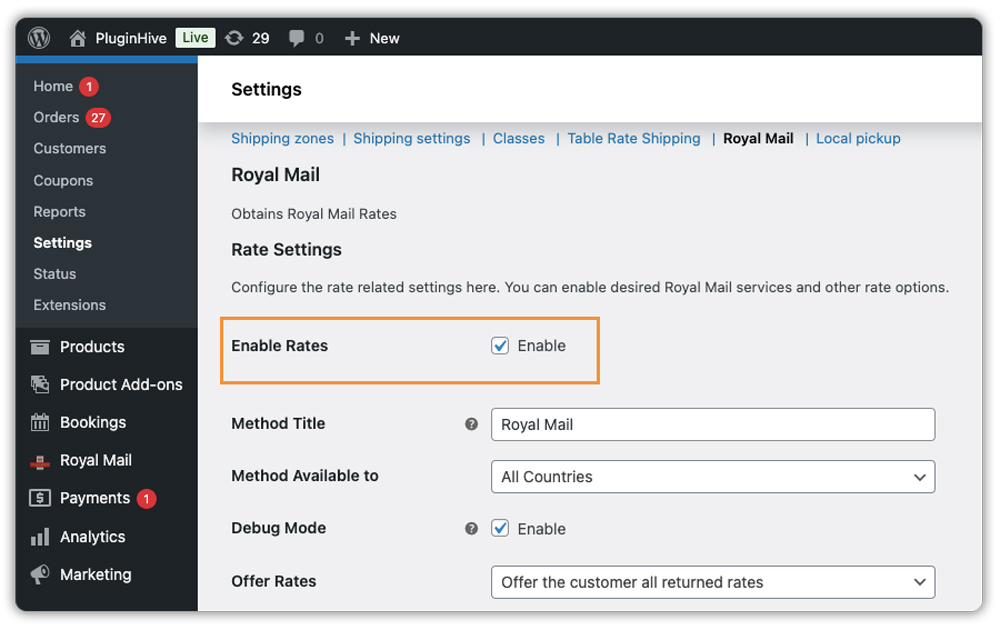
Go to WooCommerce > Settings > Shipping > Royal Mail and check the Enable Rates option. This allows the plugin to fetch Royal Mail rates and display them at checkout based on destination, product weight, and dimensions.
Step 2: Configure Packing Settings
Under Packing Method, set how the plugin calculates parcel weight. For Special Delivery, accurate weight matters because Royal Mail prices the service by weight band – make sure your WooCommerce products have the correct weights and dimensions entered.

Step 3: Enable Royal Mail Special Delivery Guaranteed
Scroll to the Shipping Services section. You’ll see a full list of Royal Mail services available. Find and enable:
- Special Delivery Guaranteed by 1 PM
- Special Delivery Guaranteed by 9 AM (optional – enable this if you want to give customers the faster window)
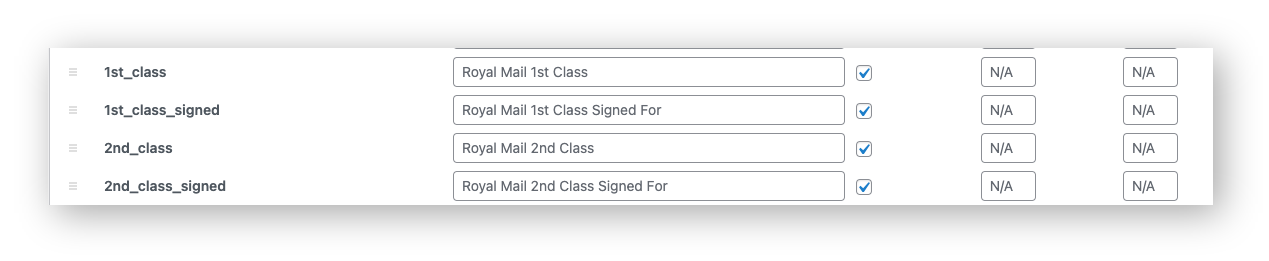
You can also customise the display name – something like “Royal Mail – Next Day Guaranteed by 1 PM” reads more clearly at checkout.
Step 4: Adjust Pricing (Optional)
Use the Price Adjustment fields to add a fixed amount (£) or a percentage (%) on top of Royal Mail’s base rate if you need to offset packaging or handling costs.
Step 5: Test at Checkout
Add a product to your cart and go through checkout with a UK address. Special Delivery Guaranteed should appear as a selectable option with the correct rate based on parcel weight.

Example Scenario: WooCommerce Store Selling High-Value Products
Let’s say you run a WooCommerce store selling jewellery and personalised gifts in the UK, and you’ve started noticing a pattern – customers buying for occasions complain when delivery doesn’t arrive on time. Here’s what you’re likely dealing with.
Challenges You’re Probably Facing
- Customers pick the cheapest shipping option but expect next-day delivery, and contact you when it doesn’t arrive
- Orders for events arrive a day late, and you’re left managing refund requests for products you’ve already shipped
- When a parcel goes missing, there’s no compensation to fall back on; you absorb the full cost
- You have no signature confirmation, which means disputes about non-delivery are harder to close
How the PH Royal Mail Shipping Plugin Solves This
With the PH Royal Mail Shipping with Tracking for WooCommerce plugin, Royal Mail Special Delivery Guaranteed becomes a visible option at your WooCommerce checkout – rated accurately and ready to select.
- Customers see Special Delivery Guaranteed as a distinct, clearly labelled option alongside standard services
- Those buying for a deadline can self-select it – you’re no longer manually upgrading orders after the fact
- Signature on delivery is built into the service, so non-delivery disputes have a clear resolution path
- Tracking details added to the order are sent to the customer via WooCommerce order completion emails
Results
- Customers who need a guarantee choose it themselves – fewer assumptions on both sides
- Event-related orders arrive on time, and refund requests for late delivery drop
- Support queries on delivery status have reduced significantly on Special Delivery orders
- Your checkout signals that you take high-value orders seriously
Once Special Delivery Guaranteed is set up, offering a credible premium shipping option is no longer something you manage case by case; it’s just part of how your WooCommerce store operates.
Tips to Get More Out of Royal Mail Special Delivery in WooCommerce
Special Delivery Guaranteed works best when it’s shown to the right customers at the right moment. Here are a few ways to make it work harder for your store.
- Set up a “Cut-Off Time” Banner: Special Delivery guarantees next-day arrival, but only if you dispatch the item the same day. Use a notice on your site saying, “Order before 2 PM for guaranteed next-day delivery.”
- Show it only when the cart value justifies it: Use the PH Hide Shipping Methods & Rate Adjustment plugin to surface Special Delivery Guaranteed only when the cart total crosses a threshold that makes the service relevant, so it never looks overpriced on a low-value order.
- Use the 9 AM option only where it adds real value: The earlier window costs noticeably more and is mainly useful for business customers or medical orders. For standard retail, the 1 PM option is sufficient and easier for customers to justify.
- Show the delivery date, not just the service name: Pair the Royal Mail plugin with the Estimated Delivery Date plugin for WooCommerce to display the actual delivery date at checkout. This makes the price difference between services immediately clear and far easier to act on.
Small adjustments to how and when Special Delivery appears can make a real difference to how customers perceive and choose it.
Conclusion
Royal Mail Special Delivery Guaranteed is one of the most reliable domestic shipping services available to UK WooCommerce store owners. If you sell products where delivery timing and item value matter, offering them at checkout gives customers confidence and protects your business. The PH Royal Mail Shipping with Tracking for WooCommerce plugin makes it straightforward to enable this service and display accurate rates directly at checkout. If you need help with the setup, reach out to PluginHive support, and the team will get you sorted.
FAQs
Q: What is Royal Mail Special Delivery Guaranteed?
It’s Royal Mail’s premium next-day delivery service for UK domestic shipments, with guaranteed delivery by 1 PM or 9 AM, full tracking, signature on delivery, and compensation cover starting from £750.
Q: Can I offer Royal Mail Special Delivery Guaranteed in WooCommerce?
Yes. WooCommerce doesn’t support Royal Mail natively, but the PH Royal Mail Shipping with Tracking for WooCommerce plugin lets you enable Special Delivery Guaranteed at checkout with live rates pulled directly from Royal Mail.
Q: Is Royal Mail Special Delivery Guaranteed available for international shipments?
No. It’s a UK domestic service only. For international tracked and guaranteed delivery, Royal Mail offers separate services such as International Tracked and International Tracked & Signed, which the plugin also supports.
