


Shipping delays are a common issue for WooCommerce stores, especially during peak periods like Black Friday, Christmas, and New Year’s. Studies show that shipping delays can rise beyond 30% during holiday seasons due to order surges and carrier congestion, while even in normal periods, 6-12% of eCommerce shipments face delays.
For WooCommerce merchants using UPS, understanding why delays happen and how UPS services can help reduce them is key to maintaining customer satisfaction during high-demand seasons.
On This Page:
- Shipping Delays in WooCommerce: Common Causes & Impacts
- How UPS Helps Reduce Shipping Delays
- Managing Shipping Delays in WooCommerce with UPS
- Real-World WooCommerce Use Case
- Conclusion
- FAQs
Shipping Delays in WooCommerce: Common Causes & Impacts
Shipping delays in WooCommerce often occur due to a combination of store-level challenges and external factors, especially during high-demand periods.
Common causes include:
- Order spikes during peak seasons: Sales events like Black Friday, Christmas, New Year, or clearance campaigns can overwhelm manual order processing and dispatch workflows.
- Manual fulfillment and label creation: Entering addresses, printing labels, and updating tracking manually increases processing time and error rates.
- Incorrect or incomplete shipping data: Address errors, wrong package weight, or dimensions often lead to re-routing or delivery failures.
- Inventory sync issues: Overselling products due to delayed stock updates can pause fulfillment until inventory is corrected.
- Limited tracking visibility: Without real-time tracking updates, store owners may miss early delay warnings.
- Carrier network congestion: Even large carriers like UPS may face delays during holidays, weather disruptions, or unexpected volume surges.
Impact on WooCommerce stores:
- Lower customer trust: Late deliveries often result in poor reviews and reduced repeat purchases.
- Higher support workload: Shipping delays trigger more “Where is my order?” queries, increasing support costs.
- Refunds and cancellations: Customers may cancel orders or request refunds if delivery expectations are missed.
- Brand reputation damage: Repeated delays during peak seasons can hurt long-term brand credibility.
Identifying these causes early helps WooCommerce merchants take proactive steps to reduce shipping delays and protect the customer experience.
How UPS Helps Reduce Shipping Delays
UPS supports WooCommerce stores in reducing shipping delays through a combination of reliable delivery services, network strength, and operational flexibility.
- Time-Definite Delivery Services
UPS offers services such as Next Day Air, 2nd Day Air, and scheduled Ground delivery. These options provide predictable transit times, helping stores meet delivery promises.
- End-to-End Shipment Tracking
Real-time UPS tracking gives both store owners and customers visibility into shipment status. Early alerts for weather issues, route disruptions, or customs checks allow proactive communication.
- Flexible Pickup and Delivery Options
Scheduled pickups, drop-off locations, and weekend delivery services in select regions ensure shipments are dispatched on time, even when stores face operational constraints.
- Customs and International Shipping Support
For cross-border WooCommerce orders, UPS provides customs clearance expertise and compliance tools. Accurate documentation and faster clearance reduce delays caused by regulatory checks.
- Peak-Season Capacity Management
During holidays and major sales events, UPS expands network capacity and staffing to handle higher order volumes. This helps prevent backlogs that commonly cause delays in WooCommerce fulfillment.
While UPS services help minimize transit-related delays, manual order processing inside WooCommerce can still slow fulfillment. To fully avoid delays, automating rate calculation, label creation, pickups, and tracking becomes essential.
Managing Shipping Delays in WooCommerce with UPS
Managing shipping delays becomes much easier with the WooCommerce Shipping Plugin for UPS with Print Label, which helps streamline fulfillment by syncing your store with UPS for rates, labels, pickups, and tracking, all from one place.
If you’re new to the plugin, start with this setup guide: UPS Plugin Setup for WooCommerce.
Here’s how WooCommerce stores can manage and avoid shipping delays using UPS:
You can configure the plugin to display UPS’s fastest service options. Offering these time-definite services helps customers choose faster delivery.

Enable estimated delivery dates so customers clearly see when their order is expected to arrive. This reduces confusion, sets accurate expectations, and lowers “Where is my order?” support tickets.
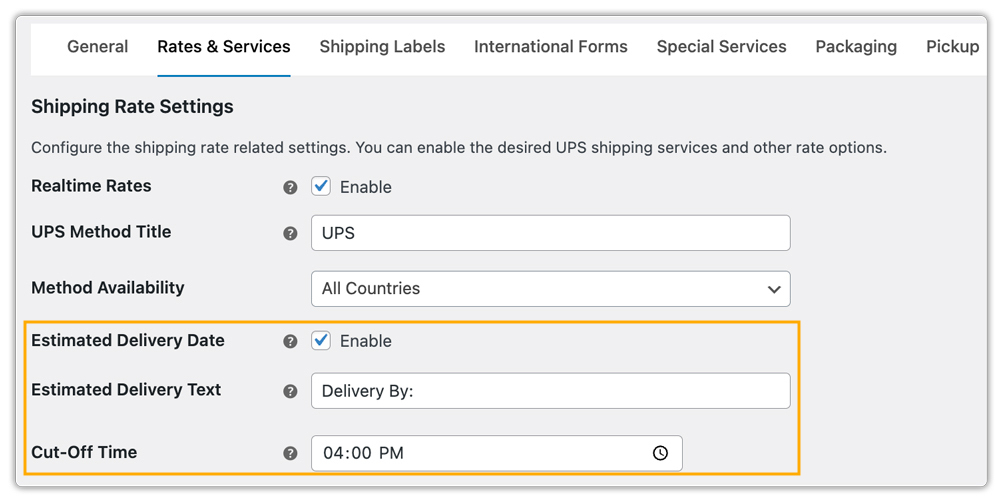
Live UPS shipping rates are shown at checkout. Customers see accurate pricing paired with delivery timelines, helping them make informed choices.

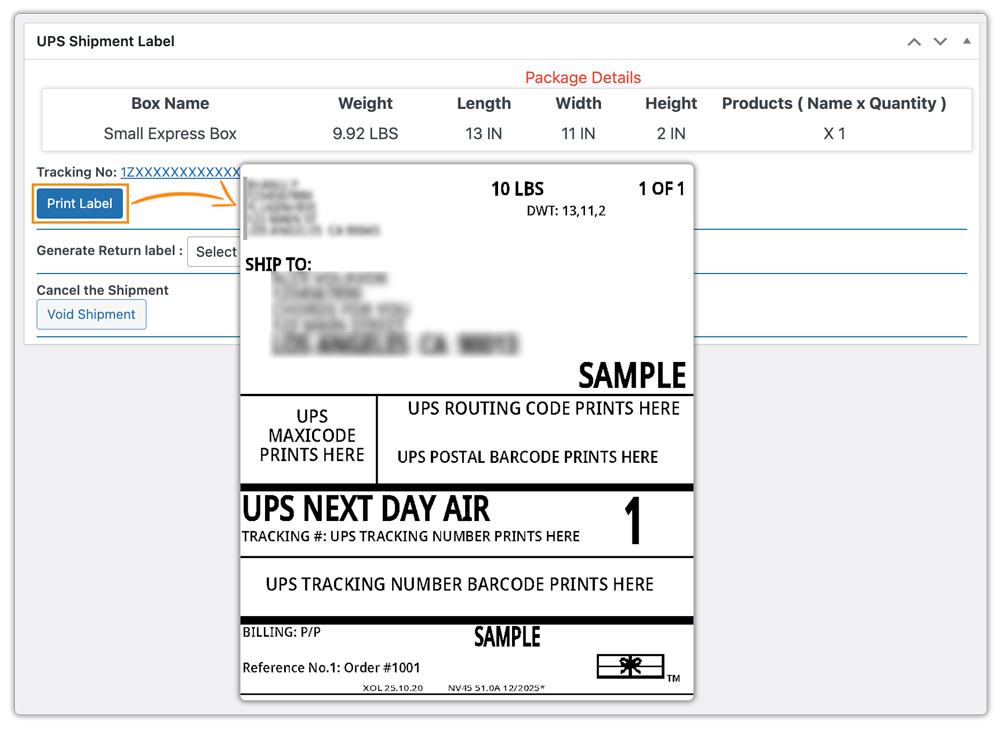
You can generate and print UPS shipping labels directly from the WooCommerce order page, removing the need to manually enter order details on the UPS website. (Bulk label printing further speeds up fulfillment when handling large order volumes.)
The plugin allows you to schedule UPS pickups directly from WooCommerce, ensuring parcels are dispatched on time without extra calls or switching platforms.

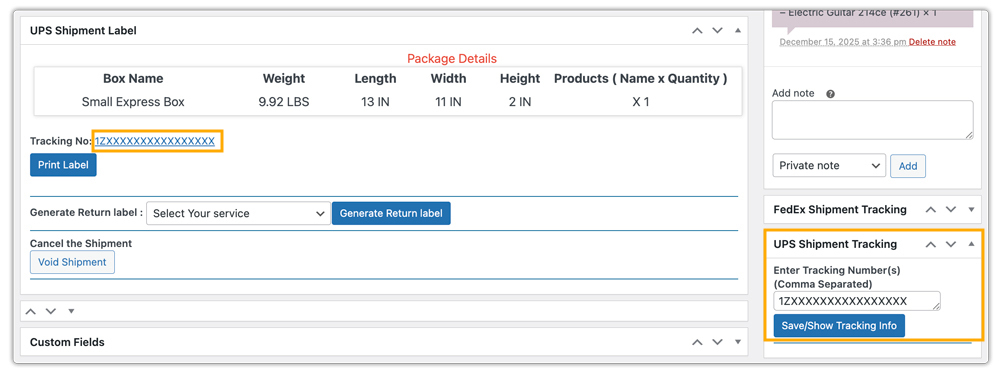
Shipment tracking updates appear inside the WooCommerce order page, keeping both store owners and customers informed without manual tracking checks.
- For advanced tracking and notifications, consider using the WooCommerce Shipment Tracking Pro Plugin.
- To customize estimated delivery dates based on handling time, extra processing days, or store-specific policies, use the Estimated Delivery Date Plugin for WooCommerce.
By combining UPS’s reliable delivery network with WooCommerce automation, stores can significantly reduce fulfillment delays and maintain customer trust, even during the festive seasons.
Let’s understand well with a real case study.
Real-World WooCommerce Use Case
A California-based WooCommerce store selling consumer electronics faced recurring shipping delays during peak sales periods, especially around year-end promotions. Order volume jumped from an average of 60 to nearly 250 orders per day, overwhelming the store’s manual fulfillment process. Delays led to missed delivery promises, rising support tickets, and negative customer feedback.
Before automation, the store manually checked UPS rates, created shipping labels on the UPS website, and updated tracking details inside WooCommerce. Each order took 4-6 minutes to process, causing same-day dispatch delays of up to 24 hours during high-volume days.
After integrating the WooCommerce Shipping Plugin for UPS, the store experienced measurable improvements:
- The store displayed UPS’s fastest services with estimated delivery dates at checkout.
- Order fulfillment time dropped by 55%, from about 5 minutes per order to under 2.5 minutes.
- Bulk label printing saved nearly 3.5 hours of manual work per day during peak weeks.
- Showing delivery estimates at checkout and customers being updated with real-time tracking reduced “Where is my order? (WISMO).
- The on-time delivery rate improved from 84% to 97%, even during holiday rush periods.
Conclusion
Shipping delays can affect customer trust and store performance, especially during peak sales periods. By understanding the causes of delays, UPS services, and automating UPS shipments, WooCommerce stores can better handle high order volumes and minimize disruptions.
If you need assistance with optimizing your WooCommerce shipping workflow with UPS, reach out to PluginHive Support.
FAQs
- Will incorrect addresses cause UPS shipping delays?
Yes. Incorrect or incomplete addresses can cause delivery exceptions, re-routing, or return-to-sender issues. Always validate customer addresses at checkout to avoid unnecessary delays.
- Can I hide certain UPS shipping methods based on package size or weight to avoid delays?
Yes. During peak seasons, some UPS services may not be ideal for oversized or heavy packages. You can hide slower or unsuitable shipping methods for specific package conditions. The PH Hide WooCommerce Shipping Methods & Rate Adjustment Plugin can help you manage this effectively.
- Can I set different UPS shipping rates based on cart weight, quantity, or product type?
Absolutely. WooCommerce orders often vary during sales seasons. Using the WooCommerce Table Rate Shipping Pro Plugin, you can define flexible UPS shipping rules based on weight, quantity, destination, or product category.
- What should I do if a UPS shipment is delayed in transit?
Monitor the tracking status closely and inform customers proactively. If required, offer alternatives such as rescheduling delivery or future shipping upgrades to maintain customer trust.
- Can I offer multiple carriers along with UPS to avoid delays during congestion?
Yes. Using a multi-carrier strategy helps balance volume during peak seasons. With tools like the Multi-Carrier Shipping Plugin, you can offer UPS alongside FedEx, USPS, and DHL, reducing dependency on a single carrier.
