



Shipping costs are often the last thing a customer sees before checkout, and a high number can end the sale right there. Offering shipping discounts in WooCommerce is a simple way to prevent that, but giving the same discount on every order cuts into your profit.
WooCommerce lets you set up free shipping and flat rates out of the box. Discounts based on cart value, customer role, coupons, or a particular shipping method need a little more help, and the PH Hide WooCommerce Shipping Methods & Rate Adjustment plugin covers that. In this guide, you’ll learn what WooCommerce offers by default and how to add conditional shipping discounts to your store with the plugin.
On this page
- Understanding WooCommerce Shipping Discounts
- Benefits of Offering Shipping Discounts in Your WooCommerce Store
- How to Offer Shipping Discounts in WooCommerce
- Example Scenarios of WooCommerce Shipping Discounts
- Best Practices for Offering Shipping Discounts
- Conclusion
- FAQs
Understanding WooCommerce Shipping Discounts
Shipping discounts reduce the delivery charges customers pay at checkout. You can offer them in different ways depending on your store’s pricing and promotional needs.
- Free shipping: Customers pay nothing for delivery, usually after meeting a condition such as a minimum order amount.
- Reduced flat rate: Customers pay a lower fixed shipping fee, such as $6 instead of the regular $10.
- Shipping rate adjustments: You reduce an existing shipping charge by a fixed amount or percentage, such as 20% off a $10 shipping rate.
- Conditional shipping discounts: Discounts apply only when specific conditions are met, such as a minimum cart value, a particular customer role, or a coupon code.
Choosing the right type of shipping discount helps you offer better delivery prices while keeping your shipping costs under control.
Benefits of Offering Shipping Discounts in Your WooCommerce Store
Shipping discounts can make delivery more affordable for customers while helping your store attract orders and encourage repeat purchases.
- Reduce cart abandonment: Lower shipping costs can encourage customers to complete their purchases instead of leaving at checkout.
- Increase average order value: Offering free shipping above a minimum spend can motivate customers to add more products to their carts.
- Reward loyal customers: Providing discounted shipping to repeat buyers or wholesale customers gives them an additional reason to shop with you.
- Attract more customers: Competitive shipping offers can make your store more appealing to shoppers comparing prices and delivery costs.
- Support promotional campaigns: Shipping discounts tied to coupons or seasonal sales can help attract customers during specific promotions.
With the right shipping discount rules in place, you can turn your checkout shipping rates from a sales barrier into a reliable conversion tool.
How to Offer Shipping Discounts in WooCommerce
You can start with what WooCommerce offers by default, then add the plugin when you need more targeted offers.
Using WooCommerce’s Built-In Options
Free shipping over a minimum amount: Go to WooCommerce > Settings > Shipping, open your shipping zone, and add the Free shipping method. In its settings, choose A minimum order amount under “Free shipping requires…” and enter your amount.
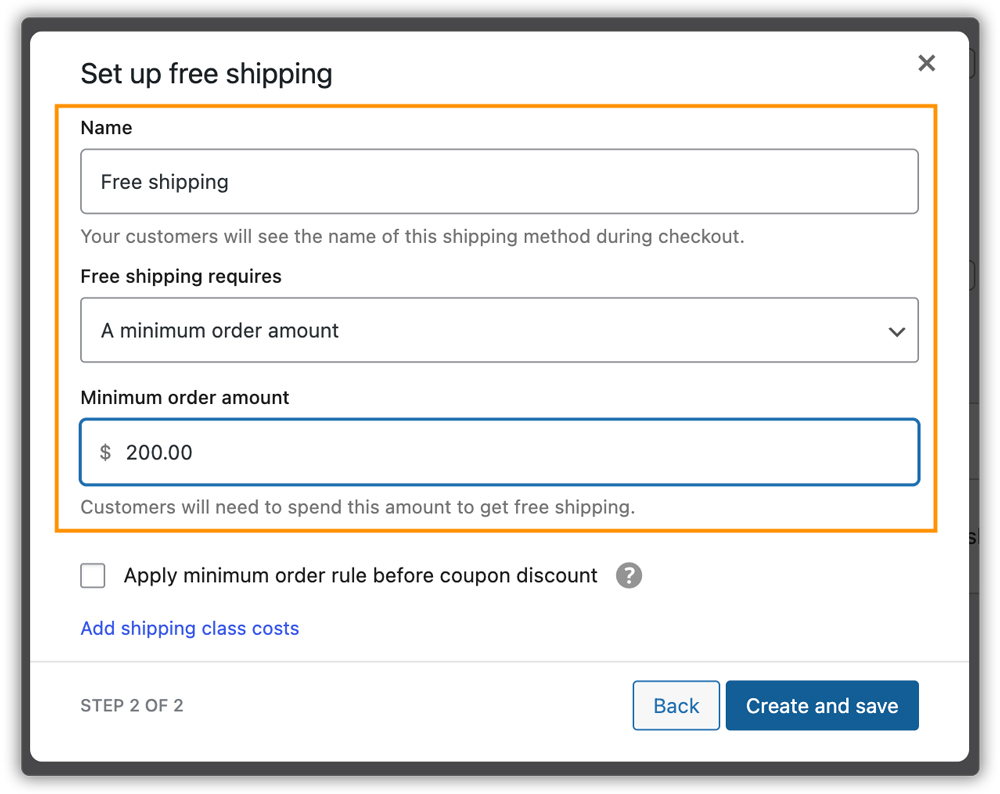
Example: If you set the minimum order amount to $200, eligible customers can select free shipping when their order meets the configured threshold. This is a simple way to nudge customers toward a bigger order.
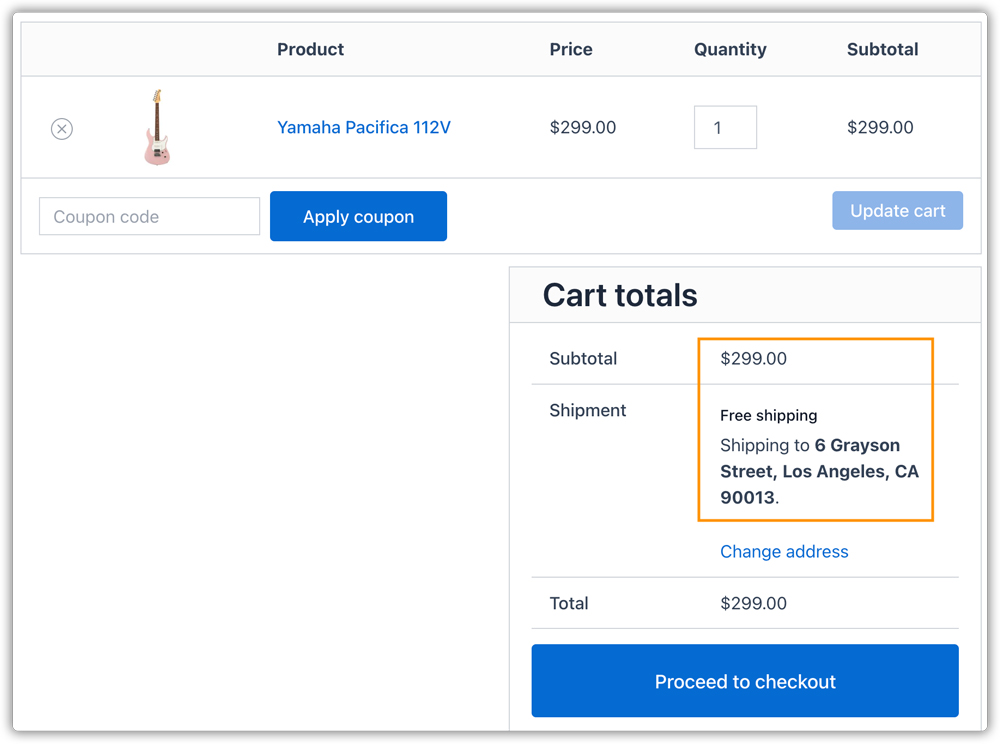
Free shipping with a coupon: Set the Free shipping method to require A valid free shipping coupon. Then create a coupon under Marketing > Coupons and tick Allow free shipping. This works well for email campaigns and first-order offers.

Example: Customers who apply the FREESHIP coupon can access free shipping, provided their shipping address and other configured conditions qualify.

For more details, refer to our guide on WooCommerce Coupons to learn how to create coupons and configure their settings for your store.
These options suit simple offers. However, WooCommerce has no built-in setting to take a percentage off a shipping rate, discount by user role, or limit a discount to certain days or times. When free shipping applies, it also still shows the other methods that qualify. For anything more targeted, a plugin is the practical route.
Creating Conditional Shipping Discounts in WooCommerce
The PH Hide WooCommerce Shipping Methods & Rate Adjustment plugin lets you show, hide, and adjust shipping methods on the cart and checkout pages using rules. It works with WooCommerce’s own methods, such as free shipping, flat rate, and local pickup, and with methods from shipping plugins. You can adjust a rate by a fixed amount or a percentage.
Here is the basic flow for creating a rate adjustment rule:
- Install and activate the plugin. Go to the Hide Shipping tab in your WordPress dashboard and enable Rate Adjustment in the general settings.

- Add a new rule, give it a name, and enable Activate rule. Turn on Break on the first occurrence if you want the plugin to stop checking further rules after a match.
- Enable the conditions you need, such as Locations, Products, Cart value, User, Shipping, Day & Time, or Coupons.

- Choose the shipping service or method to adjust, then enter a fixed amount or percentage. Use a minus sign to reduce the shipping cost.
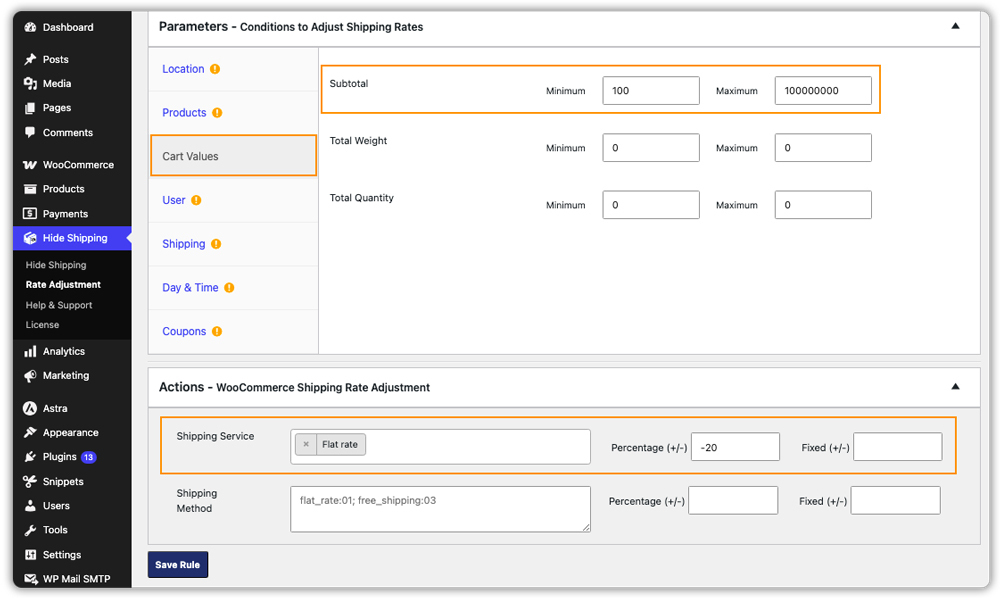
Example: Offer a 20% Shipping Discount on Orders Above $100
Suppose your store charges a flat shipping rate of $10. You want to offer a 20% discount when the cart subtotal goes above $100.
| Cart Subtotal | Original Shipping Cost | Shipping Cost After Discount |
|---|---|---|
| $80 | $10 | $10 |
| $100 | $10 | $10 |
| $120 | $10 | $8 |
To set this up, add a Cart value condition for the subtotal and apply a 20% reduction to the flat rate method. Only carts above the threshold get the lower rate, so you reward bigger orders without cutting shipping charges for everyone.


Just make sure the subtotal condition matches the threshold you intended, for example, whether a $100 cart should qualify.
Example Scenarios of WooCommerce Shipping Discounts
The same steps work for other offers. You only change the parameter and the action.
| Scenario | Parameter to Use | What the Rule Does |
|---|---|---|
| Member or wholesale discount | User | Reduces the shipping rate for a chosen user role only |
| Weekend offer | Day & Time | Applies a percentage discount on Saturday and Sunday only |
| Coupon bonus | Coupons | Reduces shipping for customers who enter a specific code |
| Category offer | Products | Discounts shipping on selected product categories or shipping classes |
| Regional offer | Locations | Reduces shipping for customers in a chosen shipping zone |
| Free shipping without distractions | Shipping | Hides all other methods when free shipping is available, so customers see one clear option |
Each scenario is just a rule, so you can add, pause, or change them as your offers evolve.
Best Practices for Offering Shipping Discounts in WooCommerce
Offering shipping discounts in WooCommerce works best when you balance customer savings with your store’s shipping costs. Follow these practices to keep your discounts effective and manageable.
- Set discounts based on your margins: Consider shipping and packaging costs before deciding on a discount. Make sure the reduced shipping rate remains affordable for your business.
- Keep discount rules simple: Use clear conditions that are easy to manage and understand. Avoid unnecessary complexity when configuring shipping discounts in WooCommerce.
- Test before launching a promotion: Check different cart values, shipping destinations, customer roles, and coupons to ensure the correct shipping rates appear at checkout.
- Make offers easy to find: Display shipping discount details on your WooCommerce store pages or promotional banners so customers understand the eligibility requirements before checkout.
Review your shipping promotions regularly and adjust discount amounts or eligibility conditions based on their performance. This helps you offer attractive shipping discounts while keeping your WooCommerce shipping costs under control.
Conclusion
Shipping discounts work best when they reward the right orders instead of every order. WooCommerce covers the basics with free shipping thresholds, coupons, and flat rates, and the PH Hide WooCommerce Shipping Methods & Rate Adjustment plugin adds conditional shipping discounts based on cart value, user role, coupons, and more. If you need help setting up your rules, contact the PluginHive Support team, and they will be happy to help.
FAQs
Q: What are the rules for offering shipping discounts in WooCommerce?
WooCommerce’s Free shipping method can require a minimum order amount, a valid coupon, or both. You can also lower the flat rate for a shipping zone. For other rules, such as a percentage off shipping or discounts for certain user roles, you need a plugin.
Q: What is the best plugin for shipping discounts in WooCommerce?
It depends on the kind of offer you want to run. If you need conditional shipping discounts based on cart value, user role, coupons, or day and time, PH Hide WooCommerce Shipping Methods & Rate Adjustment is built for that.
Q: How can I set up dynamic shipping discounts in WooCommerce?
WooCommerce does not adjust shipping rates based on conditions by itself. With a rate adjustment plugin, you create a rule that reduces the rate by a fixed amount or percentage, and it applies only when the conditions you set are met, such as the cart subtotal.
Q: How do I create a free shipping coupon in WooCommerce?
Go to Marketing > Coupons, click Add coupon, enter a code, and tick Allow free shipping. Then set the Free shipping method in your shipping zone to require a valid free shipping coupon.
