


Insuring every shipment might seem like the safest option, but it can add unnecessary costs to your WooCommerce store. On a low-value order, the insurance charge may represent a significant share of the item’s price, leaving you paying for protection that might not be worth the cost. The solution is not to stop insuring shipments altogether. It is to decide when additional coverage makes financial sense.
This guide explains when shipping insurance is worth paying for, how carrier coverage works, and how to apply a minimum order threshold to your WooCommerce shipping workflow.
On This Page
- Why Shipping Insurance Matters for WooCommerce Stores
- When Is WooCommerce Shipping Insurance Worth It?
- Minimum Order Amount for WooCommerce Shipping Insurance
- How to Configure Shipping Insurance for Multiple Carriers in WooCommerce
- Real-World WooCommerce Use Case
- Conclusion
- FAQs
Why Shipping Insurance Matters for WooCommerce Stores
Shipping insurance can help protect your business against financial losses when shipments are lost or damaged in transit. However, paying for additional coverage on every order may not be the most cost-effective approach.
Many shipping services include some form of liability or insurance coverage, but the amount and conditions vary by carrier and service.
For example:
- UPS: Standard liability for many US domestic packages is generally limited to $100 unless a higher value is declared and an additional charge is paid. Declared value does not itself constitute insurance.
- FedEx: The first $100 of declared value is generally included for eligible shipments, while higher declared values may incur additional charges. Declared value increases the carrier’s liability limit; it is not the same as purchasing insurance.
- USPS: Priority Mail, Priority Mail Express, and USPS Ground Advantage generally include up to $100 of insurance for eligible domestic merchandise shipments, subject to applicable conditions.
- DHL Express: Available shipment protection and standard liability depend on the service, destination, and applicable terms. Additional protection may be available for eligible shipments.
The key consideration is how much of your shipment’s value is already covered and how much additional protection you actually need.
When Is WooCommerce Shipping Insurance Worth It?
The value of shipping insurance depends on the potential loss, the coverage already available, and the cost of additional protection.
Low-Value WooCommerce Orders
Suppose you sell an accessory worth $25. If your shipping service already provides sufficient coverage for the eligible loss, paying extra for additional protection may offer limited financial benefit.
However, check the actual coverage terms before deciding to skip insurance. Included liability may have exclusions, and a shipment’s declared value does not guarantee reimbursement.
High-Value WooCommerce Orders
Now consider an order worth $400. If the available carrier coverage is limited to $100, a substantial portion of the item’s value could remain exposed.
In this case, additional protection may be worthwhile, particularly if replacing the item would be expensive or the business could not comfortably absorb the loss.
Orders with Higher Risk
Order value is not the only factor to consider. Fragile products, expensive electronics, and hard-to-replace items may need additional protection even when their prices fall below your usual threshold.
Review your shipping history, claim rates, product margins, and insurance costs before deciding which orders need additional coverage.
Minimum Order Amount for WooCommerce Shipping Insurance
A minimum order amount sets the value at which additional shipping insurance applies.
For example, suppose you set a threshold of $150:
- Orders below $150 do not request additional insurance through that rule.
- Orders of $150 or more qualify for insurance under the configured rule.
This approach helps you avoid paying for additional coverage on every low-value order while retaining protection for higher-value shipments.
Before choosing your threshold, consider the following:
- Existing carrier coverage: Check the coverage included with each shipping service.
- Insurance costs: Compare the additional charge with the potential financial loss.
- Product value: Consider the cost of replacing the goods, not just the selling price.
- Claim history: Review how frequently your shipments are lost or damaged.
- Business risk tolerance: Decide how much loss your business can absorb without additional protection.
How to Configure Shipping Insurance in WooCommerce
The Multi-Carrier Shipping Plugin for WooCommerce provides shipping rates from supported carriers and offers insurance options for eligible UPS, FedEx, USPS, and DHL services. Its Min Order Amount setting lets you set a minimum order subtotal for requesting shipping insurance.
In the plugin settings, select the carrier account you want to configure and enable insurance if required. Then, locate the Min Order Amount field and enter the minimum order subtotal at which insurance should apply, where supported.
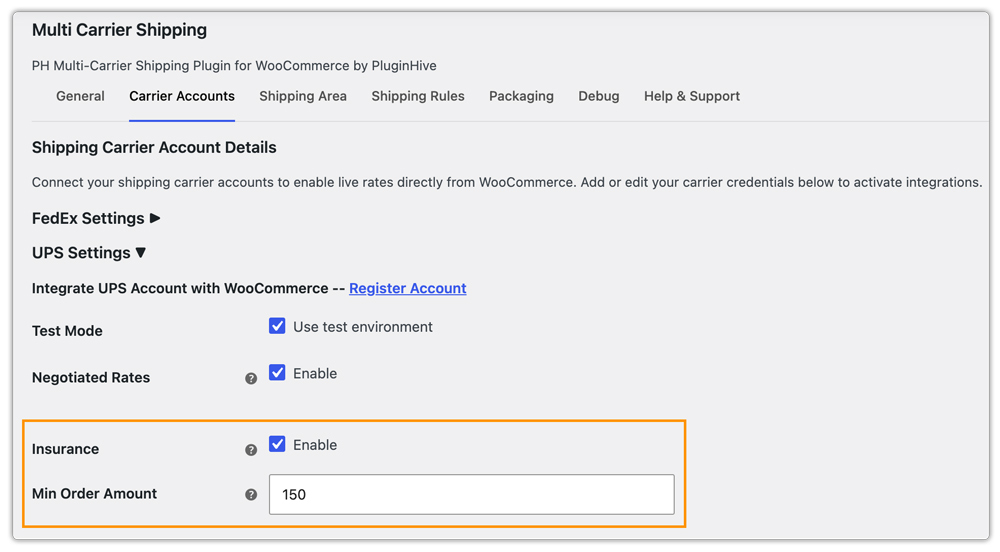
For example, if you set the threshold to $150, an $80 order will not qualify for insurance under this rule, while a $200 order will meet the threshold.
Once configured, the plugin displays real-time shipping rates from supported carriers at checkout. Insurance availability depends on the selected carrier, service, and account configuration.

Real-World WooCommerce Use Case
A WooCommerce store sold inexpensive accessories alongside higher-priced products. Because insurance was enabled for every shipment, even small orders incurred additional insurance charges. This increased shipping costs without always providing meaningful additional protection.
How the Store Changed Its Workflow:
The store kept insurance enabled via the Multi-Carrier Shipping Plugin for WooCommerce and set a minimum order amount based on the value of its higher-priced products.
- Reduced unnecessary charges: Orders below the threshold stopped requesting additional insurance through the configured rule.
- Maintained protection: Qualifying higher-value orders continued to receive insurance according to the configured settings.
- Simplified management: The team no longer needed to decide manually whether to request insurance for each order.
The Result:
The store reduced unnecessary insurance costs on low-value orders while maintaining additional protection for qualifying shipments. This made its shipping rules easier to manage and helped it balance shipping expenses with the risk of losing valuable goods.
Conclusion
Shipping insurance should reflect the value of your shipments and the risks your business faces. Insuring every order may increase costs unnecessarily, while skipping additional protection on valuable goods can leave your business exposed to losses. With the right rules in place, you can control shipping expenses without overlooking the orders that need additional protection.
If you need help choosing the right shipping solution for your WooCommerce store, contact PluginHive Support.
FAQs
Q. What is the difference between declared value and shipping insurance?
Declared value generally establishes or increases the carrier’s liability limit for an eligible shipment. It does not necessarily provide insurance coverage. Shipping insurance is a separate form of protection governed by its own policy terms.
Q. Can I use different insurance thresholds for different carriers?
Yes. The Multi-Carrier Shipping Plugin provides insurance settings within individual carrier accounts. You can configure the available settings for each supported carrier, allowing you to align your shipping rules with the coverage and costs of the services you use.
Q. Does the Multi-Carrier Shipping Plugin print shipping labels?
No. The Multi-Carrier Shipping Plugin fetches live shipping rates but does not generate shipping labels or tracking information. For label generation, you can use WooCommerce Shipping Services.
Q. How can I track valuable WooCommerce shipments?
Use a shipment tracking solution to share tracking details with customers and make shipment progress easier to monitor. Shipment Tracking Pro for WooCommerce lets you add tracking information and provide tracking updates through your store’s configured notifications.
