


A package marked ‘delivered’ that never shows up on the customer’s doorstep is one of the most common and most expensive problems in WooCommerce shipping. Industry research shows roughly one in three online shoppers has had a package stolen, and carrier liability coverage is typically capped around $100 per package, far below what most orders are actually worth.
When that gap shows up on a $150 order, the store absorbs the loss, refunds the customer, or fights a carrier claim that rarely pays out in full. This guide covers why shipping insurance matters and how to handle it differently.
On This Page
- Why WooCommerce Stores Need Shipping Insurance
- UPS, FedEx, USPS, and DHL Shipping Insurance: What Each Carrier Covers
- Carrier Insurance vs Third-Party Package Protection
- What Insuring Every Order Actually Costs You
- How to Set Up Shipping Insurance for Multiple Carriers
- Real-World WooCommerce Use Case
- Conclusion
- FAQs
Why WooCommerce Stores Need Shipping Insurance
Lost, stolen, and damaged packages aren’t rare edge cases; they’re a predictable cost of shipping at volume. Most customers don’t distinguish between a carrier’s mistake and the merchant’s; when a package doesn’t arrive, they expect the store to make it right, not to chase a carrier claim themselves.
That expectation collides with a simple fact: the liability coverage carriers include by default is thin. It’s built to cover the carrier’s own risk, not the actual value of what you shipped, which is exactly the gap shipping insurance is meant to close.
UPS, FedEx, USPS, and DHL Shipping Insurance: What Each Carrier Covers
UPS, FedEx, USPS, and DHL Express provide a small amount of liability coverage with every shipment by default. This coverage serves as a baseline, not as full protection for higher-value orders. Each carrier also lets you purchase additional insurance based on the declared value, so a $40 candle and a $400 jacket do not rely on the same flat coverage amount.
The catch for most WooCommerce stores is that store owners must request this additional coverage when they ship the package through the carrier’s system. They cannot add it after the package goes missing. That makes automation more practical than handling insurance manually for every order.
Carrier Insurance vs Third-Party Package Protection
Store owners generally choose between three approaches to covering shipment risk. Here’s how they compare:
| Carrier Liability | Carrier Insurance via Plugin | Third-Party Checkout Protection | |
|---|---|---|---|
| Coverage Amount | Capped low, often ~$100/package | Declared value you set per shipment | Order value, per the app’s own terms |
| Who Pays | Built into base shipping cost | Optional fee you configure per order | Usually a separate fee charged to the customer |
| Claims Handled By | Carrier directly | Carrier, via the insurance you purchased on that shipment | The third-party app provider |
What Insuring Every Order Actually Costs You
Carrier-purchased insurance is usually priced as a small percentage of the declared value, so it scales with the order rather than adding a flat fee to every cart. For most stores, that cost is far cheaper than absorbing full refunds on lost or damaged high-value orders, especially during high-volume periods when even a small loss rate turns into real money across thousands of shipments.
Third-party checkout protection apps work differently: they usually pass the fee to the customer at checkout, keeping it off your books but adding a line item some shoppers resent. Carrier-purchased insurance through your own WooCommerce shipping setup keeps that decision- absorb it, pass it on, or apply it selectively- entirely in your hands.
How to Set Up Shipping Insurance for Multiple Carriers
If you want to keep your shipments insured with multiple carriers, you can use the Multi-Carrier Shipping Plugin for WooCommerce. It lets you connect and configure multiple carrier accounts, including UPS, FedEx, USPS, and DHL Express, directly from your WooCommerce store.
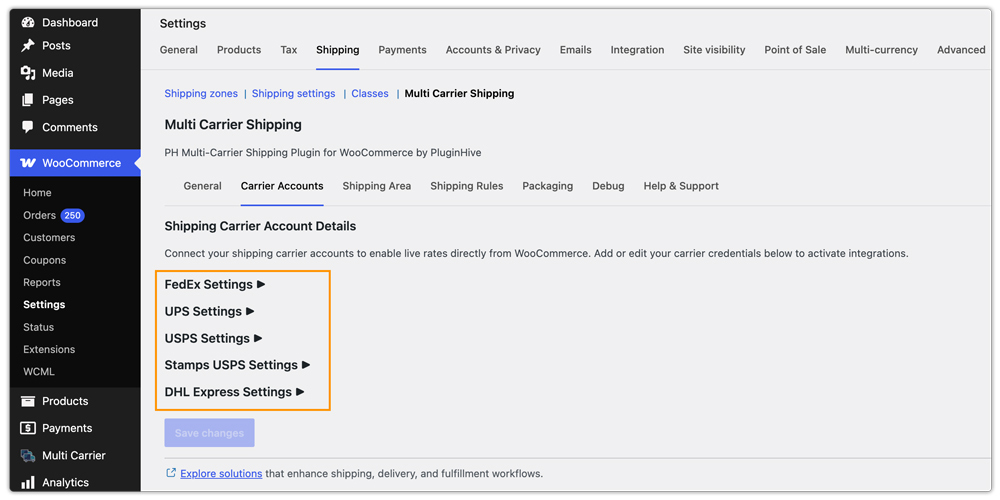
To install and configure the plugin in your store, refer to the Multi-Carrier Shipping Plugin setup guide.
Once you connect a carrier account, you can configure its shipping settings and enable insurance for each carrier separately, as shown below for UPS. The plugin also lets you set a minimum order amount for insurance, so you can choose to insure only shipments above a specific value.
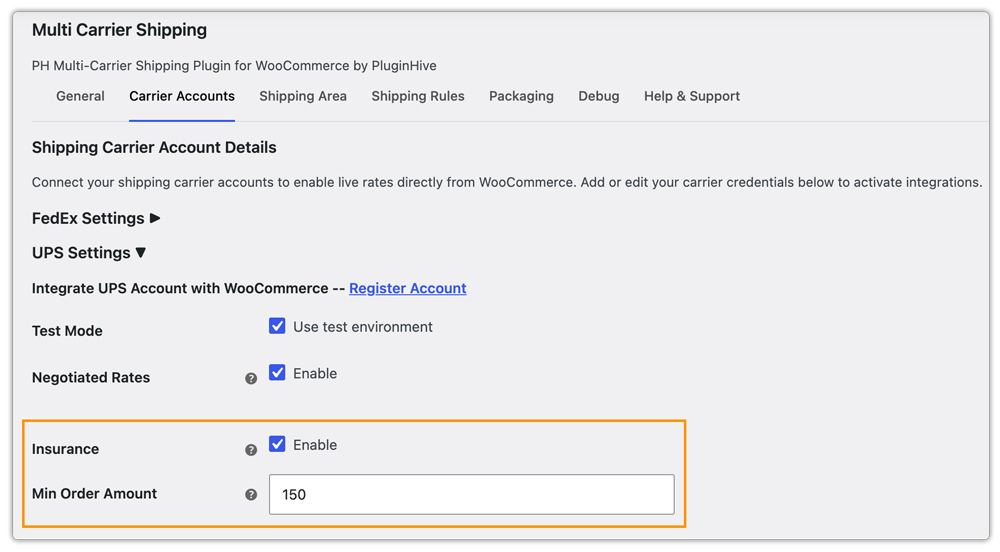
Once configured, the applicable carrier rate is calculated at checkout based on the shipment details. When the order meets your insurance conditions, the insurance option is applied to the shipment without requiring you to handle it manually for every order.

Real-World WooCommerce Use Case
A home goods store shipping fragile, mid-to-high-value items through UPS and FedEx was fielding a steady stream of damage and non-delivery complaints. Carrier liability covered only a small fraction of each item’s value, so every claim meant a full refund or replacement out of the store’s own margin.
How the Plugin Helped
The team enabled carrier-purchased insurance for UPS and FedEx through the Multi-Carrier Shipping Plugin and set a minimum order value so only shipments above their typical low-risk threshold were insured. Declared-value coverage was requested automatically at the time of shipping, with no manual step added to their fulfillment process.
The Result
Damage and loss claims on covered orders were reimbursed at their actual declared value instead of the carrier’s default cap, and the store stopped treating every lost or damaged package as a straight loss against margin.
Conclusion
Carrier default liability was never built to cover what most WooCommerce orders are actually worth, and third-party checkout protection isn’t the only way to close that gap. Turning on carrier-purchased insurance for the shipments that actually need it, through the accounts you’re already using for rates and labels, protects your margin without adding a separate system or a surprise fee at checkout.
If you need help setting up the Multi-Carrier Shipping Plugin or configuring carrier insurance, you can contact PluginHive Support.
FAQs
Q. Does UPS, FedEx, USPS, or DHL automatically insure my WooCommerce shipments?
Only up to a small default liability amount, typically capped around $100 per package. Full declared-value coverage has to be requested separately on each shipment, which is what carrier-purchased insurance through the plugin automates.
Q. Can I insure only high-value orders instead of every shipment?
Yes. The Multi-Carrier Shipping Plugin lets you set a minimum order amount per carrier, so insurance is only requested once a shipment’s value crosses the threshold you choose.
Q. Does adding insurance slow down checkout or fulfillment?
No, since it’s tied to the same carrier accounts already generating your live rates, insurance is requested automatically at the time of shipping without an extra manual step.
Q. Is shipping insurance worth it for low-value products?
Usually not on its own, which is why a minimum order value setting matters; it lets you insure the orders where a loss would actually hurt your margin, without paying a fee on every low-cost item you ship.
