


Shipping products from Sweden to other EU countries comes with its own set of challenges. For WooCommerce store owners, ensuring smooth cross-border deliveries is essential to maintain customer satisfaction and avoid delays. PostNord, as Sweden’s leading logistics provider, offers reliable and cost-effective shipping solutions across the EU.
In this guide, we’ll explore why PostNord is a top choice for EU shipping, the challenges, and how to set up PostNord shipping directly in your WooCommerce store.
On This Page
- Why use PostNord to ship to the EU from your WooCommerce store
- Challenges WooCommerce Businesses Face When Shipping to the EU
- PostNord Delivery Options for WooCommerce Stores Shipping to the EU
- How to Set Up PostNord Shipping in WooCommerce
- Real-World Example: Swedish WooCommerce Store Shipping to the EU
- 5 Tips for WooCommerce Businesses Shipping to the EU using PostNord
- Conclusion
- FAQs
Why use PostNord to ship to the EU from your WooCommerce store
For WooCommerce business owners, shipping to the EU with PostNord comes with the following benefits:
- Reliable Delivery: Extensive EU network ensures packages reach customers safely and on time.
- Cost-Effective Options: Multiple shipping levels allow merchants to balance speed and cost.
- Tracking & Transparency: Real-time tracking keeps both merchants and customers informed.
- Flexible Delivery: Customers can receive parcels at home, pickup points, or lockers, reducing failed deliveries.
- WooCommerce Integration: Shipping rates, labels, and orders can be managed directly from the store, minimizing manual work.
- EU Compliance: Experienced in cross-border shipping and customs, helping avoid delays or regulatory issues.
PostNord ensures efficient, cost-effective, and reliable EU deliveries while simplifying shipping management for WooCommerce stores.
Challenges WooCommerce Businesses Face When Shipping to the EU
When running a WooCommerce store in Sweden, selling to customers across the EU can open great opportunities, but it also comes with challenges you’ll need to manage:
- Customs & Duties: Even within the EU, VAT, tax rules, and documentation can differ. Mistakes here may cause delays or penalties.
- High Shipping Costs: Cross-border rates, surcharges, and handling fees can make your products less competitive.
- Longer Transit Times: Deliveries often take more time compared to domestic shipping, especially if customs clearance is involved.
- Tracking Issues: Without the right carrier or integration, customers may face unclear or delayed tracking updates.
- Returns & Failed Deliveries: Handling returns internationally is expensive and complicated, particularly if customers reject delivery.
- Scaling Problems: As order volume grows, managing multiple shipments manually can become overwhelming and error-prone.
These challenges highlight why choosing the right shipping partner and automating WooCommerce processes is key to making EU deliveries smooth and reliable.
PostNord Delivery Options for WooCommerce Stores Shipping to the EU
PostNord gives WooCommerce merchants in Sweden multiple ways to reach EU customers, depending on package size, urgency, and delivery preferences. With PostNord tracking, customs support, and partnerships with local carriers, these services cover everything from small letters to bulk shipments.
- Parcel Post International
Send parcels up to 20 kg to most EU countries. Delivery within Europe typically takes around 2 working days after drop-off. Some destinations also support home delivery or collection at a local service point.
- MyPack Home International
Direct home delivery to customers across Europe with full tracking and estimated delivery windows. Ideal for B2C merchants who want convenience for buyers.
- MyPack Collect International
Delivers to service points in many EU countries via PostNord’s partner networks like DPD and DHL. Available in Austria, Belgium, Denmark, Estonia, Finland, France, Germany, Latvia, Lithuania, Luxembourg, the Netherlands, and Spain.
- PostNord International Parcel
Tracked shipping for small to medium parcels across Europe and beyond. Includes customs support, making it useful for cross-border eCommerce.
- Letters & Parcels Abroad
For smaller packages and letters, this option allows international delivery across the EU. Businesses can buy postage online via Skicka Direkt or at PostNord service points.
To learn more about PostNord shipping services, check out: PostNord Shipping Services for WooCommerce.
How to Set Up PostNord Shipping in WooCommerce
To start offering PostNord shipping from Sweden to EU destinations, install and activate the PostNord Shipping Plugin for WooCommerce with Print Label. This plugin allows you to manage orders, generate labels, and handle international shipping documents directly within your store.
To configure the plugin settings, check this guide – WooCommerce PostNord Shipping Plugin Setup.
Since no PostNord plugin currently provides real-time shipping rates, you’ll need to configure shipping costs manually. You can do this using the WooCommerce Table Rate Shipping Pro Plugin or the built-in Flat Rate Shipping method.
Once the plugin is installed and your PostNord account is connected:
- A list of PostNord services will be available. Select the services you want to enable for EU shipments.

- After a customer places an order, you can generate and print the required International documents, like Commercial Invoice / CN22 / CN23 forms, for EU cross-border compliance can also be generated within WooCommerce.
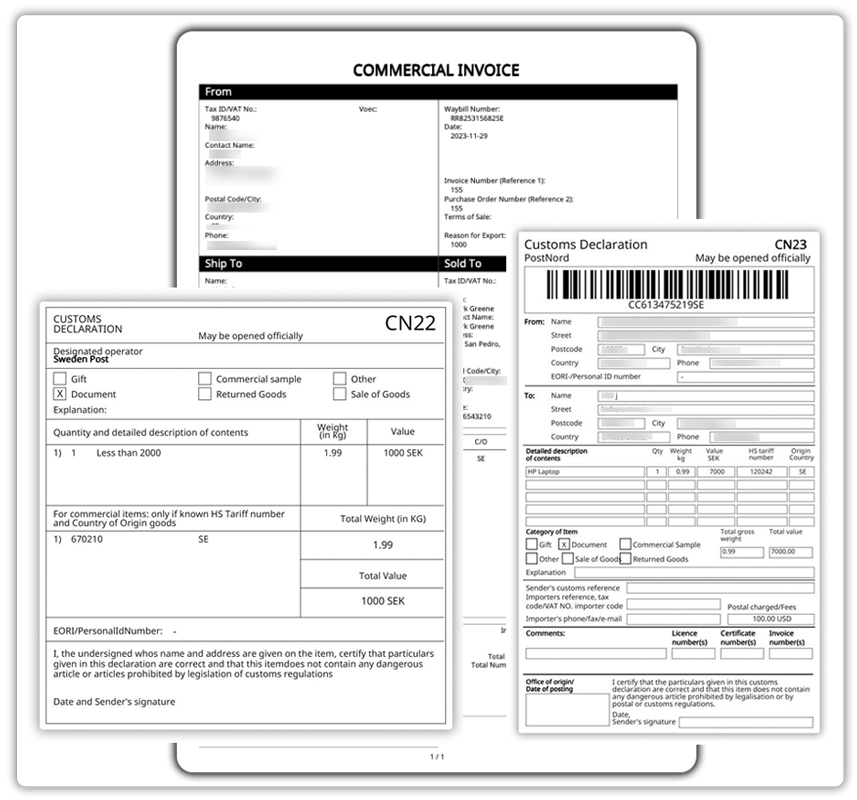
This setup ensures you can handle required EU customs forms without leaving your WooCommerce dashboard.
To learn about PostNord tracking, check this guide: PostNord Tracking for WooCommerce Orders.
Real-World Example: Swedish WooCommerce Store Shipping to the EU
Let’s take an example of a WooCommerce store based in Stockholm, Sweden, selling Scandinavian fashion and lifestyle products to customers across the EU.
Before integrating PostNord, the merchant faced several challenges:
- Every international order required logging into the PostNord portal separately to create labels, slowing down fulfillment.
- Customs forms like CN22 and CN23 had to be filled out manually, which was time-consuming and prone to errors.
- Tracking numbers had to be copied manually into WooCommerce, often causing delays and occasional mistakes.
- As sales grew across Germany, France, and the Netherlands, the store struggled to manage rising shipping volumes efficiently.
After integrating the PostNord Shipping Plugin for WooCommerce with Print Label, the process became much smoother:
- Shipping labels are generated directly from the WooCommerce order page, cutting fulfillment time significantly.
- Required EU customs documents are generated automatically within WooCommerce, ensuring compliance and avoiding delays.
- Tracking numbers sync automatically with WooCommerce orders and are sent to customers, reducing support requests.
- With automation in place, the store scaled its EU shipping operations seamlessly, even during peak shopping seasons, without needing additional staff.
This example highlights how PostNord integration helps Swedish WooCommerce merchants save time, reduce errors, and deliver a reliable shipping experience for customers across the EU.
5 Tips for WooCommerce Businesses Shipping to the EU using PostNord
To make the most of PostNord when shipping from Sweden to EU countries, WooCommerce merchants should follow these best practices:
- Automate Label Generation: Use the PostNord Shipping Plugin for WooCommerce to create labels and customs documents directly from the order page, saving time and reducing errors.
- Set Clear Shipping Rates: Since PostNord doesn’t offer live rates in WooCommerce, configure accurate shipping costs with Table Rate Shipping Pro or WooCommerce’s built-in Flat Rate method.
- Stay Customs-Compliant: Always generate and attach required EU customs forms (CN22/CN23) within WooCommerce to avoid clearance delays.
- Communicate PostNord Tracking Updates: Ensure tracking numbers sync automatically with orders and are shared with customers via email or order status pages.
- Plan for Peak Seasons: Automate as much as possible before high-demand periods to handle increased volumes without adding extra staff.
By following these tips, Swedish WooCommerce stores can streamline EU shipping with PostNord, keeping deliveries fast and customer-friendly.
Conclusion
Shipping from Sweden to EU countries presents both opportunities and challenges for WooCommerce merchants. With the right approach, PostNord makes it possible to balance cost, speed, and reliability while ensuring compliance with EU regulations. By planning and automating processes, store owners can provide a seamless cross-border shopping experience that builds customer trust and loyalty.
If you have questions or need assistance setting up PostNord for your WooCommerce store, feel free to reach out to PluginHive support.
FAQs
- Can I offer both home delivery and parcel shop pickup in WooCommerce?
Yes, PostNord allows you to provide multiple delivery options, giving customers the flexibility to choose what works best for them.
- What happens if a customer in the EU rejects delivery?
If a parcel is not collected or rejected, it is typically returned to the sender. Merchants should clearly communicate return policies and consider using pickup points to reduce failed deliveries.
- What PostNord shipping services can I offer in WooCommerce?
PostNord supports a variety of services, including home delivery, business delivery, and parcel shop pickup. Check out the guide on PostNord services in WooCommerce to learn more.
- Does PostNord handle returns for EU customers?
Yes, PostNord offers return solutions, but they may come with additional costs. Providing prepaid return labels or directing customers to service points can make returns smoother.
