



Setting the right shipping rates can make or break your WooCommerce store’s checkout experience. Charge too much, and customers leave; charge too little, and your margins suffer. Table rate shipping solves this by letting you define precise, rule-based rates for every scenario, but only if the plugin you choose is powerful enough.
This comparison looks at the PH Table Rate Shipping Pro Plugin for WooCommerce by PluginHive and the Table Rate Shipping for WooCommerce – Flexible Shipping PRO by Octolize, two of the most popular premium table rate shipping plugins available. We’ll walk through the details to help you decide which one fits your store best.
On This Page
- Overview of Both Plugins
- Core Feature Comparison: PluginHive vs Octolize
- Ease of Setup, User Experience & Workflow Efficiency
- Support, Integrations & Scalability
- Pricing & Overall Value
- Final Verdict
Overview of Both Plugins
PH Table Rate Shipping Pro Plugin for WooCommerce
The PH Table Rate Shipping Pro Plugin is a dedicated WooCommerce shipping extension built to handle virtually any shipping scenario a real-world business might face. It allows store owners to create unlimited rule-based shipping rates using a wide combination of conditions — weight, price, quantity, product category, shipping class, country, state, city, and ZIP code — all manageable directly from the WooCommerce dashboard.
Trusted by over 7,000 WooCommerce stores globally and rated 4.98/5, it is designed for merchants who need both flexibility and simplicity. From small startups shipping a handful of orders to high-volume stores with complex multi-zone setups, the plugin scales to fit.
Table Rate Shipping for WooCommerce – Flexible Shipping PRO
Flexible Shipping PRO is a premium table rate shipping plugin on WordPress.org. Built by Octolize, the PRO version extends the free plugin with advanced conditions such as user roles, date/time-based rules, product categories, and shipping classes. It also allows you to create multiple shipping scenarios using a combination of weight, cart value, or item count. While it’s flexible and reliable for custom rate setups, configuring more complex rules can take a bit of time to get right.
Core Feature Comparison: PluginHive vs Octolize
| Feature | PH Table Rate Shipping Pro | Flexible Shipping PRO |
|---|---|---|
| Shipping Rules Based on Weight | Yes | Yes |
| Shipping Rules Based on Cart Price | Yes | Yes |
| Shipping Rules Based on Item Quantity | Yes | Yes |
| Shipping Rules Based on Product Category | Yes | Yes |
| Shipping Rules Based on Shipping Class | Yes | Yes |
| ZIP Code / Postcode Level Rules | Yes, including wildcard support | Yes, via Locations Add-On (separate purchase) |
| City & State-Level Rules | Yes, built-in | Not natively built-in |
| WooCommerce Shipping Zone Integration | Yes | Yes |
| Country-Based Rules (without zones) | Yes | Requires zone setup |
| Flat Rate & Free Shipping | Yes | Yes |
| Percentage-Based Cost Calculation | Yes | Yes |
| Step/Round-Based Cost Calculation | Yes | Yes |
| Volumetric Weight Support | Yes | Yes |
| CSV Import/Export of Rules | Yes, built-in | Requires a separate Import/Export Add-On |
| Bulk Rule Management (1500+ rules) | Yes | Yes |
| Per Product Shipping | Yes, via a free add-on | Not natively included |
| WooCommerce Measurement Price Calculator Integration | Yes | No |
| WPML Multilingual Support | Yes | Yes |
| Multi-Currency Compatibility | Yes | Yes |
| 30-Day Money-Back Guarantee | Yes | Yes |
Both plugins handle core table rate shipping needs well, but the PH Table Rate Shipping Pro Plugin stands out by offering more built-in capabilities without relying on additional add-ons, making it a more complete and flexible solution out of the box compared to Flexible Shipping PRO.
Ease of Setup, User Experience & Workflow Efficiency
PH Table Rate Shipping Pro
The plugin uses a clean, tab-based layout within WooCommerce shipping settings, keeping configuration logically grouped and easy to navigate.

Store owners can set up shipping rules for specific countries, zones, states, cities, and ZIP codes, all from the same interface. The click-and-choose rule matrix makes it simple to select the conditions you want without writing any code.
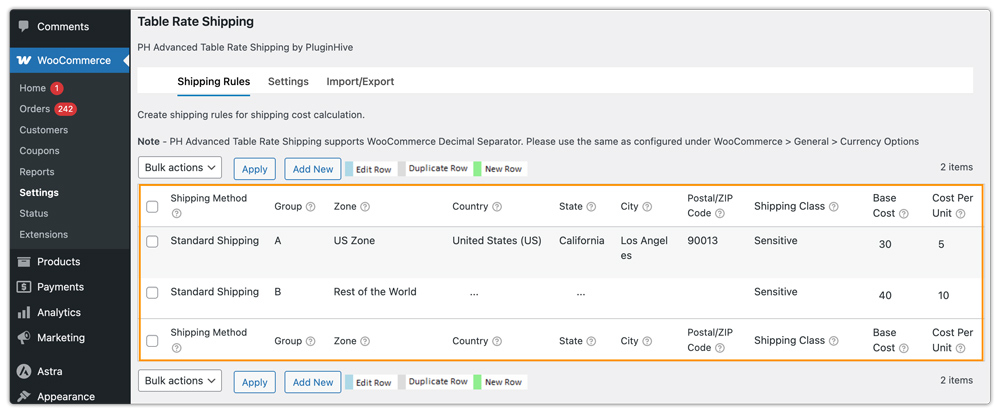
For stores managing hundreds or thousands of shipping rules, the CSV import/export feature is built directly into the PH Table Rate Shipping Pro plugin (no add-on required), allowing bulk rule creation and edits in a spreadsheet before uploading.

Flexible Shipping PRO
Flexible Shipping PRO has a well-designed and modern interface that most users find intuitive for standard setups. Its rule builder is visual and logical, making it accessible even for less technical users. However, several commonly needed features — such as ZIP code targeting, import/export of rules, and location-specific rules — require purchasing separate add-ons, which adds cost and setup steps. This can make what seems like a simpler plugin feel more fragmented when scaling up.
In short, PH Table Rate Shipping Pro delivers a more comprehensive out-of-the-box experience, particularly for stores that need granular geographic control, while Flexible Shipping PRO gives an edge in initial configuration speed for standard scenarios.
Support, Integrations & Scalability
PH Table Rate Shipping Pro
Support: PluginHive provides dedicated, shipping-focused customer support backed by detailed documentation and troubleshooting guides. The support team is known for going above and beyond; multiple verified reviewers mention Zoom calls where the team personally walked through their configuration and resolved complex setups.
Add-ons & Integrations: PluginHive offers free companion add-ons, including a Per Product Shipping Add-on and a Bundled Rate Shipping Add-on. The plugin also integrates with the WooCommerce Measurement Price Calculator, WooCommerce Multi-currency, WOOCS Currency Switcher, WPML, and the WooCommerce Ship to Multiple Addresses plugin.
Scalability: Designed for businesses of all sizes. The plugin has been verified to handle 1,500+ shipping rules and scales well for high-volume stores with complex multi-zone, multi-country setups. Its CSV import system makes managing large rule sets practical.
Flexible Shipping PRO
Support: Octolize offers priority email support for PRO customers along with solid documentation. Support quality is generally well-regarded, though it is email/ticket-based without the hands-on, call-based support that PluginHive is known for.
Add-ons & Integrations: The Flexible Shipping ecosystem involves several paid add-ons, each sold separately. This modular approach gives flexibility but raises total cost if you need multiple features.
Scalability: Suitable for growing businesses. The modular add-on structure means you can expand functionality as needed, though the total cost of the ecosystem can add up quickly.
Pricing & Overall Value
| Plugin | Current Price | Support & Updates | Notable Extras |
|---|---|---|---|
| PH Table Rate Shipping Pro | $79/year (currently discounted) | 1 year updates + dedicated shipping support + Zoom calls | Free Per Product & Bundled Rate add-ons included |
| Flexible Shipping PRO | $99/year | 1 year updates + priority email support | AI Assistant included; other add-ons cost extra |
PH Table Rate Shipping Pro is currently available at a discounted price of $79/year, making it the more cost-effective choice. Flexible Shipping PRO’s AI assistant is a genuinely useful differentiator, but stores that need the full feature set — including location add-ons and import/export — will spend considerably more than the base $99.
Final Verdict
Both plugins are good choices for WooCommerce table rate shipping, and each has separate strengths. For most WooCommerce store owners who need comprehensive, out-of-the-box table rate shipping with deep geographic control — down to the city and ZIP code level — the PH Table Rate Shipping Pro Plugin by PluginHive delivers more for less. For growing businesses that don’t want to piece together a solution from multiple paid add-ons, PluginHive is the smarter long-term investment.
