


Running a tour business is all about delivering great experiences, but managing the backend is a different story. From scheduling tours and avoiding double bookings to handling group sizes, pricing, and cancellations, the daily tasks can quickly pile up.
This article will show you how to simplify tour bookings and manage your operations effortlessly using the Bookings and Appointments for WooCommerce plugin, no matter what type of tours you offer.
Table of Contents
- Key Challenges Faced by Tour Providers
- Tour Booking Automation Made Easy with WooCommerce
- Real-World Example
- Final Thoughts
- FAQs
Key Challenges Faced by Tour Providers
Running a tour business isn’t just about guiding people; it’s about managing a lot behind the scenes. Without a proper system in place, small issues quickly snowball into missed bookings, unhappy customers, and lost revenue.
Here are the most common challenges tour providers face:
1. Double Bookings and Scheduling Conflicts: When bookings are handled manually via calls, messages, or spreadsheets, it’s easy to overbook or mix up time slots, especially during weekends or peak season.
2. No Real-Time Availability: Customers can’t see which tours are actually available, which leads to back-and-forth communication and a poor booking experience.
3. Group Size and Capacity Management: Whether you’re offering private tours or group packages, it’s difficult to track how many people are booked for each slot. Overselling leads to chaos, while underselling means lost revenue.
4. Complex Pricing Rules: Tour pricing isn’t always straightforward. Rates may vary by participant type (adult/child), group size, date, or season, making it hard to manage without a flexible pricing system.
5. Missed Revenue from Add-Ons: Many tours offer optional extras like meals, hotel pickup, or private upgrades, but without a proper upsell mechanism, these opportunities are lost.
7. Lack of Multilingual and Multi-Currency Support: International tourists may struggle to complete a booking if your site doesn’t support their language or currency, causing unnecessary drop-offs.
These challenges may feel like part of the job, but they’re not. With the right booking system, you can automate the workflow, reduce errors, and offer a smoother experience. That’s where WooCommerce Bookings makes all the difference.
Tour Booking Automation Made Easy with WooCommerce
Manually managing tours is time-consuming and prone to errors. With Bookings and Appointments for WooCommerce by PluginHive, you can fully automate your booking flow, saving time and improving customer experience.
To get started with the Bookings and Appointments for WooCommerce plugin, ensure it’s installed, activated, and configured properly. Follow this quick setup guide: Bookings and Appointments for WooCommerce Setup Guide .
Here’s how the plugin helps you overcome the key challenges tour businesses face:
- Show Real-Time Tour Availability
Display available dates and time slots directly on your product page. This prevents double bookings and ensures customers only select open slots.
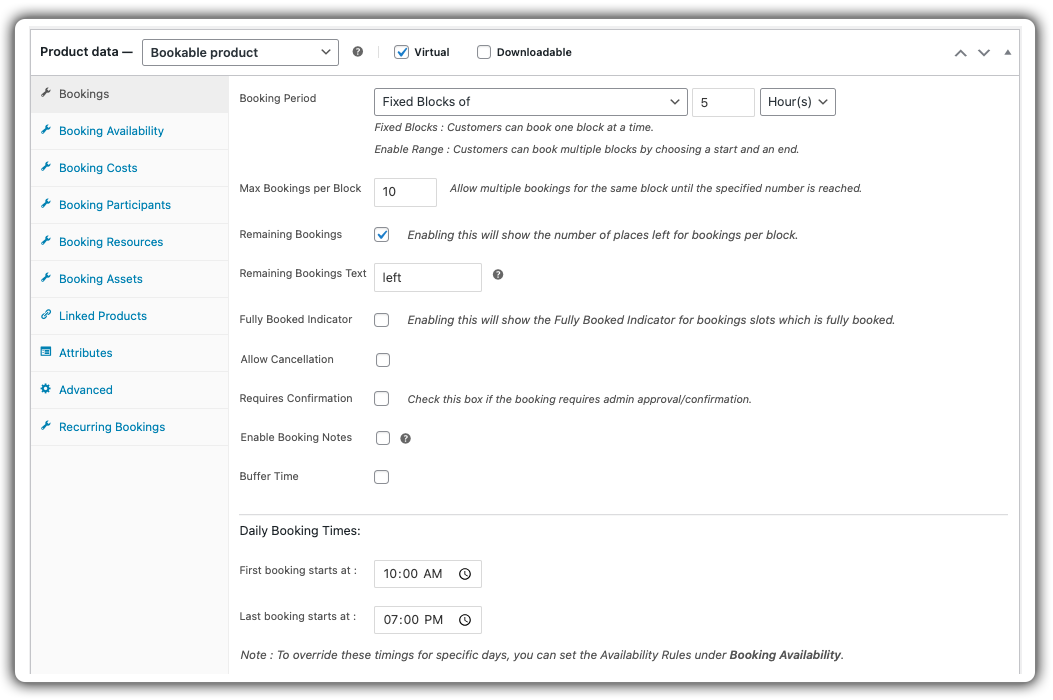
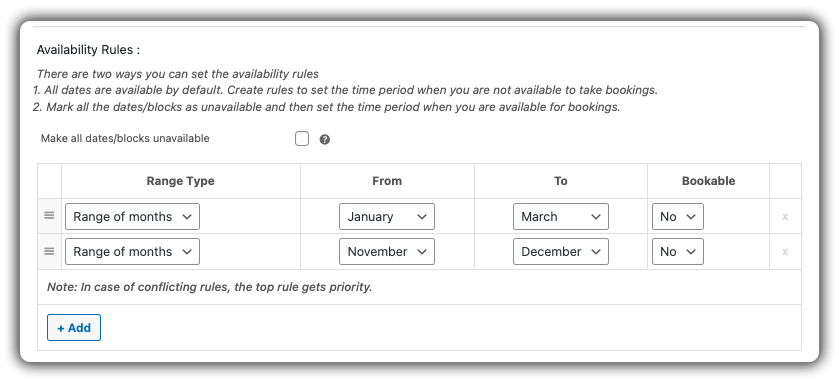
Need help setting up bookings availability? Check out this guide
- Set Participant Limits
Define minimum and maximum participants per tour to control group size automatically. Great for both private and group tours.

Want to know how to manage participants? See how it’s done
Offer Flexible & Dynamic Pricing
Create custom pricing for adults, children, groups, and special seasons. You can apply different rates based on quantity, date, or even time slot.
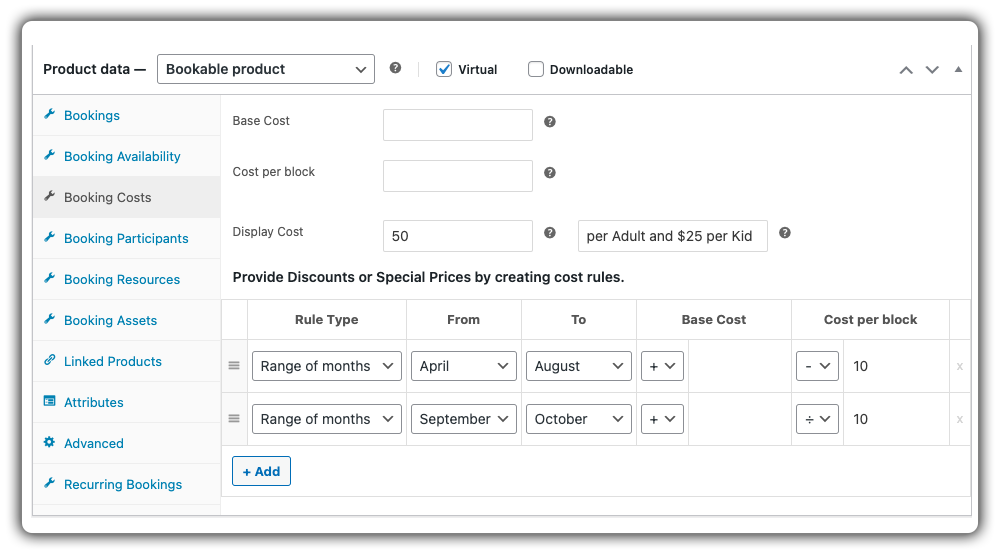
Learn how to set booking costs.
Upsell Add-Ons Like Meals or Transport
Add optional extras such as Lunch, hotel pickup, and photography using Booking Resources or the PH Product Add-Ons for WooCommerce plugin.

Need help adding upsell options? Here’s how to set booking resources.
- Manage Tour Cancellations with Ease
Set flexible cancellation rules for your tours, like allowing changes only 24 or 48 hours before the start, to stay organized while keeping things fair for customers.

Need help setting this up? Check out this guide.
This is exactly how the Tour booking experience will look on your website’s frontend:

Multilingual and Multi-Currency Ready
Support international customers with translation plugins like WPML and currency switchers.

Need a multilingual setup? Check out this step-by-step guide
You can use the PH Deposits for WooCommerce plugin to let customers pay a portion upfront and the rest later, perfect for high-value or group tour bookings.
Send Automatic Email Confirmations & Reminders
Notify customers instantly when they book or reschedule, and send reminders before their tour begins, reducing no-shows.
Learn how to Set up email notifications & reminders.

Sync Bookings with Google Calendar
Automatically sync all bookings to your Google Calendar. Customers can also add bookings to their calendars with one click from the confirmation page.

Learn how to sync bookings with Google Calendar.
Want to set this tour booking business? Follow this easy setup guide.
With these features in place, your WooCommerce store is fully equipped to handle tour bookings efficiently, saving you time while offering a smooth experience to your customers.
Real-World Example: Streamlining Tour Bookings with WooCommerce
Let’s say you run a WooCommerce-based tour company offering daily sightseeing tours in your city, think historical walks, bike tours, or food and culture trails.
The Challenges You Will Face
- Bookings come in through calls or emails, making it hard for customers to check availability or confirm instantly.
- Weekend tours often get overbooked because there’s no system to automatically close slots once full.
- You manually track group size and available slots, which becomes chaotic when multiple bookings arrive at once.
- Add-on services like lunch or hotel pickup are handled separately, making it easy to miss customer preferences.
- Guests frequently ask for confirmation emails, meeting points, or itinerary details all sent manually.
- International tourists may face confusion with local timing, leading to late arrivals or missed tours.
How to solve
With the Bookings and Appointments for WooCommerce Plugin, you can streamline the entire process:
- Each tour is listed as a bookable product with real-time availability. Customers can instantly select their preferred date, time, and group size.
- You can set a maximum number of participants, and the plugin automatically blocks bookings once the tour reaches capacity.
- Add-ons like hotel pickup, lunch, or gear rentals are offered during booking, so customers can customize their experience up front.
- Confirmation emails with tour details are sent automatically, along with reminders closer to the date.
- Time zone support ensures tourists see their tour times correctly their your local time, avoiding any miscommunication.
You eliminate scheduling chaos, reduce manual coordination, and deliver a smoother experience both for your customers and your team.
Final Thoughts
Tour businesses rely on precise timing, smooth coordination, and delivering great customer experiences. By integrating WooCommerce with Bookings and Appointments for WooCommerce by PluginHive, you remove the hassle of manual scheduling and offer guests a simple way to book their adventures.
From managing daily slots and group sizes to handling time zones seamlessly, everything runs more efficiently with less effort on your part.
Ready to modernize your booking process and focus on what you do best? Reach out to our support team for tailored assistance.
FAQs
1. Can I set different time slots for each tour package?
Yes. The Bookings and Appointments for WooCommerce plugin lets you define custom time slots per product, so you can easily offer morning, afternoon, or evening tours based on availability.
2. Will WooCommerce Bookings show tour availability in the customer’s local time zone?
Absolutely. The Bookings and Appointments for WooCommerce plugin auto-detects the customer’s time zone and displays availability based on your settings accordingly, avoiding confusion and scheduling issues.
3. Can I sync my tour bookings with Google Calendar?
Yes. You can connect your WooCommerce Bookings calendar to Google Calendar to stay updated on all your scheduled tours, cancellations, and changes.
4. What types of payments can I accept for bookings?
Since the plugin works within WooCommerce, you can accept payments through any WooCommerce-supported payment gateway, including PayPal, Stripe, direct bank transfer, and more.
Can I offer optional services with my tours using the Bookings Plugin by PluginHive?
Yes. You can use PH Product Add-Ons or Bookings resources within the plugin settings and provide optional services (like meals, pickup/drop-off, etc.)
6. How do I handle last-minute cancellations with Bookings by PluginHive?
The plugin allows you to define cancellation buffer times, giving you full control over how flexible or strict your operations need to be.
