


Fast and reliable delivery is crucial for WooCommerce stores serving UK customers. Managing orders manually can be time-consuming and prone to errors. Integrating Parcelforce with WooCommerce can help automate shipping. As a leading UK courier under the Royal Mail Group, Parcelforce offers dependable domestic and international services.
This guide explains how Parcelforce integration simplifies UK order fulfillment, saves time, and improves the delivery experience for both store owners and customers.
On This Page
- Why Choose Parcelforce for WooCommerce UK Shipping
- Benefits of Integrating Parcelforce with WooCommerce
- Parcelforce Integration in WooCommerce for UK Order Fulfillment
- Real-World Example: WooCommerce Store Using Parcelforce
- Conclusion
- FAQs
Why Choose Parcelforce for WooCommerce UK Shipping
Parcelforce is a trusted UK-based courier offering reliable, fast, and flexible delivery options for WooCommerce stores. Whether you’re shipping locally or overseas, it provides a seamless way to manage all orders directly from your store dashboard.
Here’s why many UK retailers prefer Parcelforce for WooCommerce shipping:
- Nationwide Coverage: Ship to every corner of the UK with guaranteed next-day and timed delivery options such as express9, express10, expressAM, and express24.
- Trusted UK Brand: Operated under the Royal Mail Group, Parcelforce brings decades of credibility and reliable service.
- International Reach: Deliver to many countries and territories with consistent tracking and delivery timelines.
- Real-Time Tracking: Keep customers updated with live tracking information for every order.
- Flexible Delivery Options: Offer customers convenient services like weekend or timed delivery slots.
- Excellent Support for Businesses: Ideal for small and large UK retailers looking to optimize shipping without a complex setup.
Choosing Parcelforce ensures your WooCommerce store provides faster deliveries, better transparency, and a smoother post-purchase experience for every customer.
Benefits of Integrating Parcelforce with WooCommerce
Integrating Parcelforce with WooCommerce brings automation, accuracy, and efficiency to your shipping process. Instead of handling the shipping process, you can manage everything directly from your store’s admin panel.
Here are the key benefits:
- Instant Label Generation: Create and print Parcelforce shipping labels for single or bulk orders right from WooCommerce.
- Tracking Updates: Automatically send tracking details to customers as soon as shipments are created.
- Time-Saving Workflows: Eliminate repetitive tasks like entering shipment data or copying tracking numbers.
- Support for Domestic & International Orders: Manage UK and global shipments from one unified system.
- Reduced Shipping Errors: Automatic data sync between Parcelforce and WooCommerce minimizes mistakes and delays.
Integrating Parcelforce with WooCommerce isn’t difficult when you have the right solution. Let’s see how you can set it up and start shipping smarter.
Parcelforce Integration in WooCommerce for UK Order Fulfillment
To integrate Parcelforce shipping into your WooCommerce store, start by installing and activating the WooCommerce Shipping Services plugin.
For a detailed, step-by-step installation and setup process, refer to the Setup Guide for the WooCommerce Shipping Services Plugin.
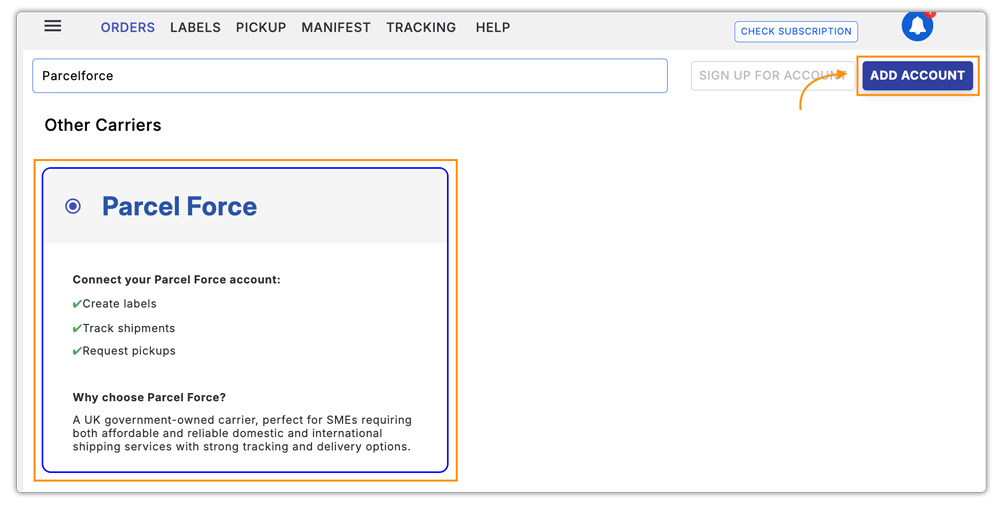
Once installed, navigate to the plugin settings and add Parcelforce as a carrier, as shown in the image below.
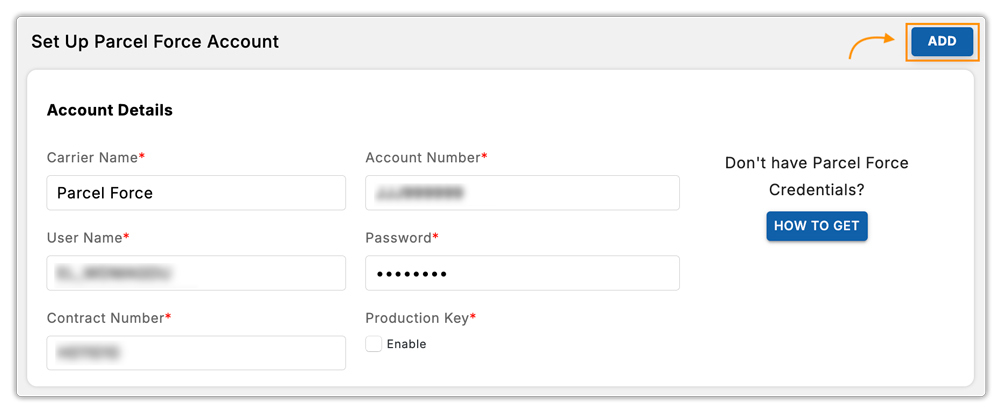
Next, enter your Parcelforce account credentials to connect your Parcelforce account with WooCommerce.
Since the Parcelforce API doesn’t currently support displaying real-time shipping rates in WooCommerce, you can use WooCommerce Flat Rate Shipping or a flexible rate plugin like WooCommerce Table Rate Shipping Pro to set up accurate custom rates.
Once connected, your store can generate and print Parcelforce shipping labels directly from WooCommerce orders.


Real-World Example: WooCommerce Store Using Parcelforce
Let’s look at how a UK-based WooCommerce store can streamline its operations using Parcelforce integration.
Scenario:
A clothing retailer in Manchester ships hundreds of orders weekly across the UK. Before integration, the team handled shipping manually, copying customer details into the Parcelforce portal, printing labels separately, and emailing tracking numbers to customers. This process was time-consuming and prone to errors.
After integrating Parcelforce with WooCommerce through the WooCommerce Shipping Services plugin, their workflow became fully automated:
- Parcelforce shipping labels are generated directly from each WooCommerce order.
- Tracking numbers are automatically added to order emails sent to customers.
- The store can schedule pickups and manage all shipments from within the WooCommerce dashboard.
- Staff no longer switch between systems, reducing order dispatch time by nearly 40%.
By automating shipping with Parcelforce, the retailer not only improved delivery accuracy but also enhanced customer satisfaction through faster fulfillment and reliable tracking updates.
Conclusion
Integrating Parcelforce with WooCommerce makes UK order fulfillment faster, more reliable, and easier to manage. From printing labels to tracking shipments, automation helps reduce manual work while improving delivery speed and accuracy. With the right setup, connecting Parcelforce to your WooCommerce store isn’t difficult and can greatly enhance your shipping workflow.
If you need help with integration or setup, contact our support team for assistance.
FAQs
- How can I show customers the estimated delivery date for Parcelforce shipments at checkout?
You can easily display expected delivery dates using the Estimated Delivery Date Plugin for WooCommerce. It helps set clear expectations, reduces customer queries, and improves the post-purchase experience.
- How do I provide tracking updates to customers once Parcelforce shipments are dispatched?
Use the WooCommerce Shipment Tracking Pro Plugin to automatically share Parcelforce tracking links with customers via email and the order page.
- Can I manage Parcelforce shipping for a multi-vendor WooCommerce store?
Yes. The WooCommerce Multi-Vendor Shipping Addon lets each vendor generate their own Parcelforce labels, track shipments, and manage orders independently.
- Does Parcelforce support same-day or next-day delivery in the UK?
Yes, Parcelforce offers multiple express options such as express9, express10, expressAM, and express24 for guaranteed next-day deliveries across the UK.
- Can I ship internationally using Parcelforce from my WooCommerce store?
Absolutely. Parcelforce supports international deliveries to many destinations worldwide with full tracking visibility and customs documentation support.
