


Returns are a natural part of running a WooCommerce store, but managing them manually can quickly increase costs. Creating return labels, tracking shipments, and processing refunds take time, especially as return volumes grow. Using UPS return labels in WooCommerce helps streamline the returns process and reduce operational effort.
In this guide, you’ll learn how UPS return labels work in WooCommerce and how they can help you control return shipping costs more effectively.
On This Page
- Why WooCommerce Return Shipping Increases Costs
- Key Return Shipping Tasks You Can Automate in WooCommerce with UPS
- How to Print UPS Return Labels in WooCommerce
- Real-World Use Case
- Conclusion
- FAQs
Why WooCommerce Return Shipping Increases Costs
Return shipping often costs more than outbound shipping because it introduces extra, unplanned steps into the fulfillment workflow. When returns are handled manually, store owners spend additional time creating return labels, coordinating pickups, and tracking shipments, which increases operational overhead.
Shipping carriers also charge return shipping fees that are not always recoverable, especially when free or prepaid returns are offered. Without clear return rules, customers may return low-value items, leading to higher shipping expenses than the product’s actual margin.
Lack of automation further adds to the problem. Manually entered addresses, incorrect package details, and missing tracking information can result in failed deliveries, reshipments, or delayed refunds, all of which increase costs and negatively impact customer satisfaction.
Key Return Shipping Tasks You Can Automate in WooCommerce with UPS
Managing returns becomes significantly easier when key return shipping tasks are automated with UPS in WooCommerce. Automation reduces manual effort, speeds up processing, and helps control return-related costs.
- Return Label Generation: Automatically generate UPS return shipping labels directly from WooCommerce orders. This removes the need to manually create labels through the UPS portal.
- Prepaid and Customer-Initiated Returns: Allow customers to use prepaid UPS return labels, eliminating back-and-forth communication. This helps standardize the return process and improves the overall customer experience.
- Return Shipment Tracking: UPS tracking numbers can be auto-assigned to return shipments, allowing both store owners and customers to monitor return progress in real time.
- Faster Refund Processing: With automated tracking updates, returns can be verified quickly, enabling faster refund approvals and minimizing delays caused by manual checks.
- Reduced Errors and Operational Costs: Automation ensures correct packages and addresses are used for return shipments, reducing failed deliveries, reshipments, and unexpected charges.
How to Print UPS Return Labels in WooCommerce
Handling product returns doesn’t have to be complicated or expensive. With the UPS Shipping Plugin for WooCommerce with Print Label, you can manage the entire UPS return workflow directly from your WooCommerce dashboard.
For a complete step-by-step setup, refer to the PluginHive UPS Shipping Guide for WooCommerce.
Once the plugin is installed and configured, you can generate UPS return labels by selecting your preferred UPS service. (The plugin also allows you to display UPS live rates and generate forward shipping labels. After the forward label is generated, you can create a UPS return label for the same order.)
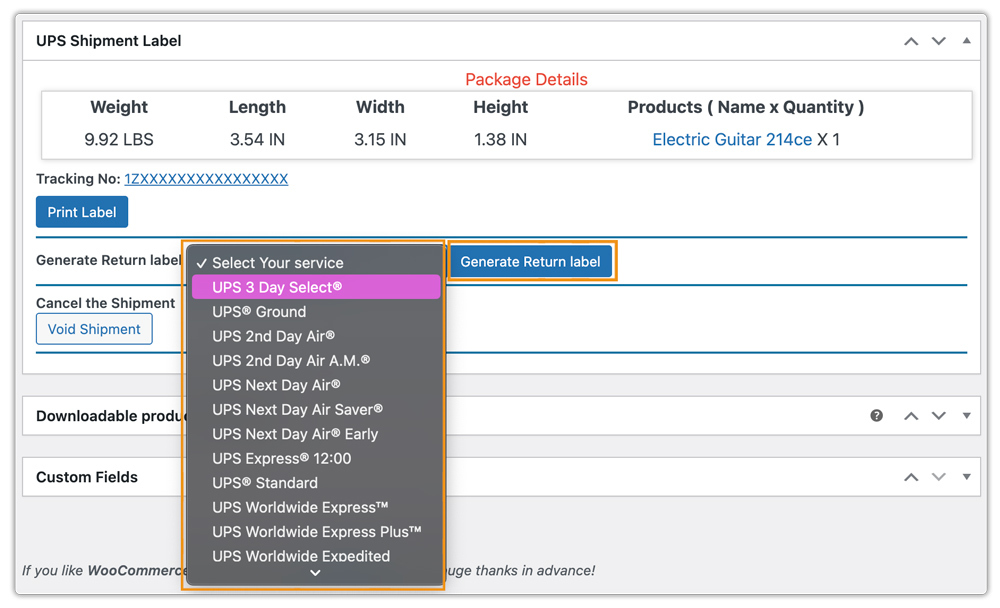
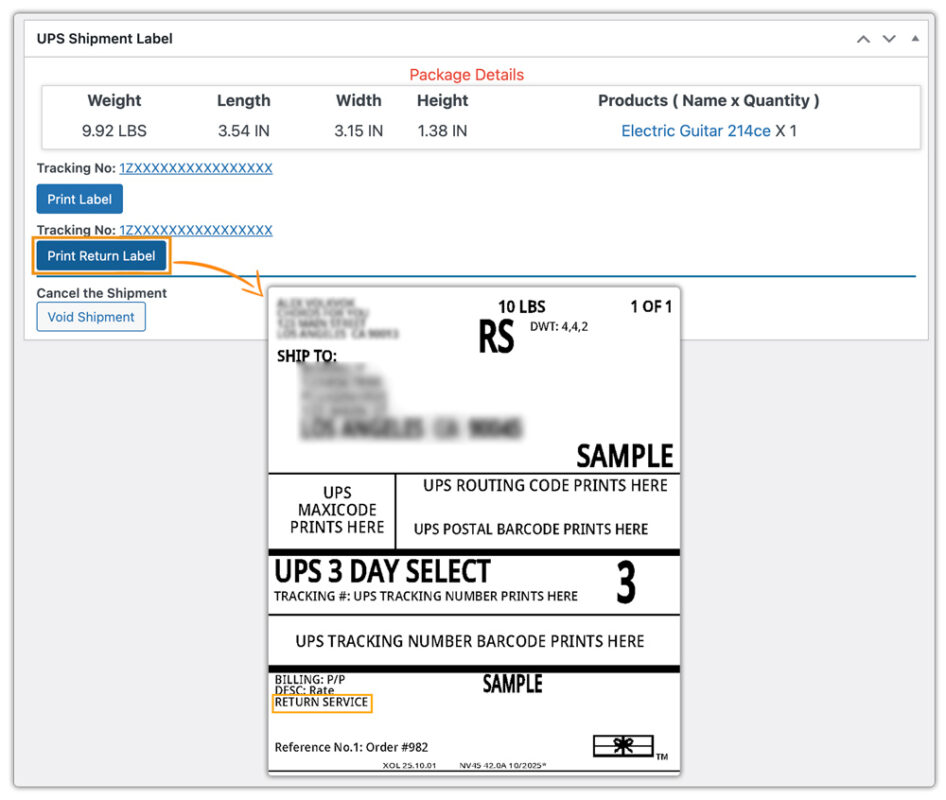
UPS return labels can be printed directly from the WooCommerce order page. You can share them with customers by:
- Emailing the return label
- Including it with the forward shipment
- Allowing customers to download it from their My Account page
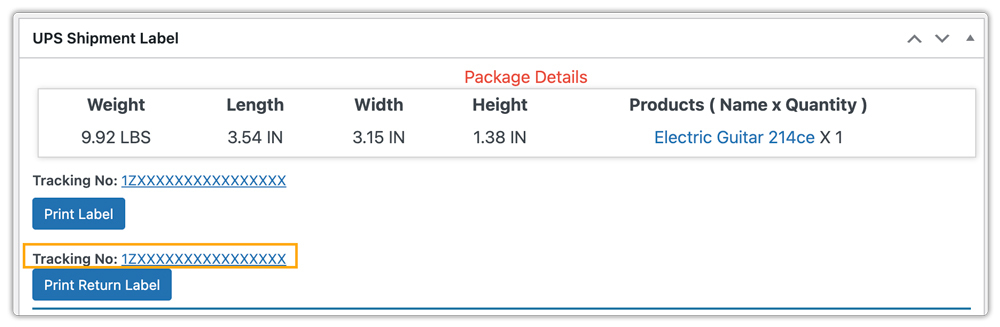
Each UPS return shipment automatically generates a tracking number, allowing both store owners and customers to track the return shipment in real time.
Once the returned product is received and verified based on your store’s return policy, you can process the refund directly from the WooCommerce order page. Faster verification and refunds reduce dispute cases and chargebacks, helping you avoid extra administrative and payment-related costs.

Real-World Use Case: WooCommerce Store Reducing Return Costs with UPS
A U.S. based WooCommerce store selling home fitness accessories was struggling with rising return costs. During peak sale periods, they processed 50-80 returns per day, and handling them manually was expensive and time-consuming:
Challenges Faced
- Generating UPS return labels manually for each order added extra labor costs.
- Customer requests for return labels increased support workload, raising operational expenses.
- Tracking returned shipments required logging into the UPS portal, adding time and risk of lost packages.
- Delayed refunds due to slow return processing hurt customer experience and led to additional administrative costs.
Solution Implemented
The store integrated the UPS Shipping Plugin for WooCommerce with Print Label to automate the return process. The store generated UPS return labels directly from the WooCommerce order page and shared them with customers via email, included them with the forward shipment, or made them downloadable from the My Account page. Automatic tracking numbers reduced errors, and the team processed refunds immediately after verifying the return.
Results
- Automated label generation saved 20-25 minutes per return, cutting labor costs.
- Customer support workload dropped, reducing related expenses.
- Real-time tracking minimized lost packages and avoided extra reshipping costs.
- Overall, the store reduced operational return costs by nearly 30%, even during high-volume periods.
By automating UPS return labels, the store directly reduced the increased costs caused by manual returns, while improving efficiency and customer satisfaction.
Conclusion
Automating return shipping in WooCommerce helps reduce operational costs, save time, and improve customer satisfaction. By streamlining the returns process and minimizing manual effort, stores can manage returns efficiently and maintain a smoother workflow.
Need help setting up return shipping for your WooCommerce store? Reach out to our support team here: PluginHive Support
FAQs
Q. Can I provide UPS return labels to customers automatically?
Yes. You can share return labels via email, include them with the forward shipment, or allow customers to download them from their My Account page.
Q. Can I hide certain UPS shipping methods at the cart/checkout page based on package details or order value?
Yes. Using the PH Hide WooCommerce Shipping Methods & Rate Adjustment Plugin, you can hide specific UPS services dynamically, ensuring only the appropriate shipping options are offered.
Q. Can I display estimated delivery dates for UPS shipments?
Yes. You can calculate and display estimated return delivery dates using the Estimated Delivery Date Plugin for WooCommerce, helping customers know when to expect their refunds or exchanges.
Q. Can UPS return labels be used for international returns?
Yes, you can generate UPS return labels for international shipments to streamline cross-border returns.
